
How to test Deferred Deep Linking with AppsFlyer
AppsFlyer Deep Link Best Practise iOS, Android, Web

Deferred Deep Link Best Practise iOS, Android, Web
What is Deep Link?
Let say you have Education app that shows you the different type of courses in the app. For instance “Learn PHP”, “Learn Java” etc.
If you want to do marketing to share the above courses by Email, SMS or Google Ads, etc. Whenever use taps the link from the Email, SMS or Google Ads. It should open the app and should display the tapped item in the app.
Note: App should be installed for the above scenario
Deep Link Sample: nameoftheapp://open?View=Course&ID=4565

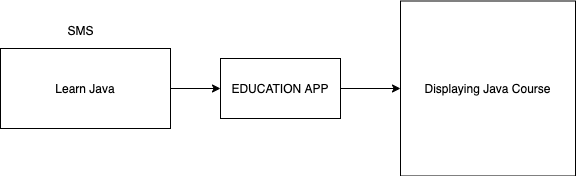
Simple Deeplink Example
Above Deep Link, the sample will display item based on ID=4565
What is Deferred Deep Link?
Taking the above example again let say you tapped on the Deep Link in the SMS but the app is not installed on your phone then the above deep link will not work. To solve this problem we use Deferred Deep Link.
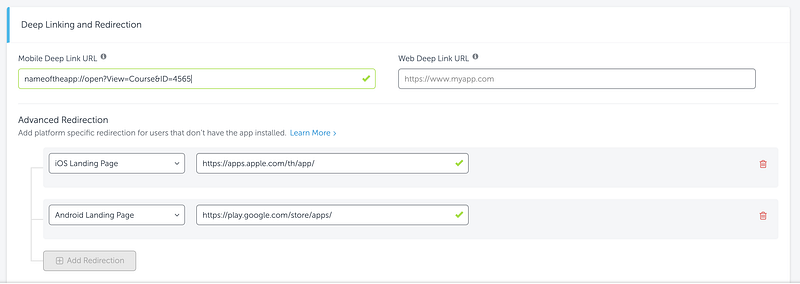
With Deferred Deep Link if the app is not installed on your phone then it will redirect the user to App Store or Play Store. To solve this issue we used AppsFlyer SDK to create Deferred deep link
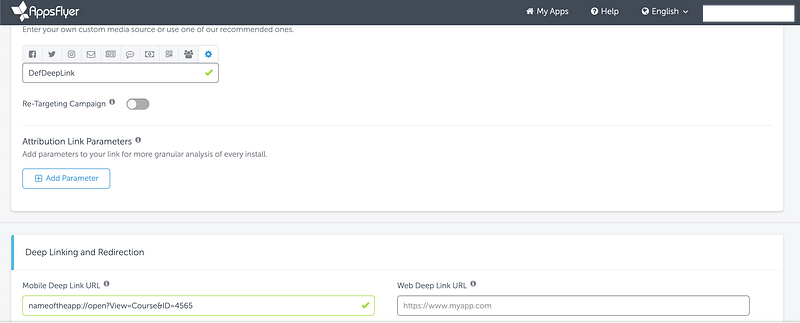
Deferred Deep Link Example: https://yourapp.onelink.me/2892277155/DefDeepLink
Following Screenshots, we have added Deep Link URL as well redirect URL of both iOS App Store and Android Play Store


If you are developing for Android then you need to add the following code to your Application file. Appsflyer Reference
If you are developing for iOS then you need to add the following code to your AppDelegate file. Appsflyer Reference
To handle Deferred Deep Link you need to use Conversion data as shown following the JSON sample. You need to handle af_dp attributes to handle Deeplink. If the user is coming from Play Store then you need to use onConversionDataSuccess which will return you attribute af_dp else you need to use onAppOpenAttribution which will also return you attribute af_dp
Reference:
https://support.appsflyer.com/hc/en-us/articles/207032096-Deferred-deep-linking-getting-the-conversion-data#examples{
  "media_source":"network_int",
  "af_dp":"nameoftheapp://open?View=Course&ID=4565",
  "adset_id":null,
  "click_time":"2017-07-18 14:48:42.896",
  "cost_cents_USD":"0",
  "iscache":true,
  "is_first_launch":1,
  "install_time":"2017-07-18 15:09:06.014",
  "af_sub2":"network_KR_G001_iOS",
  "clickID":"3gggBgAw2Bvxa8gR56ZA8Y3qjUy2gPkFgP6rA96s4e*******",
  "freehand-param":"somevalue"
}
How to test Deferred Deep Link
Step 1: Delete the app from the physical device.
Step 2: Click on to the Deep Link
Step 3: It will redirect to AppStore or Play Store. Don’t download from there
Step 4: Try to run app from Android Studio/Xcode
Step 5: Check if you are getting "af_dp" the attribute should not be null
if you are getting "af_dp" null then try to add new test device to Appslfyer Console


Download the following app it will return your device IDFA no. for iOS and AID (Android Id) for Android
iOS: https://apps.apple.com/us/app/my-device-id-by-appsflyer/id1192323960
Android: https://play.google.com/store/apps/details?id=com.appsflyer.android.deviceid&hl=en


