
How to Tax Loss Harvest with CoinTracker

Disclaimer: This is informational only. I am not a Certified Public Accountant. The information in this post is not intended to substitute for tax, audit, accounting, investment, financial, nor legal advice. For financial, tax, or legal advice please consult your own professional.
Let’s be honest: this year hasn’t been good to cryptocurrency markets. It’s not all bad though. If you’re smart, with a little planning, you can save a lot of money on your taxes even outside of cryptocurrency.
Last week we posted explaining how tax loss harvesting allows you to realize capital losses, thereby saving you huge amounts on your tax bill. Now we’re going to show you how you can use CoinTracker for free to execute tax loss harvesting in just a few minutes.
Note: you need to do this before the end of the tax year, which in the United States is December 31. Individual tax lots within a particular coin can have different cost bases, so please ensure you are considering the taxable implications of each trade before executing it. If you are unsure, you can manually add the trade in CoinTracker to see what happens before you actually make the trade.
Once you create a CoinTracker account and connect your wallets & exchanges, you’ll see a chart showing your holdings over time:
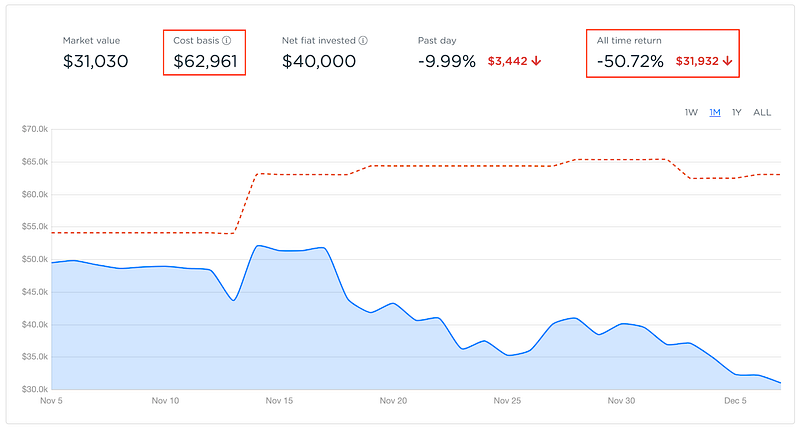
Notice that the cost basis (dotted red line) is higher than the market value of your holdings (blue). Additionally, the cost basis is higher than the market value and the all time return is negative. If this is true for you, then you may want to consider tax loss harvesting your holdings to take advantage of unrealized capital losses in your portfolio (note you still may be able to tax loss harvest individual assets even if your overall portfolio is positive).
Step 1
Navigate to the Performance page:
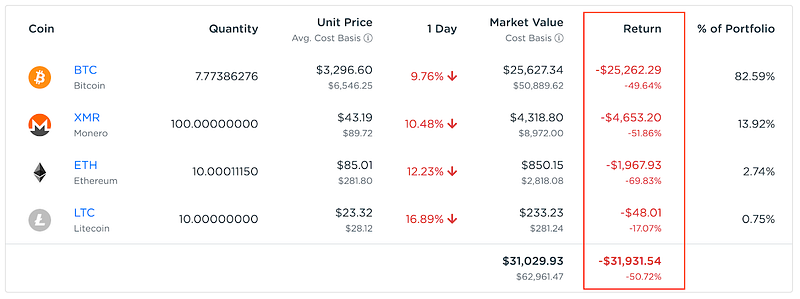
Every asset that has a negative return is tax loss harvestable.
Step 2
Sell every asset that has a negative return. For example in the above example, bitcoin (BTC) has a negative return so we sell it and realize a capital loss of over $10,000!
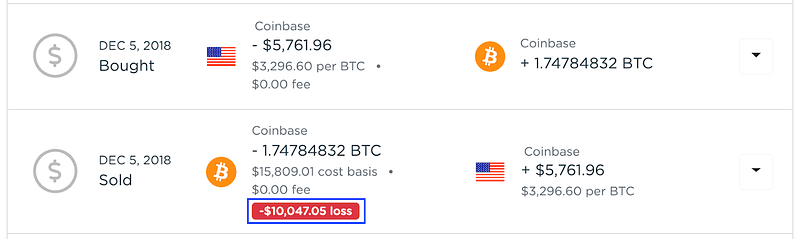
We can then choose to buy the asset back, thereby maintaining the exact same portfolio composition, yet having a smaller capital gain.
Note: the IRS has a wash sale rule for securities. Since bitcoin is not a security, this doesn’t apply here but may apply to other crypto assets. See here for more information. To be extra safe, you can avoid purchasing back the same asset for 30 days.
Step 3
Repeat step 2 for each asset class.
Step 4
Confirm that your losses are all harvested.
Your performance chart will now show close to zero return for each asset that has had its losses harvested:
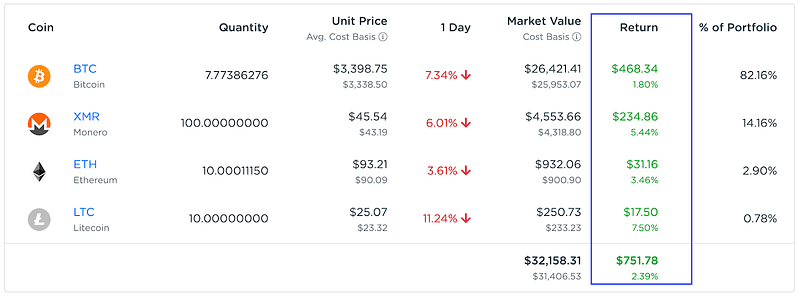
The overall dashboard will show a cost basis that closely matches the market value and the all time return is close to 0% (return is calculated on cost basis, not net fiat invested):
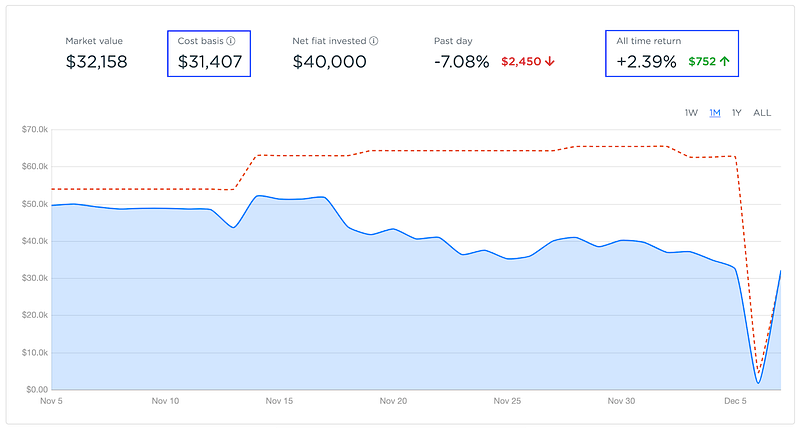
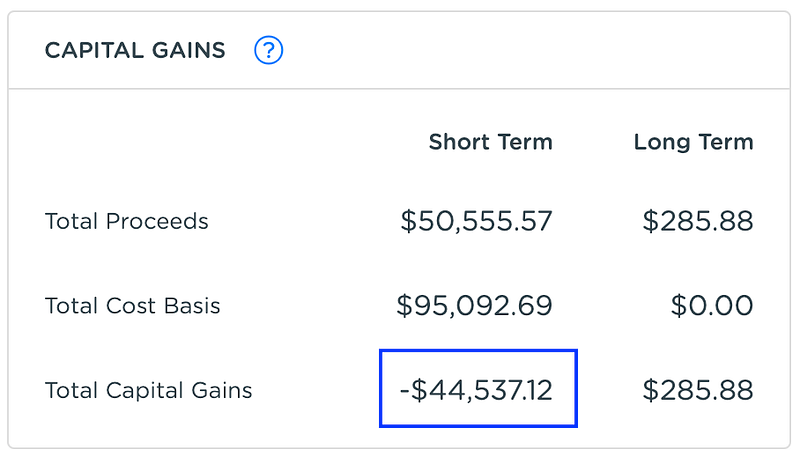
Finally, verify that your capital gains have decreased on the Tax page:
Step 5
File your cryptocurrency taxes. If you have negative capital gains overall, you can offset capital gains in other asset types. Speak to your accountant, CPA, or tax advisor for more information.
Let us know about your experiences tax loss harvesting your cryptocurrency on Twitter @cointracker_io


