
How to synchronize Azure Repos with External Git Repos

Earlier this month, I had a requirement to synchronize an external git repo(GitHub, Bitbucket, GitLab etc) to Azure Repos using Azure Pipelines. Unfortunately, there is no feature in Azure Repos now to synchronize with external repositories except a one time import function. To solve this, I had to write some tweak script containing git commands and execute it using the Azure Pipelines. Below are the steps I took in Azure DevOps to achieve the repo synchronization with GitLab Repo.
- First, we need to generate PAT from Azure Devops and GitLab.
- Create a service connection in Azure Devops Project.

3. Select the ‘Other Git’ option from the menu and click Next. Enter the external repo URL, PAT, and other details


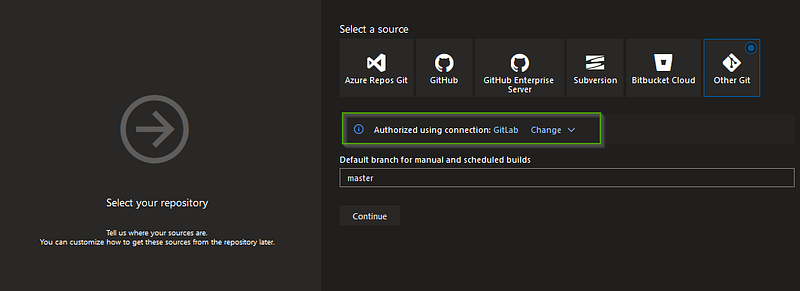
4. Create a new pipeline from Azure Pipelines and select Other Git as source code

5. Select the Service connection and repo branch that you wanted to sync
6. Create a PowerShell task and add the variables. Note on the repo urls as it is concatenated with PAT tokens GITLAB -> https://TOKENNAME:TOKEN@gitlab.com/yourid/repo/path.git AZUREPOS -> https://AZUREDEVOPSPAT@dev.azure.com/yourid/../..


Write-Host Starting the synchronization processmkdir copyrepo
$sourceURL = "https://$(GITLABPAT)@$(GITLABREPO)"
$destURL = "https://$(AZUREREPOPAT)@$(AZUREPO)"
Set-Location "$(Build.SourcesDirectory)/copyrepo"
git clone --mirror $sourceURL
Set-Location "$(Build.SourcesDirectory)/copyrepo/$(GITLABREPONAME)/"
Write-Host "*****Git removing remote origin****"
git remote rm originWrite-Output "*****Git remote add****"
git remote add --mirror=fetch origin $destURLWrite-Output "*****Git fetch origin****"
git fetch $sourceURLWrite-Output "*****Git push to Azure Repos****"
git push origin --all -fPlease note that if you are using a Linux system, the script needs to be converted into Bash or needs to install PowerShell Core in the machine. There is no change in the git commands.
Check it out and let me know your feedback on this.

Join FAUN: Website 💻|Podcast 🎙️|Twitter 🐦|Facebook 👥|Instagram 📷|Facebook Group 🗣️|Linkedin Group 💬| Slack 📱|Cloud Native News 📰|More.
If this post was helpful, please click the clap 👏 button below a few times to show your support for the author 👇


