How to store login credentials, the right way in Flutter. [2023 Update]
If you have used shared preferences to save login credentials or access tokens, well, this article is for you.
UPDATE 2023
I’ve updated this article to Flutter 3.7, Dart 2.19, and flutter_secure_storage 8.0.0. Check out the repository! ⭐️
When we are asked to develop a login screen and there is a “remember me" check box or an auto-login feature, all we have to do is to save the login credentials, or some kind of token, into a local storage. So, the next time we come back into the app, we find the form already filled with our credentials or, better, an auto-login saves us from the boring login screen.
It’s awesome, yes. But what about security?
If we store the user’s credentials into SharedPreferences, we potentially expose this data to an attacker that, potentially, can steal them.
Fortunately, the Flutter community is big enough to create a package that covers this scenario.
There is a package, called flutter_secure_storage and created by GitHub user mogol, that stores data into Keychains for iOS and uses AES encryption with Keystore for Android. Android version, from v5.0.0, supports EncryptedSharedPreferences, too.
When upgrading from 4.2.1 to 5.0.0 you can migrate to EncryptedSharedPreferences by setting the encryptedSharedPreference parameter to true as explained below. This will automatically migrate all preferences. This however can’t be undone. If you try to disable encryptedSharedPreference after this, you won’t be able to read the values. You can only read those with encryptedSharedPreference enabled.
There is a note for Android: this plugin is compatible only with Android SDK 18+ when Keystore was introduced.
Now see how we can use this plugin for a login screen.
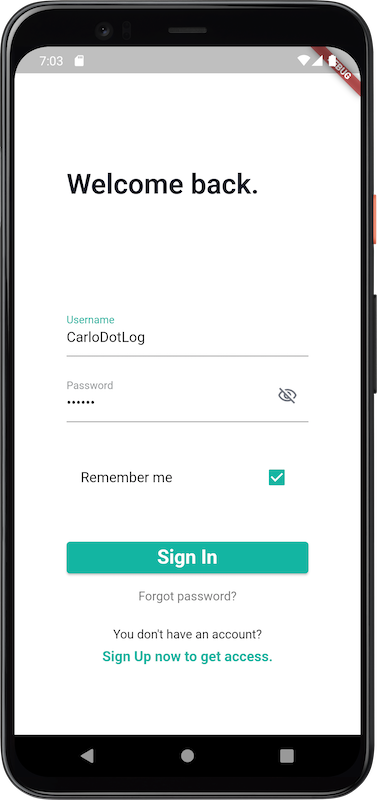
This is the login page we’re going to create.
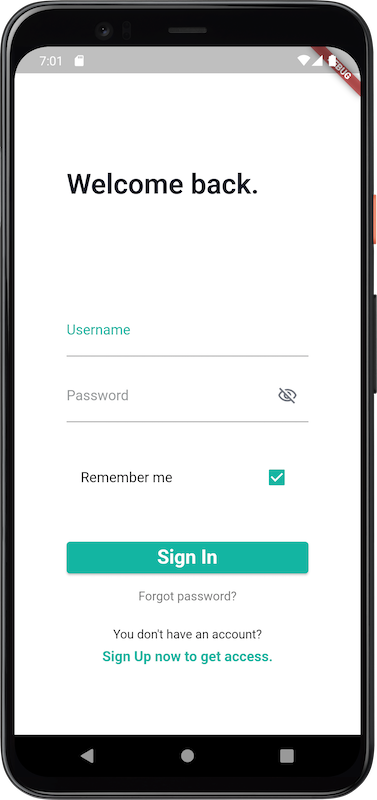
When you fill out the form with credentials and push the Sign In button, you will store them in secure storage. When you come back in app you will find your credentials auto-filled in the form.
This is a simple login UI, with any kind of login business logic behind it. I won’t use any kind of state management, only the old good setState (). It’s only a simple code sample to show the usage of the package.
Ok, let’s code.
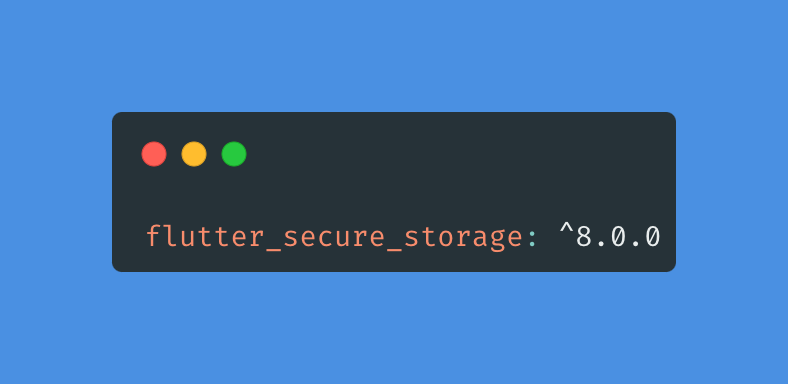
First of all, we need to add the package into the pubspec.yaml file.
Yes, but.. How flutter_secure_storage works?
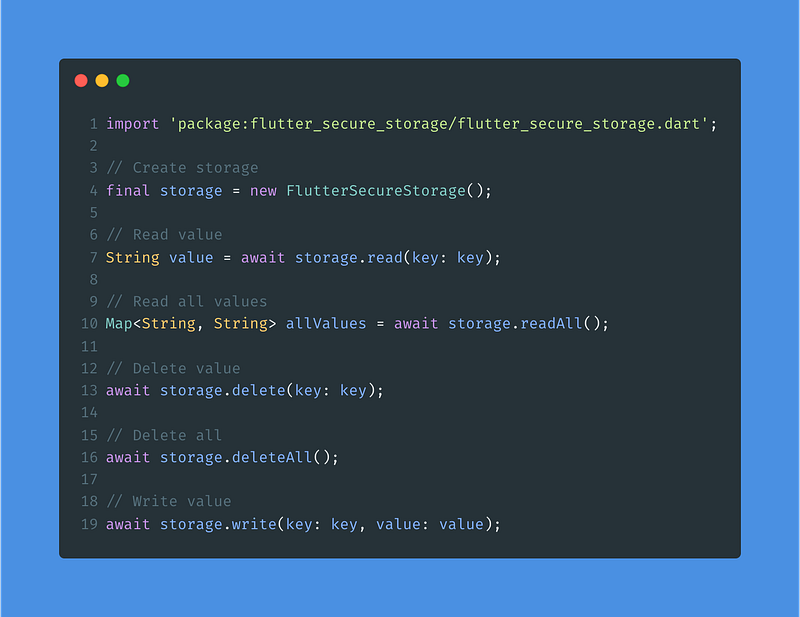
As reported in the README.md, all we have to do is:
It’s an extremely easy package, yes.
As you can see, at line 4, we create a storage that enables us to read and store data.
At line 7, we read and decrypt a String value identified by the key label, or null if key is not in the storage. Remember: the key shouldn’t be null.
At line 19, we store and encrypt a value object identified by the key label. If the key was already in the storage, its associated value is changed. If the value is null, deletes associated value for the given key.
For our use case we need:
- the
FlutterSecureStoragestorage instance; - two
TextEditingControllerassociated with twoTextInputFieldwidgets to gather user credentials; - a method to
writedata into storage; - a method to
readdata from storage;
So let’s define the first two points :)
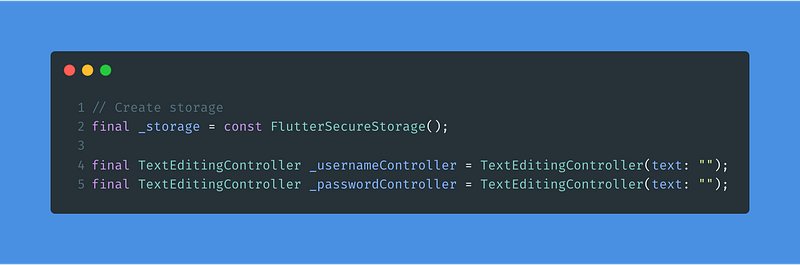
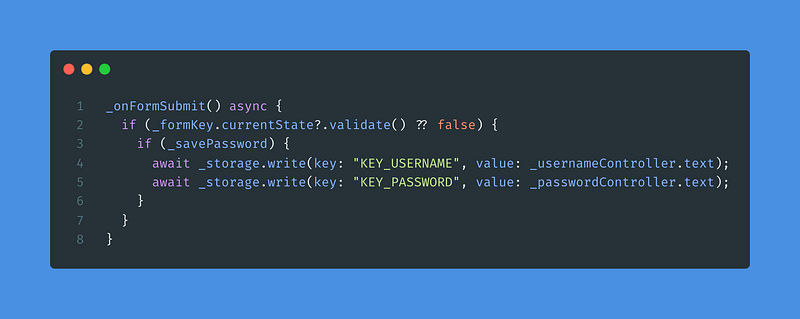
Then, we define the method _onFormSubmit() to store the user credentials. This method is the action associated with the Sign In button. The method will take care of saving the data in the storage only if the form is validated.
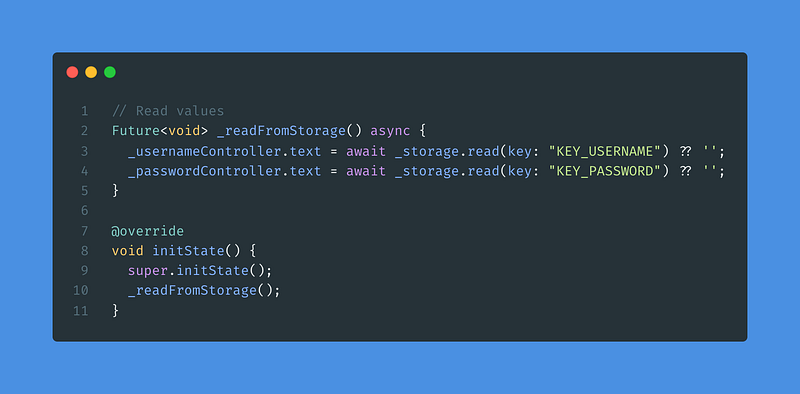
Then, we define the method _readFromStorage(). We call this method from the initState(), in this way the information in the storage will be retrieved before the construction of our UI.
The initState() method is called from the framework when the State is created. (so it’s called only one time, before the UI is draw).
In this way, we get the behavior shown in the following screenshots. At the first login, the user enters their credentials and presses the Sign In button. Later, when he opens the app again, he will find his credentials already entered in the form.
You will find the link to the repository on GitHub with the complete code below.
Congratulations! 🎉
Well done! These simple directions will allow you to add auto-login functionality to your app, but most importantly, the stored information will be encrypted in secure storage.
With these simple steps, your app will level up. :D
Conclusion
flutter_secure_storage is a very simple package that, in a few simple steps enables us to save user's data, encrypted, in a secure storage.
What’s next? You should extend this simple sample by storing other user information, for example the first name, so you can customize the “Welcome back” message.
After the 2023 update consideration
An important thing I noted when I upgraded to Flutter 3.7 is that I don’t need anymore to specify the ToolBar property for the password EditText. In fact, the right behavior is implemented by default by Flutter itself. So I simply removed this deprecated code:
TextFormField(
toolbarOptions: const ToolbarOptions(
                        copy: false,
                        paste: false,
                        cut: false,
                        selectAll: false,
                      ),
),
It’s also important to note that the plugin now has full support for all the platforms: Android, iOS, Windows, Linux, macOS, and Web. Note that for Web, flutter_secure_storage only works on HTTPS or localhost environments.
You can find the full example code on my GitHub repo:
Thank you so much for reading my article. Consider clicking the “clap” button to show me your interest and to encourage me to go on in my new adventure ^^
If you are interested in other Flutter Security Tips, you can read my other articles I’ve published here on Medium.
What about me?
I’m Carlo and I’m a passionate Italian coder since 2009. I’m Java native speaker and I’ve never left the JAVA_HOME since I met Dart and Flutter in late 2019.
Follow me here on Medium to read more articles about Flutter and mobile development.
You can find me also on Twitter and GitHub.
See you around and happy coding.


