
Productivity
How To Stop Staring At Your Phone Mindlessly
4 Easy ways to decrease your screentime

Beginning of July I found myself scrolling on my phone mindlessly. When I saw my screentime, I was shocked. It had absolutely shot through the roof. More than 3 hours daily.
I am just one of many people who has seen their screentime go up significantly indirectly due to the current pandemic. Working from home, lockdown, decreased social activity. We are filling our spare time by looking at our phones.
You will never get back time. Benjamin Hoff said it perfectly:
“The main problem with this great obsession for saving time is very simple: you can’t save time. You can only spend it. But you can spend it wisely or foolishly.”
COVID-19 or not, I wasn’t going to waste my time scrolling on my phone. Apart from actively trying not to reach for my phone all the time, I made my phone the most boring, yet functional, device I owned.
Four easy changes did the trick. Next to a significant decrease in screentime, it added some other benefits as well.
Turn off your notifications
No sounds, nothing. Silence. Turning off your notifications will make you feel undisturbed and at ease. You decide when to look at your phone.
My motto is: if it is really important people will call, at least twice. Hence, my phone only rings after the second time. Some people find me unreachable, but I rather enjoy the peace.
Before, whenever I looked at my phone I could see that I had WhatsApp messages. Seeing these banners created the need to respond to them and to unlock my phone. Not anymore. You can change the location of the banner alerts, the transparent ‘boxes’, to your notification screen. Additionally, depending on the app, you can remove them completely.
You can also make the red dot on the app icons with the number of alerts disappear by turning off ‘badges’. No longer will you have the 100+ unread emails lurking in the corner of your eye. Nothing so satisfying, then the illusion that all your messages are dealt with.
How to turn off your notifications (iPhone):1. Settings > Notifications
2. Click on the app that you would like to ‘mute’.
3. Choose your type of banner alert.
4. Turn OFF badges
5. Repeat for other appsAdditionally, if you want to remove banners completely, e.g. WhatsApp. From point 2 click on ‘WhatsApp Notification Settings’ > In-App Notifications. Change the alert style to none.Delete redundant apps
Step 2: Delete all the apps that you use mindlessly. For example, I deleted Facebook, Instagram, Snapchat, Youtube, games, etc. The only four apps that made the cut for me, next to the real functional ones, are Storytel, Insight Timer, Spotify, Duolingo and Downdog.
I still use Facebook and Instagram, but only on my laptop, sometimes. It is just less convenient, hence I use it less. Simple as that. The bonus for deleting social media apps is that it will decrease the negative effects that come with it.
If you don’t want to delete a ‘non-functional app’, I would suggest you add a timer. It is easy to forget the time when you’re mindlessly scrolling. Before you know an hour has gone by.
How to add a timer on an app (iPhone):1. Settings > Screentime > App Limits
2. Add your preferred time limitsSet a downtime
I always found myself looking up stuff on the world wide web when on my phone when I was trying to sleep. Additionally, in the morning the first thing I do is turn off the alarm on my phone. However, most of the time it ends in me staying in bed going through my messages.
Basically, the same thing as snoozing.
The solution to both problems was setting a downtime. You can set a schedule when your phone will be ‘off-limits’. You will still be able to open the apps, but you will have to pass an extra hurdle. You will have to select that you want to ignore the downtime for either 1 min., 15 min., or the whole day.
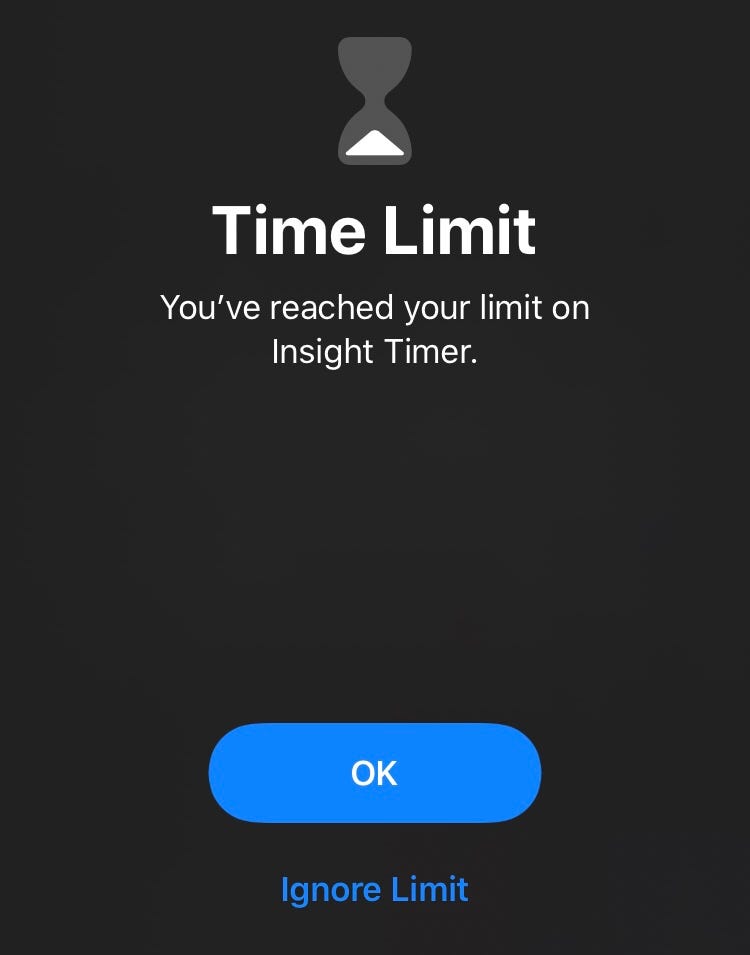
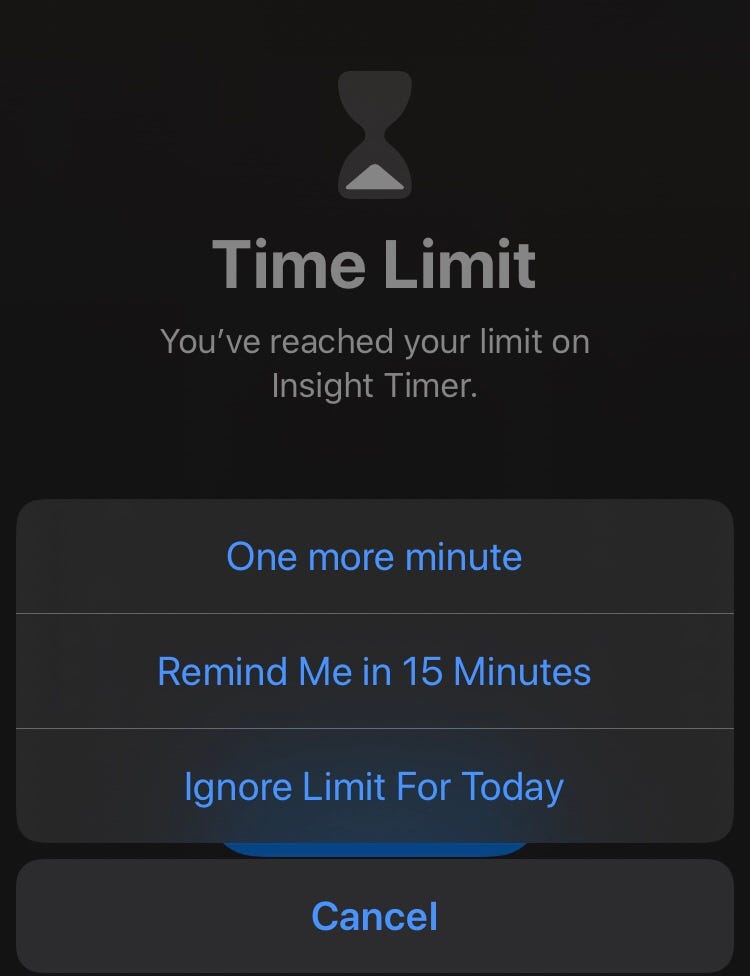
Currently, my downtime starts an hour before my bedtime and an hour after I wake up. Next to a decreased screen time, my sleeping has improved and mornings are more peaceful and productive.
How to set downtime on an iPhone:1. Settings > Screen time
2. Click on ‘Downtime’
3. Enter your preferred scheduleIf you want certain apps to always be available you can select this under point 2; ‘Always Allowed’.Put your phone on greyscale
Putting my phone on greyscale was the last thing I changed. And, it was probably the most effective thing. After this step, your phone will officially be boring.
Colours have long been an important factor in marketing and branding. Studies have shown that bright colours catch our attention and have a massive impact on how we perceive things. Hence, it makes sense that turning your phone on greyscale makes your phone less interesting to look at. It eliminates all the branding and marketing effects.
The first time I turned it to greyscale, I changed it back the next day. Photo’s look a lot different in black and white. But, in the end, I rather watch actual humans and real-life nature than pictures on my phone. So back to greyscale again.
Putting an iPhone on greyscale:1. Settings > Accessibility
2. Click on Display & Text Size
3. Change ‘Colour Filters’ to ON
4. Select Greyscale Time To Find A New Hobby
The four above mentioned tips will make you lose complete interest in your phone. I went from 3h+ to under an hour of screentime. So, in a nutshell:
- Turn off your notifications
- Delete redundant apps
- Set a downtime
- Put your phone on greyscale
It will be very uncomfortable in the beginning, but once you push through it will be worth it. The day will suddenly have more hours. Plus you will be disturbed less, and maybe sleep better.
The only thing that remains is to find something to do with all free time. Maybe that thing you always wanted to learn but never had the time for?