
How to Stand Out as a Junior UX Designer
Getting a job without reinventing the wheel.
Throughout my past year supporting students as a design mentor, I’ve noticed that a lot of junior designers feel that standing out by being “unique” and “innovative” is the only way they can find their place in the design industry.
In this article, I want to explore why this mindset may not be the most effective path toward securing a job in UX. Additionally, I will provide guidance on what aspiring designers should prioritize instead to achieve success in the field.
The design industry has grown significantly due to increased interest in UX design, driven largely by the #BreakintoTech movement during the pandemic. During this time, innovation became the most ubiquitous word in the UX industry, and it’s no surprise why. Things had to advance and change for the times, and a lot of great advancements have come out of that.
I generally consider all of that a net positive. However, one unfortunate consequence of this growth is that junior designers were “raised,” so to speak, in this era of rapidly innovative design thinking and haven’t experienced much else. While innovation is an essential aspect of design, it’s important to note that as a junior, it’s okay not to be innovative.

The UX industry is changing constantly, but when you look at the nitty gritty, those changes are relatively minute on an individual level. A majority of the work done as a designer is rarely revolutionarily innovative. “Doing UX” on a day-to-day basis tends to be more about refinement and enhancement.
That’s not to say you shouldn’t be creative or strive for innovation, but as a junior designer, presenting the fact that you have a solid foundation of design knowledge is key. Likewise, demonstrating that you can adhere to best practices and standards is more important than trying to showcase all of your creativity.
Let’s break down how you might do that.
1. Build a concise, clean, portfolio.
I’ll be honest, whenever a junior designer tells me they want their portfolio to be “unique” it almost always stands out for a negative reason. Juniors, I need you to understand something: hiring managers are not looking at your portfolio to hire you. On their first pass, they’re primarily scanning for red flags. These red flags give them a reason to disqualify you, and they’ll move on to the next person.
It’s easier to get you out of the way than it is to make a case for pushing you forward as a candidate. Simpler is better when it comes to portfolios for this reason. The fewer frills you add, the less likely it will be that you’ll introduce red flags. So, keep things aesthetic, minimalist, and red flag free.
I wrote an article last year about red flags in portfolios that touch on the minutiae of this, but for now, let’s get specific and answer some questions.
Q: How do I make my portfolio better? I’m not getting any traction but my portfolio looks really cool.
Don’t treat your portfolio like a personal art project. Think of it as a product. You have end users to keep in mind: recruiters & hiring managers. These are professionals that are very short on time and in high demand. Their priority is scanning your product, deducing value, and moving on with their day.
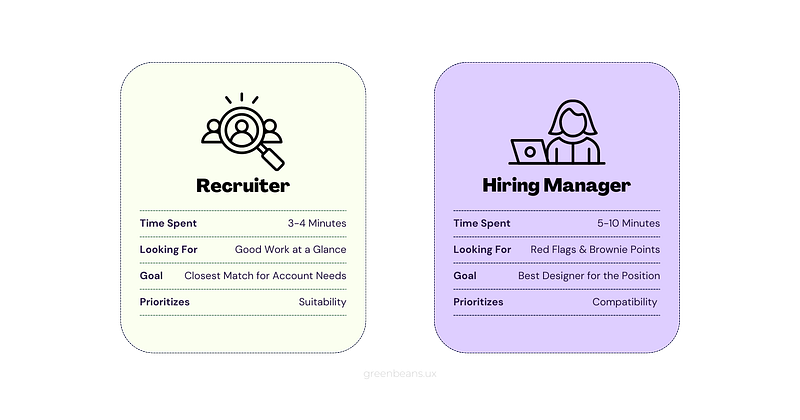
Prioritize Scanability & Content Relevance
Your portfolio is often the first impression recruiters and hiring managers have of you and your work. But with so many portfolios to sift through, you don’t have long to capture their attention and it’s not easy to keep it. Here are some tips to help maximize the time your users spend on your portfolio:
- Sell your work on your “projects” page. Sell your personality on your “about me” page.
Your end users are looking for a quick and dirty overview of your work. They don't want to sift through irrelevant content like a lengthy blurb about your love of Cheeto Puffs or pictures from your eldest pet's fifth birthday party. To create a strong first impression, keep the content on your homepage and project page concise, clean, and relevant.
If you have a one-page format, include a brief bio highlighting your most marketable attributes with a touch of personality. If possible, include a well-designed, fixed-scroll navigation that enables the user to effortlessly navigate from section to section.
- Don’t do overly-fancy transitions like delays, overlays, etc.
Someone with limited time doesn’t want to wait for page elements to load, disappear, and reappear. Likewise, it’s very frustrating when you hover over an element (perhaps trying to zoom in) and something overlays on top of it, hiding the original content. Keep your content flat to enhance the user experience and avoid any unnecessary frustration.
- Add high-level (short & sweet) descriptions to your case study thumbnails.

This provides context for your projects at a glance.
- Create an overview section at the beginning of your case studies.
Here, you can showcase a brief overview of the product, summarize the problem, elaborate on the solution, as well as provide some information about your role and the scope of the project. Add some screens from the final product or a prototype here as well. This will give your user a solid picture of your work even if they don’t read the entire case study.
Q: A recruiter told me that my UI work was really strong, but they didn’t really enjoy my case study. They said they didn’t understand what I did on my project even after reading it. What can I do?
Elevate your copywriting
As a junior designer, it’s crucial to have a clear design process and the ability to explain it in detail. Research things like UX storytelling and make sure your UX vocabulary is strong. Be descriptive and provide context for everything.
Something I see junior designers do a lot in their case studies is merely explain the step of the process, but not what they did in it or why. For example: “I did user flows because user flows help show what you should be designing.”
All that gave me was the definition of what a user flow is, kind of. I know what user flows are, and so will a hiring manager. We want to know what you took away from creating those user flows. How did they inform your process? What research, if any, went into creating them? Also, show the element you’re talking about, don’t just mention it in passing.
If you want to add some personality to your case studies, don’t be afraid to let it shine through (professionally) in your writing voice. Have fun with it.
2. Don’t just make “pretty” designs.
At this stage of your career, it’s important to focus on honing your design thinking, not just your visual design skills. Understanding the reasoning behind your design choices is essential to creating successful products, rather than just aiming for aesthetics.
While aesthetics are definitely important, your top priority should always be the usability of the product. That means thinking about who will be using your product, how they’ll be using it, and what their needs are. The best way to ensure that your products are successful is to take a holistic approach to the design process.
While it may be tempting to focus solely on the user interface, it’s crucial to ensure your design is intuitive, accessible, and easy to use, among other things. Without considering all these aspects, your design may not provide a pleasant experience for the user.
Q: How do I find good design inspiration?
I’ve said it a million times and I’ll say it again: Behance and Dribbble should not be your primary source of design inspiration. Instead, try exploring sites like Mobbin or Appshot that feature real-life products that prioritize user experience rather than just aesthetics. Is everything on these sites perfect? No, but they can give you a solid foundation of design knowledge based on what’s working in the real world.
Q: How do I find good portfolio inspiration?
Look at senior designer portfolios (designers in positions higher than that tend not to have updated portfolios). Seniors are living your dream already. Look at what they’re doing and learn from it.
Some designers you may recognize:
- Chunbuns (Stripe/Shopify): https://www.chunbuns.com/portfolio
- Grace Ling (EA/Design Buddies): https://www.grace-ling.com/
- Mizko (Microsoft/Adobe): https://www.mizko.net/case-studies
- Emilie Marurek (Barstool Sports): https://www.dandydesign.ca/
💡Try to pinpoint the commonalities in their portfolios. How are they laying out their content? How are they structuring their case studies? What are they doing differently than you are?
3. Learn how to interview well.
Something I get asked often is how I landed my job (and a few other offers, some in the six-figure range), after two weeks of job searching. Truthfully, I noticed very early on that the questions being asked in interviews fall into one of three specific buckets: UX knowledge, UI knowledge, or behavioral questions. Being able to identify the root of the question may help you identify what relevant UX terms they’re hoping to hear.
It’s important to note that this is not simply memorizing buzzwords without understanding their meaning. Interviewers will see through that and it can actually hurt your chances of getting the job. Instead, aim to have a solid understanding of key UX concepts and be able to speak about your experience using these terms in a clear and confident manner.
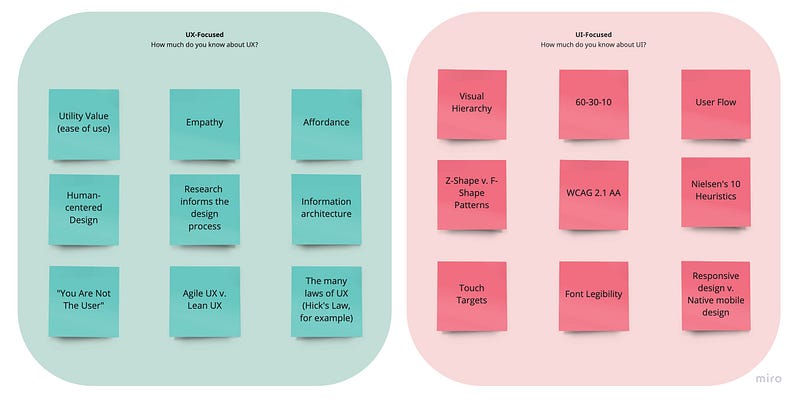
UX-prompt questions:
The interviewer is trying to get a feel for your design thinking here. How/where do you embed research into your process? What’s your workflow like? How do you consolidate user needs with business goals?
- Example: “What techniques do you use to empathize with users and understand their needs?”
- Suggestion: This is a good prompt to discuss things like user research (interviews, user/usability testing, A/B testing) and how it informs your process, along with how you create journey maps, mind maps, affinity diagrams, personas, information architecture, etc. Really dig into the specifics of what you do to make sure the user’s needs are prioritized.
UI-prompt questions:
The interviewer is trying to get a feel for your design process. What best practices are you aware of? What design methodologies are you following? What is the rationale behind your designs?
- Example: “What’s your favorite website? Why?”
- Suggestion: This is a good prompt to discuss user interface elements enhancing the user experience like the visual hierarchy, responsiveness, clear calls to action, accessibility, effective use of color, micro-interactions (technically UX, but still), delightful motion design, overall ease of use, etc. Don’t just say “because it looks nice.”
A mix of both:
UX and UI ultimately intertwine and are different but equally important pieces of the product design puzzle. How do you collaborate with developers and AMs/PMs? How do you tackle complex design problems? How do you measure the success of a design?
- Example: “That’s an interesting font choice; color, too. Why did you go with that? How did you keep it consistent across the design?”
- Suggestion: This is a good prompt to discuss things like font legibility, brand identity & consistency, accessibility (contrast), color-related design methodologies (60–30–10, for example), etc. This is also a good opportunity to discuss design systems, the specific software(s) you use/prefer, and any input from devs or PMs that also contributed to the design decision.
All in all, dig into what the interviewer is really asking and looking for. Interviewing is a lot less stressful when you realize the questions are just a vehicle for you to present your knowledge, not a scary thing meant to stump you. Show them that you know your stuff!
Accessibility:
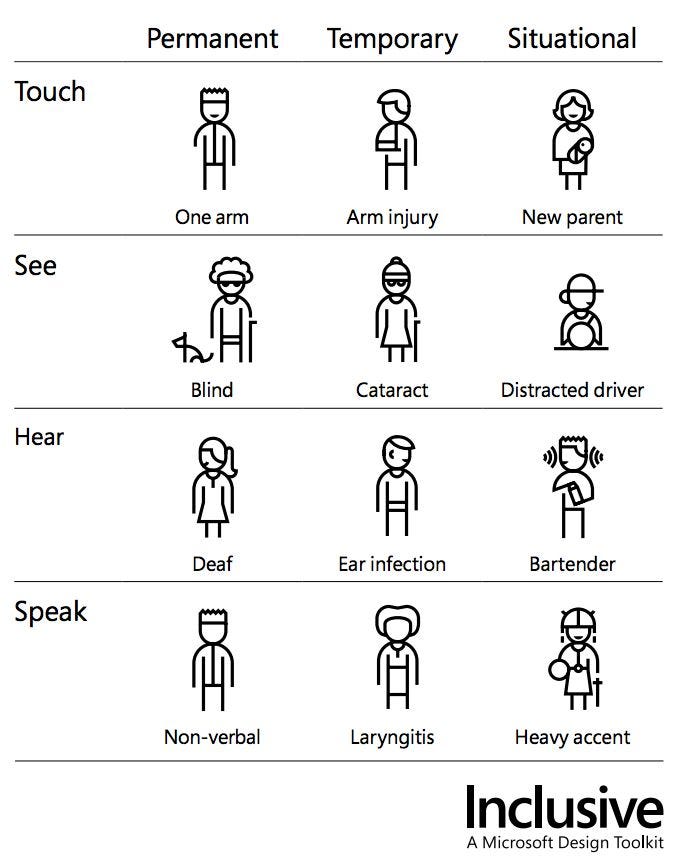
Please familiarize yourself with accessibility standards. It goes much deeper than just color contrast! Having knowledge about this will give you brownie points in any interview and a gold star from me. Accessibility is a must-have in design, not a nice-to-have. Stand out by making it a priority now.
Behavioral questions:
Anything to the tune of, “have you ever experienced conflict before?” or “why do you want to work for us?” is a behavioral question. There are numerous resources online that can prepare you for those better than I can. Personal anecdote, I found that behavioral questions are best answered honestly, not strategically. You’re either a good fit or you’re not.
My one piece of advice is to follow the CARL method for behavioral questions instead of (or in conjunction with) the STAR method.
- [C] ircumstance — what was the situation?
- [A] ction — what do you do?
- [R] esult — what were your results?
- [L] earning — what did you learn?
To wrap this all in a neat little bow, the best way to stand out in UX as a junior designer is to fit in. You can do that by doing things right, not by trying to be special. By incorporating all of these tips, you can distinguish yourself in a positive way (without trying to reinvent the wheel) and increase your chances of securing your first design job.
Remember that you don’t have to strive for perfection. Focus on establishing a strong base of knowledge, and maintain your willingness to learn. The rest will come with hard work and a little luck.
You’ve got this 🌟
All my links: https://www.liinks.co/greenbeansux


