avatarCasey Botticello

Free AI web copilot to create summaries, insights and extended knowledge, download it at here

4473

Abstract

h language. However, the spelling errors are often a deliberate part of the scammers strategy.</p><p id="8a8b">Although they are different, I would liken the effect to the subtle brilliance of Nigerian scam letters.</p><p id="bab1">According to the book “<a href="https://amzn.to/2Op5ljq">Think Like A Freak</a>,” a follow-up to the popular “<a href="https://amzn.to/2UbZbbL">Freakonomics</a>” by Steven D. Levitt and Stephen J. Dubner, the scam’s obviousness is its chief selling point.</p><p id="e003">The book refers to research from Microsoft Research computer scientist Cormac Herley, who looked at Nigerian scams — technically called advance-fee fraud — from the point of view of the scammer. How, he wondered, were scammers who never sent an email free of typos earning enough money for the United States Secret Service to establish its own task force to fight them?</p><p id="4cfa">In turns out that those typos are a key part of the scam.</p><p id="d917">Levitt and Dubner explain the genius behind such an obvious scam in terms of “false positives,” referring to email recipients who engage with the scammers but don’t ultimately pay. Reaching out to scores of potential victims isn’t much work, thanks to the ease of email, but with each reply from a gullible target, the scammers are required to put forth a little more effort.</p><p id="8691">Therefore, it’s in the scammers’ best interest to minimize the number of false positives who cost them effort but never send them cash. By sending an initial email that’s obvious in its shortcomings, the scammers are isolating the most gullible targets. If you trash their email, that’s fine. They don’t want <i>you</i>, someone from whom there’s virtually no chance of receiving any money. They want people who, faced with a ridiculous email, still don’t recognize its illegitimacy.</p><p id="cac2">As Herley tells the book’s authors, “Anybody who doesn’t fall off their chair laughing is exactly who they want to talk to.”</p><h2 id="4838">Red Flag #3 — There’s a suspicious attachment.</h2><p id="be4d">Unsolicited emails that contain attachments should always raise red flags. Typically, authentic institutions don’t randomly send you emails with attachments, but instead direct you to download documents or files on their own website.</p><p id="3631">As with the other tips on this list, this method isn’t foolproof. Sometimes companies that already have your email will send you information, such as a white paper, that may require a download. In that case, be on the lookout for high-risk attachment file types include .exe, .scr, and .zip. (When in doubt, contact the company directly using contact information obtained from their actual website.)</p><p id="c96f">The emails I received did not contain suspicious attachments, but here is an example from another phishing email:</p><figure id="4556"><img src="https://cdn-images-1.readmedium.com/v2/resize:fit:800/1*9DJa5aiOKvBK8YLcgDVnpw.png"><figcaption></figcaption></figure><h2 id="fd35">Red Flag #4 — The message is designed to create a sense of urgency.</h2><p id="a391">It is common for phishing emails to instill panic in the recipient. The email may claim that your account may have been compromised and the only way to verify it is to enter your login details. Alternatively, the email might state that your account will be closed if you do not act immediately.</p><p id="da53">Ensure that you take the time to really think about whether an email is asking something reasonable of you. If you’re unsure, contact the company through other methods.</p><p id="47f3">This is demonstrated well in the first sample email which contains an email subject headline designed to induce panic:</p><figure id="0cc0"><img src="https://cdn-images-1.readmedium.com/v2/resize:fit:800/1*D44Ft9IVQbq_BosK12CRdQ.png"><figcaption></figcaption></figure><h2 id="0cc1">Red Flag #5 — The web and email addresses do not look genuine.</h2><p id="101c">It is often the case that a phishing email will come from an address that appears to be genuine. Criminals aim to trick recipients by including the name of a legitimate company within the structure of email and web addresses. If you only glance at these details they can look very real but if you take a moment to actually examine the email address you may find that it’s a bogus variation intended to appear authentic ‒ for example: @mail.paypal.work as opposed to @ “paypal.com”.</p><p id="4b89">In the sample emails, the s

Options

ender appeared to be PayPal at first glance, but upon mousing over the sender icon (to see the actual email), it became clear that the email originated from an account posing as a PayPal account.</p><figure id="9290"><img src="https://cdn-images-1.readmedium.com/v2/resize:fit:800/1*Xp7Y69EP1F9Nz5gp9tF1zA.png"><figcaption></figcaption></figure><p id="5760">There are countless other ways to detect a phishing attack, but hopefully these 5 warnings signs will help you avoid any malicious emails that you receive.</p><p id="faf8"><a href="undefined">Casey Botticello</a></p><p id="5ece"><i>Thanks for reading this article! Leave a comment below if you have any questions, and if you want to learn more about blogging, content marketing, or subscription newsletter strategy, be sure to sign up for the <a href="https://bloggingguide.substack.com"><b>Blogging Guide Newsletter</b></a>!</i></p><div id="6c7e" class="link-block"> <a href="https://bloggingguide.substack.com"> <div> <div> <h2>Blogging Guide</h2> <div><h3>Learn how to make money writing online and navigate the digital publishing landscape! ✔️ Medium ✔️ Substack ✔️ Amazon…</h3></div> <div><p>bloggingguide.substack.com</p></div> </div> <div> <div style="background-image: url(https://miro.readmedium.com/v2/resize:fit:320/0*AAcjK3UII8QUo4u9)"></div> </div> </div> </a> </div><h2 id="f68a">If you liked this article, here are some other articles you may enjoy:</h2><div id="10d0" class="link-block"> <a href="https://bloggingguide.com/how-to-legally-protect-your-blog/"> <div> <div> <h2>How to Legally Protect Your Blog - Blogging Guide</h2> <div><h3>Wondering what pages do you need to legally protect your blog? If so, read our guide covering how to legally protect…</h3></div> <div><p>bloggingguide.com</p></div> </div> <div> <div style="background-image: url(https://miro.readmedium.com/v2/resize:fit:320/0*Y0kbsifz2qetKaVS)"></div> </div> </div> </a> </div><div id="7630" class="link-block"> <a href="https://bloggingguide.com/how-to-create-an-anonymous-email/"> <div> <div> <h2>How to Create an Anonymous Email — Blogging Guide</h2> <div><h3>Truly going invisible on the web often requires a combination of tools and practices rather than a single method. In…</h3></div> <div><p>bloggingguide.com</p></div> </div> <div> <div style="background-image: url(https://miro.readmedium.com/v2/resize:fit:320/0*gpsnGQ2-Jk5tbl6_)"></div> </div> </div> </a> </div><figure id="04d0"><img src="https://cdn-images-1.readmedium.com/v2/resize:fit:800/0*jxGUDN_JEbAGoOsa.png"><figcaption></figcaption></figure><p id="1c21"><a href="http://www.caseybotticello.com"><b>Casey Botticello</b></a> is an internet entrepreneur and the founder of <a href="https://bloggingguide.com"><b>Blogging Guide</b></a>, an online community of writers with an<b> <a href="https://bloggingguide.substack.com">award-winning newsletter</a></b>. He is also the creator of the popular <a href="https://mediumcourse.com"><b>Medium Writing Course</b></a><b> and the <a href="https://substackcourse.com">Substack Newsletter Course</a>.</b></p><p id="2a73">Casey previously worked at several tech startups, a lobbying & strategic communications firm, and has created several businesses of his own. He is a graduate of The University of Pennsylvania, where he received his B.A. in Urban Studies.</p><blockquote id="a35d"><p><i>You can connect with him on <a href="https://www.linkedin.com/in/caseybotticello/"><b>LinkedIn</b></a>, <a href="https://twitter.com/blogging__guide"><b>Twitter</b></a>, <a href="https://www.facebook.com/groups/mediumwriting"><b>Facebook</b></a>, follow his Medium publications, <a href="https://medium.com/digital-marketing-lab"><b>Digital Marketing Lab</b></a><b> </b>and <a href="https://medium.com/blogging-guide"><b>Medium Blogging Guide</b></a><b>, </b>or reach out to him directly on his<b> <a href="http://www.caseybotticello.com">personal website</a>.</b></i></p></blockquote></article></body>

How to Spot a Phishing Email

Sample phishing attempts from suspect “PayPal” email account

Source: Casey Botticello of Stealth Wealth Lifestyle

What is a Phishing Attack?

A phishing attack is a form of social engineering by which cyber criminals attempt to trick individuals by creating and sending fake emails that appear to be from an authentic source, such as a business or colleague. The email might ask you to confirm personal account information such as a password or prompt you to open a malicious attachment that infects your computer with a virus or malware.

Phishing emails often tell a story to trick you into clicking on a link or opening an attachment. They may

  • Say they’ve noticed some suspicious activity or log-in attempts
  • Claim there’s a problem with your account or your payment information
  • Say you must confirm some personal information
  • Include a fake invoice
  • Want you to click on a link to make a payment
  • Say you’re eligible to register for a government refund
  • Offer a coupon for free stuff

What Are Some of the Red flags that an Email May be a Phishing Attack? (with Examples)

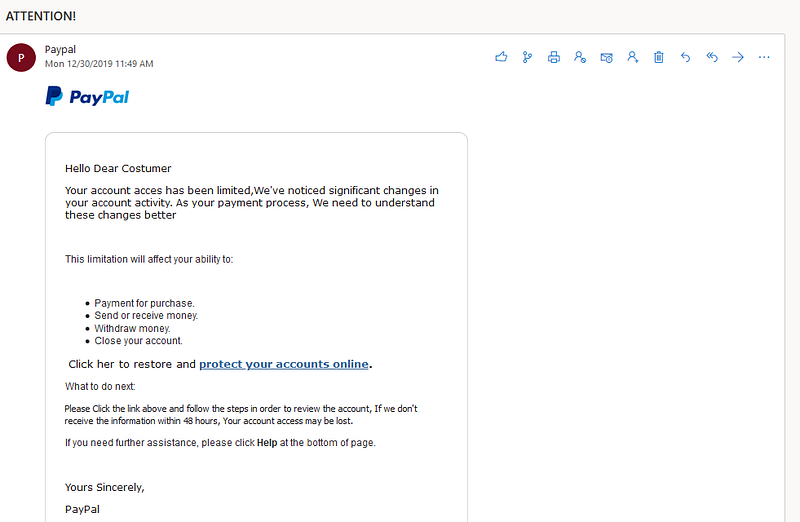
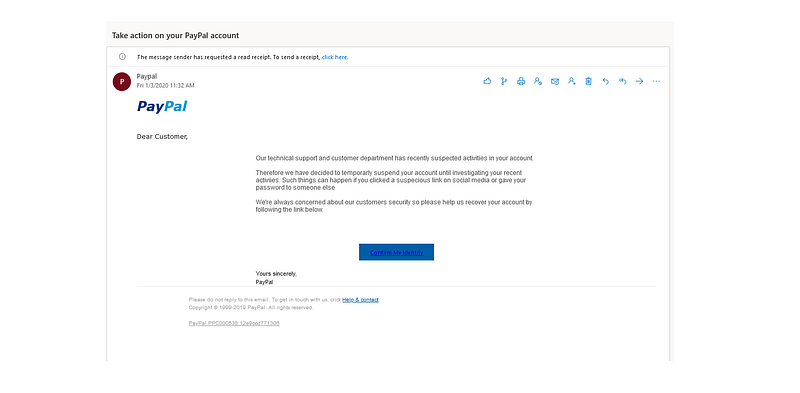
Below are screenshots of two phishing emails, that I recently received from a person/company purporting to be from PayPal (I reported these emails but maybe someone from PayPal Engineering on Medium can take a look):

Sample Phishing Email #1
Sample Phishing Email #2
Like many people I do have a PayPal account. So how did I know that this email was a phishing attack and not a legitimate email from PayPal?

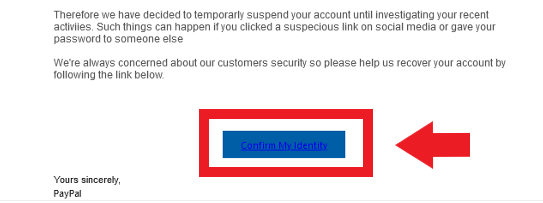
Red Flag #1 — The email asks you to confirm personal information.

Always be suspicious of emails requesting you to confirm personal information that you would never usually provide, such as banking details or login credentials. Do not reply or click any links and if you think there’s a possibility that the email is genuine, you should search online and contact the organization directly — do not use any communication method provided in the email.

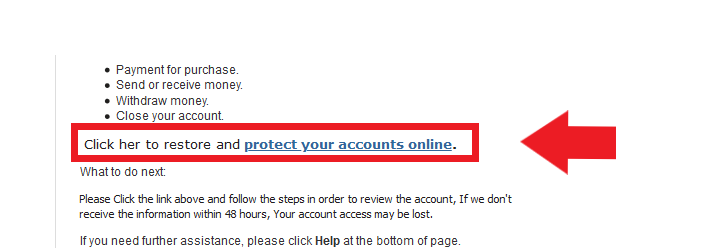
In the case of the sample emails, the hackers ask me to “protect my identity online” in the first phishing message and then to “confirm my identity” in the second email.

Although there are many more obvious signs that this is a phishing email, it is always good to question anyone requesting your personal information.
Red Flag #2 — The email is poorly written and contain typos or spelling errors.

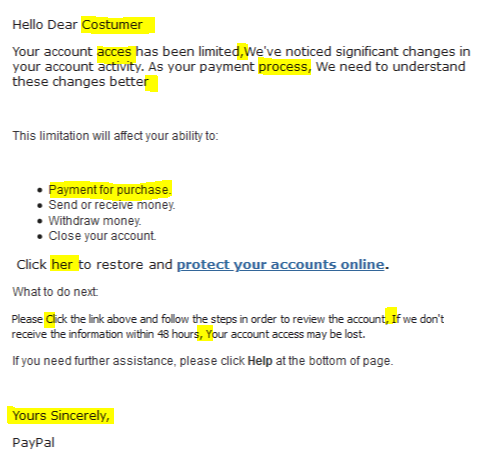
Read the email and check for spelling and grammatical mistakes, as well as strange turns of phrase. Emails from legitimate companies will have been constructed by professional writers and exhaustively checked for spelling, grammar and legality errors. If you have received an unexpected email from a company, and it is riddled with mistakes, this can be a strong indicator it is actually a phish.

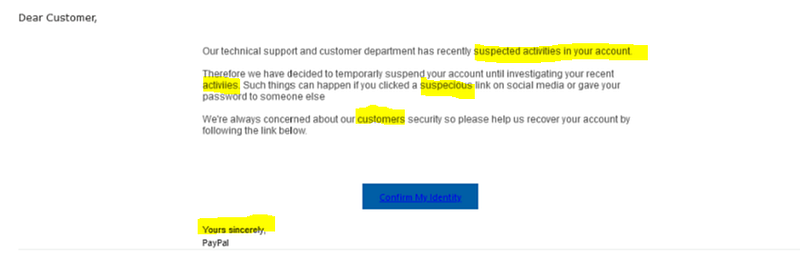
In the case of the sample emails, both emails are riddled with spelling errors:
Note: Many people think this spelling error is a function of sloppy work or a weak understanding of the English language. However, the spelling errors are often a deliberate part of the scammers strategy.

Although they are different, I would liken the effect to the subtle brilliance of Nigerian scam letters.

According to the book “Think Like A Freak,” a follow-up to the popular “Freakonomics” by Steven D. Levitt and Stephen J. Dubner, the scam’s obviousness is its chief selling point.

The book refers to research from Microsoft Research computer scientist Cormac Herley, who looked at Nigerian scams — technically called advance-fee fraud — from the point of view of the scammer. How, he wondered, were scammers who never sent an email free of typos earning enough money for the United States Secret Service to establish its own task force to fight them?

In turns out that those typos are a key part of the scam.

Levitt and Dubner explain the genius behind such an obvious scam in terms of “false positives,” referring to email recipients who engage with the scammers but don’t ultimately pay. Reaching out to scores of potential victims isn’t much work, thanks to the ease of email, but with each reply from a gullible target, the scammers are required to put forth a little more effort.

Therefore, it’s in the scammers’ best interest to minimize the number of false positives who cost them effort but never send them cash. By sending an initial email that’s obvious in its shortcomings, the scammers are isolating the most gullible targets. If you trash their email, that’s fine. They don’t want you, someone from whom there’s virtually no chance of receiving any money. They want people who, faced with a ridiculous email, still don’t recognize its illegitimacy.

As Herley tells the book’s authors, “Anybody who doesn’t fall off their chair laughing is exactly who they want to talk to.”

Red Flag #3 — There’s a suspicious attachment.

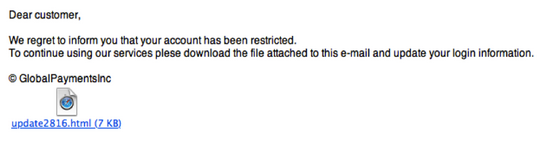
Unsolicited emails that contain attachments should always raise red flags. Typically, authentic institutions don’t randomly send you emails with attachments, but instead direct you to download documents or files on their own website.

As with the other tips on this list, this method isn’t foolproof. Sometimes companies that already have your email will send you information, such as a white paper, that may require a download. In that case, be on the lookout for high-risk attachment file types include .exe, .scr, and .zip. (When in doubt, contact the company directly using contact information obtained from their actual website.)

The emails I received did not contain suspicious attachments, but here is an example from another phishing email:
Red Flag #4 — The message is designed to create a sense of urgency.

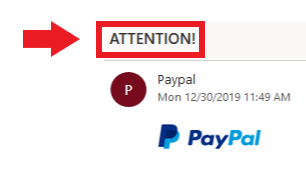
It is common for phishing emails to instill panic in the recipient. The email may claim that your account may have been compromised and the only way to verify it is to enter your login details. Alternatively, the email might state that your account will be closed if you do not act immediately.

Ensure that you take the time to really think about whether an email is asking something reasonable of you. If you’re unsure, contact the company through other methods.

This is demonstrated well in the first sample email which contains an email subject headline designed to induce panic:
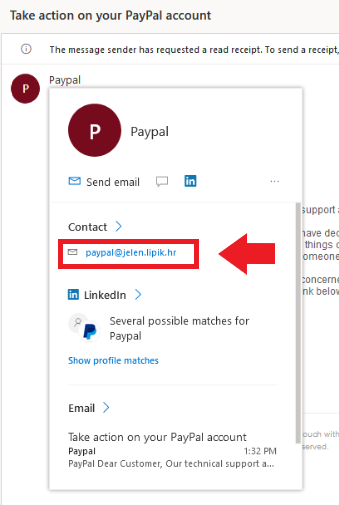
Red Flag #5 — The web and email addresses do not look genuine.

It is often the case that a phishing email will come from an address that appears to be genuine. Criminals aim to trick recipients by including the name of a legitimate company within the structure of email and web addresses. If you only glance at these details they can look very real but if you take a moment to actually examine the email address you may find that it’s a bogus variation intended to appear authentic ‒ for example: @mail.paypal.work as opposed to @ “paypal.com”.

In the sample emails, the sender appeared to be PayPal at first glance, but upon mousing over the sender icon (to see the actual email), it became clear that the email originated from an account posing as a PayPal account.
There are countless other ways to detect a phishing attack, but hopefully these 5 warnings signs will help you avoid any malicious emails that you receive.

Casey Botticello

Thanks for reading this article! Leave a comment below if you have any questions, and if you want to learn more about blogging, content marketing, or subscription newsletter strategy, be sure to sign up for the Blogging Guide Newsletter!

If you liked this article, here are some other articles you may enjoy:

Casey Botticello is an internet entrepreneur and the founder of Blogging Guide, an online community of writers with an award-winning newsletter. He is also the creator of the popular Medium Writing Course and the Substack Newsletter Course.

Casey previously worked at several tech startups, a lobbying & strategic communications firm, and has created several businesses of his own. He is a graduate of The University of Pennsylvania, where he received his B.A. in Urban Studies.

You can connect with him on LinkedIn, Twitter, Facebook, follow his Medium publications, Digital Marketing Lab and Medium Blogging Guide, or reach out to him directly on his personal website.

Phishing
Hacking
Email
Technology
Privacy
Recommended from ReadMedium