
Pandas >> How to Split One Column to Multiple Columns in Pandas
In this article, we will talk about how to split one column in which contents are concatenated with a delimiter like a comma to multiple columns. Or use regex expression to extract contents for multiple columns.
- How to use str.split() to split one column into multiple columns
- How to use str.extract() to extract contents for multiple columns

Let’s prepare data first.
Preparing data

Split column using str.split() method of Series
pandas.Series.str.split split strings around given delimiter.
str.split() method has pat parameter which can be delimiter string ( whitespace by default) or regular expression.
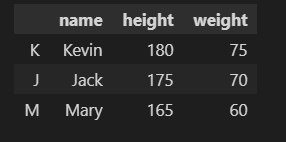
For example, we can split the height and weight of every student using str.split() method.
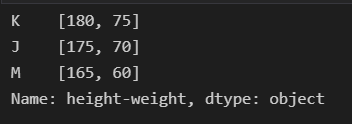
You will find the split result (list) is a Series (one column contains list value), yet different from our expected result.
So let’s add another option in split() method to achieve this goal. This option is expand, if we specified expand=True, two columns will be generated.
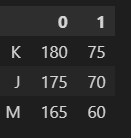
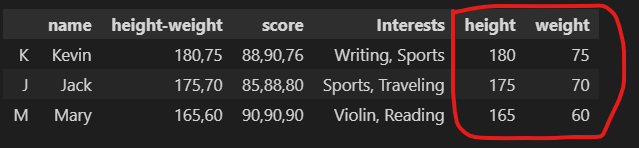
If we use two columns to accept this result, we can add height and weight column to df DataFrame.
If you want to concatenate new columns by splitting and some columns of the original DataFrame into a new DataFrame, you can use concat() method of Pandas. concat() accepts a list of DataFrame, axis=1 means concatenate DataFrames in horizontal direction. Note: The new columns by splitting have no column names but 0,1.
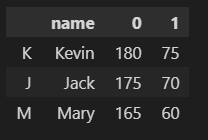
We can use rename() method of DataFrame to change column names as below. You can read another article about how to rename columns and indexes.
Pandas “ How to Rename Column and Index https://thats-it-code.com/pandas/pandas__how-to-rename-column-and-index/
Extract columns from value of one column by str.extract()
pandas.Series.str.extract will extract contents as columns by regex. In the regex pattern, capturing groups (enclosed in parentheses) must be specified. For example, we can use str.extract() method to extract three scores from the score column.
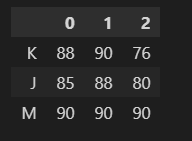
Also, we can specify column names to accept new columns.

Conclusion
- We can use str.split() to split one column into multiple columns by specifying expand=True option.
- We can use str.extract() to extract multiple columns using the regex expression in which multiple capturing groups are defined.
Originally published at https://thats-it-code.com on January 2, 2022.


