
How to Split ArrayList into Smaller SubLists
Sharing 3 options to convert lists to sublists in Java
Originally Published in https://asyncq.com/
Introduction
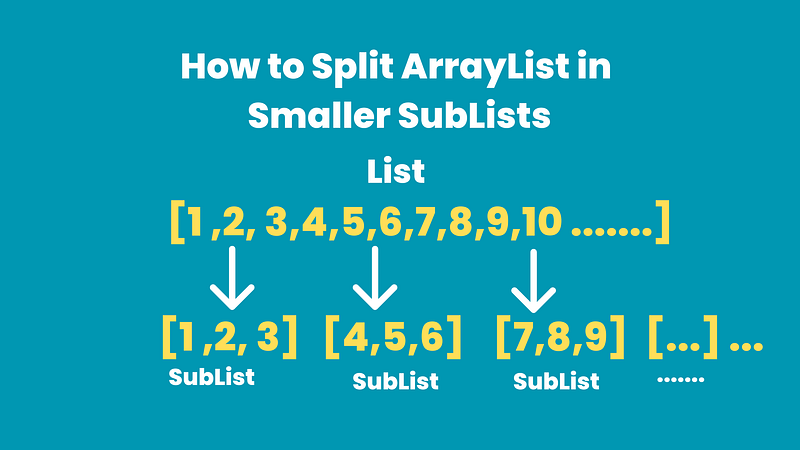
- The list is one of the most used collections in Java language. Sometimes this list can be large and creating a sublist and operating over them seems a very logical step.
- Java does not provide a helper to create N sublists from a large list, but as you know we can always use existing functionality to implement one or use a third-party library.
- In this article, we will see 3 options to create sublists from a large list.
Input List
- Our input is a simple N numbers list
List<Integer> numbers = IntStream.rangeClosed(1, 11100)
                .boxed().toList();
Option 1
- In this option, we are tracking the start and end variables and using sublist() method to get the part of the list and then add that part to the result list.
- We terminate our iteration whenever the next batch is less than or equal to the expected batch_size. this would be the final batch condition.
- Then at the end, we add leftovers to the result and we are done!
public static void option_1(){
        int batch_size = 1000;
        List<Integer> numbers = IntStream.rangeClosed(1, 11100)
                .boxed().toList();
        List<List<Integer>> results = new ArrayList<>();
        int start = 0;
        while (start+(batch_size) < numbers.size()){
            int end = start+(batch_size);
            System.out.println(end);
            results.add(numbers.subList(start,end));
            start=end;
        }
        results.add(numbers.subList(start, numbers.size()));
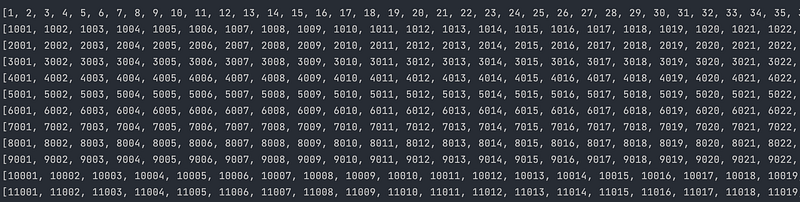
        results.forEach(System.out::println);
    }
ouput
modified_version
- we can improve our code bit by adding Math.min(numbers.size(), start+batch_size)
- Math.min condition will add the end for both the cases, 1 when the total elements are covered in batch less than the total record size and leftover elements for the last batch.
public static void option_2_modified(){
        int batch_size = 1000;
        List<Integer> numbers = IntStream.rangeClosed(1, 11100)
                .boxed().toList();
        int recordIdx = numbers.size();
        List<List<Integer>> results = new ArrayList<>();
        int start = 0;
        while (start < recordIdx){
            results.add(numbers.subList(start, Math.min(numbers.size(), start+batch_size)));
            start += batch_size;
        }
        results.forEach(System.out::println);
 }
Option 2
- In this option, we are using Java stream API to group elements.
- We provide grouping logic based on partition size and an atomic integer index.
- So if the partition size is 10, then 0 -> 9 elements will be grouped together because the dividing result would be 0 for all those elements.
public static void option_2(){
        int batch_size = 1000;
        List<Integer> numbers = IntStream.rangeClosed(1, 11100)
                .boxed().toList();
        AtomicInteger counter = new AtomicInteger();
        Collection<List<Integer>> result = numbers.stream()
                .collect(Collectors.groupingBy(a -> counter.getAndIncrement() / batch_size))
                .values();
        result.forEach(System.out::println);
    }
Option 3
- We can also use helper methods to make our life simple. If we have the liberty to use 3rd party libraries like google guava or apache commons we can take advantage of helper methods that are provided by these libraries.
- Google Guava has a Lists utility class that provides a partition helper method to partition lists with batch size.
public static void option_3(){
        int batch_size = 1000;
        List<Integer> numbers = IntStream.rangeClosed(1, 11100)
                .boxed().toList();
        List<List<Integer>> partition = Lists.partition(numbers, batch_size);
        partition.forEach(System.out::println);
    }
Using Apache Commons Collection API
- Apache Commons Collection API has a ListUtils class that provides a partition helper method to partition lists with batch size.
public static void option_3(){
    int batch_size = 1000;
    List<Integer> numbers = IntStream.rangeClosed(1, 11100)
            .boxed().toList();
    List<List<Integer>> partition = ListUtils.partition(numbers, batch_size);
    partition.forEach(System.out::println);
}
Conclusion
- In this article, we covered 3 options to convert a large list to sublists.
- We implemented our own logic and additionally looked at helper methods provided by google guava and Apache commons-collections library.
Before You Leave
- Let me know if I can be of any help to your career, I would love to chat or jump on a call.
- If you like this content consider becoming medium member to support.
- Upgrade your Java skills with Grokking the Java Interview
- If you want to upskill your Java skills, you should definitely check out [NEW] Master Spring Boot 3 & Spring Framework 6 with Java [ 38 hrs content, 4.7/5 stars, 6+ students already enrolled]


