
Solving the “RuntimeError: CUDA Out of memory” error
**Freeze frame, scratch that record and cue — ‘The Who’ intro**
Now you might be wondering, how I got here and why this blog post has such a bland, un-enticing non clickbait-y title. Why is this not an ultimate guide to something something basic? I’ll tell you. This string is what I would enter on you.com(what, are you still using google?), when I’m completely devoid of hope and praying to an imaginary deity whose existence I question, to make my deep learning models run on GPU. You can dread it, run from it, but this CUDA issue still arrives.

So here’s to hoping that your prayer will be answered when you find this post.🤞 Right off the bat, you’ll need try these recommendations, in increasing order of code changes
- Reduce the `batch_size`
- Lower the Precision
- Do what the error says
- Clear cache
- Modify the Model/Training
Out of these options the one with the most ease and likelihood to work for you, if you’re using a pretrained model, is the first one
Changing the batchsize
If you are running some pre-existing code or model architecture, your best move is to reduce the batch size. Cut down to half and keep chopping it down till you don’t get the error.

However , if in this endeavor you find yourself setting batch size to 1 and it still won’t help, then there are other problems and higher batch sizes can work if you fix it.
Lower the Precision
Now if you’re working with Pytorch-Lightning, like you should be, you might also try changing the precision to `float16`. This might come with problems like a mismatch between the expected Double and getting a Float tensor, but it is memory efficient and has a very slight trade-off in performance, making it a feasible option.
This third option —
Doing what the error says in the second line
which can be done using the following command. Alternatively if you are using a Windows machine, you can use set instead of export
export PYTORCH_CUDA_ALLOC_CONF=garbage_collection_threshold:0.6,max_split_size_mb:128One quick call out. If you are on a Jupyter or Colab notebook , after you hit `RuntimeError: CUDA out of memory`. You need to restart the kernel.
When using multi-gpu systems I’d recommend using the `CUDA_VISIBLE_DEVICES` environment variable to select the GPU to use.
$ export CUDA_VISIBLE_DEVICES=0  (OR)
$ export CUDA_VISIBLE_DEVICES=1  (OR)
$ export CUDA_VISIBLE_DEVICES=2,4,6  (OR)
# This will make the cuda visible with 0-indexing so you get cuda:0 even if you run the second one. OR you can check/set those in your python code
import os
os.environ['CUDA_VISIBLE_DEVICES']='2, 3'
Now some stack overflow posts would have you try, adding these lines to your code to -
Release Cache
To figure out how much memory your model takes on cuda you can try :
import gc
def report_gpu():
   print(torch.cuda.list_gpu_processes())
   gc.collect()
   torch.cuda.empty_cache()
If you then call python’s garbage collection, and call pytorch’s empty cache that should basically get your GPU back to a clean slate of not using more memory than it need to, for when you start training your next model, without having to restart the kernel
import gc
gc.collect()
torch.cuda.empty_cache()
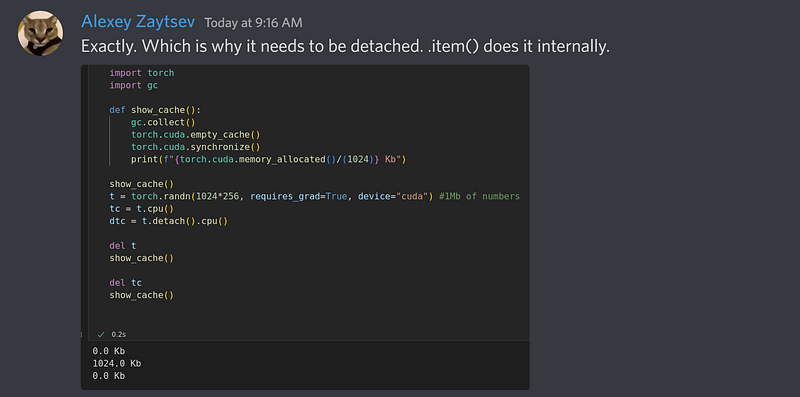
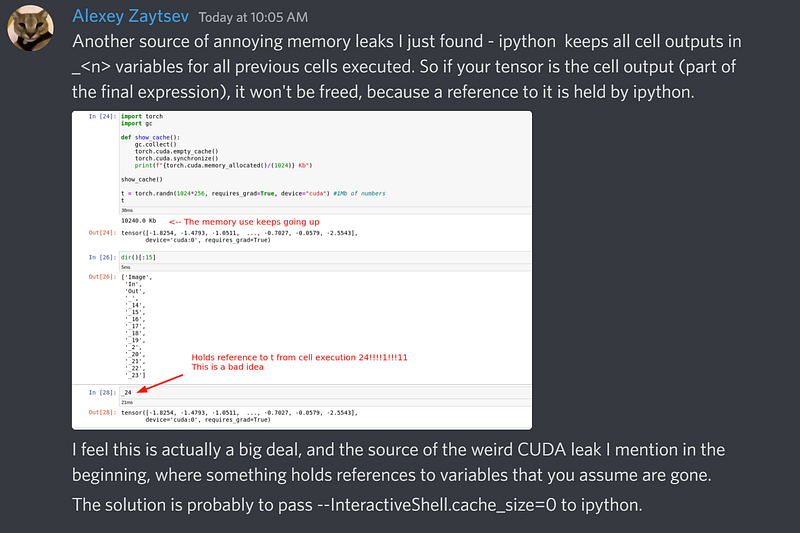
However `torch.cuda.empty_cache()` or `gc.collect()` can release the CUDA memory, but not back to Python apparently. Don’t pin your hopes on this working for scripts because it might mean some code changes that you might not have time for. For JupyterLab or Colab, these seem to work well, and if you want to know how to use these two in your code, a lively discussion I had from the fast.ai discord yielded these helpful snippets
Let’s go to an alternative method beyond those 4
Using a python package
Admittedly, I haven’t tried this hack yet, but if you did and it works, share your experience in the comments and we can update this section.
Here’s how to use koila created by github user — @rentruewang
pip install koila
# Wrap the input tensor and label tensor.
# If a batch argument is provided, that dimension of the tensor would be treated as the batch.
# In this case, the first dimension (dim=0) is used as batch's dimension.

(input, label) = lazy(input, label, batch=0)
If these didn’t help then, the only way to fix the issue is to find out
What’s using the memory?

Contrary to popular belief, you do NOT need a bigger GPU to train bigger models, You can simply use Gradient accumulation. We’ll discuss that in a bit
So let’s get into dissecting the error message because that’s usually a good hint
Total capacity tells you that this is a 16 GB machine. So a good check would be to see how big your data and model are going to be, since you might be moving them to GPU. If it is exceeding the total capacity, you can’t run on such that machine and you need to chunk your data into batches and keep moving it between cpu and gpu.
You can’t keep stuffing more into a knapsack, without removing something to make enough space, because contrary to popular opinion, a GPU though miraculous is not a mugen pocket

If it says you can’t use x MiB because you only have a little memory free, find out what other processes are also using the GPU and free up that space.
find the PID of python process by running:
nvidia-smiand kill it using
sudo kill -9 pidModify the Model/Training loop
Now we’re at the end game. Everything has failed you, nothing is using the GPU memory and you’re probably crying😭 because you have Imposter syndrome and you don’t know what you’re doing. I’m just kidding. Adopt the brilliant conman syndrome. If everyone is faking it then you too , deserve a stake in this scam.

It’s very likely that the code you wrote is pushing a lot of stuff onto the gpu. Now you might want that for large matrix multiplications, but for simple stuff like metric calculations and logging you can do those on cpu. So get those out of there.

Stop saving the whole thing. Use loss.item()when you aggregate your losses across batches at the end of the epoch.
Now remove the predictions and targets off the gpu using preds.detach().cpu(). These are heavy stuff. You don’t need to keep persisting them in memory if you only keep them for logging
Be careful here. If your loss is constant through the epochs it’s probably because you detached a part of the computation graph and backprop doesn’t have a way back to update values. so figure out at which point in your code you can do the above 2 mentioned steps
If you want to learn about Performance and Scalability, this is a super cool reference — https://huggingface.co/docs/transformers/performance
As promised, let’s discuss another clever little trick
Gradient Accumulation
Reducing the batch size was one way to avoid memory issues but, the smaller your batch size, the more volatility there is between batch to batch. So the dynamics of the training are now different. You don’t want to keep finding a different set of hyperparameters for the architecture at different batch sizes.
You can use another parameter called say accum to “Accumulate Gradients” by defining how many batches of gradients are accumulated. Since we add those gradients over accum batches, we divide the batch_size by the same number.
batch_size//accum
the accumulation can be done by using the callback GradientAccumulation
batch_size = 64
accum=2
# Data loader , change the batchsize parmeter to  bs = 64//accum
cbs = GradientAccumulation(64) if accum else []
What we can do instead is find a way to run 32 data points but make it behave like it was 64 data points at a time. You might have come across this in your training loop, where you zero out the gradients before you do loss.backward() again, either before you take the next step or go into the next epoch. If you skip this step, the gradients will be added up.
So if you do 2 half sized batches without zero-ing out the gradients, it will add them up, to make a target effective batch size , similar to what we initially chose. In the training loop, we need to use a counter to update based on the minibatch size and once it hits the target that is when we make the gradients zero. Until then they just keep accumulating due to the loss.backward()
Once there is some feedback, and I gain more knowledge about this issue, I’ll be sure to update this blog post. Till next time !
If you liked this blog and found it helpful, please share this with your friends and hit that claps (👏) button below to update the recommendations. Also add any use-cases or models that you tried, where you often ran into this error, in the comments below!


