
How to Select Subexpressions in Python’s SymPy
Computer algebra systems like Python’s SymPy are great for doing heavy, complicated analytic calculations. But that usually means that the expressions you have easily become unwieldy long. And typically, you want to apply certain operations not only to the complete expression but often only to certain subexpressions. In that case, the next problem arises: how do get access to the subexpression without inputting it by hand? That’s the problem of selecting subexpressions. There are several mechanisms in SymPy to help you with that, and I will describe two of them in this article. Sometimes, the one approach is easier, sometimes the other. If you become a proficient SymPy user, you will probably use them both, frequently.
Start a Jupyter notebook, import SymPy,
from sympy.abc import *
from sympy import *
and play with it while reading this article. Or just drink a cup of coffee. ;-)
func and args
The most direct (but also cumbersome) way to get access to a subexpression is through the args attribute that every SymPy object has. This is a (read-only) tuple that stores the next level of subexpressions for a given SymPy node. For instance, if we have
expr = x + 1 + sqrt(y**2 + z**2)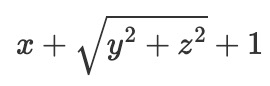
expr.argsOut:
(1, x, sqrt(y**2 + z**2))Note that the order in which the arguments are stored in args may differ from how you entered them, and it may also differ from how the subexpressions are displayed in Jupyter or on the console. Internally
SymPy objects establish some canonical order, so that you cannot make assumptions on what is the order of the args tuple. So there is basically no other way than inspecting the tuple yourself. But at least you can be certain that for a given expression, the order will always be the same, whenever you restart the ipython kernel or Python interpreter.
In our case, when we want to select the argument of the square root, we can select the square root first by
sub_expr = expr.args[2]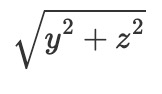
And then inspect the args tuple of that subexpression
sub_expr.argsOut:
(y**2 + z**2, 1/2)It may surprise you that the square root has two arguments, one for the actual argument and one for the power. That sounds a bit redundant, since square root implies power one half. But in fact, SymPy represent square roots more generically. This becomes obvious when you look at the second important ingredient for taking expressions apart: the func attribute. All SymPy expressions have a func attribute that stores what kind of object it is. In this case, we have
expr.funcOut:
sympy.core.add.Addand
sub_expr.funcOut:
sympy.core.power.PowSo, expr is a sum, Add and the square root really is a Pow object, which explains why it needs to store not only the base as argument, but also the exponent.
Selecting subexpressions manually using args and func is only practicable for easy cases. But it is important to know that his exists because you will quickly come into a situation where you want to write your own helper tools for SymPy and then, of course, args and func really shine.
find
Much more convenient than args is to use the find method that every
SymPy expression implements. However, the documentation of find is …
terse… to say the least? It says:
help(Expr.find)Out:
Help on function find in module sympy.core.basic:find(self, query, group=False)
Find all subexpressions matching a query.And that’s all. Not very helpful. What is a query in the first place? Let’s find
out by playing. Here is some more or less complicated expression and we will see how we can operate with find on it.
a, b, c = symbols('a,b,c', cls=IndexedBase)
f, g = symbols('f, g', cls=Function)
expr = (a[1]*x**2 + b[2]*x + c[3]) \
/ (2*d + Sum(2*((x)**n+sqrt(x*n+3)), (n, 0, oo))) \
+ x**2 * Integral(f(t)+g(t), (t, 0, x)) \
- Sum(3*y**k, (k, -oo, oo))
First, let’s try queries by type. We can search for the sums in the expression by writing
expr.find(Integral)Out:
{Integral(f(t) + g(t), (t, 0, x))}find always returns a set, which is not very convenient when you want to
pick a certain object when there is more than one object in the result set. If there is only one result in the set, just use pop() to get it:
expr.find(Integral).pop()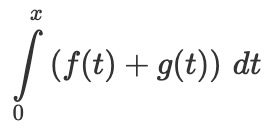
If there is more than one object in the result set, like in
expr.find(Sum)Out:
{Sum(2*x**n + 2*sqrt(n*x + 3), (n, 0, oo)),
Sum(3*y**k, (k, -oo, oo))}you must refine your query. Either you copy and paste the specific sum from the result set or, if you want to avoid this manual step, you can use wildcards to match only one of the sums.
Let’s select the sum over n from 0 to infinity. First define a wildcard symbol (that you can reuse later)
w_ = symbols('w', cls=Wild)Then make the query
expr.find(Sum(w_, (n, 0, oo)))Out:
{Sum(2*x**n + 2*sqrt(n*x + 3), (n, 0, oo))}and there it is.
find can be a bit counterintuitive. For example, we might want to insert a sine function around the denominator of the fraction in expr. The strategy should be to select the subexpression for the denominator and then replace it but sine of the subexpression. The tricky part is the selection. You might want to write
expr.find(2*d + w_)Out:
{-1,
-oo,
0,
1,
1/(2*d + Sum(2*x**n + 2*sqrt(n*x + 3), (n, 0, oo))),
1/2,
2,
2*d,
2*d + Sum(2*x**n + 2*sqrt(n*x + 3), (n, 0, oo)),
3,
d,
oo}Ouch, this is not what we wanted. Remember that find returns all matched subexpressions. For situations like this, its convenient to have a toolbox for often needed tasks like the following class, which wraps around the find function with a fluid API. The problem with find is that is returns a set, and you cannot simply apply another find to a set. Not so with this helper class:
Now we can define a Finder object and apply find to that:
finder = Finder(expr)
finder.find((2*d + w1_))
Out:
{0: 0, 1: 1, 2: 2, 3: oo, 4: 3, 5: 1/(2*d + Sum(2*x**n + 2*sqrt(n*x + 3), (n, 0, oo))), 6: 2*d, 7: 1/2, 8: d, 9: -oo, 10: 2*d + S...Ok, that is just what we had so far, but the display not looks like a dict. But in reality, what is returned is another Finder object, so we can again call find or some other method on it:
finder.find((2*d + w1_)).filter(Sum)Out:
{0: 1/(2*d + Sum(2*x**n + 2*sqrt(n*x + 3), (n, 0, oo))), 1: 2*d + Sum(2*x**n + 2*sqrt(n*x + 3), (n, 0, oo))}Instead of finding a good pattern to narrow it down to one result, it’s now easier to retrieve the denominator by accessing it through its key:
denom = _.get(1)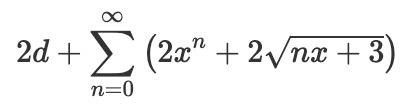
Finally, now that we have the denominator, we simply wrap the sine around it and use replace to put it in the original expression:
expr.replace(denom, sin(denom))
That’s all for today. I hope it was useful! If you have questions or comments, please post them below.
Thanks for reading!


