avatarGözde Madendere Barın

Free AI web copilot to create summaries, insights and extended knowledge, download it at here

5064

Abstract

tor for filtering rows</span> condition = df[<span class="hljs-string">'Order Quantity'</span>] > <span class="hljs-number">3</span> df[condition]

<span class="hljs-comment"># or</span> df[df[<span class="hljs-string">'Order Quantity'</span>] > <span class="hljs-number">3</span>]</pre></div><figure id="d481"><img src="https://cdn-images-1.readmedium.com/v2/resize:fit:800/0*iVGa_WntK5WmqL2-.png"><figcaption>dataframe with the order quantity > 3</figcaption></figure><ul><li><b>loc[ ]</b> : It filters <i>rows by labels.</i> Example: <code>df.loc[condition]</code></li></ul><div id="1594"><pre><span class="hljs-comment"># Using loc for filtering rows</span> condition = df[<span class="hljs-string">'Order Quantity'</span>] > <span class="hljs-number">3</span> df.loc[condition]

<span class="hljs-comment"># or</span> df.loc[df[<span class="hljs-string">'Order Quantity'</span>] > <span class="hljs-number">3</span>]</pre></div><figure id="da45"><img src="https://cdn-images-1.readmedium.com/v2/resize:fit:800/0*-BDqd0RqdZVsmsai.png"><figcaption>dataframe with the Order Quantity > 3</figcaption></figure><div id="05f2"><pre><span class="hljs-comment"># Using loc for filtering rows</span> df.loc[df[<span class="hljs-string">'Customer Country'</span>] == <span class="hljs-string">'United States'</span>]</pre></div><figure id="cd3e"><img src="https://cdn-images-1.readmedium.com/v2/resize:fit:800/0*DB3e6sYgoiClLMsa.png"><figcaption>dataframe with the Customer Country = United States</figcaption></figure><ul><li><b>iloc()</b> : It filters <i>rows by integer positions.</i></li></ul><div id="d77b"><pre><span class="hljs-comment"># Using iloc for filtering rows</span> df.iloc[[<span class="hljs-number">0</span>, <span class="hljs-number">2</span>, <span class="hljs-number">4</span>]]</pre></div><figure id="9bcb"><img src="https://cdn-images-1.readmedium.com/v2/resize:fit:800/0*emWxGkYIoIEsWmVW.png"><figcaption>rows with integer index 0, 2 and 4</figcaption></figure><div id="97d4"><pre><span class="hljs-comment"># Using iloc for filtering rows</span> df.iloc[:<span class="hljs-number">3</span>, :<span class="hljs-number">2</span>]</pre></div><figure id="8f76"><img src="https://cdn-images-1.readmedium.com/v2/resize:fit:800/0*Ic3eTIkhz3GiRtgu.png"><figcaption></figcaption></figure><p id="a2dd">first 3 rows and first 2 columns</p><ul><li><b>isin([ ])</b> : It is used to filter data based on a list. Example: <code>df[df['column_name'].isin(['value1', 'value2'])]</code></li></ul><div id="b6aa"><pre><span class="hljs-comment"># Using isin for filtering rows</span> df[df[<span class="hljs-string">'Customer Country'</span>].isin([<span class="hljs-string">'United States'</span>, <span class="hljs-string">'Puerto Rico'</span>])]</pre></div><figure id="751d"><img src="https://cdn-images-1.readmedium.com/v2/resize:fit:800/0*E1OViJZnYFroznc5.png"><figcaption>rows where column ‘Customer Country’ is ‘United States’ or ‘Puerto Rico’</figcaption></figure><div id="1f7e"><pre><span class="hljs-comment"># Filter rows based on values in a list and select spesific columns</span> df[[<span class="hljs-string">"Customer Id"</span>, <span class="hljs-string">"Order Region"</span>]][df[<span class="hljs-string">'Order Region'</span>].isin([<span class="hljs-string">'Central America'</span>, <span class="hljs-string">'Caribbean'</span>])]</pre></div><figure id="9ca5"><img src="https://cdn-images-1.readmedium.com/v2/resize:fit:800/0*7yIpAd3m29aVEAgO.png"><figcaption>it selected Customer Id and Order Region columns, where Order Region is Central America or Caribbean</figcaption></figure><div id="fa4d"><pre><span class="hljs-comment"># Using NOT isin for filtering rows</span> df[~df[<span class="hljs-string">'Customer Country'</span>].isin([<span class="hljs-string">'United States'</span>])]</pre></div><figure id="c018"><img src="https://cdn-images-1.readmedium.com/v2/resize:fit:800/0*TMUTQyHy7NoGx_7w.png"><figcaption>rows where column ‘Customer Country’ is NOT ‘United States’</figcaption></figure><ul><li><b>query()</b> : This method is used to select data based on a SQL-like expression. Example: <code>df.query('condition')</code></li></ul><p id="9454">In case your column names contain spaces or special characters, first you should use the rename() function to rename them.</p><div id="eb74"><pre><span class="hljs-comment"># Rename the columns before performing the query</span> df.rename(columns={<span class="hljs-string">'Order Quantity'</span> : <span class="hljs-string">'Order_Quantity'</span>, <span class="hljs-string">"Customer Fname"</span> : <span class="hljs-string">"Customer_Fname"</span>}, inplace=<span class="hljs-literal">True</span>)</pre></div><div id="bb4a"><pre><span class="hljs-comment"># Using query for filtering rows with a single condition</span> df.query(<span class="hljs-string">'Order_Quantity > 3'</span>)</pre></div><figure id="e46c"><img src="https://cdn-images-1.readmedium.com/v2/resize:fit:800/0*SZkAXje-HChMbzAU.png"><figcaption>dataframe with the order quantity > 3</f

Options

igcaption></figure><div id="7c06"><pre><span class="hljs-comment"># Using query for filtering rows with multiple conditions</span> df.query(<span class="hljs-string">'Order_Quantity > 3 and Customer_Fname == "Mary"'</span>)</pre></div><figure id="2fac"><img src="https://cdn-images-1.readmedium.com/v2/resize:fit:800/0*KzAlLa_-HQNZeUax.png"><figcaption>dataframe with the order quantity > 3 and Customer Fname = Mary</figcaption></figure><ul><li><b>between() </b>: Filters rows based on values that fall within a specified range. Example: <code>df[df['column_name'].between(start, end)]</code></li></ul><div id="309f"><pre><span class="hljs-comment"># Filter rows based on values within a range</span> df[df[<span class="hljs-string">'Order Quantity'</span>].between(<span class="hljs-number">3</span>, <span class="hljs-number">5</span>)]</pre></div><figure id="83db"><img src="https://cdn-images-1.readmedium.com/v2/resize:fit:800/0*5z-ZAj0qszCsbLwy.png"><figcaption>dataframe with the order quantity between 3 and 5</figcaption></figure><ul><li><b>String methods</b> : Filters rows based on string matching conditions. Example: <code>str.startswith()</code>, <code>str.endswith()</code>, <code>str.contains()</code></li></ul><div id="a6a2"><pre><span class="hljs-comment"># Using str.startswith() for filtering rows</span> df[df[<span class="hljs-string">'Category Name'</span>].<span class="hljs-built_in">str</span>.startswith(<span class="hljs-string">'Cardio'</span>)]</pre></div><figure id="b551"><img src="https://cdn-images-1.readmedium.com/v2/resize:fit:800/0*ho8aJ8mJug_WpfQ-.png"><figcaption></figcaption></figure><div id="6df5"><pre><span class="hljs-comment"># Using str.contains() for filtering rows</span> df[df[<span class="hljs-string">'Customer Segment'</span>].<span class="hljs-built_in">str</span>.contains(<span class="hljs-string">'Office'</span>)]</pre></div><figure id="1a05"><img src="https://cdn-images-1.readmedium.com/v2/resize:fit:800/0*IR37zfh1cWHoNfTT.png"><figcaption></figcaption></figure><h1 id="4317">3. Updating Values</h1><ul><li><b>loc[ ]</b> : This accessor selects specific rows and columns in the DataFrame and assigns new values.</li></ul><div id="654f"><pre><span class="hljs-comment"># Update values in a column based on a condition</span> df.loc[df[<span class="hljs-string">'Customer Country'</span>] == <span class="hljs-string">'United States'</span>, <span class="hljs-string">'Customer Country'</span>] = <span class="hljs-string">'USA'</span></pre></div><figure id="1775"><img src="https://cdn-images-1.readmedium.com/v2/resize:fit:800/0*PjpdALv2WRpkO4A6.png"><figcaption>It changed the United Stated to USA, in Customer Country column</figcaption></figure><ul><li><b>iloc[ ]</b> : This accessor selects specific rows and columns in the DataFrame and assigns new values.</li></ul><div id="4ac1"><pre><span class="hljs-comment"># Update values in a column based on a condition</span> df.iloc[df[<span class="hljs-string">'Order Quantity'</span>] > <span class="hljs-number">3</span>, <span class="hljs-number">15</span>] = <span class="hljs-string">'greater than 3'</span>

<span class="hljs-comment"># or</span> condition = df[<span class="hljs-string">'Order Quantity'</span>] > <span class="hljs-number">3</span> df.iloc[condition, <span class="hljs-number">15</span>] = <span class="hljs-string">'greater than 3'</span></pre></div><figure id="e42a"><img src="https://cdn-images-1.readmedium.com/v2/resize:fit:800/0*detn3CQFKKAXzqPt.png"><figcaption>It changed the values greater than 3 in Order Quantity column to “greater than 3” text</figcaption></figure><ul><li><b>replace() </b>: It replaces specific values in a DataFrame with new values. Ex: <code>df.['column_name'].replace(old_value, new_value, inplace=True)</code></li></ul><div id="f2c4"><pre><span class="hljs-comment"># Replace specific values in a column</span> df[<span class="hljs-string">'Order Quantity'</span>].replace(<span class="hljs-number">5</span>, <span class="hljs-string">'equals 5'</span>, inplace=<span class="hljs-literal">True</span>)</pre></div><figure id="3a5a"><img src="https://cdn-images-1.readmedium.com/v2/resize:fit:800/0*BRtv80d4iJZRGItB.png"><figcaption>It changed the “5” to “equals 5” in Order Quantity column</figcaption></figure><h1 id="d353">Conclusion</h1><p id="0978">Python pandas provides several functions and techniques for selecting and filtering data within a DataFrame. By mastering these techniques, you’ll be well-equipped to explore and analyze your data effectively.</p><p id="66be">Remember, practice makes perfect. Thank you for reading!</p><p id="9580"><b>Check my previous post: <a href="https://readmedium.com/data-cleaning-most-helpful-python-pandas-methods-21f824ce2c85"></a></b><a href="https://readmedium.com/data-cleaning-most-helpful-python-pandas-methods-21f824ce2c85">Data Cleaning: Most Helpful Python Pandas Methods</a></p><p id="b1e2"><i>Let’s connect on</i> <a href="https://www.linkedin.com/in/gozdebarin/"><b><i>Linkedin</i></b></a><b><i>.</i></b></p></article></body>

How to Select and Filter Data in Python Pandas

Python pandas library provides several methods for selecting and filtering data, such as loc, iloc, [ ] bracket operator, query, isin, between.

Image from pexels.com

This article will guide you through the essential techniques and functions for data selection and filtering using pandas. Whether you need to extract specific rows or columns or apply conditional filtering, pandas has got you covered. Let’s dive in!

Table of Contents

1. Selecting Columns : [ ] operator, loc, iloc 2. Filtering Rows : [ ] operator, loc, iloc, isin, query, between, string methods 3. Updating Values : loc, iloc, replace

1. Selecting Columns

  • [ ] Bracket operator : It allows to select one or multiple columns. Example: df[['column_label']] or df[['column1', 'column2']]
# Selecting a single column
df[['Customer Country']]
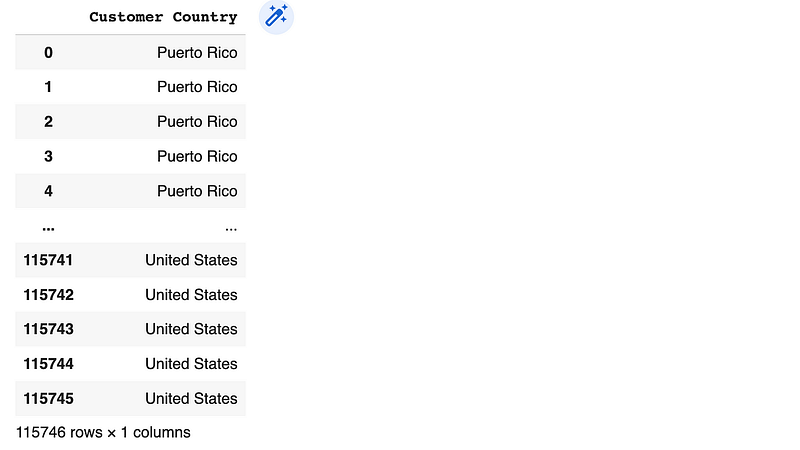
a single column
# Selecting multiple columns
df[['Customer Country', 'Customer State']]
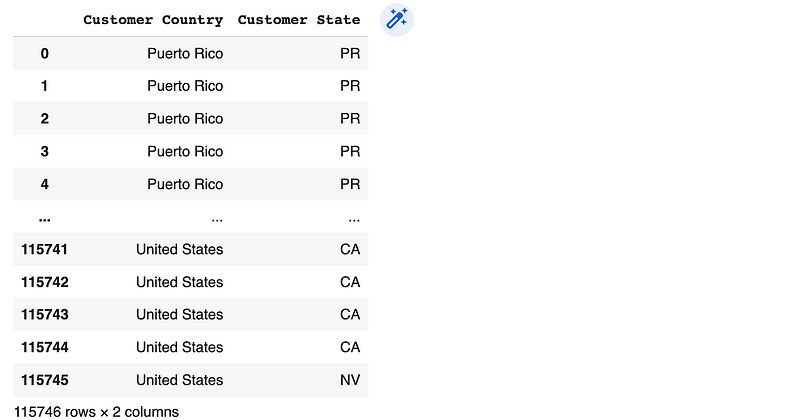
multiple columns
  • loc[ ] : This accessor selects rows and columns by labels. Example: df.loc[row_label, column_label]

*** You can also use loc for slicing operations: df.loc['row1_label':'row2_label' , 'column1_label':'column2_label']

# Using loc for label-based selection
df.loc[:, 'Customer Country':'Customer State']
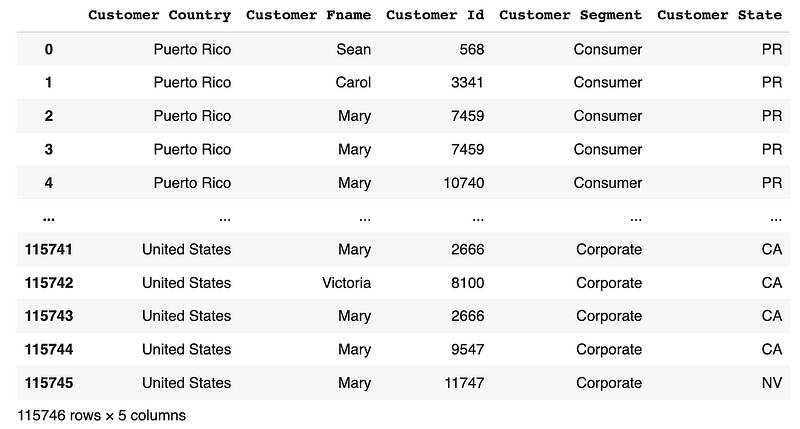
all the rows & columns from Customer Country to Customer State
# Using loc for label-based selection
df.loc[[0,1,2], 'Customer Country':'Customer State']

rows 0,1,2 & columns from Customer Country to Customer State
  • iloc[ ] : This accessor selects rows and columns by integer location. Example: df.iloc[row_position, column_position]

*** You can also use iloc for slicing operations: df.iloc['row1_position':'row2_position','col1_position':'col2_position']

# Using iloc for index-based selection
df.iloc[[0,1,2,3] , [3,4,5,6,7,8]]

# or
df.iloc[[0,1,2,3] , 3:9]

rows 0,1,2,3 & columns 3 to 8
# Using iloc for index-based selection
df.iloc[:, 3:8]
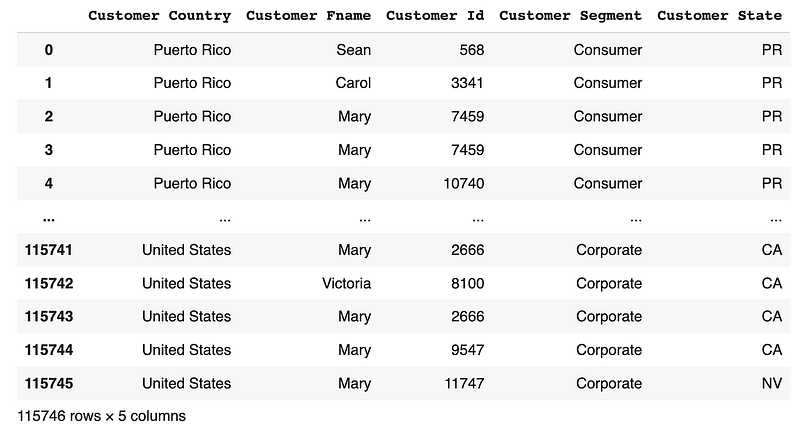
all the rows & columns from 3 to 8

2. Filtering Rows

  • [ ] Bracket operator : It allows filtering rows based on a condition. Example: df[condition]
# Using [] bracket operator for filtering rows# Using [] bracket operator for filtering rows
condition = df['Order Quantity'] > 3
df[condition]

# or
df[df['Order Quantity'] > 3]
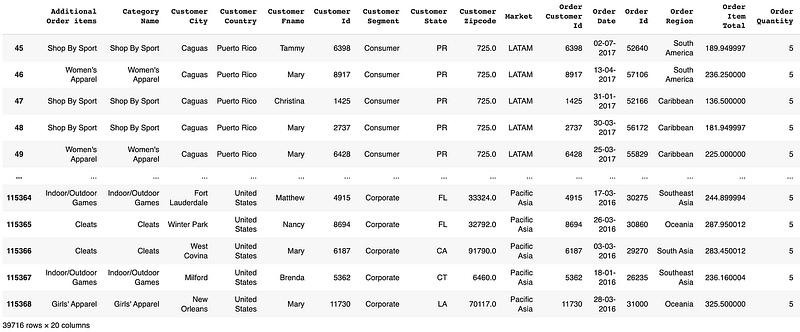
dataframe with the order quantity > 3
  • loc[ ] : It filters rows by labels. Example: df.loc[condition]
# Using loc for filtering rows
condition = df['Order Quantity'] > 3
df.loc[condition]


# or
df.loc[df['Order Quantity'] > 3]
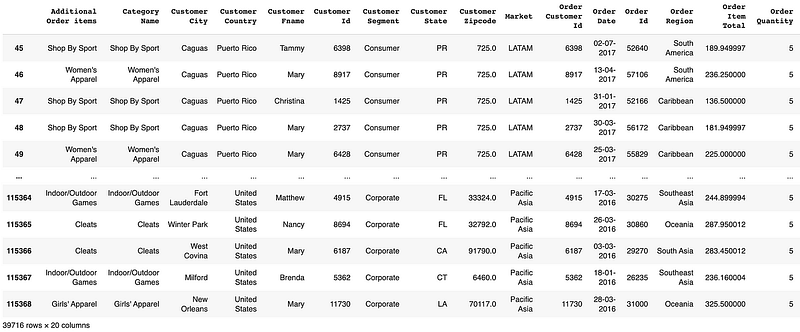
dataframe with the Order Quantity > 3
# Using loc for filtering rows
df.loc[df['Customer Country'] == 'United States']
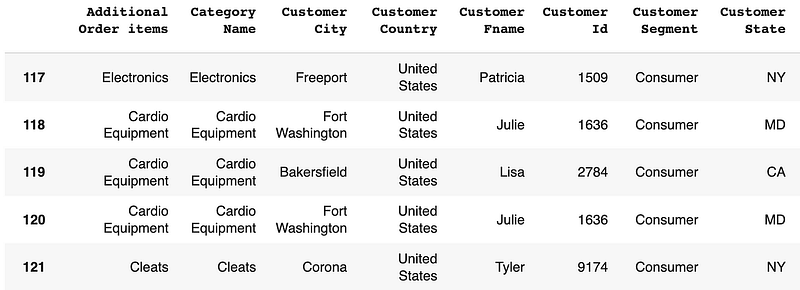
dataframe with the Customer Country = United States
  • iloc() : It filters rows by integer positions.
# Using iloc for filtering rows
df.iloc[[0, 2, 4]]
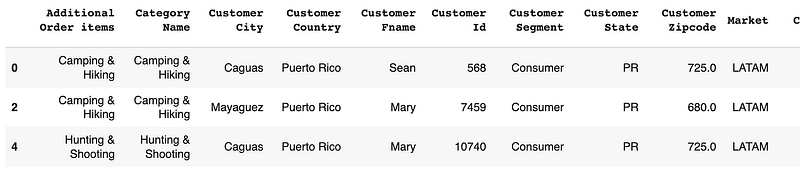
rows with integer index 0, 2 and 4
# Using iloc for filtering rows
df.iloc[:3, :2]

first 3 rows and first 2 columns

  • isin([ ]) : It is used to filter data based on a list. Example: df[df['column_name'].isin(['value1', 'value2'])]
# Using isin for filtering rows
df[df['Customer Country'].isin(['United States', 'Puerto Rico'])]
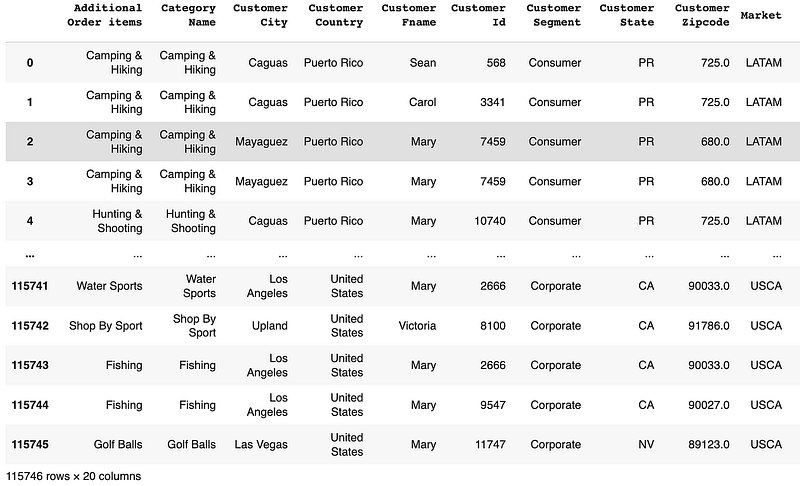
rows where column ‘Customer Country’ is ‘United States’ or ‘Puerto Rico’
# Filter rows based on values in a list and select spesific columns
df[["Customer Id", "Order Region"]][df['Order Region'].isin(['Central America', 'Caribbean'])]
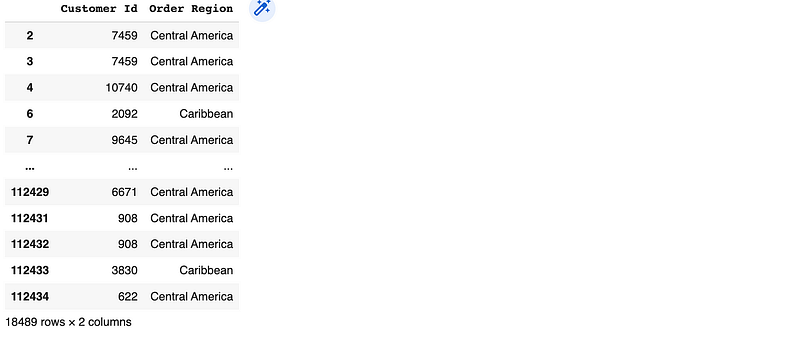
it selected Customer Id and Order Region columns, where Order Region is Central America or Caribbean
# Using NOT isin for filtering rows
df[~df['Customer Country'].isin(['United States'])]
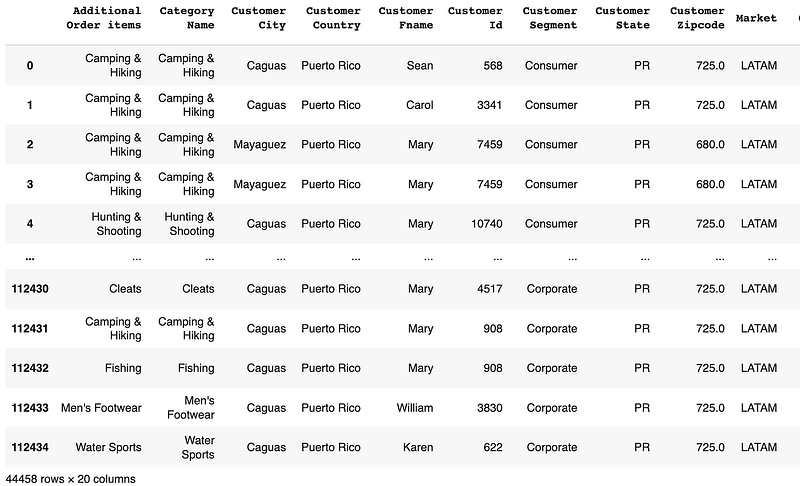
rows where column ‘Customer Country’ is NOT ‘United States’
  • query() : This method is used to select data based on a SQL-like expression. Example: df.query('condition')

In case your column names contain spaces or special characters, first you should use the rename() function to rename them.

# Rename the columns before performing the query
df.rename(columns={'Order Quantity' : 'Order_Quantity', "Customer Fname" : "Customer_Fname"}, inplace=True)
# Using query for filtering rows with a single condition
df.query('Order_Quantity > 3')
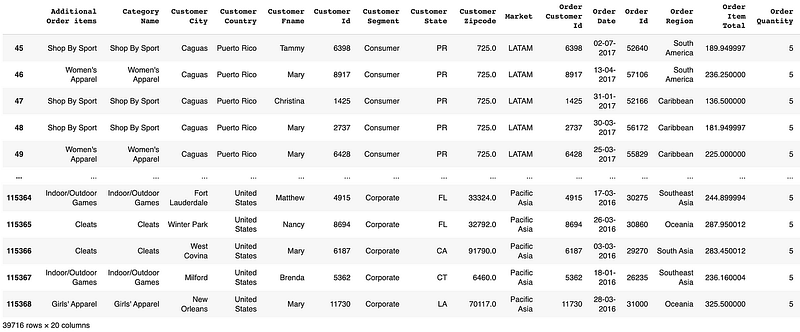
dataframe with the order quantity > 3
# Using query for filtering rows with multiple conditions
df.query('Order_Quantity > 3 and Customer_Fname == "Mary"')
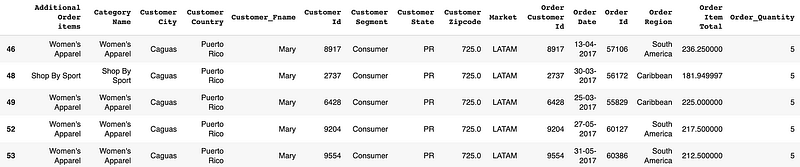
dataframe with the order quantity > 3 and Customer Fname = Mary
  • between() : Filters rows based on values that fall within a specified range. Example: df[df['column_name'].between(start, end)]
# Filter rows based on values within a range
df[df['Order Quantity'].between(3, 5)]
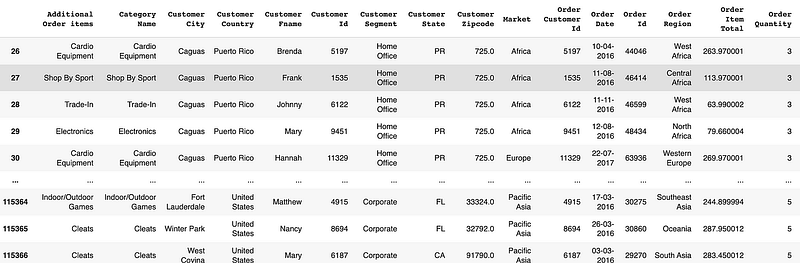
dataframe with the order quantity between 3 and 5
  • String methods : Filters rows based on string matching conditions. Example: str.startswith(), str.endswith(), str.contains()
# Using str.startswith() for filtering rows
df[df['Category Name'].str.startswith('Cardio')]
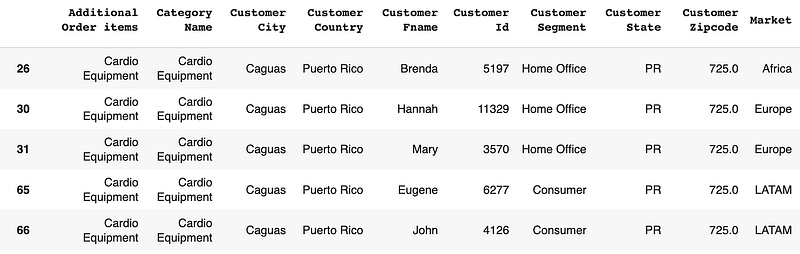
# Using str.contains() for filtering rows
df[df['Customer Segment'].str.contains('Office')]
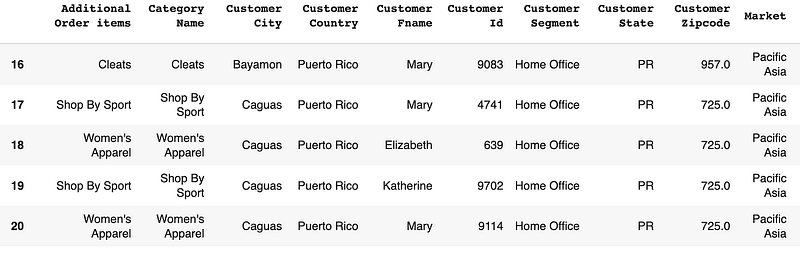
3. Updating Values

  • loc[ ] : This accessor selects specific rows and columns in the DataFrame and assigns new values.
# Update values in a column based on a condition
df.loc[df['Customer Country'] == 'United States', 'Customer Country'] = 'USA'
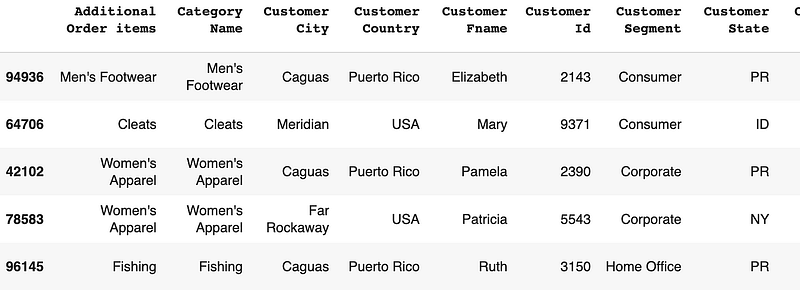
It changed the United Stated to USA, in Customer Country column
  • iloc[ ] : This accessor selects specific rows and columns in the DataFrame and assigns new values.
# Update values in a column based on a condition
df.iloc[df['Order Quantity'] > 3, 15] = 'greater than 3'

# or
condition = df['Order Quantity'] > 3
df.iloc[condition, 15] = 'greater than 3'
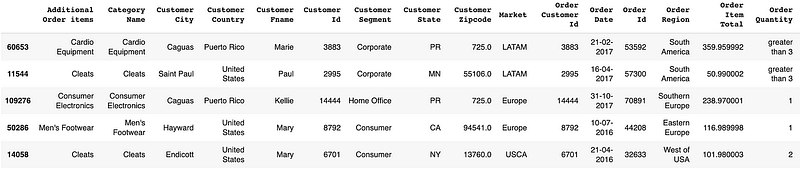
It changed the values greater than 3 in Order Quantity column to “greater than 3” text
  • replace() : It replaces specific values in a DataFrame with new values. Ex: df.['column_name'].replace(old_value, new_value, inplace=True)
# Replace specific values in a column
df['Order Quantity'].replace(5, 'equals 5', inplace=True)
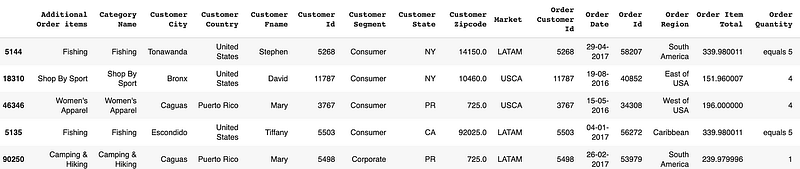
It changed the “5” to “equals 5” in Order Quantity column

Conclusion

Python pandas provides several functions and techniques for selecting and filtering data within a DataFrame. By mastering these techniques, you’ll be well-equipped to explore and analyze your data effectively.

Remember, practice makes perfect. Thank you for reading!

Check my previous post: Data Cleaning: Most Helpful Python Pandas Methods

Let’s connect on Linkedin.

Pandas
Python
Python Fundamentals
Data Scientist
Data Filtering
Recommended from ReadMedium