
How to Scrape Websites Requiring Login with Python
It’s Easy!

This story follows the Web Scraping series. If you have missed the last story, you can find it here:
There is also a GitHub repo associated with this series if you want to find code examples: Web Scraping Series
When scraping websites, you’ll sometimes have to log in to access the data you want. But sometimes, it can be a bit tricky to log in and keep track of your cookies through all the requests you want to make.
That’s why I’ll show you two ways to easily scrape websites requiring authentication.
To understand correctly this article, you must have read the two previous ones because I won’t re-explain everything.
1. Requests
My favorite way of doing this is using requests. It’s the most convenient way, but it can be only used when the content you want to scrape is static. Else, you’ll have to use Selenium.
For the example, we’ll try to log in to the following website: https://www.pianostreet.com/.
First, we want to get to the login page: https://www.pianostreet.com/amember/login/.
Then, we have to understand the page a little bit. Let’s use “Inspect” to open the developer tools!
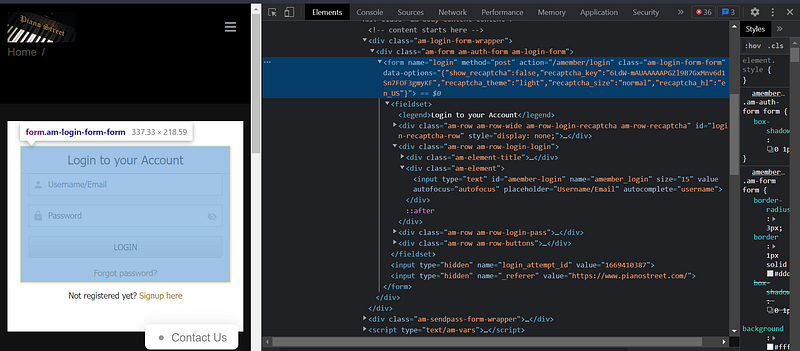
Most of the time, the login pages are built using forms. Here we can find the form easily in the elements.
We’re looking for the “method” and “action” attributes. Here, “method” is “post” and “action” is “/amember/login”. It means we can log in by sending a POST request to “https://www.pianostreet.com/amember/login”.
Then we want to find the name of the fields, which will allow us to build our payload.

The Username field is named “amember_login” and the Password field is named “amember_pass”. So our payload will look like this:
{
    "amember_login": "user",
    "amember_pass": "pass",
}
We know have everything to log in to this website using requests !
But wait! What if the login page is more complicated, or if it’s not a form? In this case, we can open the “Network” tools, and log in to see what happens.
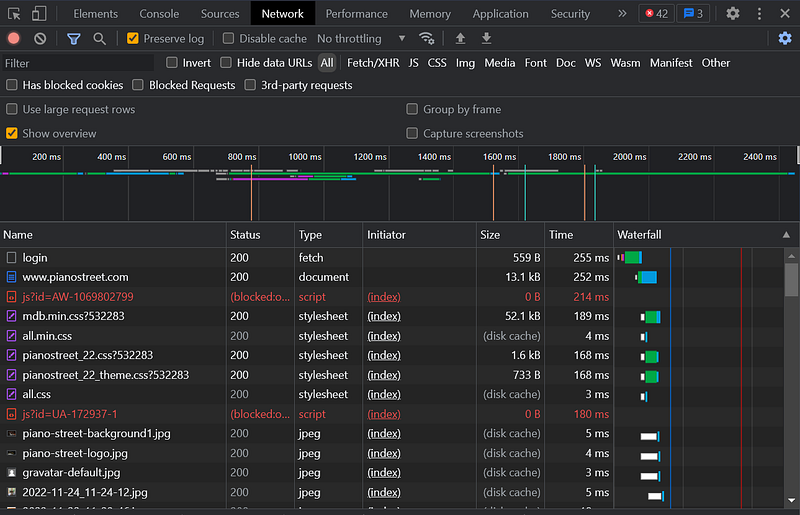
That’s a lot of requests… The one interesting us is “login”. Sometimes, it won’t be called “login” so you’ll have to search among all the requests.
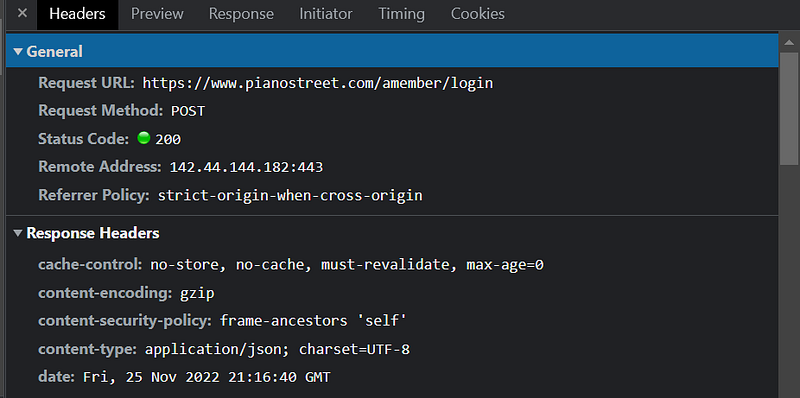
We can find a lot of information to try to reproduce the request in Python. In this example, the payload isn’t visible, but sometimes it will be visible and you will be able to understand how it is done. Example:
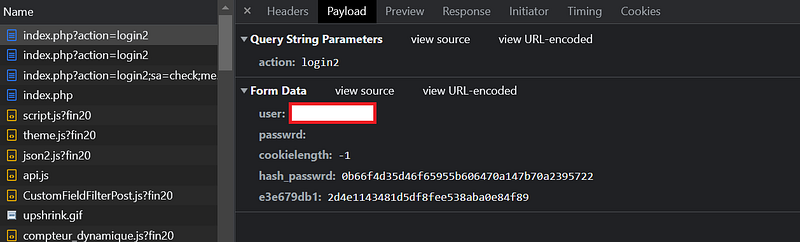
Well, here it’s not easy to understand even if we can see the payload. So let’s look into the page:

The form has an “onsubmit” attribute. So it executes a JS function before sending the request. By looking through the page source we can find this function and try to reproduce it in Python.
It’s a bit harder to do but it’s still doable!
Let’s get back to our previous website. We can now write the code to log in with requests:
What is
requests.Session()?
It’s a way to make your session persist. It allows keeping the cookies and headers between the different requests you make. Without using this, you would have to store the cookies and headers values and pass them every time you make a request to keep logged in.
Now, we’re logged in, we can for example get our profile page:
r = s.get("https://www.pianostreet.com/amember/profile")
soup = BeautifulSoup(r.content, "html.parser")
print(soup.find("div", {"class": "am-form"}).text)
So here is the full code:
As you can see, I’ve added allow_redirects=False to POST request. It’s because if you allow redirects, the response’s status code from the POST request will always be 200, even if the login fails.
Using allow_redirects=False , the status code will be 200 if it fails, else it will be 302.
2. Selenium
Selenium is a little bit more straightforward, especially for complex websites because you just have to simulate a web browser. Also, it can scrape dynamic content.
We begin back with the following page: “https://www.pianostreet.com/amember/login”.
We want to identify the input fields through the code. We can use the names, like before. We also want to identify the form to submit the action. The form name is “login” (you can see it in the previous screenshots).
Just like before, if the page isn’t a form, you have to adapt the code. But it’s more easily doable here because you just have to get the elements and send them events instead of converting the JS code into Python.
Then we can just wait for the page to be loaded and we can scrape our content. So, here is the code:
Full Code
Here is the full code (also findable on my GitHub), to log in to this website using either Requests or Selenium:
Final Note
As you can see, it’s easy to scrape websites requiring authentication.
The hardest part is to adapt your code to fit a specific website, but it can be done using some inspection of the source code so it’s not really a problem!
To find the other stories of this series, check this: Web Scraping with Python.
To explore more of my Python stories, click here! You can also access all my content by checking this page.
If you liked the story, don’t forget to clap, comment, and maybe follow me if you want to explore more of my content :)
You can also subscribe to me via email to be notified every time I publish a new story, just click here!
If you’re not subscribed to Medium yet and wish to support me or get access to all my stories, you can use my link:


