
How to Scrape JavaScript Webpages with Splash, Requests, and lxml in Python
Learn a simple way to get data from JavaScript websites
Splash is a JavaScript rendering service developed by Scrapinghub, the same company that develops the popular Scraping framework Scrapy. It is particularly useful for scraping web pages that are created by JavaScript frameworks like Angular, React, Vue, etc. This is challenging if not impossible with traditional web scraping tools that only download the raw HTML. As these JavaScript frameworks are becoming more and more popular over time, scraping JavaScript-created webpages will be more and more common in our work.
Actually, Splash is a lightweight headless web browser itself that can be accessed with an HTTP API. Therefore, it’s different from Selenium which is a browser automation framework that allows controlling web browsers like Firefox, Chrome, Edge, etc, programmatically.
Splash is easier to set up than Selenium and can be used by various programming languages or frameworks as long as HTTP requests are supported. In this post, we will introduce the basic usage of Splash for scraping JavaScript web pages with simple examples in Python, which can be used for practical scraping projects directly with minor adjustments.
Run Splash in a Docker container.
The recommended way to start a Splash server locally is to use Docker:
docker run -p 8050:8050 --rm scrapinghub/splash:3.5If you prefer to use a docker-compose.yaml file for the ease of sharing and version control, you can use this one as the starting point:
version: '3.8'

services:
  splash:
    image: scrapinghub/splash:3.5
    ports:
      - target: 8050
        published: 8050
    restart: always
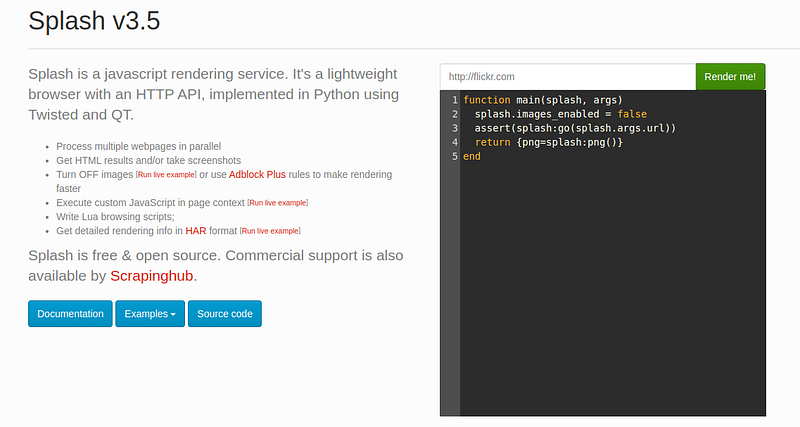
When the container is running, you can go to http://localhost:8050 to open the user interface of Splash locally, where you can see a quick introduction to Splash together with some handy Lua scripts for web scraping:
Install Python libraries
We need to use the requests library to make HTTP requests and the lxml library for scraping the rendered HTML markup using XPath or CSS selectors.
It’s always recommended to install new libraries in separate virtual environments to they won’t impact the system or other virtual environments.
We will use conda to create a virtual environment. Especially, we will install the latest Python in the virtual environment:
(base) $ conda create --name splash python=3.11
(base) $ conda activate splash
(splash) $ pip install -U "requests>=2.30,<2.31" "lxml>=4.9,<4.10"
Scrape a JavaScript webpage
In this post, we will use http://quotes.toscrape.com/js/ as an example website which is generated by JavaScript code and thus cannot be scraped directly.
Let’s first create a function that can extract data from the HTML code:
from lxml import html

def scrape_data(html_code):
    tree = html.fromstring(html_code)

    quotes = tree.xpath('//div[@class="quote"]')

    for quote in quotes:
        author = quote.xpath('./span/small[@class="author"]/text()')
        text = quote.xpath('./span[@class="text"]/text()')
        print(f"{author[0]}: {text[0]}")
Now let’s scrape the quotes page directly and see if we can get the data:
import requests

html_code = requests.get("http://quotes.toscrape.com/js/").text

scrape_data(html_code)
Nothing is scraped when the above code is run, meaning the data cannot be scrapped directly from a JavaScript-created webpage.
We will then use Splash to render the JavaScript webpage and see if the data can be scraped this time.
Let’s create a new function to get rendered HTML code by Splash to make it easier to be reused later:
import requests
from urllib.parse import quote

def get_rendered_html(url, splash_url="http://localhost:8050", wait=0.5):
    api_url = f"{splash_url}/render.html?url={quote(url)}&wait={wait}"

    response = requests.get(api_url)

    return response.text
In this function, we make a GET request to the local Splash server on the render.html endpoint, which renders a web page and returns the resulting HTML code.
Note that, the rendering process takes time and thus we normally need to specify a wait argument for Splash so that the page can be rendered completely before it’s returned. The time to wait is an arbitrary number and is normally set by trial and error. Later we will see a more robust way to wait for rendered web pages using Lua scripts where the web page is guaranteed to be rendered before it’s returned.
Let’s try to scrape the rendered web page returned by Splash:
rendered_html_code = get_rendered_html("http://quotes.toscrape.com/js/")
scrape_data(rendered_html_code)
This time the data is scraped successfully, which proves that the JavaScript webpage is rendered by Splash successfully:
Albert Einstein: “The world as we have created it is a process of our thinking. It cannot be changed without changing our thinking.”
J.K. Rowling: “It is our choices, Harry, that show what we truly are, far more than our abilities.”
Albert Einstein: “There are only two ways to live your life. One is as though nothing is a miracle. The other is as though everything is a miracle.”
....
Use Lua scripts to wait for elements more efficiently
With the code demonstrated above, we can already start to use Splash and some Python libraries to scrape simple JavaScript-created webpages. However, Splash can do much more than that. We can have fined-tuned configurations for the rendering process with some Lua scripts which can be needed on various occasions.
In the above example, we wait for 0.5 seconds before the response is returned. However, 0.5 seconds is just an arbitrary number and may not be a good choice in most other cases. If it’s too short, the web pages cannot be rendered properly and we can't get the HTML code for scraping. On the other hand, if it’s too long then it will introduce unnecessary delays in our scraping process and reduce efficiency.
We can use Lua scripts to check if a specific HTML element is available before the response is returned.
In this example, let’s check if the “Quotes to Scrape” title is available before the response is returned.
Since a Lua script will be executed now, we cannot use the render.html endpoint anymore and need to use the execute endpoint instead. To do this let’s create a new function for convenience:
import requests
from urllib.parse import quote

def get_rendered_html_by_lua(*, url, splash_url="http://localhost:8050", payload):
    api_url = f"{splash_url}/execute?url={quote(url)}"

    response = requests.post(api_url, json=payload)
    data = response.json()

    return data["html"]
A small trick here about using the star * in the function definition. It makes all arguments keyword arguments even when no default values are given. It’s needed here because I want to keep the sequence of the arguments in the specified way, but don’t want to specify a default value for the payload argument.
Another thing that should be noted here is that we should not return the HTML code by response.text directly, otherwise, the data will be JSON and cannot be scraped correctly because all the quotes will be escaped.
Then we need to create a Lua script to wait for the title to be available before the response is returned:
payload = {
    "lua_source": """
    function main(splash, args)
        assert(splash:go(args.url))

        while not splash:select('div.header-box > div > h1') do
            splash:wait(0.1)
            print('waiting...')
        end

        return {html=splash:html()}
    end
    """
}
The Lua code is quite straightforward and self-explanatory. If you need to learn or refresh the basic syntax of Lua scripting, this post can be helpful.
Note that splash:select() uses CSS selectors, rather than XPath Selectors.
Let’s now use the new function and the Lua script to scrape the quotes webpage again:
rendered_html_code = get_rendered_html_by_lua(url="http://quotes.toscrape.com/js/", payload=payload)
scrape_data(rendered_html_code)
This time we also successfully scrape the data. And more importantly, it’s scraped much faster than the example above. We actually don’t need to wait for 0.5 seconds before the rendered response is returned.
Use Lua scripts to click on some elements
In web scraping, oftentimes we need to click on some element to display some specific content. This can be realized with Lua scripts in Splash.
Let’s click on the “Next” button to scrape the contents of the next page:
payload = {
    "lua_source": """
    function main(splash, args)
        assert(splash:go(args.url))

        while not splash:select('div.header-box > div > h1') do
            splash:wait(0.1)
            print('waiting...')
        end

        local next_button = splash:select('li.next > a')

        if next_button then
            next_button:mouse_click()
        else
            return {error='Next button not found'}
        end

        splash:wait(0.5)

        return {html=splash:html()}
    end
    """
}
Some issues that should be noted here:
- We need to wait for some time before and after the button is clicked. Before the button is clicked, we can wait until the title is rendered. However, after the next button is clicked, we cannot use the same waiting logic again because the title will always be shown when the next button is clicked. It’s the content part that’s updated. In this case, we need to wait for some “magical” number of seconds which can be fine-tuned by trial and error.
- It’s better to check the existence of the button or link before it’s clicked to avoid potential errors.
The quotes on the next page are scraped when we run the following commands:
rendered_html_code = get_rendered_html_by_lua(url="http://quotes.toscrape.com/js/", payload=payload)
scrape_data(rendered_html_code)
Marilyn Monroe: “This life is what you make it. No matter what, you're going to mess up sometimes, it's a universal truth. But the good part is you get to decide how you're going to mess it up. Girls will be your friends - they'll act like it anyway. But just remember, some come, some go. The ones that stay with you through everything - they're your true best friends. Don't let go of them. Also remember, sisters make the best friends in the world. As for lovers, well, they'll come and go too. And baby, I hate to say it, most of them - actually pretty much all of them are going to break your heart, but you can't give up because if you give up, you'll never find your soulmate. You'll never find that half who makes you whole and that goes for everything. Just because you fail once, doesn't mean you're gonna fail at everything. Keep trying, hold on, and always, always, always believe in yourself, because if you don't, then who will, sweetie? So keep your head high, keep your chin up, and most importantly, keep smiling, because life's a beautiful thing and there's so much to smile about.” J.K. Rowling: “It takes a great deal of bravery to stand up to our enemies, but just as much to stand up to our friends.” Albert Einstein: “If you can't explain it to a six year old, you don't understand it yourself.” ......
Use Lua scripts to turn off images and Ads for faster rendering
In practical web scraping, there can be many images and Ads on the web pages to be scraped, which can slow down the rendering process dramatically. Most of the time, we are not interested in the images and Ads and just want to extract plain text data from the html code. Splash has the feature to do this.
Disabling images is simple, we just need to add the following code in the Lua script, before the splash:go() function:
splash.images_enabled = falseDisabling Ads is a bit more advanced. We first need to download a list of rules for blocking the Ads. Adblock Plus is a popular option and is easy to set up.
First head to this page and download the EasyList which is the primary list of ad-blocking filters that the majority of ad blockers use.
Then we need to stop the existing Splash container and restart it with the EasyList rules bound as a volume:
docker run -p 8050:8050 \
    -v ./easylist.txt:/etc/splash/filters/easylist.txt \
    scrapinghub/splash
Or use Docker Compose:
version: '3.8'

services:
  splash:
    image: scrapinghub/splash:3.5
    ports:
      - target: 8050
        published: 8050
    volumes:
      - type: bind
        source: ./easylist.txt
        target: /etc/splash/filters/easylist.txt
    restart: always
Note that we don’t need to specify --filters-path on the command line because it’s added in the ENTRYPOINT of the Splash Docker image already.
It’s recommended to use the pyre2 library if a large number of rules are used, otherwise, the rendering can be very slow. So let’s install pyre2 in our virtual environment as well:
(splash) pip install -U "pyre2>=0.3,<0.4"On Ubuntu, you would need to run this command to install some dependencies for pyre2.
sudo apt-get install build-essential cmake ninja-build python3-dev cython3 pybind11-dev libre2-dev
The dependencies for macOS and Windows can also be found in this link.
Finally, we can add the filters in our Lua script:
payload = {
    "lua_source": """
    function main(splash, args)
        -- Disable images.
        splash.images_enabled = false
        -- Disable ads.
        args['filters'] = 'easylist'

        assert(splash:go(args.url))

        -- Change to what you should wait for in your own case.
        while not splash:select('div.header-box > div > h1') do
            splash:wait(0.1)
            print('waiting...')
        end

        return {html=splash:html()}
    end
    """
}
Note that Splash only prevents the loading of the images in its own browser for faster rendering and doesn’t actually remove the <img> tags in the returned HTML code. Therefore, if you open the returned HTML in another browser, the images will still be displayed.
We can use the same command above to scrape the target webpage:
rendered_html_code = get_rendered_html_by_lua(url="http://quotes.toscrape.com/js/", payload=payload)
scrape_data(rendered_html_code)
The above updates still work for the quotes example. You are welcome to test it with some websites which have images and Ads on them.
In this post, we have introduced the basic concepts and common use cases of Splash. You are now able to set up a Splash server locally and use it to scrape JavaScript-created webpages. Some advanced features using Lua scripts are introduced, including waiting for a specific HTML element to appear, clicking an HTML button or link, and disabling images and Ads. These features are very commonly used in practical scraping projects.
In the coming posts, we will introduce how to use proxy with Splash, how to use Splash as a microservice, and how to integrate Splash with Scrapy. You are welcome to follow me if you are interested in these topics.
Related articles:
- Simple Web Scraping Using requests, Beautiful Soup, and lxml in Python
- How to scrape JavaScript webpages using Selenium in Python
More content at PlainEnglish.io.
Sign up for our free weekly newsletter. Follow us on Twitter, LinkedIn, YouTube, and Discord.


