avatarSuraj Mishra

Free AI web copilot to create summaries, insights and extended knowledge, download it at here

2810

Abstract

="hljs-name">archive</span>></span> <span class="hljs-tag"><<span class="hljs-name">manifest</span>></span> <span class="hljs-tag"><<span class="hljs-name">mainClass</span>></span>SFTPClientWithUSRPWD<span class="hljs-tag"></<span class="hljs-name">mainClass</span>></span> <span class="hljs-comment"><!-- main class name --></span> <span class="hljs-tag"></<span class="hljs-name">manifest</span>></span> <span class="hljs-tag"></<span class="hljs-name">archive</span>></span> <span class="hljs-tag"></<span class="hljs-name">configuration</span>></span>

            <span class="hljs-tag">&lt;<span class="hljs-name">executions</span>&gt;</span>
                <span class="hljs-tag">&lt;<span class="hljs-name">execution</span>&gt;</span>
                    <span class="hljs-tag">&lt;<span class="hljs-name">id</span>&gt;</span>make-assembly<span class="hljs-tag">&lt;/<span class="hljs-name">id</span>&gt;</span>
                    <span class="hljs-tag">&lt;<span class="hljs-name">phase</span>&gt;</span>package<span class="hljs-tag">&lt;/<span class="hljs-name">phase</span>&gt;</span>
                    <span class="hljs-tag">&lt;<span class="hljs-name">goals</span>&gt;</span>
                        <span class="hljs-tag">&lt;<span class="hljs-name">goal</span>&gt;</span>single<span class="hljs-tag">&lt;/<span class="hljs-name">goal</span>&gt;</span>
                    <span class="hljs-tag">&lt;/<span class="hljs-name">goals</span>&gt;</span>
                <span class="hljs-tag">&lt;/<span class="hljs-name">execution</span>&gt;</span>
            <span class="hljs-tag">&lt;/<span class="hljs-name">executions</span>&gt;</span>
        <span class="hljs-tag">&lt;/<span class="hljs-name">plugin</span>&gt;</span>
    <span class="hljs-tag">&lt;/<span class="hljs-name">plugins</span>&gt;</span>
<span class="hljs-tag">&lt;/<span class="hljs-name">build</span>&gt;</span></pre></div><ul><li>Now if we run the maven package command it will generate a jar file with dependency in the target folder.</li></ul><div id="07d0"><pre><span class="hljs-comment">#remove previous build</span>

mvn clean

<span class="hljs-comment"># build jar file</span> mvn package </pre></div><ul><li>We can see jar file with dependencies has been created</li></ul><figure id="07d1"><img src="https://cdn-images-1.readmedium.com/v2/resize:fit:800/1*WIzGP7LfKQpKHYXlGhTVIw.png"><figcaption></figcaption></figure><ul><li>Now we can run this jar file and it will get executed and print the content of the file as shown below.</li></ul><figure id="8b31"><img src="https://cdn-images-1.readmedium.com/v2/re

Options

size:fit:800/1*14eUZ_aCRW1lzNNsg_qr4A.png"><figcaption></figcaption></figure><ul><li>Our code works perfectly fine.</li></ul><p id="c6c5"><b>Create bash file</b></p><ul><li>We will create a bash file that will execute the above jar execution command.</li><li>The below code executes the jar file and logs the execution status code to cron_logs.txt.</li><li>We can verify this by looking at the file contents if the code executed successfully or not.</li></ul><div id="7378"><pre><span class="hljs-meta">#!/bin/bash</span> java -jar /Users/surajmishra/workspace/java-aapl-schedule/target/sftp-download-jar-with-dependencies.jar <span class="hljs-built_in">echo</span> <span class="hljs-string">"executed with code $?"</span> >> /Users/surajmishra/workspace/java-aapl-schedule/schedule/cron_logs.txt</pre></div><p id="19b8"><b>Create a cron job</b></p><ul><li>Now we have built a jar file with dependency and all we have to do is to run this jar file on a defined schedule.</li><li>We can use Crontab,</li></ul><div id="5fef"><pre>crontab -e</pre></div><ul><li>this will open file in editor mode, we can type our cron expression and command that we want to execute.</li><li>In the below crontab, we are executing the bash file every 5 minutes. So every 5 minutes we will read the sftp-server file content.</li></ul><figure id="9932"><img src="https://cdn-images-1.readmedium.com/v2/resize:fit:800/1*p2pVQs07nldQA8pRrE0qDg.png"><figcaption></figcaption></figure><ul><li>After some time if we see the log file we should see the log content.</li></ul><figure id="826d"><img src="https://cdn-images-1.readmedium.com/v2/resize:fit:800/1*jpRvPBk1EcAI9zV7XGE_4A.png"><figcaption></figcaption></figure><ul><li>Status code 0 means our cron job executed successfully.</li></ul><h2 id="f544">Conclusion</h2><ul><li>In this article, we used a cron job to execute the java application on a defined schedule periodically.</li><li>In future articles, we will cover some other approaches to achieve the same result.</li></ul><h1 id="1b47">Before You Leave</h1><ul><li>Let me know if I can be of any help to your career, <a href="https://topmate.io/suraj_mishra"><b>I would love to chat or jump on a call</b></a><b>.</b></li><li>If you like this content consider becoming <a href="https://i-sammy.medium.com/membership"><b><i>medium member</i></b></a><b> </b>to support.</li><li>If you want to learn spring boot 3 and spring boot 6, please check out <a href="https://click.linksynergy.com/link?id=FAaRt1BJn8w&amp;offerid=1060092.4993276&amp;type=2&amp;murl=https%3A%2F%2Fwww.udemy.com%2Fcourse%2Fspring-boot-and-spring-framework-tutorial-for-beginners%2F"><b>[NEW] Master Spring Boot 3 & Spring Framework 6 with Java</b></a><b> [ 38 hrs content, 4.7/5 stars, 6+ students already enrolled]</b></li></ul></article></body>

How to Schedule a Java Program Using Cron Job

Using Cron to Schedule Java Application

Originally Published in https://asyncq.com/
Use Case

  • In the previous article, We have built SFTP Client that mainly read file content which is on the SFTP server.
  • In this article, We will automate it and run it every hour to get the latest content of the file on the SFTP server.

Cron Job

  • We can use Cron Job on the server to schedule the execution of the java application.
  • First, we need to package our application as a jar file.
  • We need to build the package with dependencies and for that, we need to use the below plugin and add it to the build tag.
<build>
        <finalName>sftp-download</finalName>
        <plugins>
            <plugin>
                <groupId>org.apache.maven.plugins</groupId>
                <artifactId>maven-assembly-plugin</artifactId>
                <version>3.1.1</version>

                <configuration>
                    <descriptorRefs>
                        <descriptorRef>jar-with-dependencies</descriptorRef>
                    </descriptorRefs>
                    <archive>
                        <manifest>
                            <mainClass>SFTPClientWithUSRPWD</mainClass> <!-- main class name -->
                        </manifest>
                    </archive>
                </configuration>

                <executions>
                    <execution>
                        <id>make-assembly</id>
                        <phase>package</phase>
                        <goals>
                            <goal>single</goal>
                        </goals>
                    </execution>
                </executions>
            </plugin>
        </plugins>
    </build>
  • Now if we run the maven package command it will generate a jar file with dependency in the target folder.
#remove previous build
mvn clean 

# build jar file
mvn package 
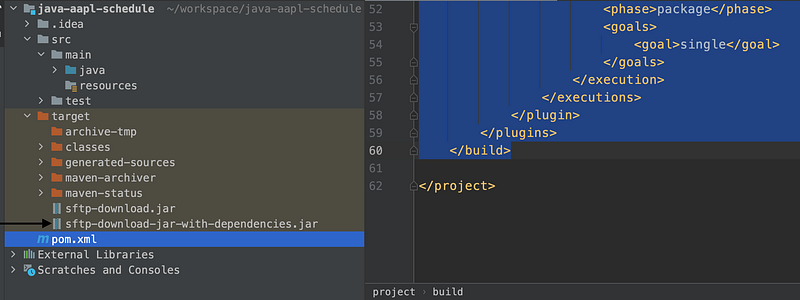
  • We can see jar file with dependencies has been created
  • Now we can run this jar file and it will get executed and print the content of the file as shown below.

  • Our code works perfectly fine.

Create bash file

  • We will create a bash file that will execute the above jar execution command.
  • The below code executes the jar file and logs the execution status code to cron_logs.txt.
  • We can verify this by looking at the file contents if the code executed successfully or not.
#!/bin/bash
java -jar /Users/surajmishra/workspace/java-aapl-schedule/target/sftp-download-jar-with-dependencies.jar
echo "executed with code $?" >> /Users/surajmishra/workspace/java-aapl-schedule/schedule/cron_logs.txt

Create a cron job

  • Now we have built a jar file with dependency and all we have to do is to run this jar file on a defined schedule.
  • We can use Crontab,
crontab -e
  • this will open file in editor mode, we can type our cron expression and command that we want to execute.
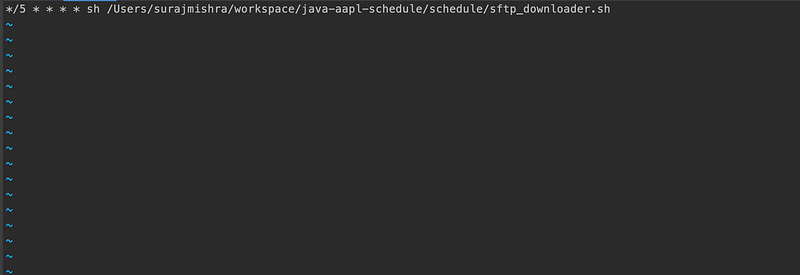
  • In the below crontab, we are executing the bash file every 5 minutes. So every 5 minutes we will read the sftp-server file content.
  • After some time if we see the log file we should see the log content.
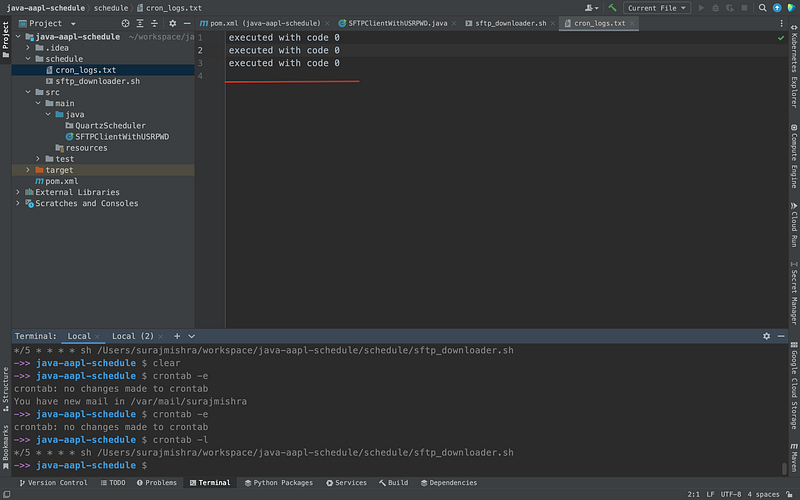
  • Status code 0 means our cron job executed successfully.

Conclusion

  • In this article, we used a cron job to execute the java application on a defined schedule periodically.
  • In future articles, we will cover some other approaches to achieve the same result.

Before You Leave

Cron
Crontab
Java Applications
Programming
Linux
Recommended from ReadMedium