avatarJerry Ng

Free AI web copilot to create summaries, insights and extended knowledge, download it at here

1274

Abstract

server using two terminals. Quite annoying don’t you think?</p><h1 id="6262">What if, we could run both the server, concurrently?</h1><p id="2e08">Navigate to your <code>server</code> folder, and install the Node package, “<a href="https://www.npmjs.com/package/concurrently">concurrently</a></p><div id="b9c4"><pre>cd <span class="hljs-keyword">server</span> npm install <span class="hljs-keyword">concurrently</span> <span class="hljs-comment">--save</span></pre></div><p id="5f68">Once concurrently is installed, navigate to the <code>server</code> folder, and paste the code below into the <code>package.json</code> . Please mind the comma at the very end of the curly bracket.</p><figure id="7a0b"><img src="https://cdn-images-1.readmedium.com/v2/resize:fit:800/1*1TYCpqGRJHH4xCm0H1b0xg.png"><figcaption>Add the line above to your <b>package.json</b> in your server folder</figcaption></figure><p id="02cb">Finally, at the same directory you are in now: <code>server</code>, you will now only run a <b>SINGLE</b> command line to start both your React front-end and your API backend server:</p><div id="5e3d"><pre><span class="hljs-built_in">npm</span> start</pre></div><h2 id="1eed">Read my other articles at jerrynsh.com</h2><div id="9269" class="link-block">

Options

<a href="https://python.plainenglish.io/build-a-web-app-without-css-and-javascript-c4ca5c2223f8"> <div> <div> <h2>Build a Web App Without CSS and JavaScript</h2> <div><h3>Read About Building a Web App Without Writing JavaScript or CSS with PyWebIO</h3></div> <div><p>python.plainenglish.io</p></div> </div> <div> <div style="background-image: url(https://miro.readmedium.com/v2/resize:fit:320/0*zXW0iSB1eeORDmyt)"></div> </div> </div> </a> </div><div id="88ad" class="link-block"> <a href="https://readmedium.com/3-best-free-no-code-tools-to-bootstrap-your-startup-ideas-360e6fe9ca"> <div> <div> <h2>3 Best Free No-Code Tools to Bootstrap Your Startup Ideas</h2> <div><h3>Ways to Build Applications Fast With No-Code or Low-Code Tools</h3></div> <div><p>medium.com</p></div> </div> <div> <div style="background-image: url(https://miro.readmedium.com/v2/resize:fit:320/0*i7pD66HJdbDT4r-4)"></div> </div> </div> </a> </div></article></body>

How To Run React Front-end + Express Back-end Concurrently

Read about how to run React and Express NodeJS concurrently in 3 minutes

React and Express NodeJS

Generally, in order to run your React app with your Node Express API back-end on your localhost server, you would usually need to run commands like npm start for both the front-end and the back-end.

For instance, this is what our project directory would look like:
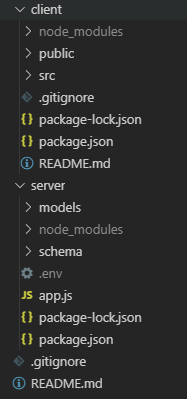
Example project directory

To start your Backend API server:

cd server
nodemon app.js

To run your React server:

cd client
npm start

So imagine in this scenario, we will have to kick start both the front-end and the back-end server using two terminals. Quite annoying don’t you think?

What if, we could run both the server, concurrently?

Navigate to your server folder, and install the Node package, “concurrently

cd server
npm install concurrently --save

Once concurrently is installed, navigate to the server folder, and paste the code below into the package.json . Please mind the comma at the very end of the curly bracket.

Add the line above to your package.json in your server folder

Finally, at the same directory you are in now: server, you will now only run a SINGLE command line to start both your React front-end and your API backend server:

npm start

Read my other articles at jerrynsh.com

Nodejs
React
Backend
Expressjs
Frontend
Recommended from ReadMedium