
How to reverse engineer Unity3D Games?

Before writing this article, I thought Unity’s games were much safer than some browser games built using JavaScript. Since games are built as binary and embedded in an apk file, which should be very challenging to reverse engineer games when compared to some games built by plaintext JavaScript codes.
However, after doing some experiments, I realized my theory is wrong and decided to write this tutorial.
With the Scripting Backend: IL2CPP to build your game, it is easy to reverse your game from apk file to source codes in C#, which gives malicious hackers the ability to see what kind of classes, methods, functions, properties, and even logic you implemented in your games.
In this tutorial, you will know how easy it is to reverse engineer a Unity-based game on Andoird.
When did this happen?
Since August 1, 2019, Google has required all games to support 64-bit architecture, the Unity developers needed to enable the Scripting Backend: IL2CPP feature when building and publishing games to the Google Play Store.
This may pose the risk that the public could easily discover game codes.
ref: https://developer.android.com/distribute/best-practices/develop/64-bit
Build Android game with ill2cpp Mode by Unity
Select ILL2CPP in Scripting Backend and build your game for Android

Reverse engineer apk file
- Download and setup apktool
- Extract apk file
- apktool d -r -s [your game].apk
- You will see decompiled folders as below

/Assets/ : contains art and sounds files,
/lib/arm64-v8a/libil2cpp.so: contains game codes
Assets/bin/data/Managed/Metadata/global-metadata.dat: contains the class name, attributes, string mapping in ill2cpp.so
Reverse DLL file
- Download
Il2CppDumper - cp global-metadata.dat and libil2cpp.so to ll2CppDumper-v6.6.2
- cp Assets/bin/data/Managed/Metadata/global-metadata.dat to ll2CppDumper-v6.6.2
- cp lib/armeabi-v7a/libil2cpp.so ll2CppDumper-v6.6.2
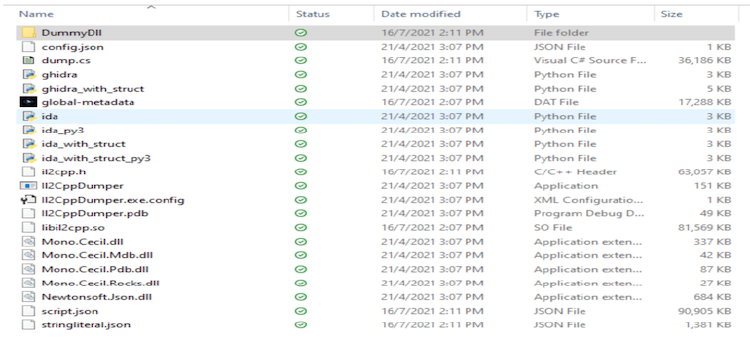
Run Il2CppDumper.exe and select global-metadata.dat and libil2cpp.so

You will see a DummyDll folder.
Download dnSpy
Use dnSpy to open the Assembly-CSharp.dll in the DummyDLL
- Assembly-CSharp.dll contains your game source codes and related libraries.
- This tool allows you to see exposed codes and classes.
Summary
In this tutorial, you have learned how easy it is to reverse engineer Android games using Unity as you are familiar with the tools.
Next, refer to how to protect your Unity Games from being hacked?
That’s all, folks. If you liked this story, please show your support by 👏 this story.
Thank you for reading!
Visit us at the website: Game Tech Tutorial


