
How To Resolve .NET MAUI Issues After The Release Of .NET 8
A new .NET version has arrived. So here is how to resolve .NET MAUI issues after the release of .NET 8.

.NET 8 has just arrived and in my opinion, it’s great. I already took a deep dive into the new C# language features. You can read my article about the changes below. But this article is about how to resolve .NET MAUI issues after the release of .NET 8.
Bud sadly, not everything ran smoothly for me with the new version.
I have a .NET MAUI project that uses a build pipeline on Azure DevOps. Since the release of .NET 8, the pipeline failed because the Android App couldn’t be built anymore.
Furthermore, a quick change of all target framework references in my .csproj files to .NET 8 caused the build to fail.
So it’s not a perfect update. You need to make your hands dirty. But I’ll show you what you need to do.
Fixing the build pipeline
My pipeline uses hosted runners. I cannot control them and have to hope that it works. Changes can happen anytime and although I didn’t spot any announcements, my Android build failed.
The error message indicates that there is an issue with a Java SDK.
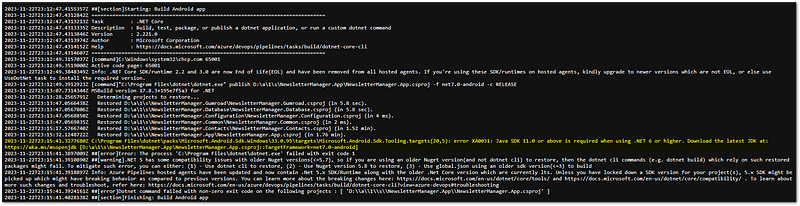
I haven’t had the problem before. In this thread, multiple people complain about the same issue which happens for Azure DevOps and GitHub Actions pipelines. The default Java version on the agent was set to 8, but since Visual Studio 17.8 (which contains a new version of MSBuild and which was released alongside .NET 8), Java 11 is required (source).
Everyone that didn’t set the default Java version to 11 or higher in their pipeline ran into this problem.
You can fix this by adding a JavaToolInstaller task in Azure DevOps or a setup-java GitHub action and setting the Java version to 11 or higher.
- task: JavaToolInstaller@0
  displayName: "Install Java Support"
  inputs:
    versionSpec: '11'
    jdkArchitectureOption: 'x64'
    jdkSourceOption: 'PreInstalled'
After that, your pipeline should be fine again.
🔔 Get a short summary of my Medium content on the 1st of every month in your inbox. Save time and pick what you like to read!

Click HERE to subscribe for free!
Fixing build errors when migrating to .NET 8
Then, let’s have a look at migrating .NET (MAUI) projects from 7 to 8. Doing that is quite simple. You only need to change the TargetFramework properties in all .csproj files that you want to migrate. As you might have guessed, the new property is net8.0.
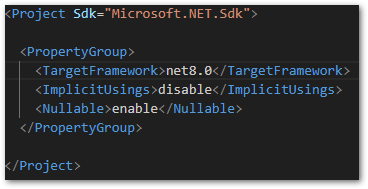
Now comes the fun part: Building the solution!
And sadly, there were some errors in my output window. Apparently, I had duplicated file names in my project and they should be unique. This was never an issue before.
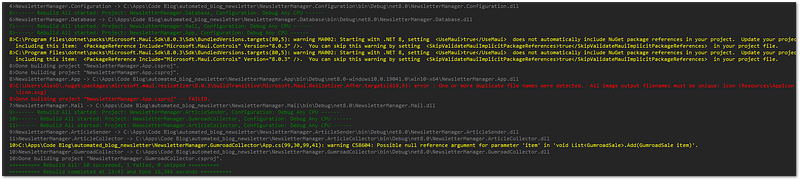
The problem and solution are also described in this GitHub thread. Open your .csproj file and check your icon references. You must not use several Include references on the same file (or on a folder and again on a file that is in that folder). The second reference must be an Update reference.
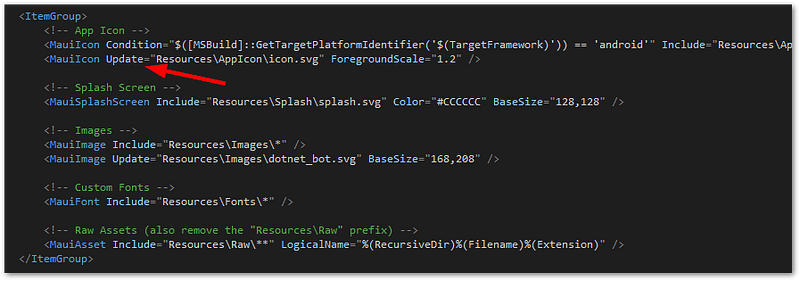
Your build error should disappear after changing the file.
Further reading
- List of breaking changes in .NET 8.
- Upgrading .NET MAUI from .NET 7 to .NET 8
- Troubleshoot known issues with .NET 8
Conclusion
In this article, I explained how to resolve .NET MAUI issues after the release of .NET 8. You saw how to fix a build pipeline of a .NET MAUI project so that it still works with .NET 7. In addition, I showed you what build errors appear after the migration and how you can fix them. Overall, the fixes didn’t take much time. So I consider this update a good one.


