
How to Repurpose Content Without Being Penalized by Google Bots
The REAL problem with duplicate content.

Congratulations! You’ve written a great article!
Your Medium readers loved it. But now the views have died down. You wonder how you can get it in front of another audience. It’s tempting to post your content on another platform.
But wait.
Doesn’t Google warn against creating duplicate content?
What is Duplicate Content?
Content that is identical to or almost identical to other content will be considered duplicate content.
Sometimes you end up duplicating content unintentionally. This can happen when you’re accommodating mobile devices, desktops, and the need to print your content.
- When you list several items in an online store and they’re linked to by multiple URLs or web addresses.
- When you’re on a site that generates regular and mobile device content pages.
- When you create printer-only versions of web pages for people who don’t want to or are unable to use a mobile device.
One thing websites can do is mark one of these versions with a noindex meta tag. The bot will ignore it.
How Does Google Penalize Duplicate Content?
Google wants to show us pages with original content. When it discovers duplicate content across multiple pages, it doesn’t want to show them all when someone searches in Google.
When Google thinks the duplicate content is an attempt to manipulate search engines, they might decide to lower both pages in the rankings and indexing process.
The ranking of the site may drop or the site might be completely removed from the Google index. That removes it from search results, which is a big problem.
How Can I Avoid This Problem?
Use a canonical link to tell Google which of the pages is your preferred URL.
What Does a Canonical Link Do?
This link tells search engines the content might be found on multiple sites, and this particular one is the main link.
Medium Says This About Duplicate Content
“When posting content to multiple platforms at the same time (such as your website and Medium), it’s important to make sure a single source of that content is the ultimate authority. Medium’s official tools for cross-posting add the source it is importing from as the canonical link automatically, but you can also add your canonical link manually to your post.
Search engines use canonical links to determine and prioritize the ultimate source of content, removing confusion when there are multiple copies of the same document in different locations.
Sites that publish an overabundance of duplicate content without indicating a canonical link may be penalized in search engine rankings.”. Source
How Do I Set Up Canonical Links on My Medium Articles?
If you are posting fresh content on Medium, the canonical link is automatically set up when you publish.
If you’ve already posted this content somewhere else you’ll want to point that out to the Google bots by creating a canonical link in your Medium article.
- Open your story and click on the three dots, then select Edit story.
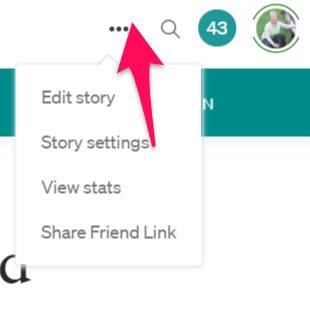
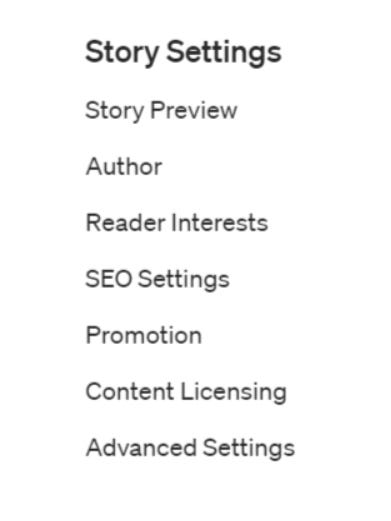
2. Select More settings. If you’ve already published your story, you will be selecting Story settings. 3. On the left side of your screen select Advanced Settings.
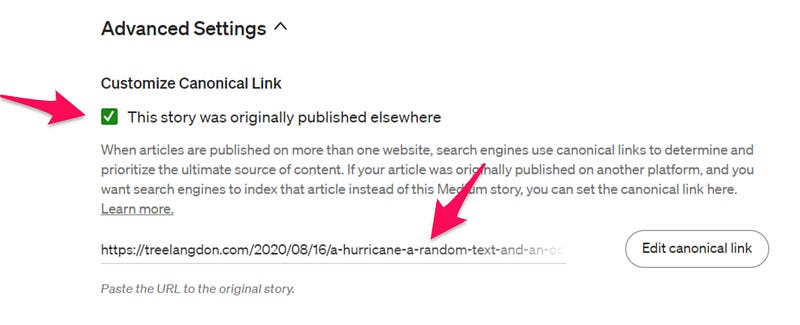
4. Click the box to indicate the story was published elsewhere.
5. Paste the URL from the website of your original article.
Publish your article. (or, if it was previously published, click Back to Editor and then Back to Story.
The really cool thing is you can do this as you go, or if you forgot, it’s possible to go back into a previously published story and set a canonical link. It might take a while for the change to be updated in the page source.
Check the Canonical Link in a Medium article.
Open the article and right-click on the page. Select view page source. Use Ctrl F and search for canonical. You should see the canonical link.
Hope this article helped you understand how to use canonical links and why they are important.