
How To Remove The Weather Icon From Your Work Computer Desktop
Well, I don’t know about anyone else but it’s taken me weeks to work out how to get rid of the Weather forecast figure at the bottom right of my work desktop!
We use Office 365 and “The Edge” browser and when you open a new page, it is “singing and dancing” with tiled information panels and weather cards and God knows what. To my disagreement, the temperature appears in the corner of a new page.
Anyhow, I don’t want to see the temperature where I am right now or anywhere else, although it seems that by having it defaulted on our computers, it is heralded as being important or a wanted item of information to many/most computer users.
But not to me ! No siree ~~ I can look out the window or feel for myself what the degrees is, plus of course I will likely (hopefully) have gadgets galore, other than a computer, to read the temperature, if my heart desires it.
So I peeked and poked at this and that Setting and managed to “personalise” some sort of Settings and TURN OFF the weather card. But, annoyingly, the round yellow icon and the temperature still appeared on the “bar” at the bottom of my computer!
I pondered whether to ask our IT Department for help, but decided to figure it out for myself. And I was sure that I would work it out, all by myself, and I did. I wondered if the icon for the weather reporting was part of my Task Bar, but no there was no option to remove it from my Task Bar.
I resorted to using Chrome but although the new Tab did not show the temperature, the Edge is the browser I have to use to support all the applications (programmes) that I use.
Cleverly I changed the location for the weather to Toronto, Canada, a place which makes me think about ice and coolness (the later being my kind of weather, whether I’m in the Northern Hemisphere or here in Australia in the Southern Hemisphere). But annoyingly, this change did not “stick.” I was puzzled as now the “programme” kindly (so it thought if it was person) showed the temperature for BOTH Toronto and Perth. Even though I tried “pinning” and removing options, the weather for my current location (cleverly, so I guess the programme thought if it could) popped up.
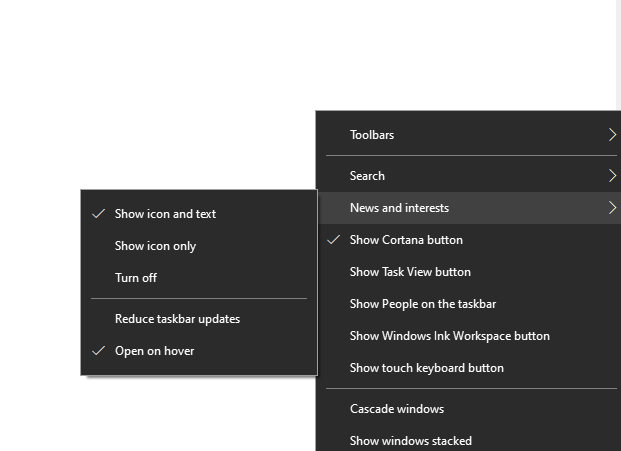
Then as if by magic or sleight of hand, I desperately right-clicked on the strip at the bottom right of my computer. I saw “News and Interests” and that rang a bell, i.e. it dawned upon me that the Weather Card thingy was part of “News and Interests”. I turned that off and to my joy the round yellow icon and the temperature disappeared!
As the only thing now was that a new Tab for a search still had the temperature at the top of it (for who knows what reason and if IT could turn that off or if I could), I cleverly bookmarked a Google search page. So now first thing in the morning when I open up “The Edge” our work intranet homepage pops up (as I configured it to be the start page). I can then right-click on the bookmarked link for GOOGLE to open up a fresh Google page for my searches.
Pheww! There are all sorts of combinations and permutations for the weather icon I have found. For example the round yellow icon is on my personal laptop, using Mozilla Firefox. You should have seen my face when I saw that! Is this Weather Card stalking me, I thought.
Good old “News and Interests” settings. On my laptop I selected or ticked “Show icons only” and now the round yellow icon appears in the bar at the bottom right, but no figure or number for the temperature. Hallelujah.
I can change it to “show icon and text” to see that it is 26 degrees Celsius outdoors as I type this. Personally if I want to see what the temperature is, I will look it up myself when I want to. I don’t want to see it on my computer, speaking for myself.


