avatarCHARLES HEARN

Free AI web copilot to create summaries, insights and extended knowledge, download it at here

399

Abstract

easy!</p><p id="e1f7">All you have to do is add this code to your Divi Theme Options CSS section:</p><p id="8862">.select_page { <b>visibility</b>: hidden; }</p><p id="82e6">Simply copy and paste that code as show below and hit save.</p><figure id="f82a"><img src="https://cdn-images-1.readmedium.com/v2/resize:fit:800/1*a3q3izM_I8pD9T5_YHB00A.png"><figcaption></figcaption></figure><p id="71ec">Ref

Options

resh your page and you’re good to go!</p><p id="6a6c">As always, I hope you’ve enjoyed this simple fix to an annoying problem.</p><p id="a068">If you have any questions or concerns please let me know by contacting me at <a href="http://www.charleshearnofficial.com">www.charleshearnofficial.com</a> or leaving a comment on the article.</p><p id="50f2">Thanks!</p><p id="217c">-C</p></article></body>

How To Remove The “Select Page” Text On Divi Mobile Menu Easy

Here is a quick an easy solution to hide the “Select Page” text that shows up on the tablet and mobile version of the Divi Hamburger Menu. It’s easy!

All you have to do is add this code to your Divi Theme Options CSS section:

.select_page { visibility: hidden; }

Simply copy and paste that code as show below and hit save.
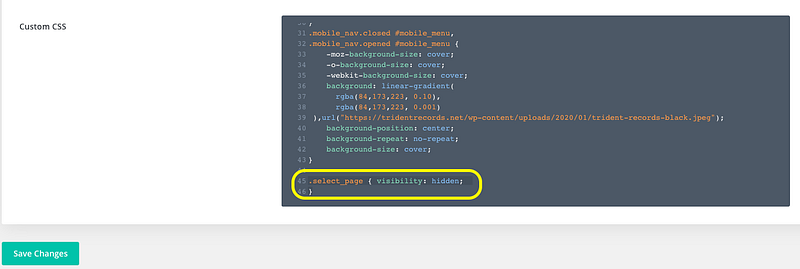
Refresh your page and you’re good to go!

As always, I hope you’ve enjoyed this simple fix to an annoying problem.

If you have any questions or concerns please let me know by contacting me at www.charleshearnofficial.com or leaving a comment on the article.

Thanks!

-C

Divination
Divi
WordPress
Wordpress Web Development
Wordpress Development
Recommended from ReadMedium