
How to Read DOCX Files With Python

Processing large amounts of data is one of the use cases Python excels in. Sometimes however we don’t have the content we need in convenient csv or XLS files, databases or other user-friendly structures: we have to work with MS Word documents, DOCX for instance. How can we read Word documents?
We can use dedicated libraries to interact with this type of files, however sometimes this is not feasible: for instance, you are trying to solve such a problem on a corporate computer, and you can’t just pip install any package you wish.
Fortunately DOCX content is stored in XML files under the hood — even though digging in a bit and understanding the structure can be a bit time consuming, once you have the logic you can easily parse documents with tools from the standard library.
Please note: I will use the ZIP, XML and BeautifulSoup modules for this demonstration, however I am not going to go into details on how they work. In case you need a refresher I am going to link documentation pages for reference.
This is a super basic 1-pager Lorem ipsum document I am going to use for the article: even though this is not even near the complexity of some of the DOCX files you might have to work with, it can give you the general idea.

zipfile module
The zipfile library was created to read and work with compressed files. Reading in our sample document is just a ZipFile object creation using the file itself as the argument.
import zipfiledoc_zip = zipfile.ZipFile(“Lorem ipsum.docx”)As a result, we got our ZipFile object (by default in read mode: mode=’r’):

This object now contains the constituting files making up for the docx document, all we need to do is read at least one of them to get the document’s content. We can list the names of all archive members in the object using the ZipFile.namelist() method:
doc_zip .namelist()
A bunch of xml files are revealed under the hood of the docx archive — discovering all these might be enticing, however now I want to focus on the actual string content of my file: that I can do by accessing the ‘word/document.xml’ file by calling the read method on my ZipFile object:
doc_xml = doc_zip.read(‘word/document.xml’)Now we have the content to parse, however we are not yet out of the woods:
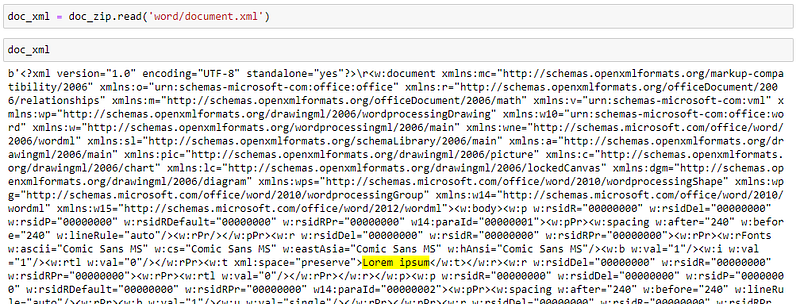
Prettify and Parse XML content
The returned xml document is far from human-friendly at this stage. We can find parts of the text we saw in the original document, but we need some tweaking to make it palatable.
Fortunately XML is perfectly structured to find the pieces we need, we just have to get the gist of the logic at hand. The BeautifulSoup library can do the necessary tidy-up so that we can find the logic behind the storage of our text:
from bs4 import BeautifulSoupsoup_xml = BeautifulSoup(doc_xml, “xml”)pretty_xml = soup_xml.prettify()This is now a (more or less) human readable hierarchical structure we can work with! Notice the complexity of the first line itself (“Lorem ipsum”): all the attributes describing exactly what should appear in front of you when opening the document:

In order to fetch desired parts of the document we need to define the XPath of these text elements — the location they are sitting in the XML file.
XPath search
Similar to HTML XPath locations, XML paths define the parent-child relationship under which you would like to access a certain data point. At this stage our prettified XML is just a string: in order to traverse it we need it to be a proper XML object. Python’s XML module can do just that for us:
import xml.etree.ElementTree as ETroot = ET.fromstring(pretty_xml)This is now a proper XML Element:

Now we can use the find and findall methods to locate specific XML node(s) using their XPath. Locating the “body” element for instance looks like this:
namespace = {'w': "http://schemas.openxmlformats.org/wordprocessingml/2006/main"}body = root.find(‘w:body’, namespace)Note the “namespace” variable/parameter in the above code. Namespaces are used to avoid confusing when mixing multiple XML documents — after all, the tag names and structure are completely up to the developer. For our purposes this has no particular significance.

Note: since there is only one “body” element, in which all other child XML elements of the document are stored, using the findall method is not necessary. You can use it though, you will simply get back a list of Elements with length 1:

Looking at the prettified XML we notice that all text blocs in the document are stored in “w:t” tags — if your goal is to get all text stored in the document, we just have to loop through these tags and get the text:
namespace = {‘w’: “http://schemas.openxmlformats.org/wordprocessingml/2006/main"}text_elements = root.findall(‘.//w:t’, namespace)for t_element in text_elements:
print(t_element.text)Here we are, the text from our docx file is ready to go. The text extracted can be now manipulated further any way you want.
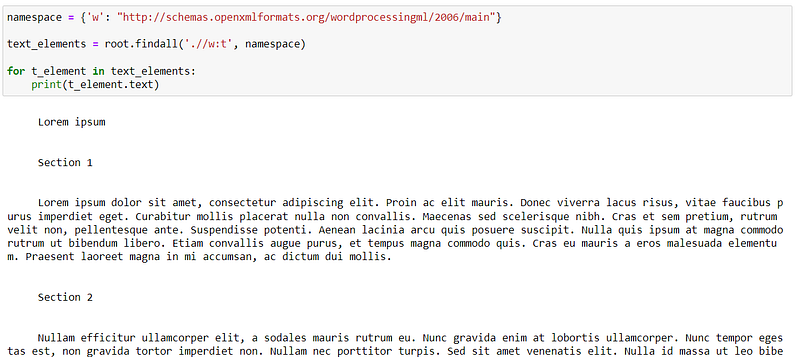
The “.//w:t” XPath defined is searching for all “w:t” elements, no matter where they are sitting in the element tree.
If you would like to keep me caffeinated for creating more content like this please consider supporting me, with just a coffee.

Assume you would like to do something more sophisticated beside grabbing all text in a document, for instance reading only specific headers, names of chapters and so on. Since this sample document is rather simple there is not much difference in the location of the elements in the tree nor in their attributes — however the title (“Lorem ipsum”) is not written in the default font, instead in Comic Sans MS. This XML document stores the font data in a “w:rFonts” node in attribute “w:ascii” (not only in that actually, but that is the first):

If I want to grab only the text elements written with this font I can do that: just need to write a bit longer XPath expression:
xpath = './/w:rFonts[@w:ascii="Comic Sans MS"]/../..//w:t'comic_sans_elements = root.findall(xpath, namespace)for element in comic_sans_elements:
print(element.text)
The XPath reads like this:
- find all “w:rFonts” nodes anywhere in the root where the “w:ascii” attributes equals to “Comic Sans MS”
- Step up two levels on the element tree
- Get all “w:t” nodes anywhere within the element located in step 2
Note that for these search criteria you need to know the structure of the document rather well so that you can make sure you get all elements you need.
Thank you for reading this post. Even though I have touched multiple libraries in order to reach our goal, this was not intended to be a ZIP, XML, or BeautifulSoup tutorial, this is why I was so generous with the assumptions that you knew these modules — if this is not the case please visit the linked documentation pages.
More content at PlainEnglish.io. Sign up for our free weekly newsletter. Follow us on Twitter, LinkedIn, YouTube, and Discord.


