How to query all Ethereum Transactions to a Database
Millions of transactions and events are carried out on the Ethereum network daily.
Querying these data is conventionally done by running a node; By running a node, a user can connect and interact with the Ethereum blockchain network.
Users will need to Install an Ethereum client on their computers, such as Geth or Nethermind, to run a full node. After the node has fully synced, use the client to query transactions on the Ethereum network. Write a script or program to extract the data from the Ethereum client and insert it into the database. Then finally, indexing & maintaining the database.
However, this process requires a lot of technical knowledge, process & huge infrastructure cost. Developers also have the problem of alignment of analytics and sorting processes of the derived data for easy access.
But Bitquery solves the above problem by providing easy-to-use unified GraphQL APIs, that allow users to access multiple indexed blockchain data.
Bitquery Queries Blockchain data in Simple, Easy Steps.
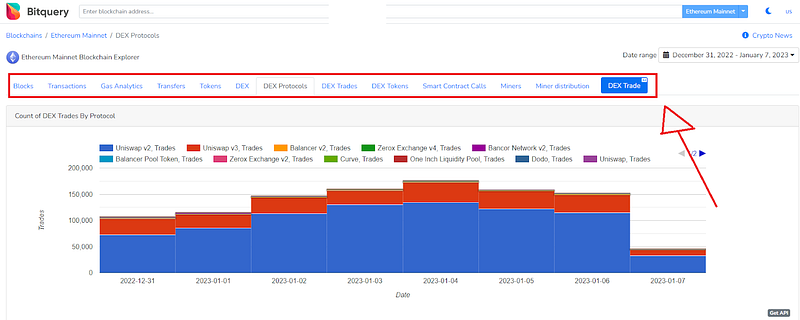
As mentioned earlier, running a node to extract and query Ethereum transactional data has a huge infrastructure cost. Unlike the conventional approach to querying Ethereum, Bitquiery interphase offers an approach that does the heavy lifting associated without the need to run your own node.
Bitquery solves this problem by providing unified GraphQL APIs to access blockchain data for Ethereum & over 30 blockchains. With the Bitquery GraphQL APIs, we can query all Ethereum transactions to data.
Bitquery interface is designed to be intuitive and user-friendly and you only need to learn GraphQL.This makes it easy for users to get up and running with Bitquery quickly, even if they have no previous experience with blockchain or data analysis.
One of the key features of Bitquery is its ability to perform complex queries on blockchain data. This includes the ability to filter, perform calculations, and aggregate data from multiple sources. This enables users to extract and analyze specific data sets in order to gain insights and make informed decisions. In addition to its querying capabilities, Bitquery also includes a range of visualization tools that allow users to present their data in a clear and concise manner. These tools include charts, graphs, and maps, which can be customized to suit the user’s needs. This makes it easy to communicate the results of data analyses to a wide range of audiences, including technical and non-technical users.
How to query All Ethereum Transactions on Bitquery to a Database.
Below are the steps to querying all Ethereum transactions on Bitquery.
Step 1.
Visit explorer.bitquery.io/ethereum to access the Ethereum mainnet explorer.
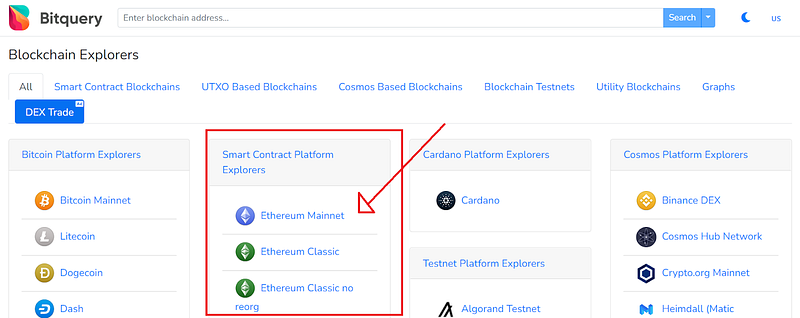
Step 2.
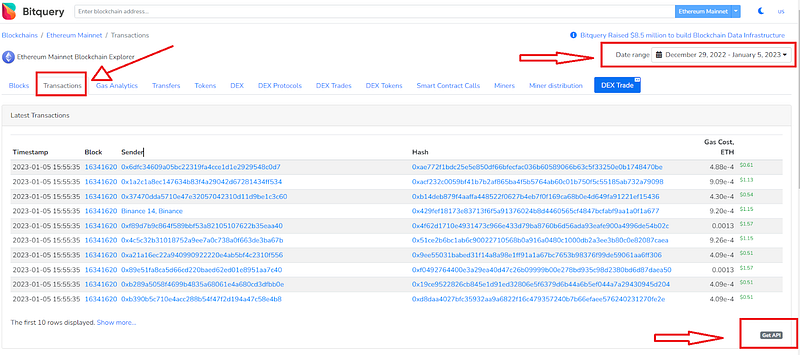
- Click on “Transaction” on the submenu.
- Choose the Time-frame for the transaction data you want to query.
- Click the “Get API” to access the script for the selected transaction timestamp on Bitquery GraphQL API.
Step 3.
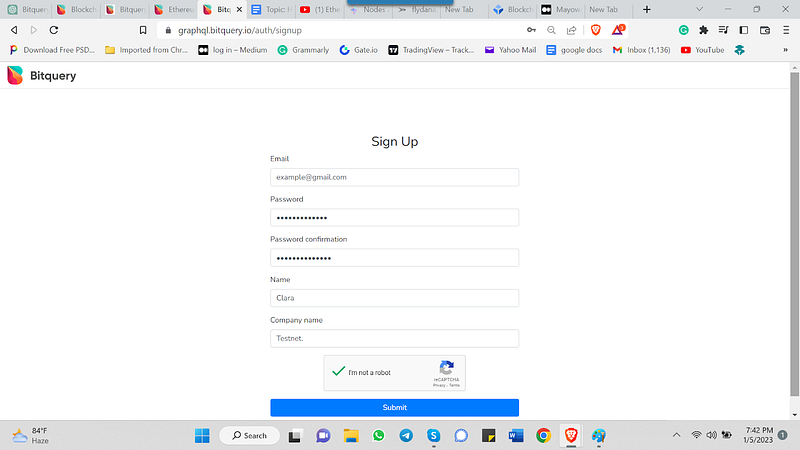
- Sign-up to register for a Bitquery account to continue on the GraphQL AP! Interface.
- Alternatively, visit graphql.bitquery.io to access the GraphQL interface if you are familiar with Bitquery GraphQL API.
Step 4.
- Modify the editor script to cover the exact transaction details you are interested in.
- Press ctrl + enter to execute the query.
P.S. you can find tips on how to modify your script on this Tutorial.
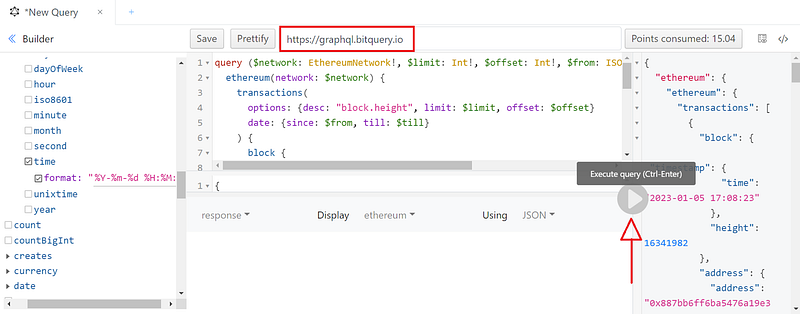
You can modify the code below and run to track Ethereum Transactions under a defined timestamp here graphql.bitquery.io.
query ($network: EthereumNetwork!, $limit: Int!, $offset: Int!, $from: ISO8601DateTime, $till: ISO8601DateTime) {
  ethereum(network: $network) {
    transactions(
      options: {desc: "block.height", limit: $limit, offset: $offset}
      date: {since: $from, till: $till}
    ) {
      block {
        timestamp {
          time(format: "%Y-%m-%d %H:%M:%S")
        }
        height
      }
      address: sender {
        address
        annotation
      }
      hash
      gasValue
      gas_value_usd: gasValue(in: USD)
    }
  }
}
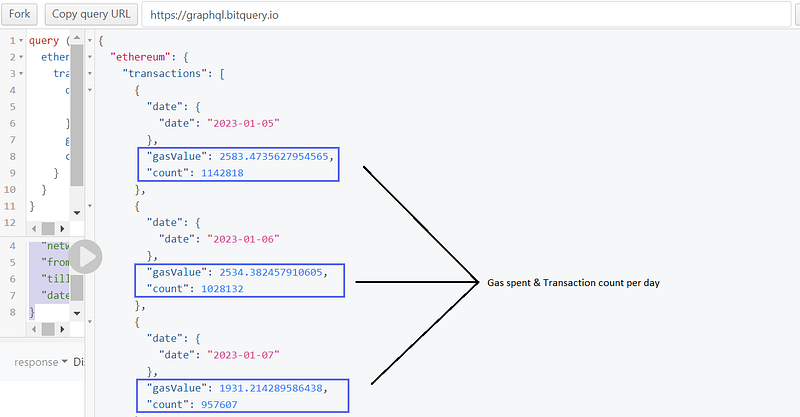
How to query Ethereum Transaction Count & gas spent per day.
To query Ethereum total daily transaction execute the following code on the Bitquery’s GraphQL interface. The unique call for the script below are “gasValue” & “count.”
query ($network: EthereumNetwork!, $dateFormat: String!, $from: ISO8601DateTime, $till: ISO8601DateTime) {
  ethereum(network: $network) {
    transactions(options: {asc: "date.date"}, date: {since: $from, till: $till}) {
      date: date {
        date(format: $dateFormat)
      }
      gasValue
      count: countBigInt
    }
  }
}
With the following conditions:
{
  "limit": 10,
  "offset": 0,
  "network": "ethereum",
  "from": "2023–01–05",
  "till": "2023–01–12T23:59:59",
  "dateFormat": "%Y-%m-%d"
}
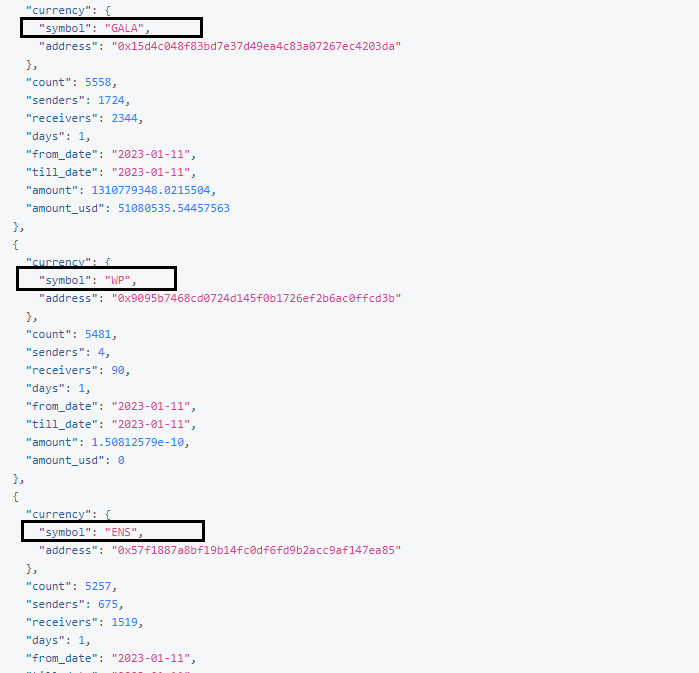
How to query ERC20 Transfers on Bitquery’s GraphQL Interface.
To execute the query of all ERC20 token transfer, modify the following codes on the graphQL interface.
query ($network: EthereumNetwork!, $limit: Int!, $offset: Int!, $from: ISO8601DateTime, $till: ISO8601DateTime) {
  ethereum(network: $network) {
    transfers(
      options: {desc: "count", limit: $limit, offset: $offset}
      amount: {gt: 0}
      date: {since: $from, till: $till}
    ) {
      currency {
        symbol
        address
      }
      count
      senders: count(uniq: senders)
      receivers: count(uniq: receivers)
      days: count(uniq: dates)
      from_date: minimum(of: date)
      till_date: maximum(of: date)
      amount
      amount_usd: amount(in: USD)
    }
  }
}
With the following conditions:
{
  "limit": 1000,
  "offset": 0,
  "network": "ethereum",
  "from": "2023–01–11",
  "till": "2023–01–11T23:59:59",
  "dateFormat": "%Y-%m-%d"
}
Result for 1000 erc20 tokens
Other Alternative Route to querying Ethereum
Alternatively, using a third-party API provider like Infura & QuickNode allows access to the Ethereum blockchain without running your own full node. This route also helps developers skip the need to go through the process of setting up and maintaining your own node. however, one of the drawbacks of these APIs is that they manage their infrastructure under few networks.
In Addition, Bitquery offers a more user-friendly APIs UX that only requires the knowledge of GraphQL to query indexed data from the blockchain.
Conclusion
Bitquery’s wide range of indexed data and easy interface has stood as it leverage among other decentralized and centralized blockchain third-party data sources. With a single endpoint, you can write a single query to get data from multiple blockchains on the GraphQL API.
If you are new or have any questions about the products offered by Bitquery, you can get started here or your questions on our Telegram channel or email us at [email protected].
New to trading? Try crypto trading bots or copy trading on best crypto exchanges


