
How to Fetch Data From an API and Save as a CSV File using Python

There are times in a project when we need to extract data from an API. The data that we get from an API is a JSON, in most cases, a nested JSON. If we need to do any further transformation or exploration of the data, we will need to convert it into a pandas data frame. Only after the data is of the type data frame, we can convert it into a CSV. So let’s see how we can convert a JSON into a data frame and then in turn into a CSV file.
The API I am using is around the stock market. Here is the URL for the documentation: https://www.alphavantage.co/documentation/
It is super easy to get your free API key. You can even use the API even without the API key as an example.
Install libraries
import pandas as pd
import requests
import json
import csv
Send a request to the API
We now need to send a request to the API. The requests library is used for that. This library allows you to send HTTP requests easily.
In this code snippet, I am using TIME_SERIES_DAILY function from the API, for IBM. The API key is ‘demo’.
response = requests.get(f'https://www.alphavantage.co/query?function=TIME_SERIES_DAILY&symbol=IBM&apikey=demo')Get a response from the API
We need to check where we can send a request to the API successfully. For that, we need to check the status code. If it’s 200 — we are good!
print(response.status_code)
The response is 200, which means the request has succeeded.
Get the data in DataFrame
Since we can send a request to the API, we now need to get data from it.
data = response.text
The response.text initializes the entire data coming out from the API to the data variable as a string type.
But we need data in JSON, and consequently in a data frame. To have it changed to a JSON type, we need to use a function.
Load the data in JSON
json_data = json.loads(data)
This loads the string-type data to JSON-type data.
Now our data is in JSON and is ready to be converted to a data frame.
Convert JSON data into a data frame
If you look at the JSON data carefully, you’ll see that the first key-value pair is just metadata, which we don’t need in a data frame. We directly need values from the ‘Time Series (Daily)’ key and need to ignore the ‘Meta Data’ key.
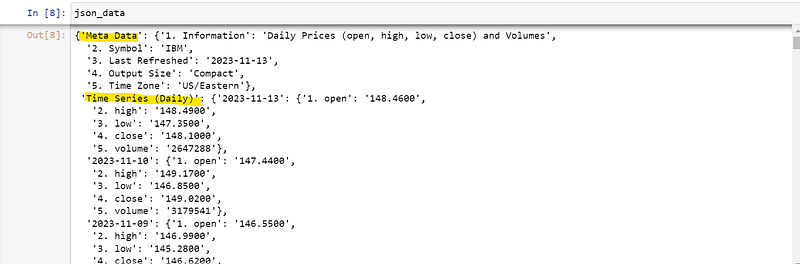
To do this we need to run a loop for all the values of the ‘Time Series (Daily)’ key. Now if you look carefully, we also have nested JSON, with the key as date and values as open, high etc.
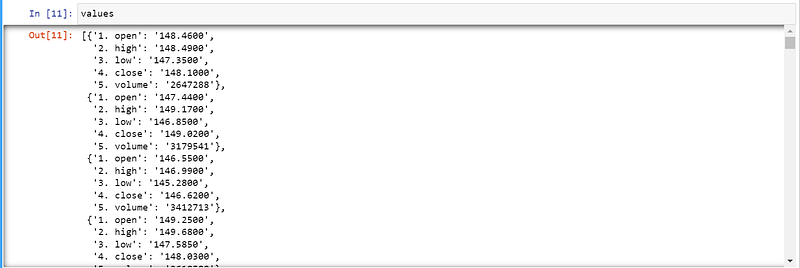
For this, we’ll create two arrays, one for values and the other for headers. In the loop, the i variable is the date, which we will append in the headers array. For values, we need to get the value of the key, i. You can print the arrays or variables and see the data — this will be even clearer.
values = []
headers = []

for i in json_data['Time Series (Daily)']:
  headers.append(i)
  values.append(json_data['Time Series (Daily)'][i])
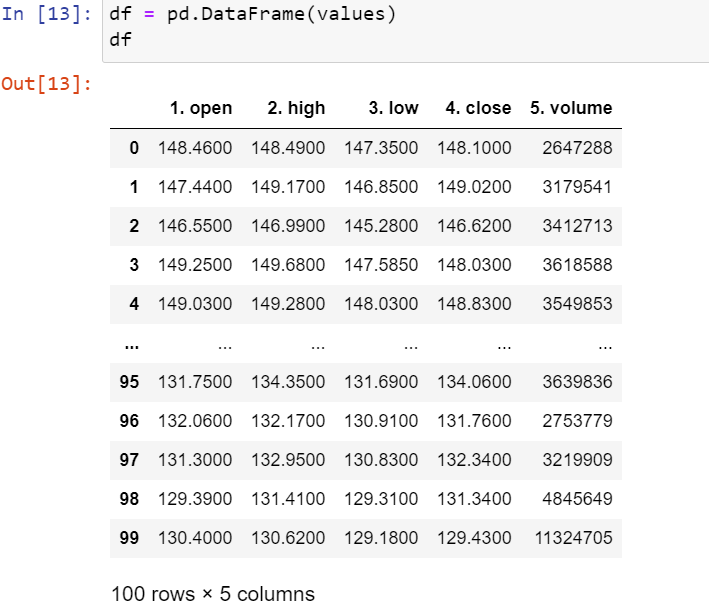
Once we have our headers and values arrays, we will create a data frame from the values array. The values array is an array of dictionaries, so when we use the DataFrame function of the pandas library, it automatically makes the key row headers and values and data frame values.
df = pd.DataFrame(values)
This will directly convert the values array into a data frame.
Voila!
Now, we also have headers array which consists of dates. In the above screenshot, as you can see, we have the row headers as an integer number. We need to change it into the dates from our headers array.
To do that, there is the function set_axis(), which sets the row headers.
df.set_axis(headers, axis=0, inplace=True)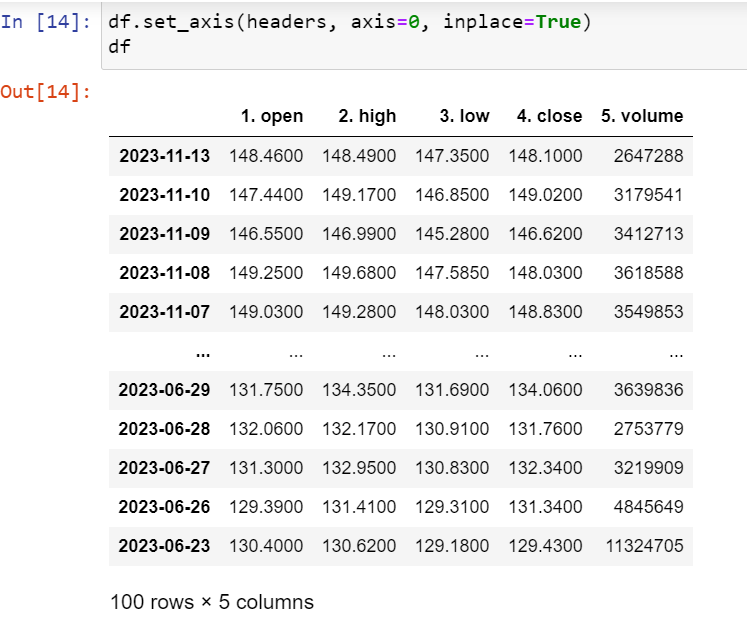
And that’s it! Now we can save this data frame as a CSV file.
Data frame to CSV
Since we were getting the stock name in the ‘Meta Data’ key, I thought of saving the file name as dynamic to the stock name.

name = json_data['Meta Data']['2. Symbol']
df.to_csv(f'stock_data_{name}.csv')
This will return the CSV file as stock_data_IBM.csv
Entire Code
I am sharing the code that will save the data into different CSV for each company mentioned in the list automatically, in a single run. You can add or remove the company symbols in the company array, as per your wish.
Note: To get data for multiple companies, you need to get your API key.
import pandas as pd
import requests
import json
import csv

company = ['AAPL', 'IBM', 'AMZN', 'MSFT', 'TSLA', 'GOOGL', 'META', 'LYFT', 'INTC', 'JBLU']


#function to get the company name
def get_name(json):
    name = json_data['Meta Data']['2. Symbol']
    return name

#function to convert data into csv
def get_csv(json, name):
    values = []
    headers = []
    for i in json_data['Time Series (Daily)']:
        headers.append(i)
        values.append(json_data['Time Series (Daily)'][i])
    df = pd.DataFrame(values)
    df.set_axis(headers, axis=0, inplace=True)
    df.to_csv(f'stock_data_{get_name(json)}.csv')


#loop for each company
for i in company:
    response = requests.get(f'https://www.alphavantage.co/query?function=TIME_SERIES_DAILY&symbol={i}&apikey=<your_api_key>')
    print(response.status_code)
    data = response.text
    json_data = json.loads(data)
    get_csv(json_data, get_name(json_data))
There you have it! Multiple files, each with a separate name!
Contact me at [email protected] or https://www.linkedin.com/in/diksha-madan/
Thanks!


