
How to Pull an Image from AWS ECR in Minikube
My previous experience told me pulling image from Private Container Registry such as AWS ECR(Elastic Container Registry) in Kubernetes Cluster is not a tricky setup. However, when I was making the Kubernetes Course, I tried to pull image from AWS ECR in Minikube using the known method but it failed.
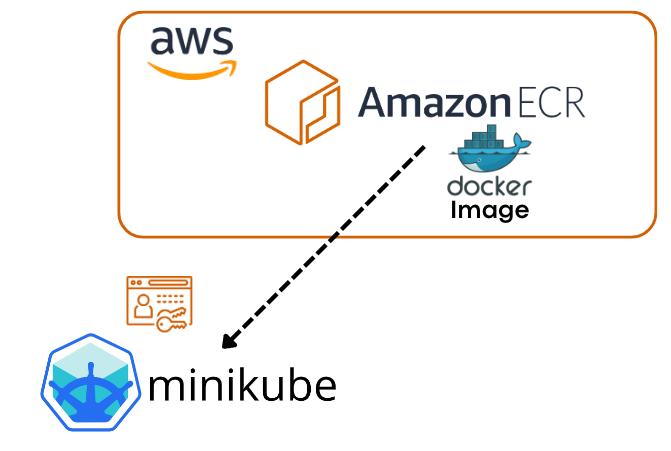
I did some research and I found out why. This article can also be used for your reference as pulling image from any private container registries.
The Context
I am running Minikube for my local k8s cluster. I would like to create a pod via the image I built and pushed to my private repository.
Sounds like a simple task, right?
General Method
I just need to create two components: A Pod and A Secret for AWS ECR Credentials
Here comes the Yaml files
- The Pod
#react-pod.yaml
apiVersion: v1
kind: Pod
metadata:
  name: react-app-1
spec:
  containers:
    - name: react-app-1
      image: <account-id>.dkr.ecr.ap-southeast-2.amazonaws.com/react-app-1:latest
      ports:
        - containerPort: 80
  imagePullSecrets:
- name: awsecr-cred-secret- The Secret
#secrets.yaml
apiVersion: v1
kind: Secret
metadata:
  name: awsecr-cred-secret
type: kubernetes.io/dockerconfigjson
data:
  .dockerconfigjson: |
     "<base64 encoded ~/.docker/config.json>"
The kubernetes.io/dockerconfigjson is a Kubernetes secret type that is used to store and manage authentication information for accessing private container registry.
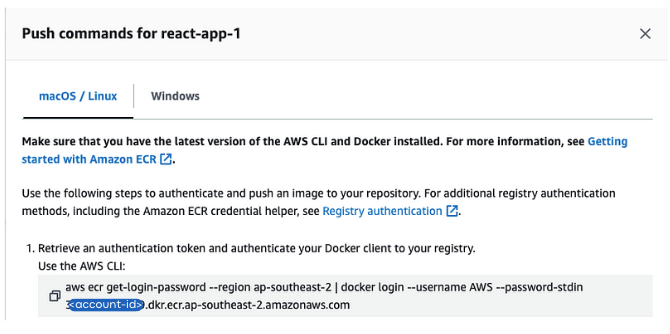
You can easily get the docker login command line from your repository as above. Once you successfully log in, a config.json file will be created in ~/.docker/. Then you can just run below command to get the data string for dockerconfigjson.
cat ~/.docker/config.json | base64Still Failed in Pulling Image
If you follow this method to get the data string and create the secret with it, you will face a problem of pulling image error.
Let’s have a look at below to find out why.
harry@MyLaptop kubernetes-application % cat ~/.docker/config.json
{
        "auths": {
                "<account-id>.dkr.ecr.ap-southeast-2.amazonaws.com": {},
                "ghcr.io": {},
                "https://index.docker.io/v1/": {}
        },
        "credsStore": "desktop"
}
When I cat the config.json file, you can see the credsStore is desktop.
Reason
Minikube is running in a separate environment and does not automatically inherit Docker’s configuration, including the credential store settings, so when I encoded the config file and used it for Minikube, Minikube still cannot be properly authorised.
How to fix
The method I use might not be the best but it did help me solve the problem. And with this method, I believe you can understand the root cause and find out your better solution
- Get ECR Login password on your local machine, not Minikube.
aws ecr get-login-password --region ap-southeast-2
2. SSH to Minikube and run docker login with the password you get from step 1.
minikube ssh
docker login --username AWS -p <password-from-last-step> <account-id>.dkr.ecr.ap-southeast-2.amazonaws.com
3. Encode the config.json file. -w0 means the no line-wrapping. Exit Minikube ssh.
cat ~/.docker/config.json | base64 -w0
exit
4. Paste the output data string to the Yaml file for secret in your local machine.
apiVersion: v1
kind: Secret
metadata:
  name: awsecr-cred-secret
type: kubernetes.io/dockerconfigjson
data:
  .dockerconfigjson: |
     "<output-of-above-step>"
5. Create or Apply the Secret and Pod. I use kubectl. Then the pod is up.
kubectl create -f secrets.yaml
kubectl create -f react-pod.yaml
harry@MyLaptop kubernetes-application % kubectl get pods
NAME          READY   STATUS    RESTARTS   AGE
react-app-1   1/1     Running   0          2m
If this solves your problem, please give me a clap.
Thank you.
Harry@NZ
More content at PlainEnglish.io.
Sign up for our free weekly newsletter. Follow us on Twitter, LinkedIn, YouTube, and Discord.


