
How To Produce/Consume Messages With Java, Apache Camel and Kafka
A simple pub-sub message system with Java using Apache Camel and Kafka

Hello guys! Today I want to speak about producing and consuming messages with Java, Spring, Apache Camel and Kafka. Many applications today use streaming of events and message publishing systems to communicate each other. One of the last I’ve used is Apache Kafka, a distributed streaming platform which mostly makes simple publishing and subscribing to topics and getting great performance by parallelizing the consumers. This article is for anyone who want to use Kafka and maybe would do a simple basic usage exploiting the abstraction provided by another framework : Apache Camel.
Apache Camel is an enterprise integration framework (I like to call it the integration swiss knife) which is comprehensive of hundreds of ready-to-use components for the integration with libraries, frameworks and techniques known in the enterprise industry and in the open-source world.
Goal
In my last project, I’ve used Apache Camel to give the project the flexibility we needed with the routes and, while doing this, I’ve also used the abstraction that Camel offers to deal with Kafka topics. Our goal was to share a way for our microservices projects to produce and consume messages from every Kafka topic without worrying the nature of the message and using an abstraction model which encapsulates all the possible messages we could exchange.
The model — MessageWrapper
First of all we have started defining a single model with the goal of abstracting each message we would exchange. With this in mind, we have defined the following class :
In the MessageWrapper model, we have the following fields :
- timestamp : stores when the message was published to the Kafka topic
- callerModule : contains info about who was the publisher of the message (if needed)
- messageType : custom field to define the type of messages in terms of Java classes we would like to exchange with Kafka topics
- payload : a string with JSON representation, encapsulating the real message exchanged
And then we have the MessageType enum, defined as follows :
Through this enumeration, we are saying that we can exchange two type of messages : simple strings and items (more complex objects). Just to give you an idea, Item class could be as follows :
The ProducerService
Now we need a central place to encapsulate all the messages going towards a Kafka topic within the MessageWrapper and this place is the ProducerService class. We have called “Producer” because it is only called when producing a message to Kafka and not when consuming the message. The ProducerService class is implemented as follows :
As I’ve done with the models, I’m going to explain you the part of this class. Basically, the central component is the ProducerTemplate of the Camel framework : this is a generic component making the function of publishing and sending an object (that we call also payload) to a specific endpoint; in our case, the endpoint is the one specifying the Kafka topic.
In the ProducerService class, we have two sendBody methods : the simplest (lines 47–49) sends a payload as it is directly to the Camel endpoint; instead, the other sendBody method (lines 35–40) is useful to us in order to exchange message in a standard form and does the following steps :
- takes a payload and converts it to the JSON format
- use the encapsulateMessage method to build the MessageWrapper object
- send the MessageWrapper object to the Camel endpoint relative to the Kafka topic
Therefore, with this class we can take any type of message, encapsulate inside a MessageWrapper object and publish to a Kafka topic.
Message Serialization and Deserialization
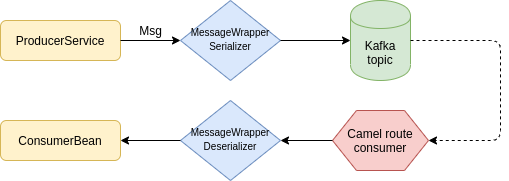
When producing and consuming a message to the Kafka topic, we have the option to specify a custom serializer, as well as a custom deserializer. We have the goal to exchange messages in an interchangeable and unique way, so this is the case to use custom components for serializing and deserializing.
Then we have implemented a serializer, the MessageWrapperSerializer class, which has the only responsibility to convert the MessageWrapper in a JSON string, through the serialize method, as follows :
And then we have implemented the respective deserializer, the MessageWrapperDeserializer class, to take the JSON which is being consumed from the Kafka topic, converting it to a MessageWrapper object and take the payload of our interest, with the deserialize method, as follows :
With all of these class, what does it remain us to do? The configurations and running the example.
Environment configurations
In order to speed up environment configuration I’ve used Docker with the following docker-compose.yml settings :
With this configurations, it is quite fast to setup the environment and get Zookeeper and Kafka working for you. Note : to startup the environment, from the terminal, enter inside the folder of the project and give the command :
docker-compose upFor all the other configurations like Maven dependencies or for the complete code of this article, I leave the link to my personal Github repository for the project : https://github.com/dariux2016/template-projects/tree/master/camel-kafka-producer
Kafka configurations
In addition to the environment, at the application level, we have to configure the parameters to correctly communicate with Kafka. Then we have created the following application.yml :
In this configuration, we’ve set some things :
- the connection to the Kafka brokers
- some Kafka Producer and Consumer properties, as the message serializer and deserializer that we have customized
- the Kafka URI base to the Topic of our interest, which here I’ve named with EXAMPLE-TOPIC
Camel configurations
What we have seen until now, it’s all oriented to producing the message (except the MessageWrapperDeserializer component). Now we see how to setup a route consuming the MessageWrapper objects from the Kafka topic in which we have published through the ProducerService.
Inside the folder src/main/resources, we can create a folder “camel” in which we can place some XML files to be loaded as Camel routes. A Camel route for consuming a message is simple to be written, as follows:
The URI is substituted when starting the route with properties configured in the application.yml. When consuming from that endpoint, it gets called the component which is a simple consumer of the messages arriving to the Kafka topic : the ConsumerBean.
A consumer bean is nothing else than a Spring component class, as follows :
Tests
After all the implementations, I’ve done and shared below a simple test class by which I’ve executed the tutorial and get all the things working. With this test, I’ve published two messages to the Kafka topic :
- a string “hello world”
- an item with code “A” and name “first item”
Both get encapsulated into a MessageWrapper and get published to Kafka. After the Camel routes starts consuming, by the configuration it launches the MessageWrapperDeserializer, which takes the payload and puts it inside the body part of the Camel Exchange. Doing this, the ConsumerBean will simply take the body and consume it.
Well, I’ve finished. I hope you find this story interesting and if you have any questions or proposal about it, please leave me a comment.


