
How to Play a Gainer…Use Some Python, an API and the Cloud
Create a historical database of the top gaining stocks of the day with the Financial Modeling Prep API and AWS S3, Lambda, and Eventbridge. Strategically make trades based on trends and analysis with the Alpaca API.

Introduction
Each day there are a group of stocks that are deemed the “top gainers”. Many of the popular trading apps have a section on the frontend that displays these stocks to their users. Many days, one may see several stocks that have risen or decreased 50 or 60%. It only takes a few clicks to start riding the wave and see if you can “play the gainer” correctly, but by doing so you are exposing yourself to a lot of risk. However, wouldn’t it be nice to have more historical data around these types of movements in the market? Maybe you could practice riding the wave a few times, build out some logic, and see what happens before you just click a button on a screen.
This article will walk through the steps on how to build a historical database of top movers and how to capture this data each day, multiple times a day by leveraging AWS and a few specific services, S3 and Lambda.
Technology and services used:
- An AWS account
- An API Key from Financial Modeling Prep
- An API and Account with Alpaca
- Python
Step 1: Set Up the Lambda Function
There are many ways to go about this step. Overall, the requirements for the Lambda are that it needs the ability to import pandas and datetime and and so this will require either adding a layer to the lambda or building the lambda using a container image. If you are new to AWS Lambda, check out this great article by Nikki Siapno— Everything You Need to Know About AWS Lambda | by Nikki Siapno | The Startup | Medium.
A few other things to note while setting up the Lambda. The Lambda IAM role will need permission to S3, seeing that is where we will be storing our data and the size and time may need to be increased.
If you are interested in building your Lambda using a container image, check out this article. — How to Build an AWS Lambda for Data Science | by McKlayne Marshall | Towards Data Science
Step Two: Start a Free Account with Financial Modeling Prep
We will be pulling our top gaining stock data from the Financial Modeling Prep API. See docs here — Free Stock API and Financial Statements API — FMP API (financialmodelingprep.com)
They have a lot of really great data and their free tier allows for 250 unique API calls in a day. Which is plenty for what we will be building.
Step Three: Write the Lambda Function
The lambda function is pretty simple. We begin by establishing our S3 path from AWS. Afterwhich, we call the Financial Modeling Prep API URL and add the new API key to the end after apikey= within the URL. The URL object is then called to create a Pandas DataFrame. We then calculate the percentage because the API provides the percentage in text form with a % sign. For further analysis we will want the percentage to be a float. Lastly, we add a date and time to our database.
The final try catch portion of the function is to either open the csv file that is in the cloud from previous times we have run the Lambda and append the new dataset or to create the initial CSV for the first 30 data points.
Step Four: Trigger the Lambda with the Help of EventBridge
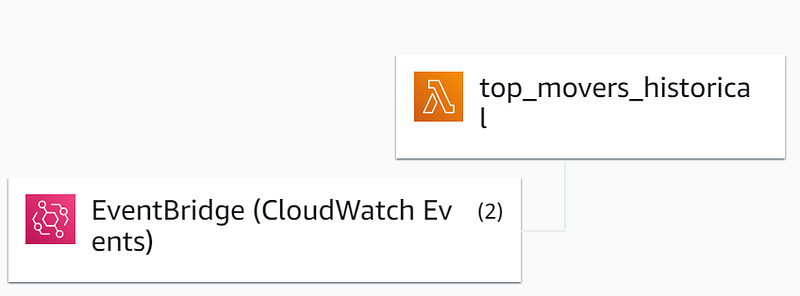
By leveraging EventBridge rules, we are able to trigger the Lambda at the frequency we desire. For example, lets say that we wanted to add the top gainers an hour into the market and an hour before the market closes. This would be done by using the CRON job option and calculating the UTC equivalent for each of those times. You would build two different rules and tag the lambda with those two rules.
Step Five: Make Some Trades
Hopefully, this historical dataset will allow you to find some interesting trends, backtest some unique strategies, and make some trades manually or algorithmically. This last section is more a way to apply the data that we are now able to pull each day. For this last step we will be using the Alpaca API to trigger a market buy order and trailing stop sell on the top 10 movers of the day. By placing a trailing stop sell order a few seconds after buying, we are able to participate in a very volatile portion of the market but decrease the risk and our exposure to large losses. Be mindful, as well, with the day trading regulation with accounts under 25k. This strategy could lead to buying and selling multiple stocks in the same day.
A few additional thoughts to improve this strategy. By leveraging the historical database you could monitor when a new stock has hit the top mover list for the first time in a while or ever, based on the amount of historical data you have. This would imply that it may have more growth over the next few weeks. Another thought would be to trigger the lambda more than twice a day and see if there is any pattern of a stock hitting the list at the beginning of the day and moving towards the top throughout the day. Obviously, this will vary because each company is different and there are a variety of reasons why the market is bullish on a specific day for a company.
Conclusion
Each day there are thousands of data points that can be captured, analyzed, and acted upon. This is just one example of the many within the stock market. It is exciting and tempting to jump on the wave as a stock makes the top gaining list; nevertheless, I would rather have the data to back up a trading strategy and have the ability to automatically place certain types of orders after jumping onto the crazy train. I hope this article leads you to building something you are proud of and learning something new. As always, happy building!


