avatarZineb Bouhafs

Summary

The article provides instructions on how to add a "kicker," or a category/tag, above the title in a Medium article using the Medium editor.

Abstract

The author of the article shares their discovery on how to include a kicker, which is a short sentence or word functioning as a category or tag, at the top of a Medium article title. The process involves typing the kicker above the title, highlighting it, and then formatting it as a subtitle using the Medium editor's text style options. The article includes visual aids to demonstrate the steps: first, typing and highlighting the main title and selecting the large "T" format, then repeating the process for the subtitle with the small "T" format, and finally, applying the subtitle format to the kicker text above the title. The author hopes the guide will be helpful to others who may have struggled to find this information and encourages readers to become Medium members, offering their referral link for membership sign-up.

Opinions

  • The author admits to being new to Medium editing and spent a significant amount of time figuring out how to add a kicker.
  • They find the process of adding a kicker to be a useful feature for categorizing Medium articles.
  • The author is enthusiastic about sharing the newly learned technique with others.
  • They suggest that becoming a Medium member is beneficial for unrestricted reading, including access to their articles.
  • The author is transparent about receiving a small commission for new memberships using their referral link.

MEDIUM EDITOR

How to Place a Category or Tag at the Top of Your Medium Title Article

Add What we Call a Kicker to Your Medium Article

Image Edited by the author

Because I am new to medium editing, there are some effects that I was unsure how to do at first. But there is one thing that I spent an entire day trying to figure out how to do hahaha.

It is how to add a category or tag called a kicker to your article in the medium editor. It is a short sentence or word that can be placed above your title.

Now that I’ve discovered how to do it, I’d like to share it with you in case some of you are looking for the same information:)

So, when we insert a title, we simply type it, then highlight it and select the big T, as shown below:

Then, when we want to add a subtitle, we repeat the process, but this time we select the small Tfor the subtitle:

And now, to add the kicker (category/tag) on top of our title, simply write your kicker on top of the title, highlight it, and then select it as a subtitle, as shown in the image below:
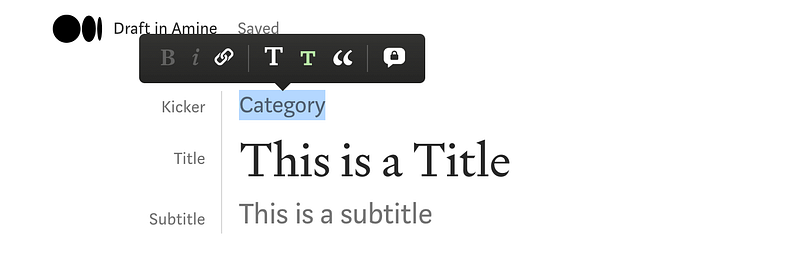
That’s it; you now have a nice-looking article with the category at the top.

I hope that was helpful because I was looking for it as well hahaha.

If you aren’t already a Medium member, I recommend you sign up right away so you can read thousands of articles, including mine, without restriction.

You can use my referral link, and I’ll receive a small commission from your membership :)

Medium
Medium Editor
Kicker
Tag
Category
Recommended from ReadMedium