
How to Perform Feature Selection with Scikit-Learn
How to select important features for your machine learning model

If you are not subscribed as a Medium Member, please consider subscribing through my referral.
Feature selection is choosing the most relevant features to the underlying problems. In predictive machine learning, we choose features suitable to improve the model prediction capability.
There are many methods to perform feature selection, including statistical analysis, such as the Chi-Square method, or a more advance one, such as model feature importance. Having good domain knowledge is also the best way to do feature selection.
In Scikit-Learn, we can use various functions to perform feature selection. What are these functions? Let’s get into it.
1. VarianceTreshold
The simplest feature selection method uses a certain baseline as a rule. In the Scikit-Learn, there is a function called VarianceTreshold to select features based on the variance threshold.
The VarianceTreshold aim for selecting features based on the feature's homogeneity. When certain features were below the variance threshold, they would be removed. By default, The VarianceTresholdwould also remove features with 0 variance or all the features with only one value.
Statistically, variance measures how our data spread based on the data mean. The variance score indicates how far spread the data is between the mean and each other. The higher the score, the wider the data is spread.
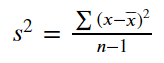
Let’s try the VarianceTreshold function with a dataset example. First, let’s create a simple dataset that we would use.
import pandas as pd
import numpy as np

X = pd.DataFrame(
    [[0, 2, 0, 3],
     [0, 1, 4, 3],
     [0, 1, 1, 3]],
columns = 'a b c d'.split())
X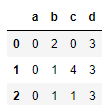
Let’s measure each column's Variance before we perform any feature selection.
for i in X.columns:
    print(f'column {i} Variance: {np.var(X[i])}')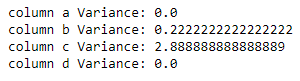
We can see the column a and d have variance 0 because all the values within their columns are the same. In contrast, columns c have the biggest variance as the data is more spread there. Now, let’s use the VarianceTreshold function to perform feature selection.
from sklearn.feature_selection import VarianceThreshold
var_th = VarianceThreshold()

pd.DataFrame(var_th.fit_transform(X), columns = var_th.get_feature_names_out())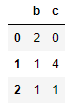
The result is the removal of features with 0 variance, which is the column a and d. By default, the VarianceTreshold function only remove the feature with 0 variances. Let’s see if we change the variance threshold.
var_th = VarianceThreshold(1)

pd.DataFrame(var_th.fit_transform(X), columns = var_th.get_feature_names_out())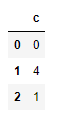
Only one feature is left, as the other features did not pass the threshold.
The VarianceTreshold function would calculate the variance as it is, so it’s a good idea to standardize the features before using this feature selection function.
2. Univariate Feature Selection
Univariate Feature Selection refers to choosing features based on the univariate statistical test. This selection method would use a scoring score and p-values between the independent and dependent variables.
The scoring function could be anything if it has a score output to rank the features. For example, we can use Chi-Square statistic or Pearson Correlation; if applicable, we can also develop our function.
In the Scikit-Learn, there are a few ways for feature selection based on the Univariate Feature Selection. Let’s try them one by one.
First, we would prepare our dataset. In this example, I would use the tips data from the Seaborn. Then we would prepare the dataset for classification machine learning modelling.
import seaborn as sns
tips = sns.load_dataset('tips')

#OHE for categorical values
tips = pd.get_dummies(tips, columns = ['sex', 'smoker', 'day', 'time'], drop_first = True

#For example, we want to predict for Female values
X = tips.drop('sex_Female', axis =1)
y = tips['sex_Female']
With all the datasets ready, we would try to apply Scikit-Learn Univariate Feature Selection.
a. SelectKBest
The first function we would learn is SelectKBest from Scikit-Learn. In this function, we would select the top K features from the statistical analysis; for example, the highest correlation or statistic.
Let’s try the function with a dataset example. In this sample, we would try to find the top 2 features based on the Chi-Square score.
from sklearn.feature_selection import SelectKBest, chi2
selector =SelectKBest(chi2, k= 2).fit(X, y)
We can access the scoring result after the function is finished fitting the data.
res_score = pd.DataFrame([ selector.feature_names_in_, selector.scores_, selector.pvalues_]).T
res_score.columns = ['Features', 'Score', 'P-Value']
res_score.sort_values('Score', ascending = False).reset_index(drop =True)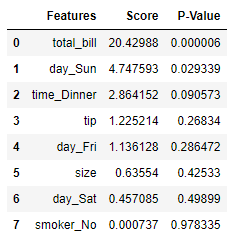
We can see that the feature total_bill and day_Sun is the top two features. Those two features also have a P-value less than 0.05, which means the features are significant.
If we use our SelectKBest function above, below is the result of the feature selection.
pd.DataFrame(selector.transform(X), columns = selector.get_feature_names_out())
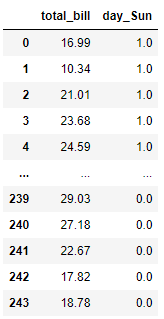
We can tweak the K parameter if we want to change the number of features to keep.
2. SelectPercentile
Similar to the above, SelectPercentile function also chooses a certain number of features. However, the SelectPercentile function uses the percentile of the top scores instead an absolute number.
Let’s try using the SelectPercentile function with the similar dataset above.
from sklearn.feature_selection import SelectPercentile, chi2

#Select top 30% of the features
selector =SelectPercentile(chi2, percentile = 30).fit(X, y)

res_score = pd.DataFrame([ selector.feature_names_in_, selector.scores_, selector.pvalues_]).T
res_score.columns = ['Features', 'Score', 'P-Value']
res_score.sort_values('Score', ascending = False).reset_index(drop =True)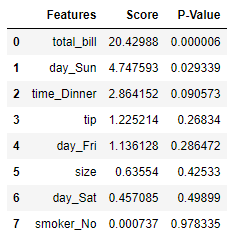
The score result is the same as the SelectKBest because the scoring function is not changing at all. Let’s see how the feature selection works.
pd.DataFrame(selector.transform(X), columns = selector.get_feature_names_out())
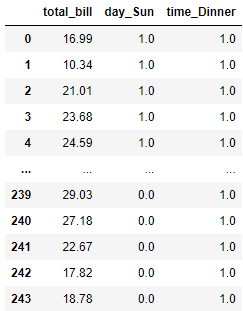
The result is similar to the SelectKBest but with additional features as we select the top 30% of the features.
3. SelectFpr
The SelectFpr is a feature selection based on the False Positive Rate test. The method would use the P-value to select the features — which select the features below the intended alpha value.
from sklearn.feature_selection import SelectFpr
selector =SelectFpr(chi2, alpha = 0.05).fit(X, y)

pd.DataFrame(selector.transform(X), columns = selector.get_feature_names_out())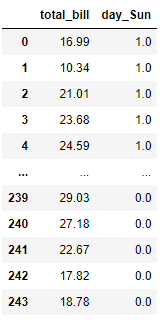
We set the selection based on the alpha level of 0.05, where the feature selected only the one below the intended level. There are also variations based on False Discovery Rate and Family Wise Error you should check out.
3. Recursive Feature Elimination
Recursive Feature Elimination (RFE) is a wrapper method feature selection class to select features by repetitively training the model into the dataset and pruning the less significant features until it reaches a certain number of features.
How to define which feature is better or not was defined by the estimator way to assign weight to the features; for example, the coefficient for a linear model or impurity loss in the decision tree.
Let’s try to use RFE for our feature selection method. In this example, we would try to use RFE to secure the top three most significant features based on the Decision Tree.
from sklearn.feature_selection import RFE
from sklearn.tree import DecisionTreeClassifier

dt = DecisionTreeClassifier()

rfe = RFE(estimator=dt, n_features_to_select=3, step=1)
rfe.fit(X, y)
In the above function, we set the number of features we want the n_features_to_select while the step parameter control how many features are pruned in each iteration.
After fitting the data, let’s see the overall ranking of our feature selection.
res = pd.DataFrame([ rfe.feature_names_in_, rfe.ranking_]).T
res.columns = ['Features', 'Ranking']
res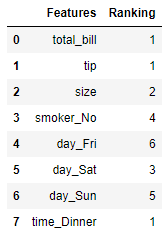
We can see from the above result that the selected features have the ranking one, and we can see which features were pruned (and the order). The selected features are different from our previous sample when we use the Univariate Feature Selection Method as the method are different.
We can get the features from the RFE feature selection with the following code.
pd.DataFrame(rfe.transform(X), columns = rfe.get_feature_names_out())
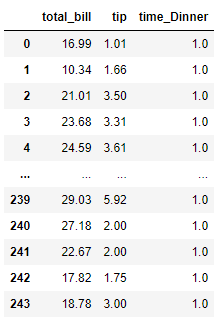
There is also an RFE variation that utilizes cross-validation to improve the feature selection method called RFECV. Like the RFE above, we can perform the RFECV feature selection method with the following code.
from sklearn.feature_selection import RFECV
from sklearn.tree import DecisionTreeClassifier

dt = DecisionTreeClassifier()

rfecv = RFECV(estimator=dt, min_features_to_select=3, step=2, cv = 5)
rfecv.fit(X, y)
The cross-validation is set to five by default, but we can always change it in the cv parameter. I also increase the step parameter to see how the result differs. Additionally, the min_features_to_select control of how many minimum features should exist.
res = pd.DataFrame([ rfecv.feature_names_in_, rfecv.ranking_]).T
res.columns = ['Features', 'Ranking']
res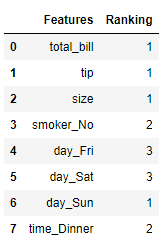
There is a difference in the RFECV feature selection result compared to the previous example. You can change the parameter to see how it fits your data pipeline.
4. SelectFromModel
The SelectFromModel is a feature selection method that relies on the estimator or machine learning model. This transformer assigns importance to the features based on the model importance attribute (such as coefficient or feature importance).
What’s different from the RFE is the SelectFromModel function selecting the features based on the threshold rather than constant feature elimination. The threshold could be the mean, median, or anything applicable to the model.
Let’s use the dataset example to perform feature selection with SelectFromModel.
from sklearn.feature_selection import SelectFromModel
from sklearn.tree import DecisionTreeClassifier

dt = DecisionTreeClassifier()

sfm = SelectFromModel(estimator=dt)
sfm.fit(X, y)
By default, the tree-based model uses the mean as a threshold. Let’s see the overall feature importance from the estimator and the chosen threshold.
res = pd.DataFrame([ sfm.feature_names_in_,sfm.estimator_.feature_importances_]).T
res.columns = ['Features', 'Feature Importances']
res.sort_values('Feature Importances', ascending = False).reset_index(drop = True)

print('SelectFromModel threshold Based on Feature Importances Mean: ',sfm.threshold_)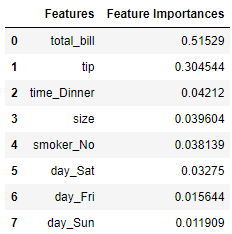

The two top features have the biggest contribution and make the mean skewed. Based on the selection above, only two features that pass the threshold: total_bill and tip which is shown in the transformer below.
pd.DataFrame(sfm.transform(X), columns = sfm.get_feature_names_out())
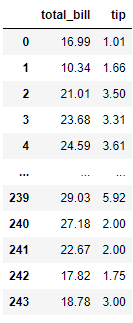
Only two features are retained based on our estimator above. The result will certainly change if we change the threshold to other metrics. For example, I change the threshold to Median.
sfm = SelectFromModel(estimator=dt, threshold = 'median')
sfm.fit(X, y)

pd.DataFrame(sfm.transform(X), columns = sfm.get_feature_names_out())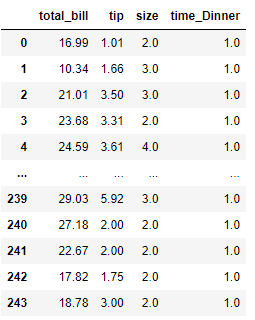
The result has four features instead of two because the threshold is changed to the median. Try to tweak the parameter to see if the change provides a better model.
5. SequentialFeatureSelector
The SequentialFeatureSelector or SFS is a greedy procedure for selecting features. We can select features forwardly or backward based on the scoring function or metrics.
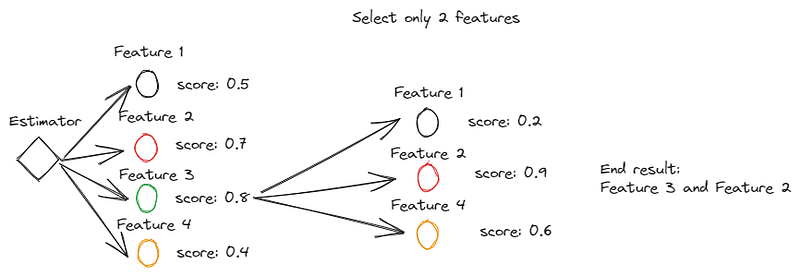
Forward selection is a greedy method for selecting features by adding features. We start from zero features, and the function would iteratively try out the features to find the best feature that maximizes the CV score when trained on the single feature. The next step is adding more features to the selected features and seeing which ones contribute the most.
Here is an example image of how the Forward Selection works.
In contrast, the Backward Feature selection might be similar to the RFE as it uses the whole features and pruning them according to the scoring. Although, SFS can be more versatile as it can use any metrics or scoring function.
Let’s try the SFS method with our dataset example.
from sklearn.feature_selection import SequentialFeatureSelector
from sklearn.tree import DecisionTreeClassifier

dt = DecisionTreeClassifier()

sfs = SequentialFeatureSelector(estimator=dt, scoring = 'accuracy', n_features_to_select = 'auto', cv = 5)
sfs.fit(X, y)
We use the accuracy metric and keep everything else as default ( n_features_to_select having auto as default which is half of the features number while cv default is 5).
pd.DataFrame(sfs.transform(X), columns = sfs.get_feature_names_out())
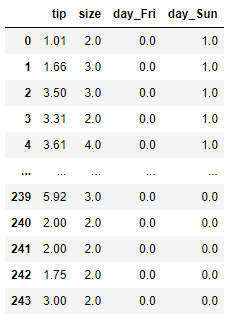
The result is four features that increase the model accuracy the most by adding features individually. Let’s see if we change the direction to the backward selection.
sfs = SequentialFeatureSelector(estimator=dt, direction = 'backward',
                                scoring = 'accuracy', n_features_to_select = 'auto', cv = 5)
sfs.fit(X, y)

pd.DataFrame(sfs.transform(X), columns = sfs.get_feature_names_out())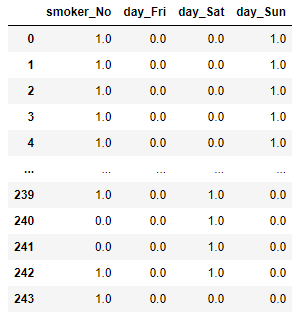
The result differs from the forward selection as we used and pruned all the features individually.
Conclusion
Feature selection is an important method in data science as we don’t want trained models with useless features. We often need domain expertise to perform feature selection, but Scikit-Learn provides a way.
With Scikit-Learn, we can perform feature selection using the following functions:
- VarianceTreshold
- Univariate Feature Selection
- Recursive Feature Elimination
- SelectFromModel
- SequentialFeatureSelector
I hope it helps!


