
Organization and Productivity
How to Organize Your Life and Get Things Done.
A productivity hack that won’t leave you like a hamster on a wheel.
Do you often feel overwhelmed with the number of things you have to do? Do you get to the end of the week feeling like you were super busy but didn’t really make any progress? Do you want to be productive AND have a life?
Then this scheduling guide for ultimate productivity is for you.

How I Came to Learn This Hack
Not too long ago I was obsessed with being “productive”, I thought if I didn’t spend every minute of every day working, then I haven’t used my time effectively and that day was a fail.
My days would look something like this: I would schedule every minute (literally every minute was accounted for) of my day for the sake of being busy so that I felt productive.
Spoiler alert: productivity is not a feeling.
Running a military operation for your schedule won’t make you any more productive either.
That girl was a bit of a ‘sad-sack’ — let’s be honest.
What I found in doing this, was that instead of being productive, I was just being busy. I had no idea how I was tracking with anything and was stressed about spending more than 5 minutes on the toilet.
After burning out, I decided to take R&R more seriously and view my goals on a more macro scale. As long as I make a little bit of progress each week, I am happy. This means I can be more flexible when things come up or I‘m having a slow day without feeling like I’ve completely lost control of my time.
The takeaways from time spent as a Hamster on a wheel:
A) You gotta give yourself some rest homie. The “grind mentality” is not for everyone (or anyone…??).
B) Have Goals and Prioritize them.
C) Aim for weekly progress targets (instead of daily)
D) Use time-blocking.
How to Organize Your Time
First up: I’m going to go ahead and assume you’ve got some goals you’re aiming for or a project you’re working on.
With that cleared up, here’s how you’re going to get on top of your schedule (and your dreams — ooooh):
I interrupt this program with a quick disclaimer: Here I am breaking it down step-by-step so it may seem like a super long process. It’s not. It takes me about 10 minutes each week.
1. Choose a Planning Day
Pick a day that you want to make your planning day (some people do Sunday evenings but it really doesn’t matter, just be consistent with this day).
2. Write Your Laundry Lists of Tasks
On your planning day get out a pen and paper or your fav online template and write out the following task lists (or update them if this is not your first time):
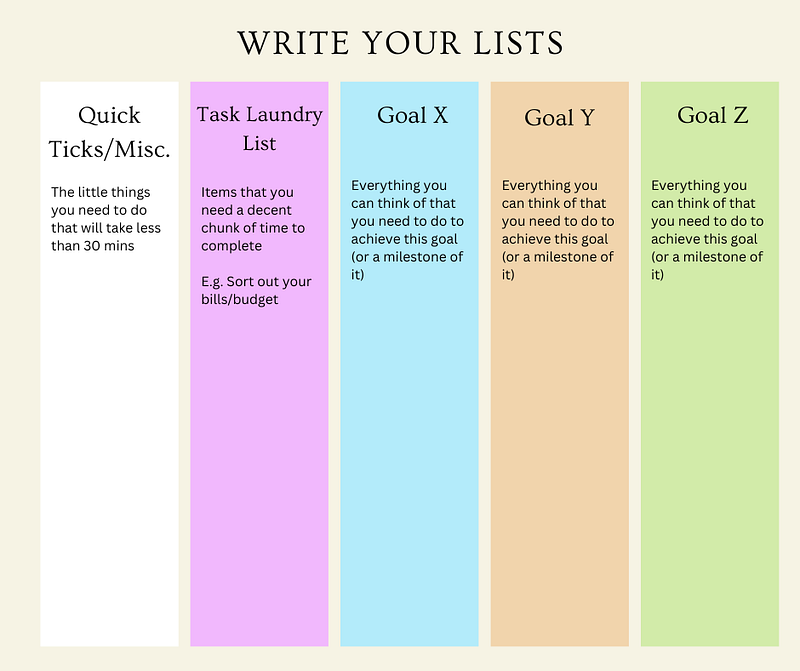
- One list for little things you need to do that will take less than 30 mins.
- One list for all the larger tasks you can think of that will take you more than 30 minutes
- One list for each of your goals that cover all the things you can think of that you need to do to achieve them.
Your lists will look something like this:
3. Prioritize Your Tasks and Drag Them Into the Week
On another piece of paper select the top priority items from each list that you want to focus on that week and group them into the following categories
- A) Quick Ticks (same as above only now you’ve prioritized specific to this week)
- B) Non-Negotiables. This is the category I put everything that I absolutely must do that week. No Ifs, Ands or Buts about it.
- C) A list of tasks that you’ve prioritized for that week for each of your projects/goals
- D) Some ideas/Inspo for how you want to rest that week. This is honestly just a cute way of reminding you not to jam-pack your schedule and allow some time to be a human.
Your page might look something like this:
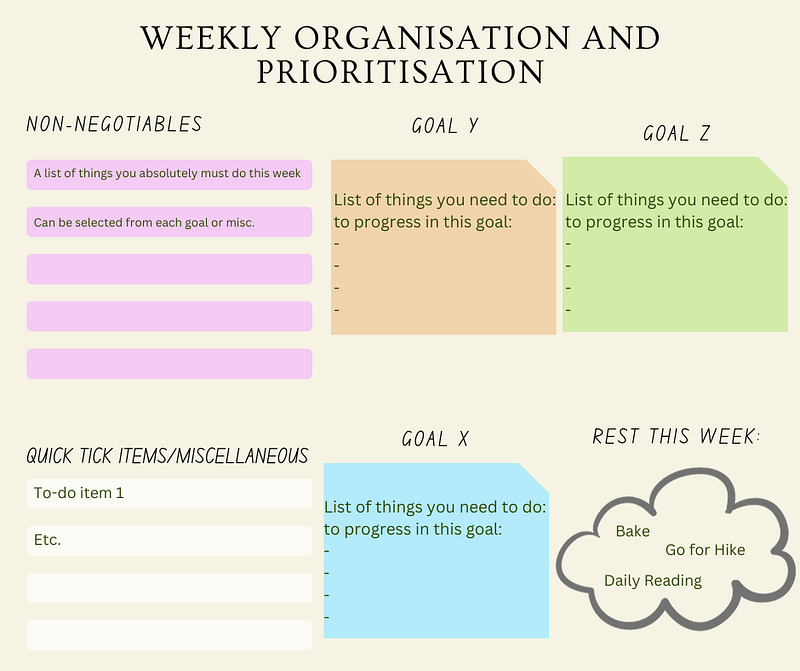
The reason I do this as a separate step as opposed to just having the one page of lists (step 2), is so that I can have a running backlog of things I have on. When I (randomly) think of something that I need to do or a new commitment pops up, I can add it to my backlog (the task laundry lists).
Then as I complete things, they get crossed off and each week (on my planning day) I can pull items from my backlog into that week s’ schedule— it just helps me keep on top of commitments and prevents things from slipping through the cracks of my mind.
Now for the last step — my personal favorite if you care
4. Time Block Your Schedule
Now that you have your groups of tasks, you know what you have to work on that week. You know what area they are contributing progress to. You know all the important things are accounted for.
Now all you need to do is allocate some time to each category.
First, I like to look at my weekly schedule and block out the time that I have prior engagements (i.e. that pesky thing they call work).
Next, I fill in the gaps with chunks of time (usually 2 hours minimum) to dedicate to a certain category of tasks. Tip: let your inner child loose with some highlighters.
Your Schedule might look something like this:
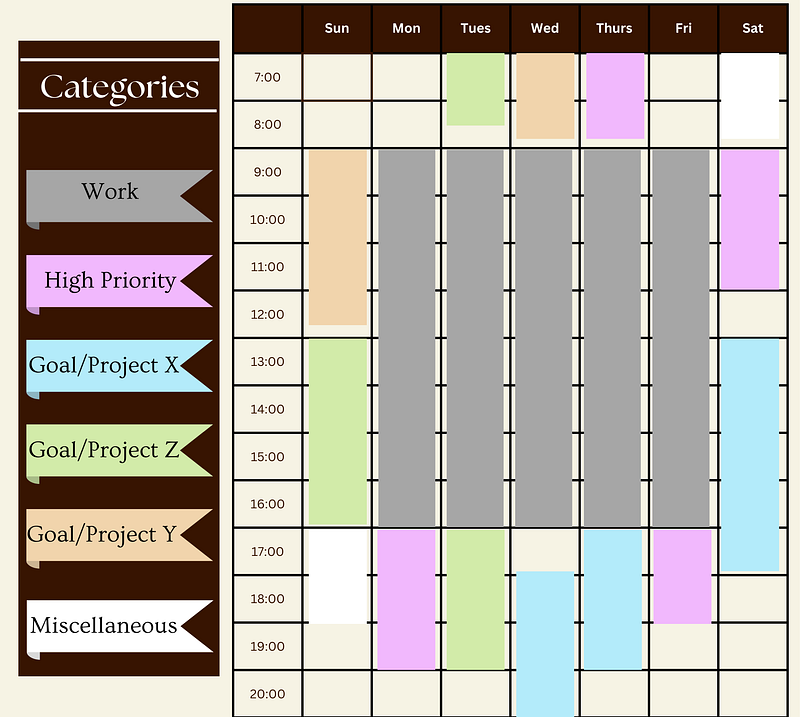
Since you have your groups of tasks (from step 3) which are hopefully color-coded the same as your schedule. You can choose items from those lists during the time blocks you’ve created in your schedule.
For example: on Sunday between 1pm — 5pm you can do whatever you want from your list of tasks for Goal Z that you selected for the week. You can also move that block of time around as you need to throughout the week.
With this method you can:
- Be flexible with how your week pans out — If you’re feeling inspired in project X after work on Tuesday then just swap that block around with another.
- Feel less overwhelmed — You are only scheduling blocks of time not nitty-gritty tasks.
- Have a good idea of what you’re going to do each day without acting as your own army general.
- Make progress!!
Note: The blank spots are there on purpose — the ‘Rest’ category is not just there to look cute.
I hope with this approach you can get on-top of your to-do lists and organize your time so that you’re set-up for success.
This productivity and scheduling hack has worked wonders for me, let me know how it works for you too!
If you have any other tips to share, leave a response and share your knowledge!
Until next time,
Luisa


