
How To Optimize Your Medium Articles for Google
And how to read the stats

If you are having trouble viewing this content here’s how to fix that.
No matter what type of writing you do and no matter where you choose to post your work online, you’re writing for search engines like Google. If SEO is not in your wheelhouse, you need to learn, adjust, and be deliberate with your methods.
This article will cover stats analysis, a discussion on outside traffic to your Medium stories, and using the SEO settings options on your stories.
When an Article Does Well, Figure Out Why
Recently, I had an article “take off” on Medium. It’s the first article I’ve posted on the platform to receive such attention. Aside from it being a reasonably inflammatory personal story, I wanted to know why this article was doing so well.
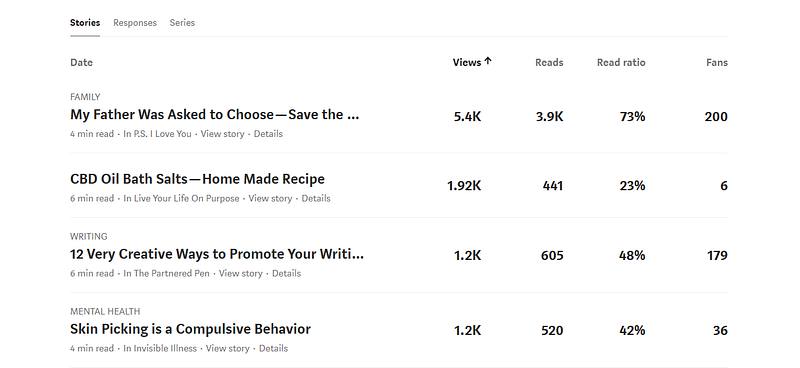
When you look at your top stories, you need to be asking yourself, “What do these stories have in common?” and, “How can I improve them?” SEO should be a part of the equation.
Let’s take a look at the stats for the first story I shared in the screenshot.
Go to your stats, click on the word “views,” and organize your stories into a list descending by numbers of views. From there, click on the most-viewed story to get to the internal stats for the story. You’ll see something like this at the bottom of the page:
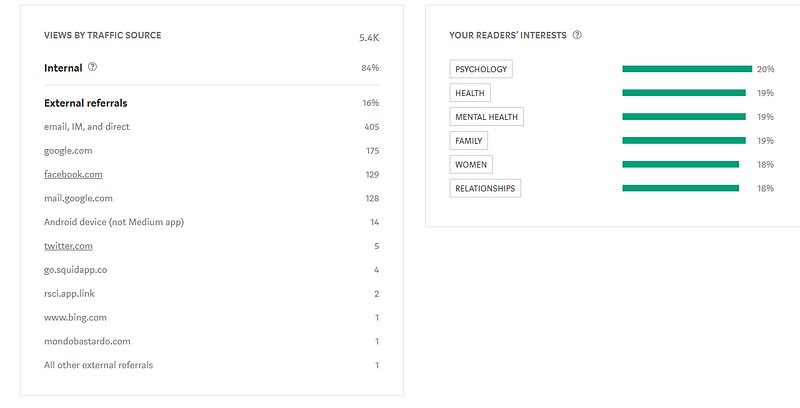
For this story, 84% of the views are from internal traffic, meaning other Medium readers are clicking on the story. It’s important to note two things: this story is from last July, and it was curated in only one topic. Yet, somehow, internal views are way up, and there are also 175 views from Google traffic, meaning that people are finding the article as they perform Google searches.
The next story had much higher Google traffic. Let’s think about why.
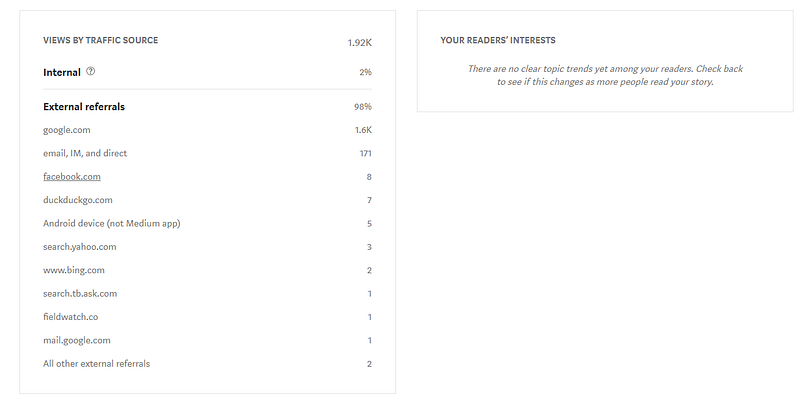
Clearly, Google users are clicking on this story, bringing 1.6k in traffic to my Medium page. I suspect this says a lot about our society — most of these clickers are thinking they’re getting a recipe for making drugs. Joke’s on them, huh? It really is a recipe for bath salts — for your bath. This accounts for the high views and low reads. (Note: This story was not curated.)
But the story also has keywords like “CBD oil” in the title and throughout the story. This increases the story’s visibility online. This is important to remember when optimizing your stories.
Let’s quickly look at the other two before I get into some SEO tips for your Medium articles
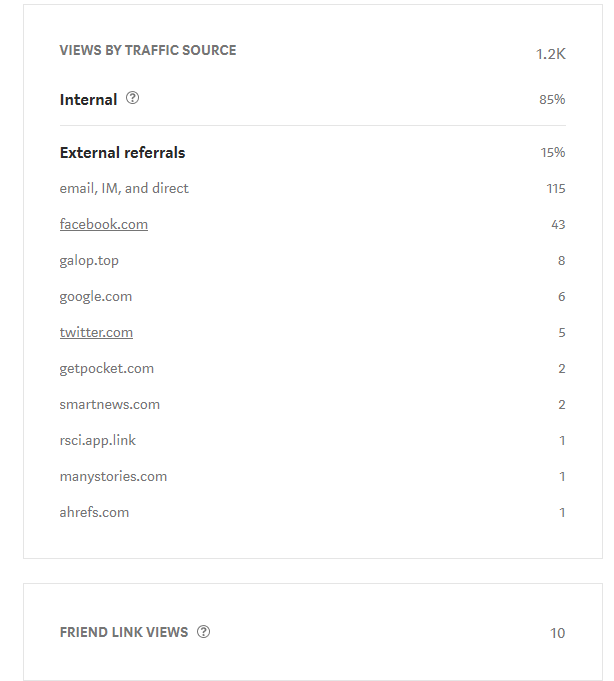
“12 Very Creative Ways to Promote Your Writing” was curated in two topics: Creativity and Writing. While the external views at 15% doesn’t seem like much, these extra views are helping to push the success forward.
Keep in mind — once your article makes a “run” through Medium followers and Medium promotion, this external traffic can continue for much longer.
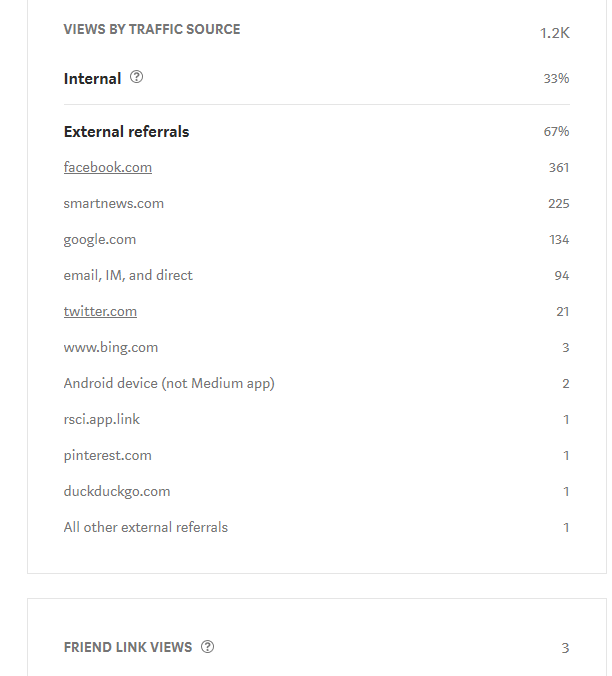
“Skin Picking is a Compulsive Behavior” is curated in Mental Health and deals with a very specific issue: Dermatillomania, or Excoriation disorder. You can see that a large portion of the attention on this article is coming from outside sources.
The topic, clearly, is of interest to search engine users who are looking for help with this issue.
Also, many views come from Smartnews, which is an app that features news stories. Smartnews picked up this article and distributed it on their app.
How Can We Improve?
So what can we do with the information we find when we look into our top stories, and how can we use it to generate more interest in our work and set up future articles for success?
With the “help” that certain topics (keywords) and outside traffic offers, you need to make SEO a priority.
Distribution and Search Engine Optimization (SEO)
- Curation matters and not just for internal distribution. Often these are the articles chosen by apps like Smartnews for distribution.
- Adjust the SEO description on your article before publishing.
- Use keywords in your SEO description that will trigger the article to appear in “searchable” topics on search engines. Think — if I wanted to find this article, what would I type into Google to bring it up and others like it?
- Get the link for your article on as many sites as possible.
- Optimize your article’s title with one to two keywords. Repeat these keywords throughout your article.
“Link to your article across your social media, networking, and institutional sites The more in-bound links to your article, the more search engines like Google will value and highlight your content
Encourage colleagues to link to your article The more links from respected individuals/trusted sites the more powerful the effect. Don’t forget to do the same for them!” — Search Engine Optimization (SEO) for your article
Medium Has an SEO Settings Option That You Need to Be Using
I discovered this hidden gem while doing a thorough analysis of my top story, My Father Was Asked to Choose — Save the Mother or the Baby. As I mentioned, the topic is personal, ethically inflammatory, and doing well with Medium readers. The Google views are up a bit, but I wanted to improve them.
Here’s how to do that
Go to your article (or do this in one you’re writing), click the gear in the top right corner, and then select “edit story.”
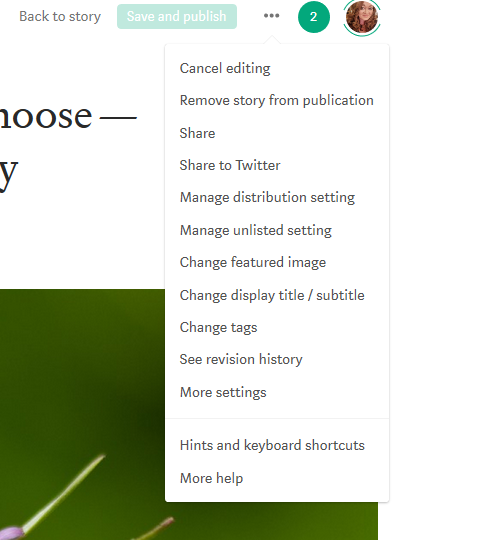
From there, click the three dots to open the drop-down menu.
Scroll down to “More settings” and choose that option.
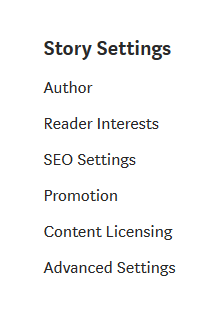
This will take you to a new page with more settings options.
From here, click on SEO settings and scroll down to this section:
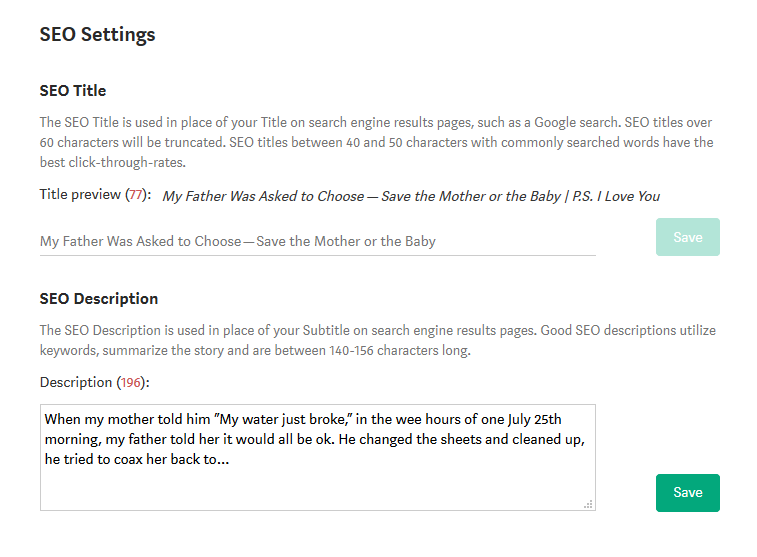
The screenshot shows this section prior to any editing on my part. As you can see, the SEO description automatically selects a portion of your text, typically the first few lines of your story, and uses it in place of your tagline to feed the search engine algorithms.
(Collective *gasp*)
Are you thinking of all the stories with a great “lead-in” but no real “meat” for search engines in the first few lines? What about poetry or fiction? Do you really want a few lines plucked out for this very important purpose?
You need to edit this section before you publish. You need to include some keywords here for the search engines and give a very brief synopsis of the piece and what it has to offer.
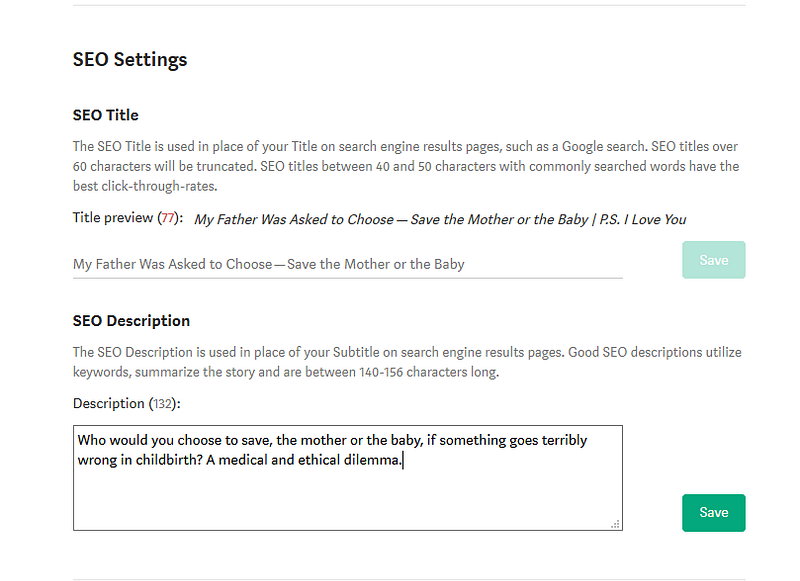
I made a few changes to this article’s SEO description (don’t forget to click “save”) and will be watching the Google views to see if it’s working.
I invite you to use this tool and learn a bit more about SEO and keywords so that you give your work the views it deserves.
The more you know, right?


