
How to optimize Firebase Realtime Database calls to improve performance?
A simple solution for optimizing Firebase Realtime Database calls using data denormalization.
When it comes to displaying a list of products from a Firebase Realtime Database node that looks like this:
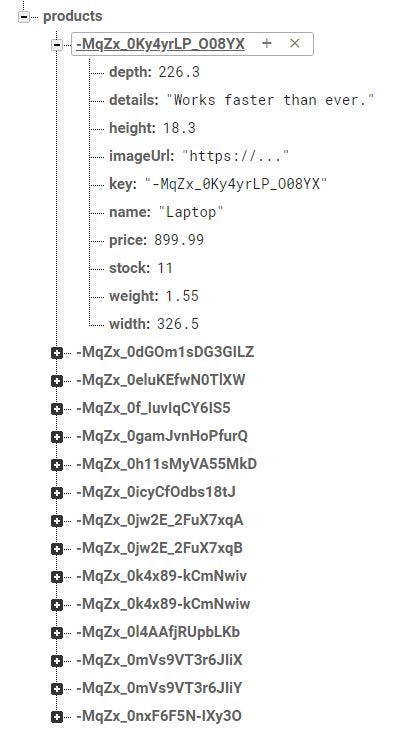
Most likely we are tempted to use a DatabaseReference:
val db = FirebaseDatabase.getInstance().reference
val productsRef = db.child("products")
Or a Query that looks like this:
val queryByName = productsRef.orderByChild("name")Which is fine. We can create a get()call and return a list of products. I also wrote an article on this topic called:
But is it worth it to get a list of Product objects every time we only want to display a list of product names?
The answer is no. Why? Simply because we are downloading an amount of data that we actually don’t need it. When we read the children under the “products” node, we always download the entire Product object along with all 10 fields. It’s true that we can limit the amount of data using a limit(n) call, but that doesn’t mean we get fewer fields from each object. Our goal should always be to avoid wasteful operations.
So what’s the best way to improve performance?
Since we cannot get only a subset of the data from the “products” node, the best practice is to only load the data that we’re going to display to the user in the UI and nothing more.
How can we achieve that?
Simply by duplicating the subset of the data into its own separate node. This practice is called denormalization and it’s a quite common practice when it comes to Firebase. If you are new to NoSQL databases, I recommend you see this video, Denormalization is normal with the Firebase Database for a better understanding.
What does denormalization mean?
Denormalization is the process of optimizing the performance of NoSQL databases, by adding redundant data in other different places in the database. What I mean by adding redundant data, it means that we copy the same data that already exists in one place, in another place, to store only what we precisely need.
In our case, we can create a “productNames” node that contains only the name of the products. The key of each child is the key of product and the value is the name of the product:

This means that for displaying a list of product names, we’ll have to query the “productNames” node and not the “products” node. This also means that we have to read both, the key and the value. Why? Because on product click we need to navigate further, to actually read the details of the selected product. So for creating the list we are only reading the product names and for displaying the details, we create another database call to download the details.
How can we active this in clean architecture?
If you read some of my latest articles, you’re probably already familiar with the fact that I’m using the MVVM architecture pattern. That being said, the code in the project is divided into three separate layers, the data layer, the domain layer, and the presentation layer:
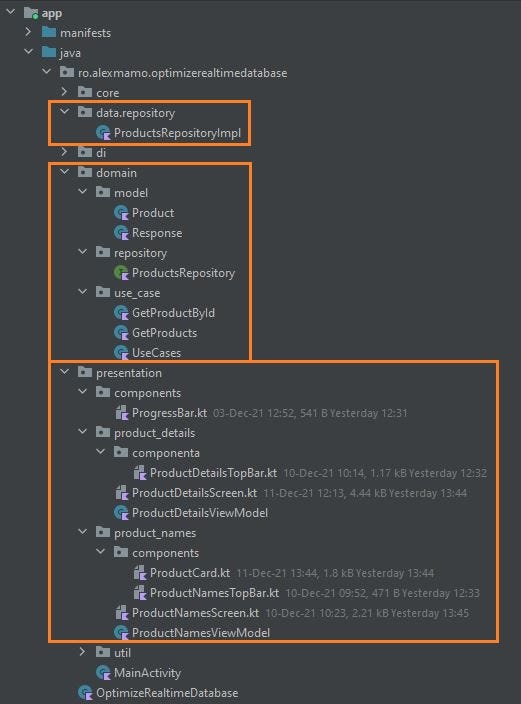
When talking about the data layer, because it’s a very simple app, it only contains a single class, the ProductsRepositoryImpl class.
And as you can see, this class it’s responsible for the Firebase Realtime Database calls. Being asynchronous, for both operations, we are using Kotlin Asynchronous Flow. As I think you already noticed, this class represents the actual implementation of the ProductsRepository interface that exists in the repository package in the domain layer.
Since we are using in this project use cases, in the use_case package inside the domain layer, we have added a use case object for each operation that we perform. All these operations are present inside the UseCases class:
But why do we do that? Simply to be able to inject an instance of the UseCases class inside the ProductNamesViewModel class constructor:
As well inside the ProductDetailsViewModel class constructor:
Going forward to the presentation layer, inside it, we can find the MainActivity where we only create the NavController and set the NavHost:
Besides the activity, there are also two more UI-related packages present, one package for each screen. Inside the productNames package, we can find the ProductNamesScreen:
And inside the product_details package, we can find the ProductDetailsScreen:
Since the “startDestination” in the NavHost is the ProductNamesScreen, when we click on a specific product, we navigate further to the ProductDetailsScreen to see the corresponding details. To keep things simple, I have only created a Column with a Text for each detail.
Conclusion
That’s the simplest solution for optimizing Firebase Realtime Database calls using a clean architecture with Jetpack Compose. Please also remember to always make sure to keep both nodes in sync. This means that once you delete a product from the “products” node, you have to delete the corresponding name from the “productNames” node. The same rule applies when adding a new product or when changing a product name.
So I hope you found this article useful and if you have any questions regarding this topic, feel free and leave a comment in the section below.
If you wanna support me, please join me!
Thanks for staying with me. You can find the full source code here.
You can see it on youtube:
#BetterTogether 🔥


