avatarMarianna Morais

Free AI web copilot to create summaries, insights and extended knowledge, download it at here

1207

Abstract

cdn-images-1.readmedium.com/v2/resize:fit:800/1*tKJHiSJGJ_6b5BdkS-erXQ.png"><figcaption>Source: <a href="https://medium.com/@mariannamorais_">Author</a></figcaption></figure><p id="aa7e">As you can see, a lot has been reworded and moved around, though, the main points have remained unchanged.</p><p id="b70e">The <i>baby draft </i>is a sentence, a couple of bullet points, or simply just a title that you can come back to when you don’t know what to write about. Essentially, it’s your brain’s dumbing ground for even the smallest idea. It will be filled with grammatical and spelling errors but that’s the point, so don’t be too harsh on yourself and just jot down what comes to mind. Also, you might not end up writing about the first idea you wrote down — if you don’t feel motivated to write about the idea in your baby draft try some <a href="https://readmedium.com/how-to-increase-your-writing-productivity-9dc89d6d7fcd">brainstorming</a> to get your creative wheels turning.</p><h2 id="4cc1">1. Download the Medium app</h2><p id="14e2">I highly recommend downloading the Medium app on your phone. Not only is it great to be able to read stories on the go, but it will also allow you to substitute th

Options

e notes app for all your random ideas.</p><p id="867a">This will help you keep you organized and maintain your on-the-go article ideas where they belong — your Medium drafts.</p><h2 id="7091">2. Copy and paste links</h2><p id="74d8">No matter what you are surfing the internet on, phone or computer, if you get inspired by a certain post, youtube video, article, etc, then copy and paste that link as a new draft on Medium.</p><p id="58d0">This will be better for when you return to the <i>baby draft </i>as you will have the original content that inspired you available at hand — rather than just some spitball of notes you tried to make sense out of.</p><h2 id="d170">3. The old fashion way</h2><p id="7b9f">I know not all of us will have access to Medium itself at all times. And that’s totally okay, just do it the old fashion way. Fire your ideas at a sticky note or even a napkin, then, once you get the time, write it as a <i>baby draft.</i></p><p id="59be">It is important to make it work with the resources you have at that moment because usually, the best ideas come at random times.</p><p id="d383">Moral of the story, have fun with your ideas, and start <i>baby drafting</i>!</p></article></body>

How to Never Run Out of Writing Ideas

A simple technique I call ‘the baby draft’

Photo by Thought Catalog on Unsplash

The dreaded…writer’s block. Unfortunately, most of us have been there. If you're anything like me, then you're probably searching for new ways to avoid it; lucky for you, I have your answer! Or at least a solution for most days.

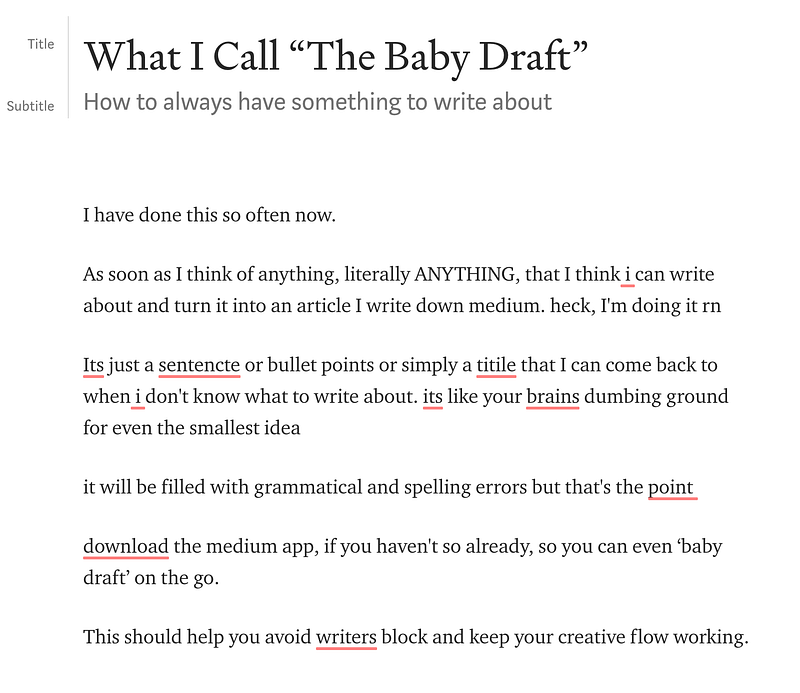
I have done this so often now, the baby draft, weird name, right? Well, basically all this method requires you to do is to use the Medium editor just like you would the notes app on your phone. Thus, as soon as you think of anything you believe can turn into your next article you write it down as a new draft in Medium. Heck, I did it to write this article. Here’s what my baby draft for this article looked like:
Source: Author

As you can see, a lot has been reworded and moved around, though, the main points have remained unchanged.

The baby draft is a sentence, a couple of bullet points, or simply just a title that you can come back to when you don’t know what to write about. Essentially, it’s your brain’s dumbing ground for even the smallest idea. It will be filled with grammatical and spelling errors but that’s the point, so don’t be too harsh on yourself and just jot down what comes to mind. Also, you might not end up writing about the first idea you wrote down — if you don’t feel motivated to write about the idea in your baby draft try some brainstorming to get your creative wheels turning.

1. Download the Medium app

I highly recommend downloading the Medium app on your phone. Not only is it great to be able to read stories on the go, but it will also allow you to substitute the notes app for all your random ideas.

This will help you keep you organized and maintain your on-the-go article ideas where they belong — your Medium drafts.

2. Copy and paste links

No matter what you are surfing the internet on, phone or computer, if you get inspired by a certain post, youtube video, article, etc, then copy and paste that link as a new draft on Medium.

This will be better for when you return to the baby draft as you will have the original content that inspired you available at hand — rather than just some spitball of notes you tried to make sense out of.

3. The old fashion way

I know not all of us will have access to Medium itself at all times. And that’s totally okay, just do it the old fashion way. Fire your ideas at a sticky note or even a napkin, then, once you get the time, write it as a baby draft.

It is important to make it work with the resources you have at that moment because usually, the best ideas come at random times.

Moral of the story, have fun with your ideas, and start baby drafting!

Writing
Productivity
Creativity
Writing Tips
Self Improvement
Recommended from ReadMedium