
How to Mosaic/Merge Raster Data in Python
A simple process to merge different Raster files
Satellite Image scenes might not coincide with your area of interest. You might need to clip into a boundary (make it smaller) or create a mosaic of different scenes to get the desired result (merge different raster files).
This short blog post will show you how to merge different raster tiles in Python using Rasterio.
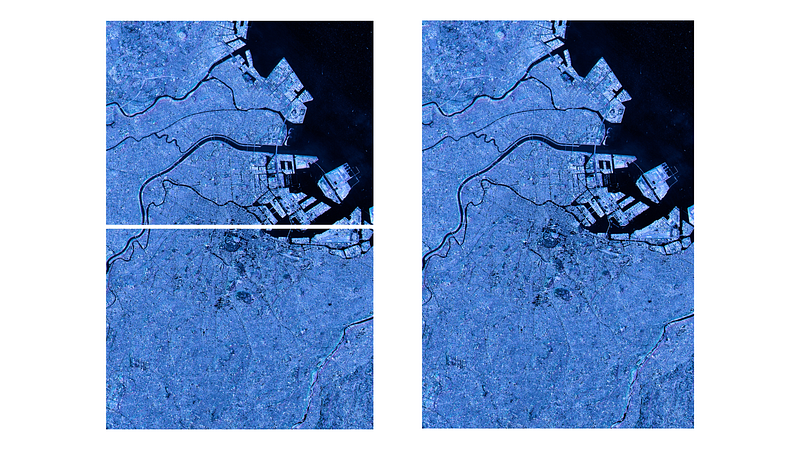
Raster Mosaic with Python
Let us first import the libraries and create the output folder with Python path lib.
from rasterio.plot import show
from rasterio.merge import merge
import rasterio as rio
from pathlib import Path
path = Path('data/')
Path('output').mkdir(parents=True, exist_ok=True)
output_path = 'output/mosaic_output.tif'Now we iterate over the available .tif files in the data folder. We will merge all files in this data folder and create a mosaic from them. We also create an empty list to hold the files in the data folder.
raster_files = list(path.iterdir())raster_to_mosiac = []We then loop through the raster files, open them with rasterio and append them to the raster_to_mosiac list we created above.
for p in raster_files:
    raster = rio.open(p)
    raster_to_mosiac.append(raster)
From this stage on, it is easy. We use the merge() method from rasterio to create the mosaic. We also create the output transformation parameters to use later.
mosaic, output = merge(raster_to_mosiac)Now, we copy the raster's metadata and update it to match the height and width of the mosaic.
output_meta = raster.meta.copy()
output_meta.update(
    {"driver": "GTiff",
        "height": mosaic.shape[1],
        "width": mosaic.shape[2],
        "transform": output,
    }
)
In this final stage, we write the mosaiced file in a local folder.
with rio.open(output_path, “w”, **output_meta) as m:
    m.write(mosaic)
And there you have your mosaiced raster image!
Final Words
In this short blog post, we have seen how to merge different raster images using Rasterio. I find this process the easiest. There are other procedures, of course, so let me know how you do mosaicing in Python.


