
How To Mock an Angular Service with Dependency Inversion
A valuable technique for writing a mock service for our test harness and for running our application in a full mock mode
Protecting our Angular code with tests has many advantages:
- Starting a test suite is much faster and more efficient than running the Angular application. Using smoke tests every time we change our code is not a very efficient way to check if something is broken. “Test-Driven Development by Example” by Kent Beck is a great book describing all these advantages of using a test harness.
- Code refactoring (also a good book by Marting Fowler) is much easier with a test harness because we need to run our unit tests to check whether something works or is broken while we refactor our code. Otherwise, we need to start our application (ng serve), wait for it to compile and load, and click through it to discover if something is broken (ahh, these boring smoke tests). This costs a lot of time!
- Every developer could find easy examples inside the test harness, how to use the code and how it works. Sometimes, this is a better understandable way than combining through a complex business logic (maybe our application), especially for a developer who has never seen the code before.
- Our code automatically gets a better architectural design because we write our classes and methods in a testable way. So, the modules are more encapsulated; there is no duplicated code, classes and methods are small and short, fewer parameters in function headers, to name just a few advantages. We preserve SOLID in a straightforward way.
“[…] TDD helps teams productively build loosely coupled, highly cohesive systems with low defect rates and low cost maintenance profiles […]” (Kent Beck [Test-Driven Development by Example])
Starting Point — A SPA meets an API
Every Angular application needs to consume an API to show external data and store user inputs. Often, API endpoints get wrapped in an Angular service. When the application needs to get data by an HTTP-Protocol, we must define Angular’s HTTPClient as a necessary dependency (import statement) in the service.
@Injectable({
  providedIn: 'root'
})
export class AnimalService {
  constructor(private http: HttpClient) { }

  public getAnimals(): Observable<Animal[]> {
    return this.http.get<Animal[]>('api/animals');
  }

  public getAnimalById(id: number): Observable<Animal> {
    return this.http.get<Animal>('api/animalById/' + id);
  }

  public addAnimal(animal: Animal): Observable<number> {
    return this.http.post<number>('api/add', { animal } );
  }

  public addAnimalByName(name: string): Observable<number> {
    console.log(name);
    return this.http.post<number>('api/addByName', { name: name });
  }

  public addAnimalByIdAndName(id: number, name: string): Observable<number> {
    return this.http.post<number>('api/addByIdAndName', { id, name} );
  }
}
General Testing of an HTTP-Service
Angular provides some good techniques to mock and test such services using HTTPClient. One method is using a Spy; another is using the HTTPClientTestingModule.
Extended interactions between a data service and the
HttpClient can be complex and difficult to mock with spies.
The
HttpClientTestingModule can make these testing scenarios more manageable.
While the code sample accompanying this guide demonstrates
HttpClientTestingModule, this page defers to the Http guide, which covers testing with theHttpClientTestingModule in detail. [Angular Docs]
Both methods are very complex and time-consuming because we need some dependencies in every test file (*.spec.ts) and sometimes the mocks and invokes are duplicated. That is why many people avoid testing their components and services. But testing could be a lot easier and more exciting.

A third technique is to use an abstract class as a template for the services: the real API-consumer and the mock service for the test harness. This approach describes Michael C. Feathers in Working Effectively With Legacy Code, among other things.
This technique is quite similar to the Design Pattern Template Method.
How To Mock an Angular Service With Dependency Inversion
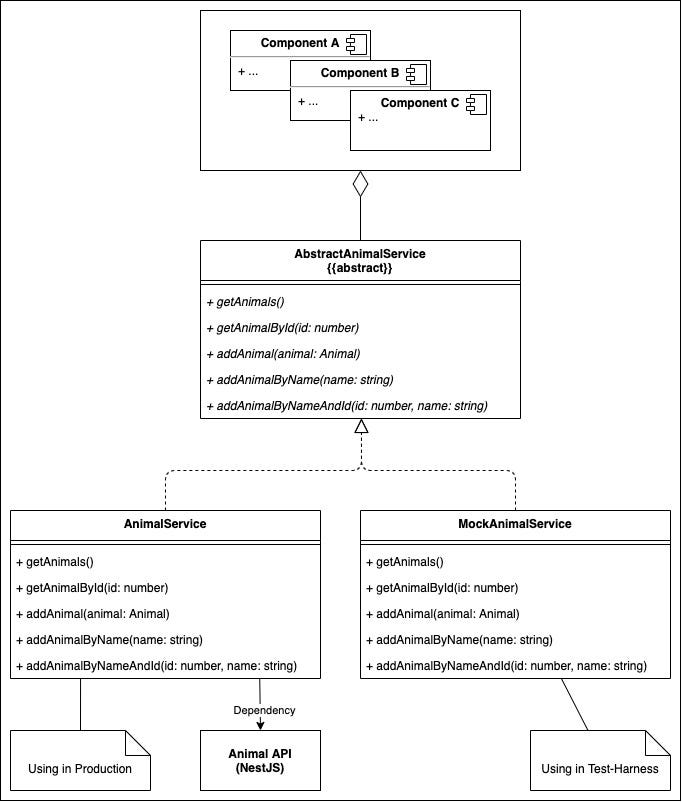
Firstly, we start by implementing an abstract class — this is a template for the upcoming services.
// animal.abstract-service.ts

export abstract class AbstractAnimalService {
  public abstract getAnimals(): Observable<Animal[]>;
  public abstract getAnimalById(id: number): Observable<Animal>;
  public abstract addAnimal(animal: Animal): Observable<number>;
  public abstract addAnimalByName(name: string): Observable<number>;
  public abstract addAnimalByIdAndName(id: number, name: string): Observable<number>;
}
Now the mock service can implement the template (abstract class), where we may add the methods and fill the service with some mock data. In my case, I implemented a simple service that provides some animal data. For the mock service, I added a simple list of animals with three entries and appended the logic to add and read data from it. Every component that consumes the service will get the same mock data — without duplicated code and duplicated mocks or fakes.
Important is, that the service implements the abstract class we created recently.
@Injectable({
  providedIn: 'root'
})
export class MockAnimalService implements AbstractAnimalService {
  private readonly listAnimals: Animal[];

  constructor() {
    this.listAnimals = new Array<Animal>();
    this.listAnimals.push(AnimalFactory.createAnimal(0, 'Zebra'));
    this.listAnimals.push(AnimalFactory.createAnimal(1, 'Rabbit'));
    this.listAnimals.push(AnimalFactory.createAnimal(2, 'cat'));
  }

  public getAnimals(): Observable<Animal[]> {
    return of([...this.listAnimals]);
  }
  public getAnimalById(id: number): Observable<Animal> {
    return of(this.listAnimals.find(x => x.id == id) || new NullAnimalImpl());
  }
  public addAnimal(animal: Animal): Observable<number> {
    return of(this.listAnimals.push(animal) - 1);
  }
  public addAnimalByName(name: string): Observable<number> {
    return of(this.listAnimals.push(AnimalFactory.createAnimal(this.listAnimals.length, name)) - 1);
  }
  public addAnimalByIdAndName(id: number, name: string): Observable<number> {
    return of(this.listAnimals.push(AnimalFactory.createAnimal(id, name)) - 1);
  }
}
So, we can use this service for the test harness now.
For instance, if we use an HttpClientModule in our production service to communicate with a REST-API, we need to mock this module with Angular’s HttpClientTestingModule and mock the response for different routes. With the mock service shown above, we got a little bit more flexibility and fewer dependencies, and we can start the whole application with it — like a mock mode.
But now, let the production service implement the abstract class, too.
@Injectable({
  providedIn: 'root'
})
export class AnimalService implements AbstractAnimalService {
  constructor(private http: HttpClient) {

// ...

}
To use the principle, we need to set a reference to the abstract class instead of referring to the production service. This is very important! We will inject the required service with Dependency Inversion.
@Component({
  selector: 'animal-view',
  templateUrl: './animal-view.component.html',
  styleUrls: ['./animal-view.component.scss']
})
export class AnimalViewComponent {

  // ...

  constructor(private animalService: AbstractAnimalService) {
    this.getAnimals();
  }

  // ...

}
The Trick with Dependency Inversion
Now we need to reference the service we want to use. In production mode, we want to use the real service that uses the HTTPClient to consume the real API endpoint. In the test/mock mode and in our test harness (*spec.ts), we want to use the mock service that repeatedly returns the same mock data — without too much complexity and without invoking third-party dependencies.
Angular allocates a simple syntax by Dependency Providers: https://angular.io/guide/dependency-injection-providers
With this information, we can extend our app.module.ts . For production mode, we use the production array below; for a complete mock runtime mode, we use the test array.
const production = [
  { provide: AbstractAnimalService, useClass: AnimalService }
];

const test = [
  { provide: AbstractAnimalService, useClass: MockAnimalService }
];

@NgModule({
  declarations: [AppComponent, AnimalViewComponent, AnimalAddComponent, AnimalSearchComponent],
  imports: [BrowserModule, HttpClientModule, FormsModule],
  providers: [
    httpInterceptorProviders,
    // ...test <--- this can be used for a complete mock runtime modus
    ...production
  ],
  bootstrap: [AppComponent],
})
export class AppModule {}
Usage in the Test Harness
We reference the abstract class with the mock service in the test harness. So, we can be sure we always get the same data from the service — with no duplicated code or duplicated mock data. The same principle we apply in the app.module.ts.
With this technique, we have no third-party dependencies in our test harness and can test against mock data.
describe('AnimalSearchComponent', () => {
  let component: AnimalSearchComponent;
  let fixture: ComponentFixture<AnimalSearchComponent>;

  beforeEach(async () => {
    await TestBed.configureTestingModule({
      declarations: [ AnimalSearchComponent ],
      imports: [FormsModule, HttpClientTestingModule],
      providers: [
        {
          provide: AbstractAnimalService,
          useClass: MockAnimalService
        }]
    })
    .compileComponents();
  });

  beforeEach(() => {
    fixture = TestBed.createComponent(AnimalSearchComponent);
    component = fixture.componentInstance;
    fixture.detectChanges();
  });

  it('should find an animal', done => {
    component.id = 1;
    component.btnSearchAnimal();
    component.searchedAnimal.subscribe((next: Animal) => {
      expect(next.name).toEqual('Rabbit');
      done();
    })
  });
});
Architectural Concerns
If we use this technique, we can be sure there is no complex functionality inside the service we try to mock (because the mocked service bypasses the complex functionality).
This technique works well with endpoint-consuming services like REST-APIs, GraphQL, or FileSystems. In other words, this technique is brilliant for data mocks that should be consistent, coherent, and reusable.
Conclusion
Using abstract classes, Dependency Inversion in combination with the principle of the Template Method can be very useful to expand the test harness and protect the code with consistent tests — especially Angular services that consume third-party dependencies. It is a common technique from the good old days, as Michael C. Feathers describes in Working Effectively With Legacy Code. So, in summary, we can create a separated service for our test harness without third-party dependencies (for instance, a file system, APIs, and micro-services) and run our tests in an encapsulated environment.
Thanks for reading! Follow me on Medium, Twitter, or Instagram, or subscribe here on Medium to read more about DevOps, Agile & Development Principles, Angular, and other useful stuff. Happy Coding! :)


