
How to Merge Adapters Sequentially in Android
Introducing a brand new MergeAdapter for Android developers

Introduction
MergeAdapter is a new feature introduced in recyclerview:1.2.0-alpha02, enabling us to club multiple adapters sequentially. This provides more encapsulation and re-usability, instead of merging several data sources into the same adapter. In this article, you’ll learn how to use MergeAdapter and some other useful things, like how to use the view pool efficiently across adapters.
Integration
The Android team has now released the new version of recyclerview. To use MergeAdapter, update the recyclerview library version to 1.2.0-alpha02 or include the following line under the dependency tag in-app level build.gradle file:
dependencies {
   implementation 'androidx.recyclerview:recyclerview:1.2.0-alpha02'
}
Working with MergeAdapter
Let’s take a basic use case. We need to show a header layout, then a list of topics, and a footer showing either loading or error. We have three different adapters, one for each type — HeaderAdapter, TopicAdapter, and FooterAdapter.
We want to merge these three adapters using the merge-adapter constructor and set the result MergeAdapter instance to recyclerview. The first here is to merge three adapters as shown:
val headerAdapter: HeaderAdapter= …
val topicAdapter: TopicAdapter= …
val footerAdapter: FooterAdapter= …
val mergeAdapter = MergeAdapter(headerAdapter, topicAdapter,
footerAdapter)The views in the recyclerview will render according to the order of adapters in the MergeAdapter constructor. After that, as usual, we need to invoke setAdapter and pass themergeAdapter`instance, as shown below:
recyclerView.adapter = mergeAdapter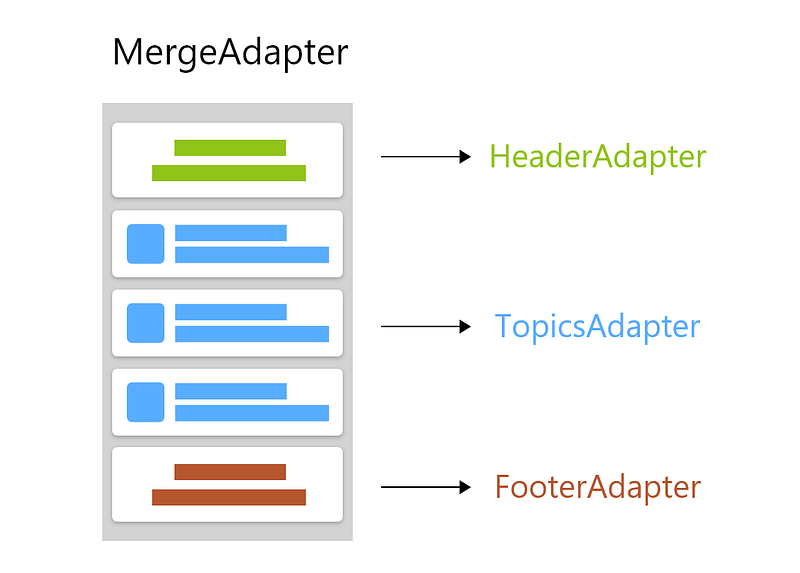
In this way, we achieve separation of concerns:
- To show loading or error case, now we can do it in
FooterAdapter - If we have different view-types in topics, then we can do it separately in
TopicAdapter.
Exploring MergeAdapter
MergeAdapter.Config
By default, every adapter uses its own pool of viewHolders. If you have the same layout that needs to be used across different adapters, you have to use MergeAdapter.Config. We can configure merge-adapter to three different types:
MergeAdapter.Config.StableIdMode.NO_STABLE_IDS — This is the default mode. Each adapter has their ownviewholderpool and ignores the stable IDs from sub adapters.MergeAdapter.Config.StableIdMode.ISOLATED_STABLE_IDS — In this mode,MergeAdapterviewHolders may return the same ID because they’re unaware of each other. ThenMergeAdapter will isolate eachRecyclerView.Adapter's ID pool from each other, causing it to overwrite the reported stable ID before reporting back to theRecyclerView.MergeAdapter.Config.StableIdMode.SHARED_STABLE_IDS — In this mode,MergeAdapter won’t isolate each adapter’s pool from each other and also won’t override ID’s as it did in the previous case.
Updating Data and ViewHolders
I would recommend using ListAdapter, which handles the data changes for you instead of the general recyclerview.adapter. The next thing is viewholder. To obtain the adapter position in recyclerview, we use ViewHolder.getAdapterPosition, but when you’re operating through the Merge adapter, you need to use ViewHolder.getBindingAdapter().
Conclusion
As it’s still in the early stages of development, I would not recommend you use this feature in production code just yet. There may be changes in the future, or some features may be removed in forthcoming versions.
I also recommend using the view-types feature from Recyclerview.Adapter to show different views in recyclerview. Use the MergeAdapter only when it benefits from encapsulation. MergeAdapter isn’t a solution to show different view-types; it’s a way of providing encapsulation while inflating different view-types.
Bonus
To learn more about adapters in Android, read the following articles:
Thank you for reading.