
How to mention a Slack @username in the Webhook message?
Navigate the nuances of the Slack Webhook to notify a user directly by mentioning their username in your programmatically generated messages.
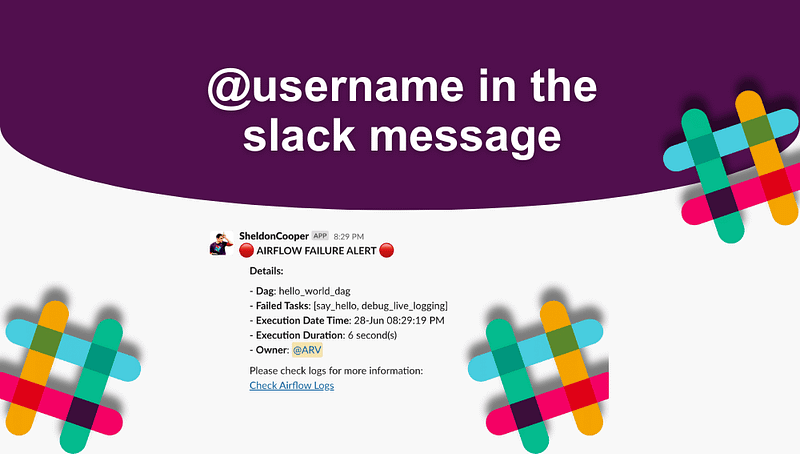
Welcome to our tutorial on how to mention a Slack @username in the Webhook messages. This guide is designed as a step-by-step walkthrough, to help you grasp the process of using the Slack Webhook to programmatically generate messages that notify a specific user. Whether you’re new to Slack or an experienced user looking for further insights, this guide is designed to be straight to the point and easily comprehensible.
Table of Contents
· Background and Solution · Supported API end point to fetch userid · Generate Slack Authorization Token ∘ Step 1: Create Slack developer App ∘ Step 2: Generate OAuth Token · Get: UserID By Email Utility · Airflow Specific, Get: UserID By Email Utility · Mention a Slack @userid in the Webhook message · Conclusion
Background and Solution
In Slack, your profile can display two different names. The first one is your full name, and the second one, highlighted in light orange, is your display name. Please note not to mistake your display name for a username, as Slack does not utilize the concept of usernames. Instead, Slack identifies users through their member ID, or userid, which is highlighted in red on the profile.
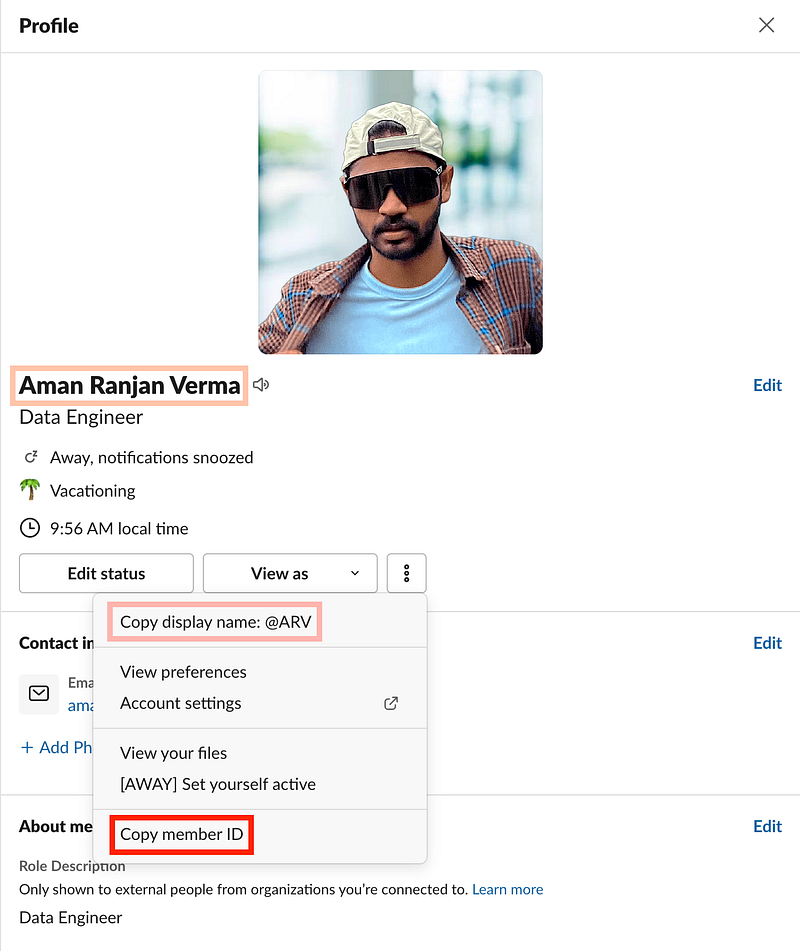
If you would like to mention a user in your Slack message programmatically through the Slack webhook message, you must use this memberID/userid [Example: XYZ123AB]. An effective way to retrieve this memberID/userid is with the aid of the Slack Developer API, provided you have access to the user’s email id.
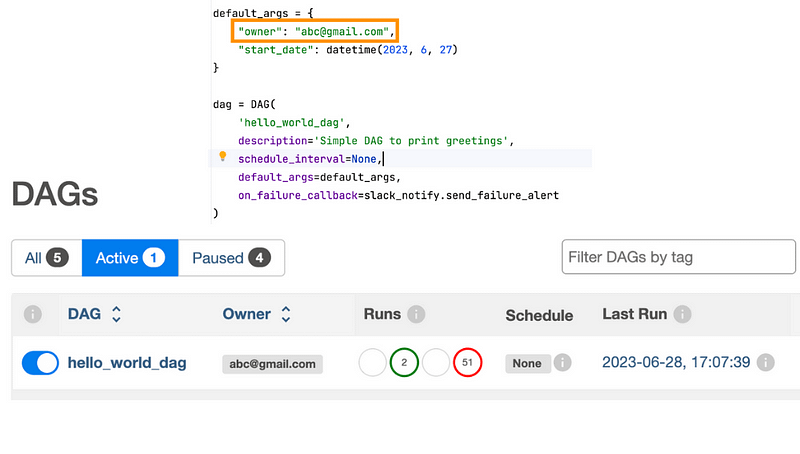
In the context of my project, I used the Slack webhook messaging system to facilitate the notification of Airflow DAG failures. Obtaining the email ID was a straightforward process for me, as I ensured that every DAG contained an email ID in its owner field, as depicted in the image below.
Supported API end point to fetch userid
# Endpoint
url: https://slack.com/api/users.lookupByEmail?email={email}

headers: {
        "Content-type": "application/json",
        "Authorization": f"Bearer {slack_auth_token}",
        "type": "url_verification",
    }

# MemberId/UserId
resonse.json()["user"]["id"]
Generate Slack Authorization Token
Step 1: Create Slack developer App
Follow Steps 1 and 2 from this blog:
Step 2: Generate OAuth Token
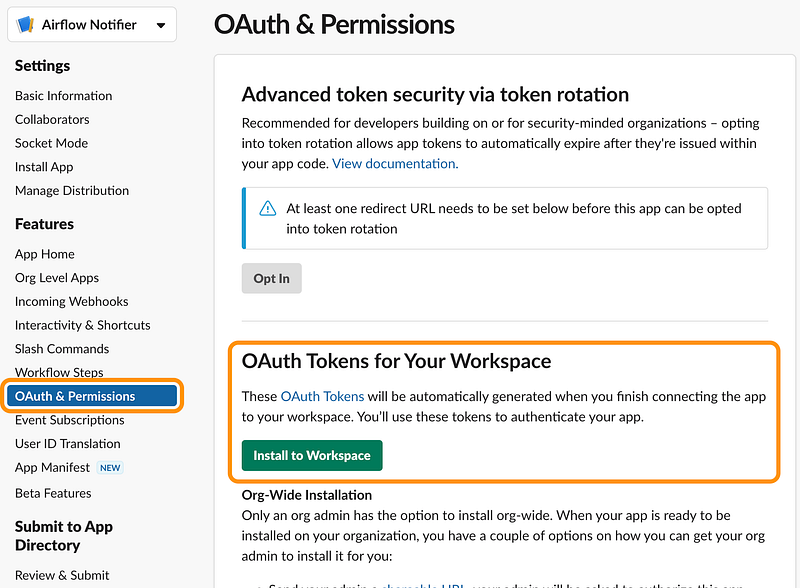
Once you are done with this step, you will get the Bot User OAuth Token. Example: [xoxb-2323–3213213-fg2332]. This is your slack_auth_token.
Get: UserID By Email Utility
import requests
import logging

def get_userid_by_email(email):
    """
    Given a user's email, fetches the corresponding Slack user ID.

    Args:
        email (str): The email address of the Slack user.

    Returns:
        str: Returns the Slack user ID if successful, otherwise returns the input email.
    """
    slack_api_token = "xoxb-2323–3213213-fg2332" # Replace with correct value

    headers = {
        "Content-type": "application/json",
        "Authorization": f"Bearer {slack_api_token}",
        "type": "url_verification",
    }
    url = f"https://slack.com/api/users.lookupByEmail?email={email}"

    try:
        res = requests.get(url=url, headers=headers)
        res.raise_for_status()
        return res.json()["user"]["id"]
    except Exception as e:
        logging.warning(f"Error getting userid: {e}")
        return email
Airflow Specific, Get: UserID By Email Utility
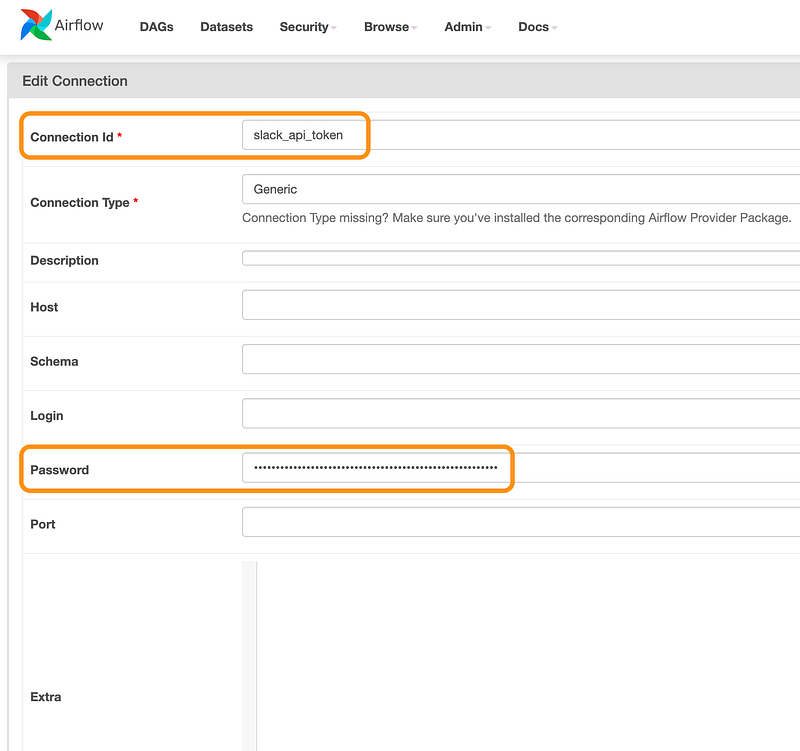
In airflow, we can make use of connections to save the slack_api_token. You can create a Generic connection and fill in the token in the password field. Give your connection a name in the Connection ID field.
import logging
import requests
from airflow.hooks.base import BaseHook


def get_userid_by_email(email):
    """
    Given a user's email, fetches the corresponding Slack user ID.

    Args:
        email (str): The email address of the Slack user.

    Returns:
        str: Returns the Slack user ID if successful, otherwise returns the input email.
    """
    connection = BaseHook.get_connection("slack_api_token")
    if not connection:
        logging.error("Cannot get connection: slack_api_token")
        return email

    slack_api_token = connection.password

    headers = {
        "Content-type": "application/json",
        "Authorization": f"Bearer {slack_api_token}",
        "type": "url_verification",
    }
    url = f"https://slack.com/api/users.lookupByEmail?email={email}"
    try:
        res = requests.get(url=url, headers=headers)
        res.raise_for_status()
        return res.json()["user"]["id"]
    except Exception as e:
        logging.warning(f"Error getting userid: {e}")
        return email
I use this utility method to tag the DAG owners to notify them when a Webhook message is triggered in case of a DAG failure.
Mention a Slack @userid in the Webhook message
webhook_url = "https://hooks.slack.com/services/dsd/ssds/dsdadas"
data = {
    "text": "Hello, <@{owner}>!".format(
        owner=get_userid_by_email("[email protected]")
    )
}
headers = {
    'Content-type': 'application/json'
}

response = requests.post(webhook_url, headers=headers, data=json.dumps(data))
Conclusion
We’ve navigated from the basics of identifying a Slack @username, to fetching user ids and generating Slack Authorization Tokens. This article also covered how these strategies can be utilized in situations specific to Airflow. Hopefully, by now, you feel more confident in leveraging the capabilities of Slack’s Webhook to improve the efficiency of your messaging. Keep practicing and exploring the opportunities provided by these tools to upgrade your Slack usage skills even further.



