
How to map an array of objects from Cloud Firestore to a List of objects?
Even from the beginning, the array is a supported data type in Cloud Firestore. It’s very useful for storing data in String format or even as custom objects, as long as the size of the document is less than 1 MiB (1,048,576 bytes). For larger amounts of data, a sub-collection is more likely to be used. However, if we only need small datasets, then storing data in an array is the best option.
Now, let’s assume we have a document that contains a property of type array. This array is named users and holds a few User objects. The User class is very simple, contains only two properties, and looks like this:
And this is the database structure:
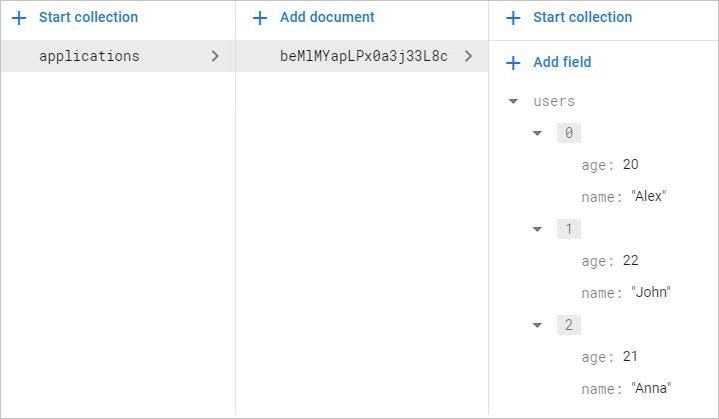
So our goal is to get in code the users array as a List<User>. To achieve that, we need to attach a listener on the document and use a get() call:
To actually get the values out of from users array, we are calling:
document.get("users")And we cast the object to a List<Map<String, Object>>. So this object is actually a List of Maps. It’s true that we can iterate through the Map, get the data out and create the List<User> ourselves. But as DocumentSnapshot contains different flavors for the get() method, according to each data type, getString(), getLong(), getDate(), etc, it would have been very helpful if we also had a getList() method, but unfortunately we don’t. So something like this:
List<User> users = document.getList("users");It’s not possible. So how can we still get a List<User>?
The simplest solution is to create another class that holds only a property of type List<User>. It looks like this:
And to directly get the list, only the following lines of code are needed:
That’s the simplest way you can get the content of an array as a list of custom objects.
Credit to Sam Stern 🙏
If you are using the Realtime Database and you’re looking for a similar solution, I have already written an article regarding the same topic:
If you wanna support me, please join me!
#BetterTogether 🔥


