="3707">But then I realized some of these prolific authors publish every five minutes — I’m not going to name names, <a href="undefined">Amy Sea</a>, <a href="undefined">Anthony (Tony/Pcunix ) Lawrence</a>, <a href="undefined">Christine Stevens</a>, and <a href="undefined">George J. Ziogas</a>.</p><p id="99d1">I’m not one of these inbox-zero fastidious types. Still, my inbox was becoming overrun with Medium stories.</p><p id="c3a0">I felt like Lucy and Ethel working the line at the chocolate factory. I couldn’t keep up.</p>
<figure id="1aec">
<div>
<div>
<img class="ratio" src="http://placehold.it/16x9">
<iframe class="" src="https://cdn.embedly.com/widgets/media.html?src=https%3A%2F%2Fwww.youtube.com%2Fembed%2FAnHiAWlrYQc%3Ffeature%3Doembed&display_name=YouTube&url=https%3A%2F%2Fwww.youtube.com%2Fwatch%3Fv%3DAnHiAWlrYQc&image=https%3A%2F%2Fi.ytimg.com%2Fvi%2FAnHiAWlrYQc%2Fhqdefault.jpg&key=a19fcc184b9711e1b4764040d3dc5c07&type=text%2Fhtml&schema=youtube" allowfullscreen="" frameborder="0" height="480" width="854">
</div>
</div>
</figure></iframe></div></div></figure><p id="f7be">So I put on my big boy pants and learned how to manage the onslaught in Gmail. My goal was to continue subscribing to all the writers I love, keep my inbox free of the clutter, and keep all the stories in a separate area to read when time permits.</p><p id="ea5b">Here are some steps to follow:</p><ol><li>Click the “Create new label” plus sign.</li></ol><figure id="d87f"><img src="https://cdn-images-1.readmedium.com/v2/resize:fit:800/1*63ZDDezDbXTfskvW5qkd6Q.jpeg"><figcaption>Gmail screen capture by author</figcaption></figure><p id="f647">2. Type in the name of the label — you needn’t name it “Medium” if you’re a maverick.</p><figure id="d589">
Options
<img src="https://cdn-images-1.readmedium.com/v2/resize:fit:800/1*HjdH6deRrrKGcknhK4iTtw.jpeg"><figcaption>Gmail screen capture by author</figcaption></figure><p id="fb1b">3. Voila. The “Medium” label will appear in the “Labels” group.</p><figure id="0443"><img src="https://cdn-images-1.readmedium.com/v2/resize:fit:800/1*TYnaFPldwkWdfI5CRLh34A.jpeg"><figcaption>Gmail screen capture by author</figcaption></figure><p id="1f66">4. Create a filter. Go to the search window, type “[email protected],” and click the filter button. All of the subscription emails originate from the [email protected] address, so this rule filter is simple.</p><figure id="dfc9"><img src="https://cdn-images-1.readmedium.com/v2/resize:fit:800/1*wKpKUvNxusV6-vzXss6uog.jpeg"><figcaption>Gmail screen capture by author</figcaption></figure><p id="ccfd">5. No need to add anything to this popup dialog. Just click Continue.</p><figure id="8729"><img src="https://cdn-images-1.readmedium.com/v2/resize:fit:800/1*F_H3sl9yUFWpVp2DD4Pomw.jpeg"><figcaption>Gmail screen capture by author</figcaption></figure><p id="fea9">6. This is the important part. Selecting the “Skip the Inbox (Archive it)” box will <b>archive</b> all incoming Medium mail. Archiving means the Medium emails will appear in your “All Mail” Gmail folder but not in your Inbox.</p><p id="9753">Selecting the “Apply the label: Medium” box will also cause the incoming mail to appear in the “Medium” group (step 3 above).</p><figure id="bf86"><img src="https://cdn-images-1.readmedium.com/v2/resize:fit:800/1*2FVBM06eOo0Szhf4wdsS_w.jpeg"><figcaption>Gmail screen capture by author</figcaption></figure><p id="2e80"><a href="undefined">Tony Stubblebine</a> can easily make this story obsolete if he takes the product suggestions that many other Medium groupies and I regularly submit. I hope he does.</p></article></body>
How to Manage Medium Writer Subscriptions in Gmail To Avoid Going Nuts
By all means, subscribe to your favorite writers like crazy
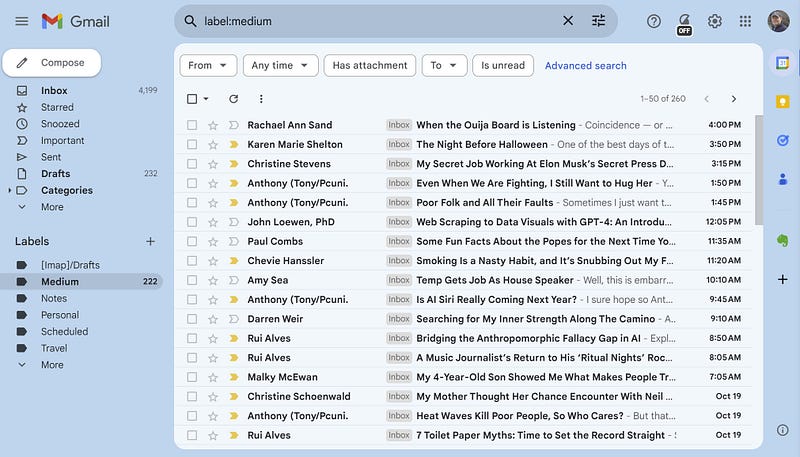
Gmail Medium Filter. Screen Capture by Author
One of the marvelous aspects of Medium is reading and commenting on the stories of people who think more clearly and write more eloquently than me.
Roz Warren, Writing Coach recently wrote a story, “Why You Should Subscribe to the Medium Writers You Love,” about why merely following your favorite writers is insufficient in today’s Medium. One must also subscribe to receive an email for each story a writer produces.
Roz points out that there’s no obligation to read everything that comes your way, but it’s good to be able to pick and choose.
I’m a fool but not so foolish that I’d ignore Roz’s sage advice. So, I went whole hog and subscribed to approximately 100 writers’ stories. For a while, it was empowering to see all this fantastic content flowing into my inbox.
I’m not one of these inbox-zero fastidious types. Still, my inbox was becoming overrun with Medium stories.
I felt like Lucy and Ethel working the line at the chocolate factory. I couldn’t keep up.
So I put on my big boy pants and learned how to manage the onslaught in Gmail. My goal was to continue subscribing to all the writers I love, keep my inbox free of the clutter, and keep all the stories in a separate area to read when time permits.
Here are some steps to follow:
Click the “Create new label” plus sign.
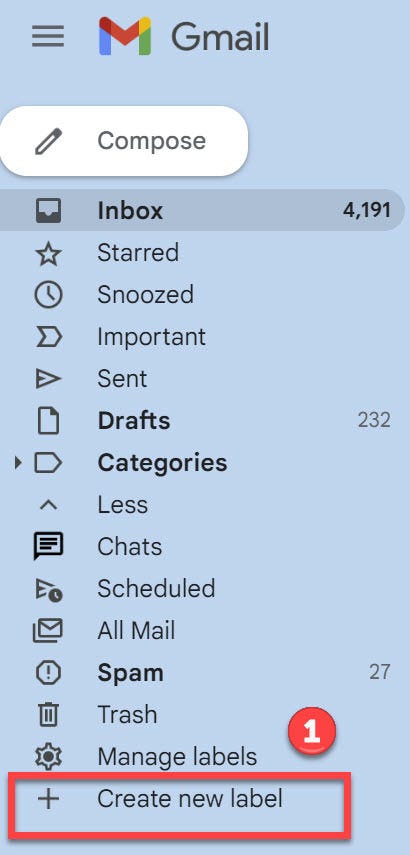
Gmail screen capture by author
2. Type in the name of the label — you needn’t name it “Medium” if you’re a maverick.
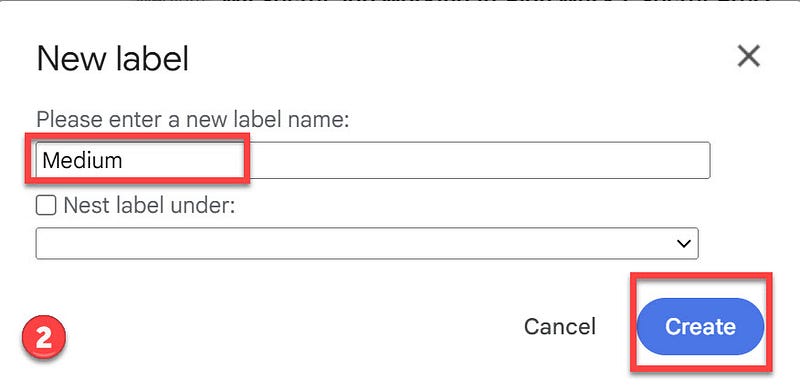
Gmail screen capture by author
3. Voila. The “Medium” label will appear in the “Labels” group.
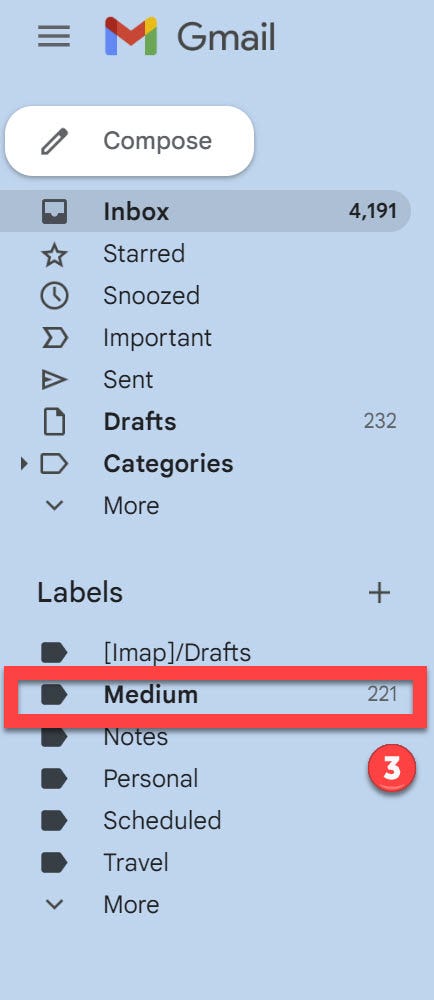
Gmail screen capture by author
4. Create a filter. Go to the search window, type “[email protected],” and click the filter button. All of the subscription emails originate from the [email protected] address, so this rule filter is simple.

Gmail screen capture by author
5. No need to add anything to this popup dialog. Just click Continue.
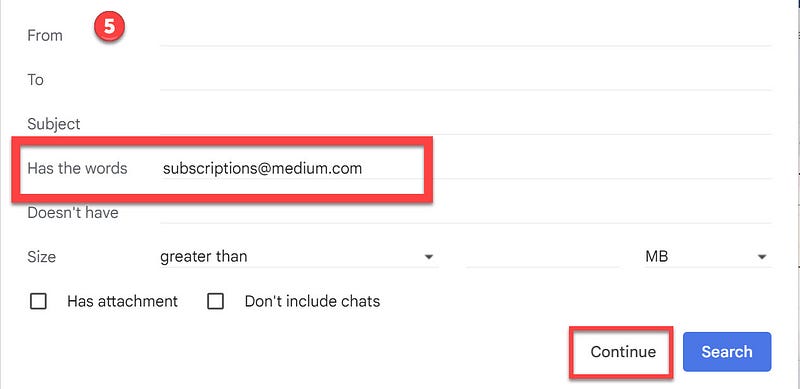
Gmail screen capture by author
6. This is the important part. Selecting the “Skip the Inbox (Archive it)” box will archive all incoming Medium mail. Archiving means the Medium emails will appear in your “All Mail” Gmail folder but not in your Inbox.
Selecting the “Apply the label: Medium” box will also cause the incoming mail to appear in the “Medium” group (step 3 above).
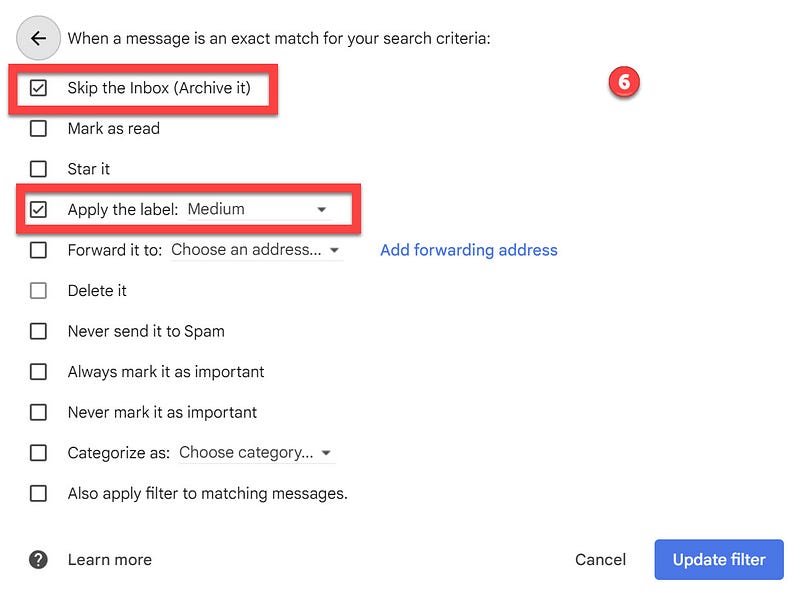
Gmail screen capture by author
Tony Stubblebine can easily make this story obsolete if he takes the product suggestions that many other Medium groupies and I regularly submit. I hope he does.