avatarShreya Badonia

Free AI web copilot to create summaries, insights and extended knowledge, download it at here

2073

Abstract

about every week, I created a list for them and left some topics that I don’t want to promote.</p><figure id="afa3"><img src="https://cdn-images-1.readmedium.com/v2/resize:fit:800/1*JBIoQfBs6ltQu-PmYD0ilQ.png"><figcaption>Screenshot of my public lists on Medium</figcaption></figure><p id="7a2b">Before organized my articles in the list, I’d spend a ton of time finding the right article to interlink in another article. With my reading list growing at 10x speed every day and adding my personal articles to the same list was challenging.</p><p id="9ee3">But with this list, makes my life as a writer much easier.</p><p id="98f6">Another great thing about separating your articles into different topics is knowing which topics you enjoy writing about the most. Then, you can use the same metric and convert them into an e-book or a lead magnet in the future.</p><p id="aef3">They can also be converted into a course, and you save hours in researching and scripting the video production.</p><p id="884b"><b>Note:</b> You don’t have to add all your articles into categories; add the ones worth sharing and you’re proud of.</p><p id="5557">The fewer number of lists, the less confused your readers will be.</p><h2 id="7c9a">2. Curate</h2><p id="554e">If you’re less into writing and more into finding and organizing content from others, this could be your way to use the list feature.</p><p id="a01f">Collect all your favorite stories and add them to a relevant list. The feature also allows you to write a single line about the article in the list to share your 2 cents about the shared content—a great way to share the curated list across social media.</p><figure id="1ad8"><img src="https://cdn-images-1.readmedium.com/v2/resize:fit:800/1*8gFnMNU0uMw42IhUvzDcPA.png"><figcaption>Topic-wise list with the tagline above each article. Screenshot by the <a href="https://shreyabadonia.medium.com/list/content-marketing-612a07cdecc4">author’s list</a></figcaption></figure><p id="ed75">You can curate your favorite articles from the platform and share them with people outside t

Options

he Medium ecosystem as well.</p><p id="eb76">The curation can also be used to promote your publication and your students' work if you’re a writing coach.</p><p id="d420">There are multiple ways the curation can work for you, and if one of your lists gets tons of traffic, your profile and other lists can benefit from it.</p><p id="5d72">I hope this article showed you a way to organize your list or curate it as per your interest :)</p><p id="32f6"><a href="https://shreyasls.substack.com/"><b><i>Every Sunday, I send an email about creativity, personal experiments, and lifestyle design with my best finds of the week. Join the community today</i></b></a><b><i>.</i></b></p><p id="c7af"><i>Further reads</i></p><div id="f124" class="link-block"> <a href="https://readmedium.com/4-unusual-ways-to-get-ideas-for-your-next-article-e01f7bffe009"> <div> <div> <h2>4 Unusual Ways To Get Ideas For Your Next Article</h2> <div><h3>Let’s think outside the box and write something we haven’t written before</h3></div> <div><p>medium.com</p></div> </div> <div> <div style="background-image: url(https://miro.readmedium.com/v2/resize:fit:320/0*zozBEQzRKwC2Iiww)"></div> </div> </div> </a> </div><div id="ea8a" class="link-block"> <a href="https://readmedium.com/the-sandwich-technique-is-helping-me-stay-consistent-with-my-writing-f3e0dad02ffd"> <div> <div> <h2>The Sandwich Technique Is Helping Me Stay Consistent With My Writing</h2> <div><h3>I borrowed the technique from my reading process to stay consistent with writing</h3></div> <div><p>medium.com</p></div> </div> <div> <div style="background-image: url(https://miro.readmedium.com/v2/resize:fit:320/1*QcXmu3_OAxPOWYoG335OTg.jpeg)"></div> </div> </div> </a> </div></article></body>

How To Make The Most of Medium List Feature

I am using it to organize my writing and find my value proposition

Image by rawpixel.com

The new list feature excited me when I first saw it, as I was tired of keeping track of my 1200+ unread and 50+ beautifully crafted articles.

For a person like me who writes on various topics. It helps me segregate and know what I am writing about and for my readers to simply to a particular category instead of their search from a mess.

When I first started experimenting with the feature, I had no idea how to use it for my benefit. However, after fidgeting with it for a couple of days, I came up with a couple of ways to utilize it.

There are two ways you can use the feature

1. Organize

Organizing your content for an audience to read your articles on a single topic in one way.

I prefer not niching down my writing because that’s the primary faucet of my creativity. As a multi-passionate person, it allowed me to see what I was writing mostly about.

To give you a better picture, I write the following topics

Keeping these main categories I write about every week, I created a list for them and left some topics that I don’t want to promote.
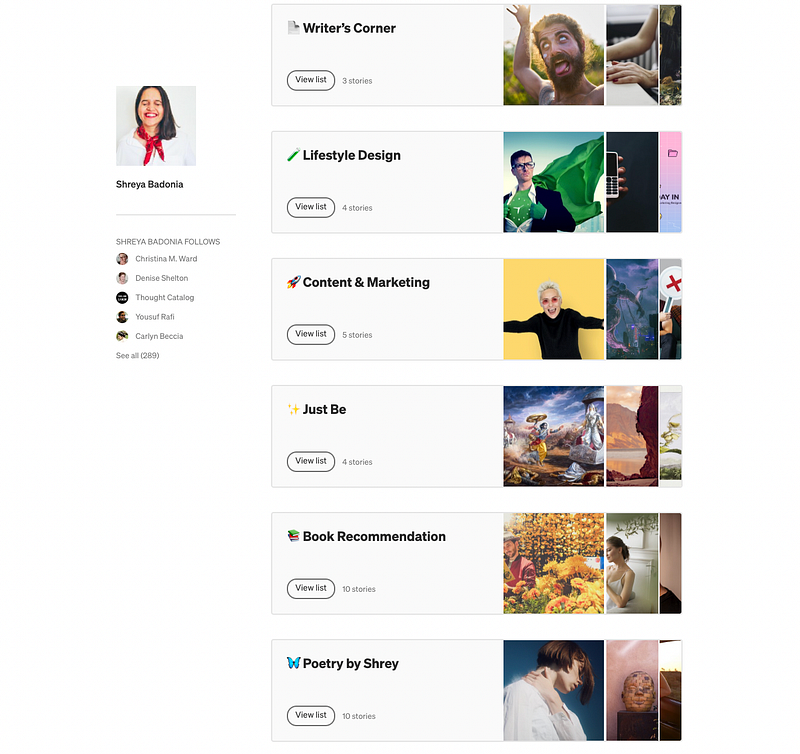
Screenshot of my public lists on Medium

Before organized my articles in the list, I’d spend a ton of time finding the right article to interlink in another article. With my reading list growing at 10x speed every day and adding my personal articles to the same list was challenging.

But with this list, makes my life as a writer much easier.

Another great thing about separating your articles into different topics is knowing which topics you enjoy writing about the most. Then, you can use the same metric and convert them into an e-book or a lead magnet in the future.

They can also be converted into a course, and you save hours in researching and scripting the video production.

Note: You don’t have to add all your articles into categories; add the ones worth sharing and you’re proud of.

The fewer number of lists, the less confused your readers will be.

2. Curate

If you’re less into writing and more into finding and organizing content from others, this could be your way to use the list feature.

Collect all your favorite stories and add them to a relevant list. The feature also allows you to write a single line about the article in the list to share your 2 cents about the shared content—a great way to share the curated list across social media.
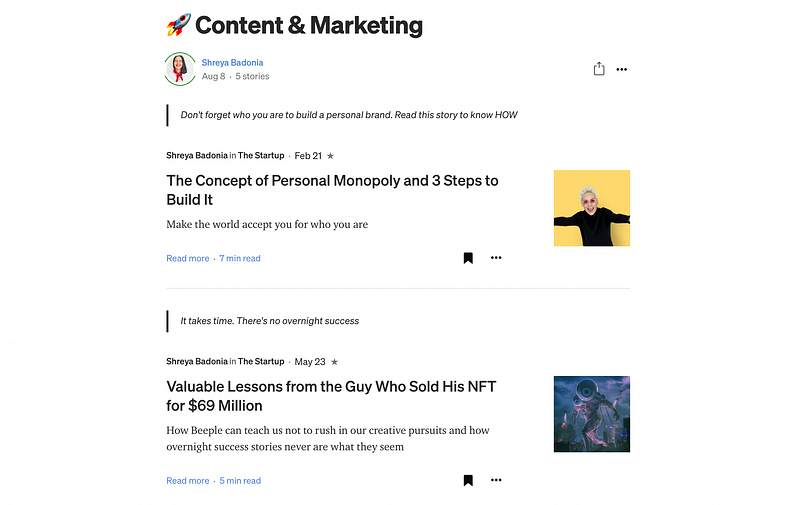
Topic-wise list with the tagline above each article. Screenshot by the author’s list

You can curate your favorite articles from the platform and share them with people outside the Medium ecosystem as well.

The curation can also be used to promote your publication and your students' work if you’re a writing coach.

There are multiple ways the curation can work for you, and if one of your lists gets tons of traffic, your profile and other lists can benefit from it.

I hope this article showed you a way to organize your list or curate it as per your interest :)

Every Sunday, I send an email about creativity, personal experiments, and lifestyle design with my best finds of the week. Join the community today.

Further reads

Medium
Medium List
Curation
Writing
Category
Recommended from ReadMedium