How to make the best out of Splunk & your Threat Intel Platform
After working with many different Threat Intelligence Platforms (TIP) and Indicators of Compromise (IOC) feeds I've decided to break the primary CTI use cases down down into the following components:
- CTI Repository Stats: IOC repository insights via dashboards.
- IOC Ad-Hoc Scanner: interactive dashboard for IOC scanning.
- IOC Scan Framework: automated near real-time and retrospective IOC matching following a systematic workflow.
They are basically a collection of Splunk artifacts (aka Knowledge Objects, KOs) for which I refer to as a Threat Intel Analytics package.
This is part of the work I do as an independent consultant, something that has been evolving over the years which is now super fast to replicate — regardless of the SIEM events normalization state (more details here).
Why not using Splunk's ES Threat Intelligence Framework?
To cut it short: just like many other out-of-the-box (OOTB) products, while it's good for some (quick value, less customization), it's not enough.
In highly demanding setups such as large scale SecOps and other mission-critical environments (ICS/SCADA), a relevant IOC match cannot be missed!
Also, consider that an insufficient IOC scanning implementation leads to performance impact on the Splunk infra while introducing false-negatives.
Lastly, we need to consider customers that are not using Enterprise Security (ES) App but still need to visualize and scan for IOCs in Splunk.
IOC Repository Stats
Once IOCs are available in Splunk, they usually land in a lookup before becoming ready for consumption (enrichment, matching, etc).
So at this point, we assume that IOC records are available in one or multiple lookups which are representations of tabular data (tables).
Using a TIP enables your teams to standardize ingestion and management of threat feeds and other CTI data at a very granular level while the output (IOC records) gets normalized, which eases later consumption.
There are a few differences when it comes to the IOC attributes provided by distinct Threat Intel providers, primary ones are listed below:
- IOC Type: IP address, Hash (MD5, SHA1), Domain and others.
- Threat feed name: the origin of the IOC record, for instance, ThreatFox from Abuse.ch is one.
- Confidence/Severity: how fresh or severe a related incident was but can also be related to how trustworthy the reporter (feed, circle) is.
- Tag: multi-value attribute providing extra context around an IOC.
Note that once you manually import a new IOC value or dataset via the TIP, the possibility to use custom tags basically enables adding extra context around each IOC record.
This particular feature (tagging) comes in handy later in the framework.
Splunking IOC datasets
Once you set an export filter in your TIP, depending on the integration, there will be a periodic pooling of the IOC database to Splunk so that all current records are always available in the SIEM.
What questions are usually asked here?
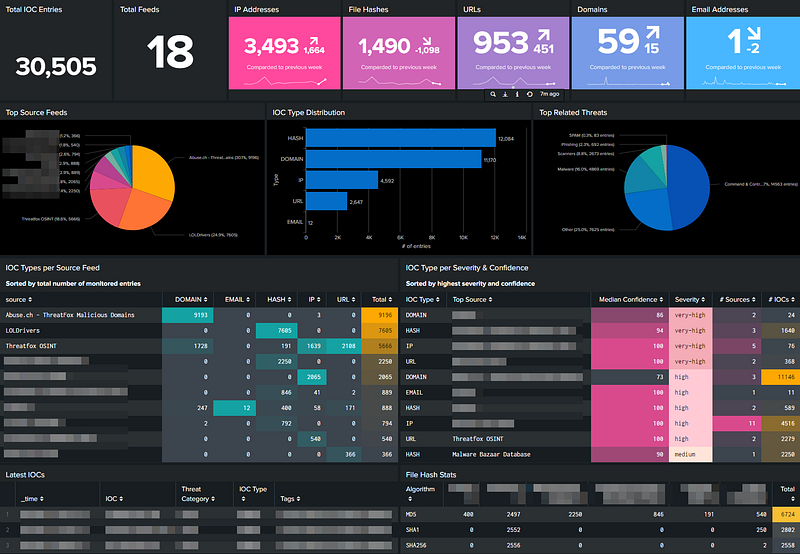
- How many IOCs are currently being monitored?
- How many new values are being ingested daily/weekly?
- What are the top threat feeds by overall volume and by IOC type?
- Which IOC types are the most common? Hashes? Domains?
- How many monitored IOCs are related to Malware or C&C?
The list goes on and on. At the end of the day, we want to be able to answer all those questions quickly, not by inspecting tabular data.
To address that, I've crafted a single dashboard to display all those metrics:
From that view more questions arise, for instance:
- How IOCs are overlapping across different Threat Feeds?
- How much more value premium feeds are bringing in?
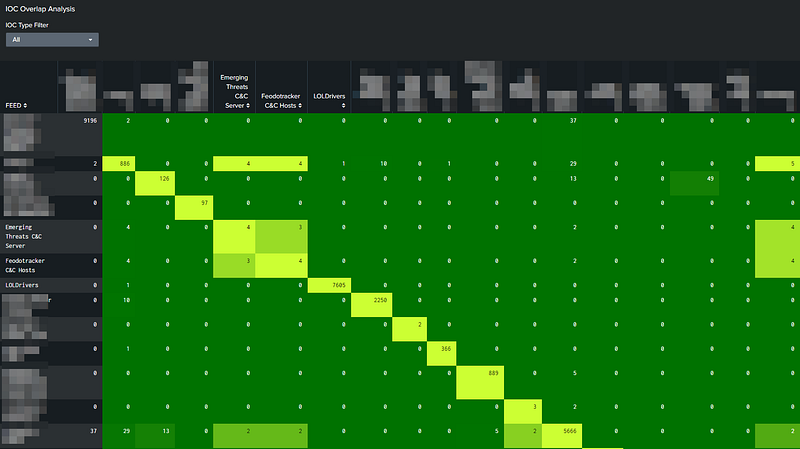
The trick there is to leverage Splunk's chart (over) command and heatmaps.
That might be handy for those paying for commercial threat feeds, especially if the plan is to scan for IOCs which requires de-duplication.
While all that helps understanding and getting insights on your threat feeds, it generates little value when it comes to actual security monitoring.
For that, we need to match those IOCs against the relevant logs without affecting Splunk performance, and most important, without missing a hit.
IOC Scan Framework
Whether IOC scanning is Threat Hunting or not, we should agree that every-single-SOC must be able to match IOCs against their logs, don’t we?
In case you want to know a bit more about this very controversial topic, consider reading the most accessed article from this blog this year:
The dotted lines between Threat Hunting and Detection Engineering
Motivation / Features
Below is what I had envisioned for such framework during design stage:
- What if you could simply flag (tag) or upload any IOC to your TIP and have it automatically scanned in Splunk?
- What if you could have the IOC hits or, in CTI lingo, the sightings displayed in a nice timeline with a solid drilldown to raw events?
- What if instead of simply looking 15 minutes back (near real-time), you could also scan for a longer period, say, last 90 days (retrospective)?
- What if that works without following the Common Information Model (CIM) or any other normalization practice? 😮
- What if the exception handling and IOC matching behavior could be fully controlled via the TIP via tagging by the CTI team? 🔥
Once such framework is deployed, it not only saves hundreds of analyst hours but also prevent users from running inefficient and heavy queries in Splunk!
The scanning workflow
The key here is collaboration among the different teams enabling management and consumption of IOC feeds from the TIP while the actual matching happens automagically in Splunk.
After the scanning gets rolling, the IOC matches or sightings are then stored in a summary index enabling later reporting and alerting.
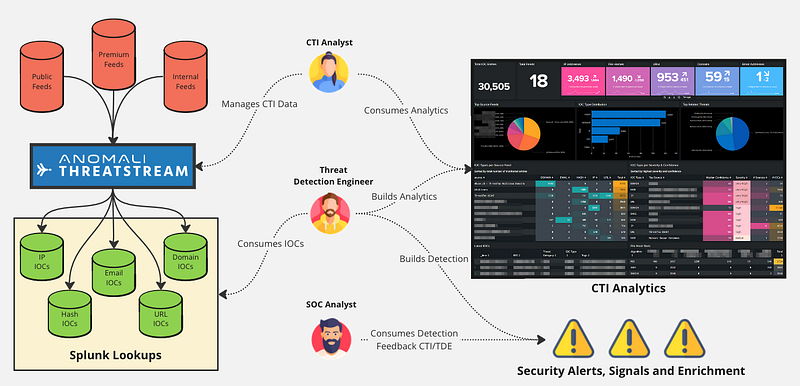
Properly curating a list of IOCs is a full-time job! And consider that's very far from everything a CTI analyst or team usually does.
To fully manage and control what gets exported to the detection pipeline requires some effort and it really pays off when the framework's outputs fruitful sightings and therefore, potential security incidents.
Centralizing the ingestion of thread feeds via a single point (TIP) not only standardizes how new entries or datasets are added but streamlines the process of consuming IOCs via other integrations (ex.: SOAR).
IOC Scan Types
It's of course prohibitive to scan all exported IOCs against many days back since that's going to affect the performance of the system.
With that in mind, I've basically decided to split the scan into two types:
- Near real-time
- Retrospective
The near real-time (NRT) scan jobs basically take all current exported IOCs and match them against the relevant log stream given a small lookback period, usually about a few minutes.
This is the most common scenario seen out there. That's also doable at log ingestion or earlier in the data engineering pipeline (tagging). However, that's not enough (keep reading).
💰 Here's a quick tip for Detection Engineers working with Splunk.
Always use _indextime as the time reference for high-frequency, short lookback time queries.
Even seasoned Splunk/SIEM developers might miss this one.
For instance, if your scan jobs are bound to _time value (log time), you might be missing the opportunity to match them in case there are delayed events or any misconfiguration around sensor clocks or time parsing.
Solutions to those challenges are detailed here and here.
What's missing with the NRT scan? ⚠️
It's really simple: if there are log events from yesterday matching a particular IOC record ingested today, you won't get any hits until that attacker infrastructure (IP, domain, URL, email) or file (hash) is seen again.
Introducing the Retrospective Scan
The retrospective scan is implemented a bit differently. First of all, we introduce the concept of Delta IOCs:
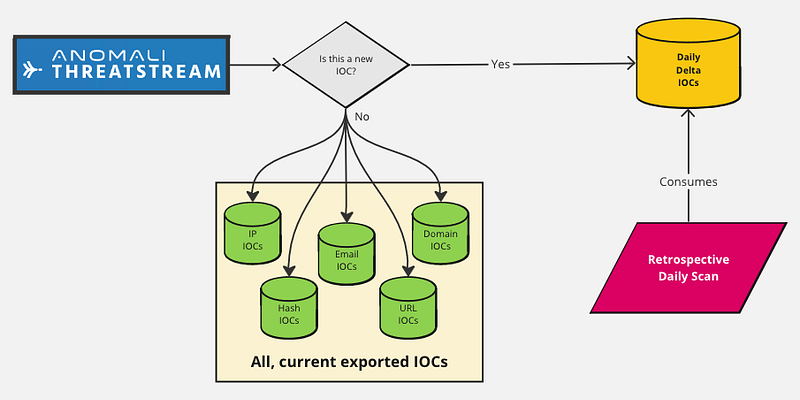
Delta IOCs are basically the IOC records difference between the current export and the previous one. It can be done daily (suggested) or even in shorter intervals which, of course, affects the overall implementation complexity and some detection metrics (time to detect).
As you can guess, the delta dataset is also stored in a lookup and is the result of a scheduled search that separates old from fresh records.
Those retrospective jobs (pink box) are able to look back for really longer periods, depending on how many target data sources are selected and how much resource capacity the Splunk environment has at its disposal.
The million dollar question: Alert on every single IOC hit?
Simple answer is no. Best answer is “it depends”.
I could spend many paragraphs on this one but consider the following:
- SMB, Enterprise and MSS/MDR providers have distinct targets when it comes to output quality and risk appetite.
- Threat Intel feeds, whether they are free/public or not, will provide distinct output and therefore the quality level varies widely.
- Alerting on file hashes and email addresses is very likely generating less matches than IP addresses and domain names. However, that doesn't necessarily mean it's good for alerting!
Having said that, here are a few suggestions:
- Making sure you have an individual or team owning the IOC or threat feeds management (curation). This requires time to do it properly.
- Define the data source target scope according to the IOC types. Makes little sense to match file hashes against web proxy logs.
- Dump the “hits” into a summary index. After designing your detection and enrichment use cases, those should then consume from that index.
- Evaluate the value CTI team could get from sightings. Building up an internal threat feed? Leveraging sightings in a TI circle or community?
For instance, if hashes hits are quite rare, it's easy to set it for alerting. Even though a phishing email is already blocked, you might be able to later link it to a relevant Threat Actor (TA) or campaign.
An IP address hit might only fulfill the alerting threshold once it’s observed steadily over a few hours and when matching certain protocols. Perhaps it's worth only doing so for outgoing traffic!
You see? This is not as easy as it seems. Detection Engineers should play an active role along with CTI and SOC teams during these discussions.
Displaying scan results
Once a match is observed via those scan jobs (scheduled searches) and since every IOC match is saved into a summary index, it becomes easy to nicely display those results in a dedicated dashboard.
The IOC Scan Stats contains the following info and metrics:
- Daily delta records broken by IOC type
- Sightings timeline with a drilldown to the matching raw events
- Health status on the scanning jobs broken down by scan type
Here's a sample view:
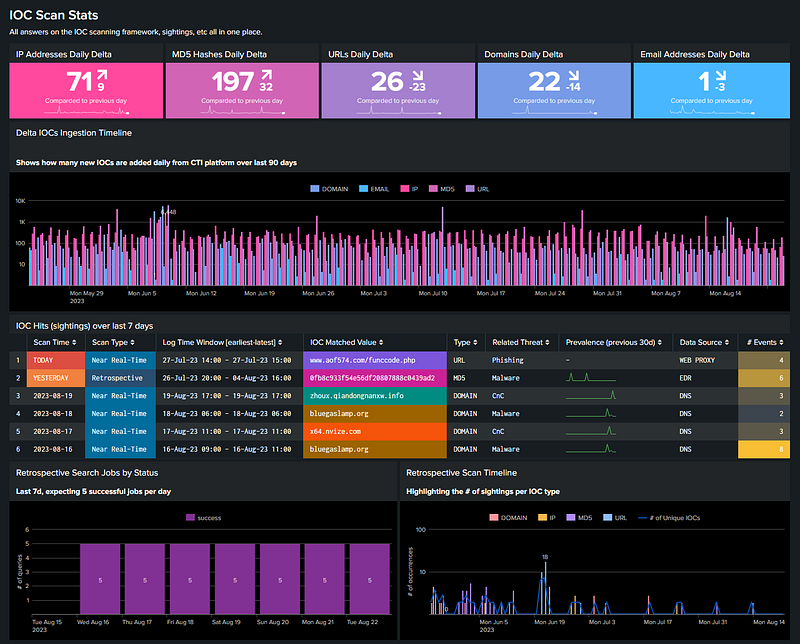
In case those matches (summary index events) are also consumed for alerting, the same drilldown to the raw events is easily included in the alert payload so that triage and investigation can be quickly performed.
There are many framework details to explore here but I will keep it short.
Controlling the scan behavior via IOC tagging 💡
As mentioned earlier, a decent TIP allows CTI analysts to add custom tags to every IOC record or threat feed so that extra context can be added.
With that in mind, this feature allows us to implement a few distinct use cases so that SOC and CTI can benefit from it. For instance:
- IOCs with an <ORG>_Ignore tag are automatically ignored by the framework. Useful for preventing more hits from false-positives.
- Similarly, IOCs containing an <ORG>_Watchlist will get scanned but never used to generate alerts, only for reporting.
- In case there are manually added IOCs with an <ORG>_Internal tag, those are always exported, regardless of the export filter criteria.
The possibilities are endless. have you noted that a simple tag change in the TIP basically controls the scanning outcome in the SIEM? All that while providing visibility and ownership to both CTI and SOC teams.
IOC Ad-Hoc Scanner
Besides the automated scanning, during analysis and investigations, analysts may need to quickly uncover the activity matching a particular entity (IP, Domain, Email, etc).
For that, this package also includes an interactive dashboard interface for enabling ad-hoc, manual scans according to what the user specifies.
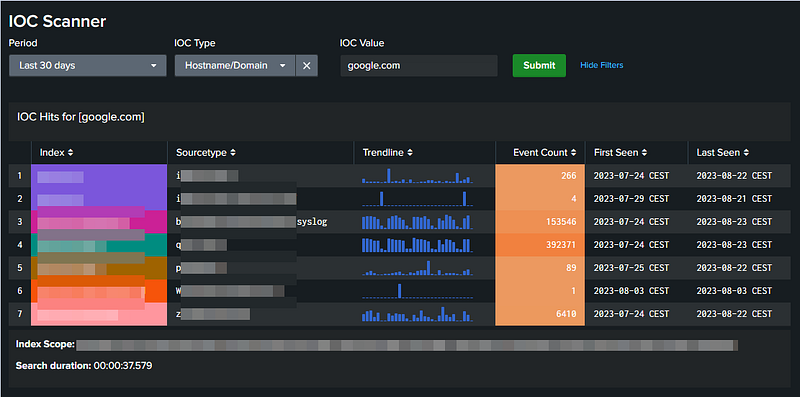
The trick part here is not only using tstats and TERM() but also fine-grained scoping of the target indexes and sourcetypes according to the IOC type.
That way, massive amounts of events/buckets can be crunched, leading to less performance impact and faster results! A real game-changer.
The details on what goes under the hood can be found here. If you already leverage that or is doing something similar, happy to bounce ideas off.
Closing Thoughts
The analytics shown here use Splunk and Anomali’s ThreatStream but they should be repeatable in any other decent SIEM in combination with an IOC dataset, regardless if it comes via a Threat Intel Platform or not.
What are the main challenges when leveraging IOCs for Threat Detection in your org? Happy to hear from you!
Eager for more?
If you like this article, please leave a clap, a highlight or a comment.
Lastly, consider following our Threat Detection publication where a team of talented practitioners share more tips and insights from the field.