
How to make sure you’re on top of your tasks
Make this your priority
If, like me, you need to write everything down, then what are the best ways to make sure it’s captured in a way that suits you? And, once you’ve put it somewhere — then what?
Task management is nothing new. It’s been happening since the dawn of time. From the early cave dwellers who needed to know what to hunt for dinner; you’ve seen the drawings on cave walls, to modern families needing to know what to buy for dinner and all projects and ‘stuff to do’ in between.
OK, so maybe I exaggerated about the cave dwellers, but the theory remains if you have something that needs to be done, write it down.
Get it out of your head and into a system. It’s pretty much the first rule of Getting Things Done®️, the productivity system created by David Allen.
If you don’t capture your to-dos; those jobs that need doing, you will forget. You will appear unfocused and unreliable to people around you.
The human brain is great for the here and now, but remembering what to do in the future is not top of its list.
Write It Down
Get it out of your head!
You’ll experience less stress. You know you won’t forget to do something, because it’s written down. And, importantly, keep them in one place. Having different lists, or individual tasks jotted on post-it notes around the house or office is almost as bad as not writing them down in the first place; not least because they can get lost.
So; are we agreed that you’ll get all those tasks out of your head and into a system? You’ll be much better organised and you’ll be much more reliable.
Of course; the next question is; “Where do I capture them?”
This one is quite personal, and we’ll start with the basics.

The good, old fashioned, pad and pen. Let’s be honest, it’s cheap. The batteries won’t run out (unless you run out of ink) and sometimes it’s just quicker to jot a note down, but that may not be best, and I’ll come on to that later.
The downsides of a pad and pen (or pencil) are that it’s not always convenient to carry a pad with you everywhere, and as I’ve already mentioned, scraps of paper will just get lost. Finally, it’s much harder to manage tasks on a paper-based system, you’ll see why in a bit.
So, if not paper and pen, then the obvious alternative is electronic. Using an app or web-based system.

Firstly, the majority of us always have a device to hand; whether our phone, tablet or laptop — this means we can quickly add a task to one of many apps that are available on the market.
Apps such as Things, Google Keep, TickTick and Todoist. Most of them are available across different platforms, so can be used on Windows, Mac, Android or iOS/iPadOS and on the web too.
Once in an app, tasks are easy to manage and set priorities and deadlines.
Of course, the battery might run out (in which case you’re relegated to paper and pen for now) and it isn’t as quick to just jot down a note. You need to unlock the device, find the app and enter it. Ok, so you can use things like Siri or Alexa or Google to add tasks to your lists, so this isn’t the end of the world.
You now know that it’s important to get all of your tasks, jobs, to-dos, call them what you like, out of your head. Immediately. As soon as you think of something that needs doing write it down.
There is one small caveat here.
If the task will take less than 2 minutes just do it. You’ll spend longer writing it down than actually doing it, and you’ll feel better having done something.
Managing Your Tasks
So, tasks captured. Now you need to manage them. This is important for two reasons. Well, first, you’ll actually remember to do them. Secondly, once written down, you can see what there is, and start to prioritise. Also, seeing them written down will help to reduce anxiety and stress. You know what needs to be done. Now you need to work out how and when. This leads us very nicely onto prioritisation.
It’s all very well capturing your tasks, whether on paper or in an app, but if you don’t do anything with them then there’s very little point. The first thing to do is prioritise them. This sounds more onerous than it actually is and in fact, there is a great method you can use to help you.
It’s called the Eisenhower Matrix. Urgh! More theory…. I knooooowww....
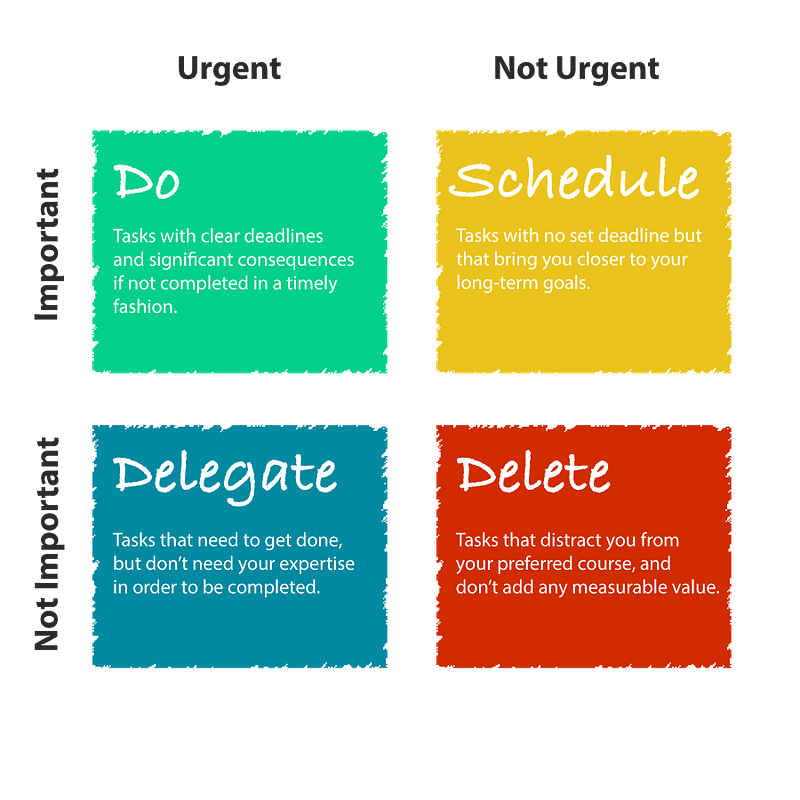
The Eisenhower Matrix is a quadrant for helping to understand how priorities work.
1. Important and Urgent — these are your highest priority. The “must do now” tasks. Also sometimes known as P1. 2. Important by Not Urgent — these are the P2 tasks, those that need to be done, but not as quickly as the others 3. Not Important but Urgent — P3 — these are the tasks that have a deadline attached to them 4. Not Important and Not Urgent — P4 (or no priority associated with them. These ones are your ‘someday’ tasks. Almost the ‘nice to do’ but not when you have time.
Considering these 4 points will help you to determine how you should prioritise the tasks you need to do.
Using an app for this is much easier than using paper. You can add priorities easily (and change them where necessary) without needing to cross things out, or rewrite entire lists. So now you have your tasks written down, and you’ve prioritised them, according to their importance and urgency. What now?
Bigger is not better when it comes to managing and completing tasks. A job that looks too big will just cause you to delay. You’ll put it off, because it looks too intimidating. You’ll push it to the bottom of the list, which is no good for anyone.
Smaller is better. Break tasks into small chunks, make them more manageable. This might increase the actual number of tasks on your to-do list, but they will be easier to achieve. In most apps you can set them as sub-tasks of the main one, so they are nested; instead of one long list!
Oh, and start small. Do the smaller tasks first and two things will happen: Firstly, you’ll actually start to get them done Secondly; you will feel like you’re accomplishing something, which in turn will spur you on to do more.
Focus is the key…
Focus on one task at a time. This can take discipline to achieve, but do ONE task at a time. See what it is that you need to do and focus.
If you start to jump around from one task to another there’s a very high possibility that you won’t complete the task properly; if at all. There’s the saying “don’t put off until tomorrow what you can do today”.
Don’t procrastinate.
It’s obvious really, but when we’re faced with the struggle of getting something done, we just decide we don’t want to do it — and put it off for another time.
If necessary, see if you can break it down; and take it from there. Depending on the tasks you have; it might be necessary to put a time limit on how long you spend in one sitting.
Remember, you do have other things to do, so dedicating all your time to your tasks will actually mean you’ll end up behind, and an ever-growing task list.
Set aside 20 minutes or so to get through what you can, before returning to your other work.
Of course, if you find you’re getting through them, then keep going. But that’s a call you’ll have to make.
Planning
Next, plan ahead.
A big part of planning your tasks is actually knowing what’s on the list. Put aside some time every day to review your to-do list. I usually look at my list every evening and where necessary I’ll re-prioritise those that don’t need completing straight away.
I also check that each task is meaningful. It’s horrible when you get to a task that, maybe you noted a while ago, and you think “what does that mean”
Make sure you have enough information to continue. If necessary, add more context to the task.
If you can’t remember, then delete it (you can always add it again later).
Distractions
There’s so much going on around us, it’s easy to be distracted.
- Social media vying for our attention.
- Emails
- Meetings
- Life!
There are a number of things you can do, to cut down on the distractions, to help you focus on the tasks at hand:
- Turn off notifications on your devices.
- Set yourself a dedicated time to look at emails. They don’t need to be looked at or actioned immediately. So put some time in your diary to look at your emails and reply, action or delete as necessary
- Don’t let anyone interrupt you. In fact, with so many working at home this could go two ways. Either the family is interrupting you, or Slack is pinging all over the place. Just ask, politely, if you can get back to them when you have finished what you’re doing.
- Don’t have the television on in the background. That’s a sure-fire distraction.
- Set yourself periods for breaks
So far we’ve looked at capturing your tasks somewhere, how to prioritise them and reducing the number of distractions.
Delegation
But, what if you want to delegate the tasks to someone else? What is delegation? Some say that it’s the art of good management. Get the task off your list and give it to someone else to worry about!
In reality, delegation means the transfer of responsibility for a task from a manager to a subordinate. Which is great if you’re the sort of person who just can’t say ‘No’. The ability to delegate may help you deal with your workload.
Delegation is also great for increasing the responsibility of someone new, and training someone in a new role.
However, if you plan to delegate you need to bear in mind a couple of things:
- Is the person who you’re delegating to actually capable of doing the task? You own the task. Its completion is your responsibility.
- You need to be sure it will be completed to the standard you expect.
As I’ve said, it’s ideal if it’s part of training someone, but you need to hold their hand to start with. Check what they’re doing and be sure they know what to do before you can be confident they will do the job the right way, every time.
Wow!
That’s been a lot to go through, and I hope there’s value somewhere in there to help you.
Revision Time
- Capture your tasks — on paper or in an app, that’s up to you — but write them down. Get them out of your head.
- Manage and prioritise — Organise your tasks, break them down into bitesize chunks to make them more manageable, and prioritise them.
- Use the Eisenhower Matrix to help you
- Reduce the number of distractions — turn off the tv, turn off notifications and, if you can, ask people to come back later.
- Delegation — If you’re confident that someone else can do the job, or you’re training someone new, then delegation will help you reduce your direct workload, but you are still responsible for the task being completed.
That’s it.
That’s all there is to it!
As with anything, it’s habit-forming, you need to start doing this and you need to continue to do this, and it will soon become totally natural.
Thank you for reading
👉🏻 Click here if you’d like to receive my articles directly into your inbox
👉🏻 Sign up with this link for access to everything on Medium, and you’ll support me directly with a portion of your fee, it won’t cost you a penny more.
👉🏻 If you’d prefer, please buy me a coffee to show your appreciation. 20% of payments received will be donated to Cancer Research UK.


