avatarDi(Candice) Han

Free AI web copilot to create summaries, insights and extended knowledge, download it at here

2281

Abstract

an class="hljs-attr">sizes</span> = df[‘y’] <span class="hljs-attr">colors</span> = [‘<span class="hljs-comment">#FFB600’, ‘#09A0DA’,’#8464a0'] #define colors of three donut pieces</span> explode = (<span class="hljs-number">0</span>, <span class="hljs-number">0</span>, <span class="hljs-number">0</span>) <span class="hljs-comment"># explode a slice if required</span> textprops = {“fontsize”:<span class="hljs-number">14</span>,’color’:’black’} <span class="hljs-comment"># Font size of text in donut chart</span></pre></div><div id="5461"><pre>plt.pie(sizes, <span class="hljs-attribute">explode</span>=explode, <span class="hljs-attribute">labels</span>=labels, <span class="hljs-attribute">colors</span>=colors, <span class="hljs-attribute">autopct</span>=’%.2f%%’, # Show data <span class="hljs-keyword">in</span> 0.00% pctdistance =0.9, <span class="hljs-attribute">shadow</span>=<span class="hljs-literal">False</span>, textprops =textprops, wedgeprops={‘linewidth’: 3.0, ‘edgecolor’: ‘white’},)

<span class="hljs-comment">#draw a circle at the center of pie to make it look like a donut</span> centre_circle = plt.Circle((0,0),0.65,<span class="hljs-attribute">color</span>=’grey’, <span class="hljs-attribute">fc</span>=’white’,linewidth=1.00) fig = plt.gcf() fig.gca().add_artist(centre_circle)</pre></div><div id="b235"><pre>plt.axis(‘equal’) # <span class="hljs-keyword">Set</span> aspect ratio <span class="hljs-keyword">to</span> be equal so that pie <span class="hljs-keyword">is</span> drawn <span class="hljs-keyword">as</span> a <span class="hljs-type">circle</span>. plt.<span class="hljs-keyword">show</span>()</pre></div><p id="49c6">The donut chart looks like this:</p><figure id="561f"><img src="https://cdn-images-1.readmedium.com/v2/resize:fit:800/1*xGmGNdYmLChO_j1sT0LS1g.png"><figcaption></figcaption></figure><h1 id="5227">4. Draw a nested donut chart</h1><p id="7834">If under each market, we would like to show the shares of each product, then we need to create subgroup data and draw the nested donut chart.</p><div id="7ce3"><pre>plt.figure<span class="hljs-params">(<span class="hljs-attr">figsize</span>=(8, 8)</span>) <span class="hljs-comment"># change the size of a figure</span></pre></div><div id="9c45"><pre><span class="hljs-at

Options

tr">labels</span> = df[‘x’] <span class="hljs-attr">sizes</span> = df[‘y’] <span class="hljs-attr">colors</span> = [‘<span class="hljs-comment">#FFB600’, ‘#09A0DA’,’#8464a0']</span></pre></div><div id="f3e6"><pre>labels_subgroup = [‘product A’, ‘product B’, ‘product C’, ‘product D’, ‘product E’, ‘product F’, ‘product G’] sizes_subgroup = [20, 15, 10, 20, 15, 10, 10] colors_subgroup = [‘#FFCE53’, ‘#FFDA7E’, ‘#FFE9B2’, ‘#30B7EA’, ‘#56C7F2’, ‘#C8A2C9’,’#D6A7DF’]

outside_donut = plt.pie(sizes, <span class="hljs-attribute">labels</span>=labels, <span class="hljs-attribute">colors</span>=colors, <span class="hljs-attribute">startangle</span>=90, <span class="hljs-attribute">frame</span>=<span class="hljs-literal">True</span>, <span class="hljs-attribute">autopct</span>=’%.2f%%’, pctdistance =0.85)</pre></div><div id="a4e3"><pre>inside_donut = plt.pie(sizes_subgroup, <span class="hljs-attribute">labels</span>=labels_subgroup, <span class="hljs-attribute">colors</span>=colors_subgroup, <span class="hljs-attribute">radius</span>=0.7, <span class="hljs-attribute">startangle</span>=90, <span class="hljs-attribute">labeldistance</span>=0.6, <span class="hljs-attribute">autopct</span>=’%.2f%%’, pctdistance =0.4) centre_circle = plt.Circle((0, 0), 0.4, <span class="hljs-attribute">color</span>=’white’, <span class="hljs-attribute">linewidth</span>=0) fig = plt.gcf() fig.gca().add_artist(centre_circle)

plt.axis(‘equal’) plt.tight_layout()</pre></div><div id="6dde"><pre>plt.<span class="hljs-keyword">show</span>()</pre></div><p id="8059">Then we will get a nested donut chart which looks like this:</p><figure id="8b16"><img src="https://cdn-images-1.readmedium.com/v2/resize:fit:800/1*3wmVFwc7PI5Txp8rKIAQCg.png"><figcaption></figcaption></figure><p id="04c4">Generally, the subgroup will follow the color of its main group but with different shades. So the audience will not be confused by too many colors.</p><p id="9841"><i>More content at <a href="http://plainenglish.io/"><b>plainenglish.io</b></a>. Sign up for our <a href="http://newsletter.plainenglish.io/"><b>free weekly newsletter</b></a>. Get exclusive access to writing opportunities and advice in our <a href="https://discord.gg/GtDtUAvyhW"><b>community Discord</b></a>.</i></p></article></body>

How to Make a Beautiful Donut Chart and Nested Donut Chart in Matplotlib

Donut charts are used to show the proportions of categorical data, with the size of each piece representing the proportion of each category.

A donut chart is essentially a pie chart with an area of the centre cut out. However, a donut chart has its own advantage compared to a pie chart. Donut charts is able to provide a better data intensity ratio to standard pie charts since the blank center can be used to display additional, related data. Also, it is possible to nest several donut charts together to visualize data in different granularity.

In this tutorial, I will show you how to make a standard donut chart and a nested donut chart using matplotlib in Python.

1. Import libraries

import numpy as np 
import pandas as pd
import matplotlib.pyplot as plt

2. Create a dataframe for data visualization

df=pd.DataFrame({'x':['Market A', 'Market B', 'Market C'],
 'y':[45, 35, 20]})
df

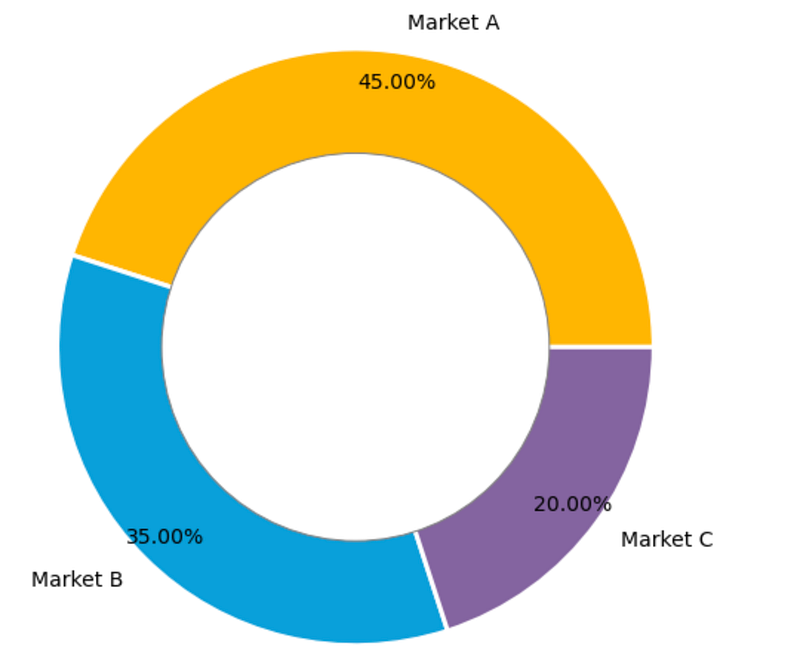
The dataset is very simple. It contains 3 markets and their respective market shares.

3. Draw a standard donut chart

plt.figure(figsize=(8, 8)) # change the size of a figure
# The slices will be ordered and plotted counter-clockwise.
labels = df[‘x’]
sizes = df[‘y’]
colors = [‘#FFB600’, ‘#09A0DA’,’#8464a0'] #define colors of three donut pieces
explode = (0, 0, 0) # explode a slice if required
textprops = {“fontsize”:14,’color’:’black’} # Font size of text in donut chart
plt.pie(sizes, explode=explode, labels=labels, colors=colors,
 autopct=’%.2f%%’, # Show data in 0.00%
 pctdistance =0.9,
 shadow=False,
 textprops =textprops,
 wedgeprops={‘linewidth’: 3.0, ‘edgecolor’: ‘white’},)
 
#draw a circle at the center of pie to make it look like a donut
centre_circle = plt.Circle((0,0),0.65,color=’grey’, fc=’white’,linewidth=1.00)
fig = plt.gcf()
fig.gca().add_artist(centre_circle)
plt.axis(‘equal’) # Set aspect ratio to be equal so that pie is      drawn as a circle.
plt.show()

The donut chart looks like this:

4. Draw a nested donut chart

If under each market, we would like to show the shares of each product, then we need to create subgroup data and draw the nested donut chart.

plt.figure(figsize=(8, 8)) # change the size of a figure
labels = df[‘x’]
sizes = df[‘y’]
colors = [‘#FFB600’, ‘#09A0DA’,’#8464a0']
labels_subgroup = [‘product A’, ‘product B’, ‘product C’, ‘product D’, ‘product E’, ‘product F’, ‘product G’]
sizes_subgroup = [20, 15, 10, 20, 15, 10, 10]
colors_subgroup = [‘#FFCE53’, ‘#FFDA7E’, ‘#FFE9B2’, ‘#30B7EA’,
 ‘#56C7F2’, ‘#C8A2C9’,’#D6A7DF’]
 
outside_donut = plt.pie(sizes, labels=labels, colors=colors,
 startangle=90, frame=True,
 autopct=’%.2f%%’,
 pctdistance =0.85)
inside_donut = plt.pie(sizes_subgroup, labels=labels_subgroup,
 colors=colors_subgroup, radius=0.7,
 startangle=90, labeldistance=0.6,
 autopct=’%.2f%%’,
 pctdistance =0.4)
centre_circle = plt.Circle((0, 0), 0.4, color=’white’, linewidth=0)
fig = plt.gcf()
fig.gca().add_artist(centre_circle)
 
plt.axis(‘equal’)
plt.tight_layout()
plt.show()

Then we will get a nested donut chart which looks like this:
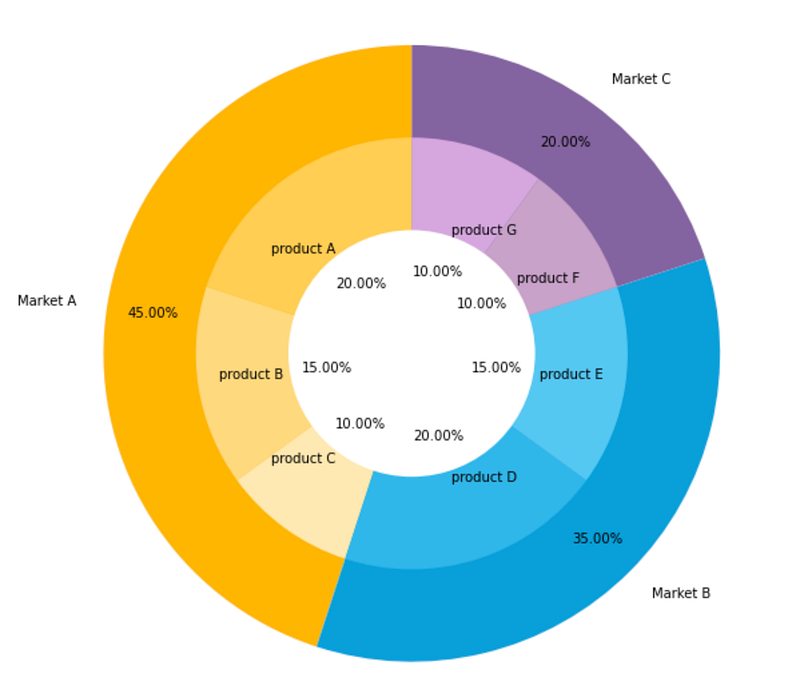
Generally, the subgroup will follow the color of its main group but with different shades. So the audience will not be confused by too many colors.

More content at plainenglish.io. Sign up for our free weekly newsletter. Get exclusive access to writing opportunities and advice in our community Discord.

Python
Matplotlib
Charts
Data Science
Data Visualization
Recommended from ReadMedium