avatarMartynas Ki. (@strangecash)

Summary

The website content provides instructions on how to back up all Medium stories, emphasizing the importance of this often overlooked feature.

Abstract

The article "How to make a backup of all your Medium stories?" discusses a crucial yet underemphasized feature on Medium that allows users to export their content. It guides readers through the process of creating a complete backup of their Medium stories, including not just their articles but also bookmarks, claps, highlights, comments, and even IP addresses. The author, who has become an avid Medium user, points out that the backup feature is not prominently highlighted on the platform. The steps involve navigating to the 'Settings' section of a user's Medium account, selecting 'Security and apps,' and then choosing 'Download your information' to initiate the export. The author also shares a personal GIF demonstrating the backup process and expresses relief in knowing that their data is secure, ensuring that users can rest easy with their content safely backed up.

Opinions

  • The author considers the backup feature on Medium to be essential but insufficiently promoted.
  • They express a personal obsession with Medium, engaging extensively with the platform's features.
  • The author admits laziness in not wanting to use external video hosting services like YouTube or Vimeo for Medium content.
  • There is a sense of amazement at the amount of personal data that is collected and can be backed up.
  • The author reassures readers that having a backup provides peace of mind in the event of a service disruption or data

How to make a backup of all your Medium stories?

One of the most important features that every Mediumer should know about 🤷

Photo by Alexander Sinn on Unsplash

So yes, I have to admit… Recently I became a maniac of Medium: reading, writing, responding, commenting and trying to figure out all the features that this platform has. 🤓

And, in my opinion, this backup feature is a bit “hidden” — it does not get enough attention that it deserves. 💾

So, StrangeCash 👽 to the rescue! 🦸‍♂️😂

Steps to make a complete backup of your Medium stories:

  1. Login to your Medium account and go to Settings
  2. There click on Security and apps
  3. Then click on Download your information
  4. On the opened window, click on the green button Export

As far as I know, Medium does not allow to upload videos directly into their editor. And I am too lazy to create YouTube / Vimeo account for that. 🦥

So the whole process can be seen in this GIF:
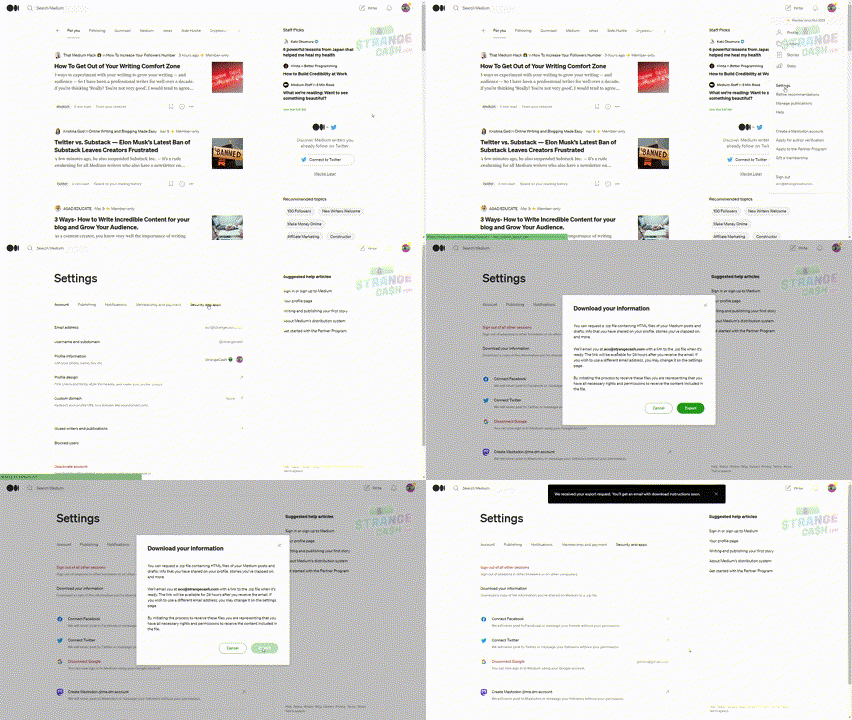
Me exporting Medium backup 😎

And that’s it folks! You will receive a link with a .zip archive with all of your Medium data. The file structure looks like this:
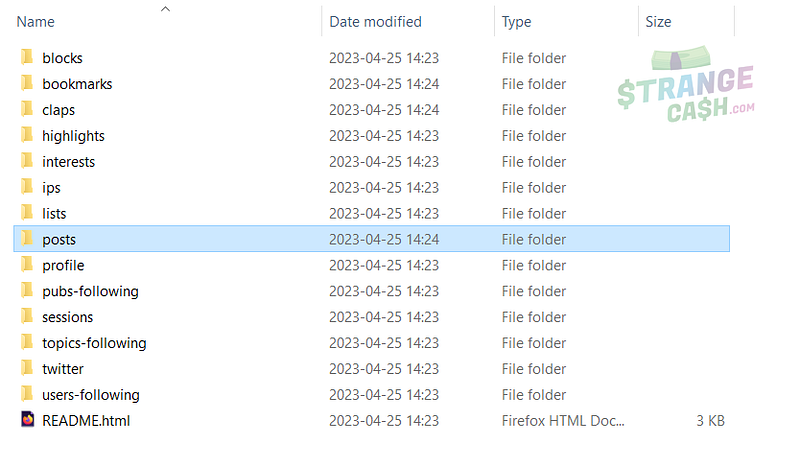
File structure of Medium backup 💾

So as you can see it is not only your stories/articles/posts in HTML format, but also bookmarks, claps, highlights, comments and even IP addresses!

Amazing how much data we leave as a trace, huh? 🧐

So now you can sleep peacefully — you have a backup and in case Medium goes down or some Black Swan event happens, you have all of your data saved!

Thank you very much for reading! Check out my other stories:

🪩 🤩 If you liked this story, you know what to do. 👏 😂

Medium
Writing On Medium
Backup
Medium Tips
Medium Advice
Recommended from ReadMedium