
How to load model YOLOv8 Tensorrt
YOLOv8 is the latest version (v8) of the YOLO (You Only Look Once) object detection system. YOLO is a real-time, one-shot object detection system that aims to perform object detection in a single forward pass of the network, making it fast and efficient. YOLOv8 is an improved version of the previous YOLO models with improved accuracy and faster inference speed.
TensorRT is a high-performance deep learning inference library developed by NVIDIA. It is designed to optimize and deploy trained neural networks for production deployment on NVIDIA GPUs. TensorRT can take trained deep learning models, such as those created with popular frameworks like TensorFlow, PyTorch, and Caffe, and convert them into highly optimized inference engines that can be deployed for real-time inferencing on a variety of NVIDIA hardware platforms.
- How to export model to Tensorrt?
git clone https://github.com/triple-Mu/YOLOv8-TensorRT.git
cd YOLOv8-TensorRT

# Install requirements
pip3 install -r requirements.txt
Clone repository git clone https://github.com/triple-Mu/YOLOv8-TensorRT.git and then install requirements
# Download model yolo
wget https://github.com/ultralytics/assets/releases/download/v0.0.0/yolov8s.pt
# Export to onnx
python3 export-det.py \
--weights yolov8s.pt \
--iou-thres 0.65 \
--conf-thres 0.25 \
--topk 100 \
--opset 11 \
--sim \
--input-shape 1 3 640 640 \
--device cuda:0This script can be used to export a YOLOv8 model to ONNX. The command also includes several arguments that configure the export process:
--weights yolov8s.pt: specifies the path to the YOLOv8 weights file. In this example, the weights file is named "yolov8s.pt".--iou-thres 0.65: specifies the IoU threshold to use during post-processing. Any detections with an IoU less than this threshold will be discarded.--conf-thres 0.25: specifies the confidence threshold to use during post-processing. Any detections with a confidence score less than this threshold will be discarded.--topk 100: specifies the maximum number of detections to return.--opset 11: specifies the ONNX operator set version to use for the exported model. In this example, version 11 is used.--sim: specifies that TensorRT should use the INT8 precision mode for the exported model.--input-shape 1 3 640 640: specifies the input shape of the model. In this example, the model takes an input tensor with shape (1, 3, 640, 640).--device cuda:0: specifies the GPU device to use for inference. In this example, the first GPU device is used.
python3 build.py \
    --weights yolov8s.onnx \
    --iou-thres 0.65 \
    --conf-thres 0.25 \
    --topk 100 \
    --device cuda:0
This script can be used to build a TensorRT engine from an ONNX model file. The command also includes several arguments that configure the build process:
--weights yolov8s.onnx: specifies the path to the ONNX model file. In this example, the ONNX model file is named "yolov8s.onnx".--iou-thres 0.65: specifies the IoU threshold to use during post-processing. Any detections with an IoU less than this threshold will be discarded.--conf-thres 0.25: specifies the confidence threshold to use during post-processing. Any detections with a confidence score less than this threshold will be discarded.--topk 100: specifies the maximum number of detections to return.--device cuda:0: specifies the GPU device to use for inference. In this example, the first GPU device is used.
2. Load Inference Model
import os
import cv2
import warnings
from collections import namedtuple
from pathlib import Path
from typing import List, Optional, Tuple, Union

import numpy as np
import pycuda.autoinit  # noqa F401
import pycuda.driver as cuda
import tensorrt as trt
from numpy import ndarray

os.environ['CUDA_MODULE_LOADING'] = 'LAZY'
warnings.filterwarnings(action='ignore', category=DeprecationWarning)
class TRTEngine:
def __init__(self, weight: Union[str, Path]) -> None:
self.weight = Path(weight) if isinstance(weight, str) else weight
self.stream = cuda.Stream(0)
self.__init_engine()
self.__init_bindings()
self.__warm_up()
def __init_engine(self) -> None:
logger = trt.Logger(trt.Logger.WARNING)
trt.init_libnvinfer_plugins(logger, namespace='')
with trt.Runtime(logger) as runtime:
model = runtime.deserialize_cuda_engine(self.weight.read_bytes())
context = model.create_execution_context()
names = [model.get_binding_name(i) for i in range(model.num_bindings)]
self.num_bindings = model.num_bindings
self.bindings: List[int] = [0] * self.num_bindings
num_inputs, num_outputs = 0, 0
for i in range(model.num_bindings):
if model.binding_is_input(i):
num_inputs += 1
else:
num_outputs += 1
self.num_inputs = num_inputs
self.num_outputs = num_outputs
self.model = model
self.context = context
self.input_names = names[:num_inputs]
self.output_names = names[num_inputs:]
def __init_bindings(self) -> None:
dynamic = False
Tensor = namedtuple('Tensor', ('name', 'dtype', 'shape', 'cpu', 'gpu'))
inp_info = []
out_info = []
out_ptrs = []
for i, name in enumerate(self.input_names):
assert self.model.get_binding_name(i) == name
dtype = trt.nptype(self.model.get_binding_dtype(i))
shape = tuple(self.model.get_binding_shape(i))
if -1 in shape:
dynamic |= True
if not dynamic:
cpu = np.empty(shape, dtype)
gpu = cuda.mem_alloc(cpu.nbytes)
cuda.memcpy_htod_async(gpu, cpu, self.stream)
else:
cpu, gpu = np.empty(0), 0
inp_info.append(Tensor(name, dtype, shape, cpu, gpu))
for i, name in enumerate(self.output_names):
i += self.num_inputs
assert self.model.get_binding_name(i) == name
dtype = trt.nptype(self.model.get_binding_dtype(i))
shape = tuple(self.model.get_binding_shape(i))
if not dynamic:
cpu = np.empty(shape, dtype=dtype)
gpu = cuda.mem_alloc(cpu.nbytes)
cuda.memcpy_htod_async(gpu, cpu, self.stream)
out_ptrs.append(gpu)
else:
cpu, gpu = np.empty(0), 0
out_info.append(Tensor(name, dtype, shape, cpu, gpu))
self.is_dynamic = dynamic
self.inp_info = inp_info
self.out_info = out_info
self.out_ptrs = out_ptrs
def __warm_up(self) -> None:
if self.is_dynamic:
print('You engine has dynamic axes, please warm up by yourself !')
return
for _ in range(10):
inputs = []
for i in self.inp_info:
inputs.append(i.cpu)
self.__call__(inputs)
def set_profiler(self, profiler: Optional[trt.IProfiler]) -> None:
self.context.profiler = profiler \
if profiler is not None else trt.Profiler()
def __call__(self, *inputs) -> Tuple[ndarray, ndarray, ndarray, ndarray]:
assert len(inputs) == self.num_inputs
contiguous_inputs: List[ndarray] = [
np.ascontiguousarray(i) for i in inputs
]
for i in range(self.num_inputs):
if self.is_dynamic:
self.context.set_binding_shape(
i, tuple(contiguous_inputs[i].shape))
self.inp_info[i].gpu = cuda.mem_alloc(
contiguous_inputs[i].nbytes)
cuda.memcpy_htod_async(self.inp_info[i].gpu, contiguous_inputs[i],
self.stream)
self.bindings[i] = int(self.inp_info[i].gpu)
output_gpu_ptrs: List[int] = []
outputs: List[ndarray] = []
for i in range(self.num_outputs):
j = i + self.num_inputs
if self.is_dynamic:
shape = tuple(self.context.get_binding_shape(j))
dtype = self.out_info[i].dtype
cpu = np.empty(shape, dtype=dtype)
gpu = cuda.mem_alloc(contiguous_inputs[i].nbytes)
cuda.memcpy_htod_async(gpu, cpu, self.stream)
else:
cpu = self.out_info[i].cpu
gpu = self.out_info[i].gpu
outputs.append(cpu)
output_gpu_ptrs.append(gpu)
self.bindings[j] = int(gpu)
self.context.execute_async_v2(self.bindings, self.stream.handle)
self.stream.synchronize()
for i, o in enumerate(output_gpu_ptrs):
cuda.memcpy_dtoh_async(outputs[i], o, self.stream)
data_output = tuple(outputs) if len(outputs) > 1 else outputs[0]
num_dets, bboxes, scores, labels = (i[0] for i in data_output)
nums = num_dets.item()
bboxes = bboxes[:nums]
scores = scores[:nums]
labels = labels[:nums]
return bboxes, scores, labels‘’This class is used to create an instance of the TRTEngine. The __init__() method takes a weight parameter which can be either a string or a Path object, and sets up the engine, bindings, and runs a warm-up. The __init_engine() method initializes the model, context, and names of inputs and outputs. The __init_bindings() method creates dynamic or static tensors depending on the shape of the input data. The __warm_up() method runs 10 iterations of the engine to warm it up. The set_profiler() method sets a profiler for the context if one is provided. The __call__() method takes in inputs and returns bboxes, scores, labels, and nums as outputs.
def letterbox(im: ndarray,
              new_shape: Union[Tuple, List] = (640, 640),
              color: Union[Tuple, List] = (0, 0, 0)) \
        -> Tuple[ndarray, float, Tuple[float, float]]:
    # Resize and pad image while meeting stride-multiple constraints
    shape = im.shape[:2]  # current shape [height, width]
    if isinstance(new_shape, int):
        new_shape = (new_shape, new_shape)

    # Scale ratio (new / old)
    r = min(new_shape[0] / shape[0], new_shape[1] / shape[1])

    # Compute padding
    new_unpad = int(round(shape[1] * r)), int(round(shape[0] * r))
    dw, dh = new_shape[1] - new_unpad[0], new_shape[0] - new_unpad[
        1]  # wh padding

    dw /= 2  # divide padding into 2 sides
    dh /= 2

    if shape[::-1] != new_unpad:  # resize
        im = cv2.resize(im, new_unpad, interpolation=cv2.INTER_LINEAR)
    top, bottom = int(round(dh - 0.1)), int(round(dh + 0.1))
    left, right = int(round(dw - 0.1)), int(round(dw + 0.1))
    im = cv2.copyMakeBorder(im,
                            top,
                            bottom,
                            left,
                            right,
                            cv2.BORDER_CONSTANT,
                            value=color)  # add border
    return im, r, (dw, dh)
This function takes an image (im) as an input and returns a tuple of the resized and padded image, the scale ratio, and the padding width and height. The new_shape parameter is an optional argument that specifies the desired shape of the output image (defaults to (640, 640)). The color parameter is also an optional argument that specifies the desired color of the padding (defaults to black). The function first computes the current shape of the image. It then calculates a scale ratio based on new_shape and current shape. It then computes padding for each side of the image. Finally, it resizes and pads the image with cv2.copyMakeBorder() using the specified color.
def letterbox(im: ndarray,
              new_shape: Union[Tuple, List] = (640, 640),
              color: Union[Tuple, List] = (0, 0, 0)) \
        -> Tuple[ndarray, float, Tuple[float, float]]:
    # Resize and pad image while meeting stride-multiple constraints
    shape = im.shape[:2]  # current shape [height, width]
    if isinstance(new_shape, int):
        new_shape = (new_shape, new_shape)

    # Scale ratio (new / old)
    r = min(new_shape[0] / shape[0], new_shape[1] / shape[1])

    # Compute padding
    new_unpad = int(round(shape[1] * r)), int(round(shape[0] * r))
    dw, dh = new_shape[1] - new_unpad[0], new_shape[0] - new_unpad[
        1]  # wh padding

    dw /= 2  # divide padding into 2 sides
    dh /= 2

    if shape[::-1] != new_unpad:  # resize
        im = cv2.resize(im, new_unpad, interpolation=cv2.INTER_LINEAR)
    top, bottom = int(round(dh - 0.1)), int(round(dh + 0.1))
    left, right = int(round(dw - 0.1)), int(round(dw + 0.1))
    im = cv2.copyMakeBorder(im,
                            top,
                            bottom,
                            left,
                            right,
                            cv2.BORDER_CONSTANT,
                            value=color)  # add border
    return im, r, (dw, dh)
This function takes an image (im) as an input and returns a tuple of the resized and padded image, the scale ratio, and the padding width and height. The new_shape parameter is an optional argument that specifies the desired shape of the output image (defaults to (640, 640)). The color parameter is also an optional argument that specifies the desired color of the padding (defaults to black). The function first computes the current shape of the image. It then calculates a scale ratio based on new_shape and current shape. It then computes padding for each side of the image. Finally, it resizes and pads the image with cv2.copyMakeBorder() using the specified color.
def blob(im: ndarray, return_seg: bool = False) -> Union[ndarray, Tuple]:
    if return_seg:
        seg = im.astype(np.float32) / 255
    im = im.transpose([2, 0, 1])
    im = im[np.newaxis, ...]
    im = np.ascontiguousarray(im).astype(np.float32) / 255
    if return_seg:
        return im, seg
    else:
        return im
This function takes in a ndarray (im) and an optional boolean argument (return_seg) and returns a Union[ndarray, Tuple]. If return_seg is True, the function will also return seg. The function first converts the im ndarray to float32 and divides it by 255. Then it transposes the array so that the 2nd, 0th and 1st elements are in that order. It then adds a new axis to the array and converts it to a contiguous array of type float32 before dividing it by 255 again.Finally, if return_seg is True, it returns both im and seg, otherwise it just returns im.
enggine = TRTEngine('yolov8s.engine')This code creates an instance of the TRTEngine class, with the argument ‘yolov8s.engine’. The TRTEngine class is used to create a TensorRT engine from a serialized engine file.
H, W = enggine.inp_info[0].shape[-2:]This code is used to get the height and width of an image from a list of input information. The variable “enggine” is a list containing information about an image, such as its size, color depth, etc. The variable “inp_info” is the first element in the list. The shape attribute is then used to get the height and width of the image, which are stored in the variables H and W respectively.
image = cv2.imread('data/zidane.jpg')
bgr, ratio, dwdh = letterbox(image, (W, H))
rgb = cv2.cvtColor(bgr, cv2.COLOR_BGR2RGB)
tensor = blob(rgb, return_seg=False)
dwdh = np.array(dwdh * 2, dtype=np.float32)
tensor = np.ascontiguousarray(tensor)
This code reads an image from a file called ‘zidane.jpg’ located in the ‘data’ folder and converts it into a tensor. It also performs letterboxing on the image, which is a technique used to resize an image while preserving its aspect ratio. The letterbox function takes two parameters, W and H, which are the width and height of the desired output image respectively. The cv2.cvtColor function then converts the BGR (Blue, Green, Red) color space of the image to RGB (Red, Green, Blue). The blob function is then used to convert the RGB image into a tensor. Finally, dwdh is converted to an array of type float32 and tensor is made contiguous.
# Detection
results = enggine(tensor)
results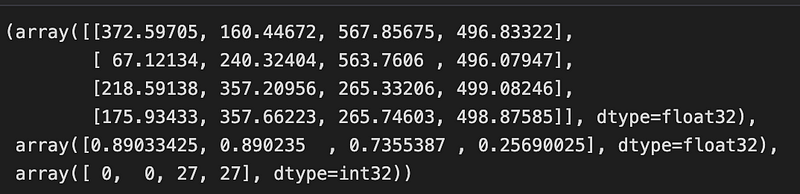
bboxes, scores, labels = results
bboxes -= dwdh
bboxes /= ratio
After running the results = engine(tensor) line, the next lines bboxes, scores, labels = results unpack the output tensors from the engine object.
The bboxes tensor contains the predicted bounding box coordinates for the detected objects, and the scores tensor contains the corresponding confidence scores. The labels tensor contains the predicted class labels for each of the detected objects.
The next two lines of code bboxes -= dwdh and bboxes /= ratio reverse the letterbox transform applied to the input image during preprocessing. The dwdh value is a scaling factor that was used to resize the input image to the size expected by the YOLOv8 model. Subtracting dwdh from the bboxes tensor adjusts the predicted bounding box coordinates to account for the image size scaling. Dividing by ratio scales the bounding box coordinates back up to the original image size, so that they can be correctly displayed on the original image.
CLASSES = ('person', 'bicycle', 'car', 'motorcycle', 'airplane', 'bus',
           'train', 'truck', 'boat', 'traffic light', 'fire hydrant',
           'stop sign', 'parking meter', 'bench', 'bird', 'cat', 'dog',
           'horse', 'sheep', 'cow', 'elephant', 'bear', 'zebra', 'giraffe',
           'backpack', 'umbrella', 'handbag', 'tie', 'suitcase', 'frisbee',
           'skis', 'snowboard', 'sports ball', 'kite', 'baseball bat',
           'baseball glove', 'skateboard', 'surfboard', 'tennis racket',
           'bottle', 'wine glass', 'cup', 'fork', 'knife', 'spoon', 'bowl',
           'banana', 'apple', 'sandwich', 'orange', 'broccoli', 'carrot',
           'hot dog', 'pizza', 'donut', 'cake', 'chair', 'couch',
           'potted plant', 'bed', 'dining table', 'toilet', 'tv', 'laptop',
           'mouse', 'remote', 'keyboard', 'cell phone', 'microwave', 'oven',
           'toaster', 'sink', 'refrigerator', 'book', 'clock', 'vase',
           'scissors', 'teddy bear', 'hair drier', 'toothbrush')
define classes YoloV8
for (bbox, score, label) in zip(bboxes, scores, labels):
    bbox = bbox.round().astype(np.int32).tolist()
    cls_id = int(label)
    cls = CLASSES[cls_id]
    color = (0,255,0)
    cv2.rectangle(image, tuple(bbox[:2]), tuple(bbox[2:]), color, 2)
    cv2.putText(image,
                f'{cls}:{score:.3f}', (bbox[0], bbox[1] - 2),
                cv2.FONT_HERSHEY_SIMPLEX,
                0.75, [225, 255, 255],
                thickness=2)
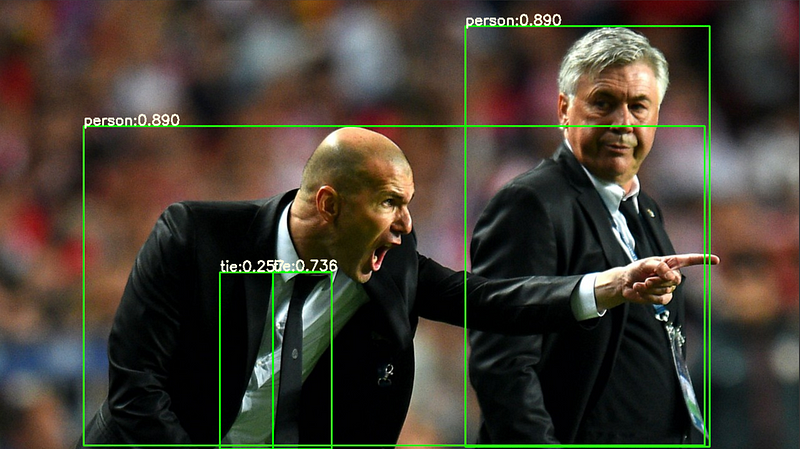
This is a code block for drawing the predicted bounding boxes, class labels and confidence scores on the input image. The zip function is used to iterate over the predicted bounding boxes, scores and labels simultaneously.
For each object detected, the bbox coordinates, score and label are retrieved. The bbox coordinates are rounded to the nearest integer values and converted to a list. The cls_id variable is set to the integer value of the predicted class label.
Conclusion
TensorRT achieves high performance by using a combination of techniques such as layer fusion, kernel auto-tuning, and precision calibration to reduce memory usage and computation time. This allows TensorRT to deliver low latency and high throughput for a variety of deep learning applications, including computer vision.
Overall, TensorRT is a valuable tool for developers looking to optimize and deploy their deep learning models on NVIDIA GPUs for high-performance inference.
If you found this article helpful, please consider following my medium account for more informative and insightful content.

Reference:
Notebook Link:
Read More :
Reach me at
- LinkedIn : www.linkedin.com/in/alimustoofaa
- Email : [email protected]
- Github : https://github.com/Alimustoofaa
- Twitter : https://twitter.com/Alimustoofaa


