
How to Learn Search Engine Optimization for Beginning Bloggers
Because you want people to find your work

When I started writing online, I’d heard of SEO (search engine optimization), but I didn’t understand why I needed it. Seasoned bloggers would mention SEO in posts and I filed the term in the back of my mind to research when I had more time. I was focused on writing. Of course, I never had more time.
Finally, I took the advice of the self-help gurus and invested in my learning. Of course, the self-help gurus usually want you to invest in their training and mentoring programs, but I didn’t need more encouragement to wake-up early, sit down and write, or take a cold shower. I needed technical help. I needed technical help for absolute beginners. Whenever I attempted to create an email list or a publication, I spent hours getting frustrated at things others seemed to do easily. All the technical terminology seemed like a foreign language to me. I needed to learn search engine optimization for beginners.
So, I reinvested my modest writing earnings into a training program for bloggers. After only three months, this training has already paid off in higher curation rates and blogs posts indexed by Google. I’ve learned how to use search engine optimization to help others find my work.
I posted for a year on a blog with no idea about SEO. If you’re a beginning blogger, I want to save you time and frustration. I hope this post teaches you how to learn search engine optimization so people will find your work. It’s a great feeling when they do.
What is SEO and Why is it Important?
SEO stands for search engine optimization. Bloggers strive to optimize posts so they are ranked higher in Google.
Think about your last search online. Did you find the answer to your query on the first page? Did you even look at the second page of the Google results? How about the third? If your article appears on the tenth page of an online search, will people see it? Unlikely.
Ideally, you want your post to appear on the first page when people search for your topic. This is why search engine optimization is so important to a blogger who wants his/her work found.
How Do Small-time Bloggers Get Ranked by the Big Search Engines?
As small time bloggers, what can we do to improve our post rankings in search engines? Here are a few things I’ve learned, broken down for beginners.
The first thing we can do is find keywords with less competition.
If you are truly a beginner like I was three months ago, your next question is: What are keywords?
“Keywords are ideas and topics that define what your content is about. In terms of SEO, they’re the words and phrases that searchers enter into search engines, also called “search queries.” If you boil everything on your page — all the images, video, copy, etc. — down to simple words and phrases, those are your primary keywords.”
For a long time the term ‘keyword’ confused me as a writer. To me, keyword is singular. It implies one word. But, in reality, a keyword is a phrase or group of words. Your keyword should capture the essence of your post. It is your topic sentence or thesis.
Keyword Placement is Important
You don’t want to stuff your blog post with your keyword. Not only will your post sound awkward, but this tactic will be obvious to your audience and to search engines.
We are writers. We want our work to flow. We don’t want to use repetitive words and phrases over and over again. However, if you strategically mention your keyword 2–4 times, it will help search engines identify your keyword and share your post in relevant searches.
You do want to include your keyword in the first or second paragraph of your post and possibly as part of your title. Your title shouldn’t be just your keyword, but it helps to have a title that explains the point of the post. A clickbait title hurts your chances of getting ranked if it doesn’t give any indication of your post content.
I also try to include a version of my keyword in the conclusion of my post.
Since I started strategically placing my keyword in my writing, I’ve had all of my new blog posts indexed by Google.
How to Choose an Effective Keyword
My training module includes the use of Jaaxy, a keyword research tool. A keyword research tool is a great way to find keywords that will rank well.
Jaaxy offers thirty free keyword searches if you want to try it. If you’re trying to choose a domain name for a new website or blog, you can use some of your free searches on Jaaxy to look for domain names that will rank well. For more on this, you may want to read this post:
Now, I’ll explain how Jaaxy works with screenshots so you’ll understand how to interpret your keyword search results. I’ll also include a list of free keyword research tools you can use if you don’t have the money to invest in a keyword research tool at the moment.
How to Use a Keyword Research Tool
First, open your keyword research tool. I will use Jaaxy so I can show you screenshots as visual aids. If you are like me, you need these.
In the search bar, type in your working title or topic. For this post, I tried ‘SEO for Beginning Bloggers’. Here’s a screenshot of my results.
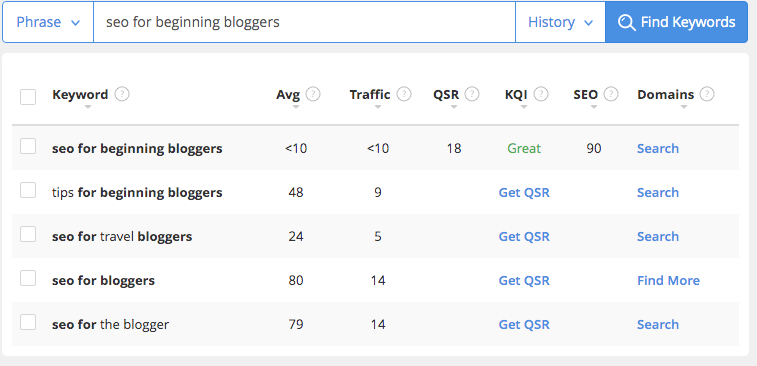
My working title for this piece was ‘SEO for Beginning Bloggers’, but the first two columns of my keyword research results show that this keyword won’t generate many visits to my website.
Here’s a breakdown of what each column heading means. If you forget what the column title shows, simply click on the question mark next to it, and you’ll see the explanation.
Avg means the average number of searches the keyword receives each month. Less than ten is not good.
Traffic shows how many visits to your website you would receive if you achieve first page rankings in the search engines.
QSR: If you click on this it will show you the number of competing websites ranked in Google for this exact keyword.
When I click on this, it shows 18. According to my training, you should target a keyword that has less than 100 competing pages if possible. This is also a ‘Great’ keyword as far as quality. This means it has a high chance of ranking well on Google.
SEO is a score based on traffic and competition. The higher the score, the more likely you will rank for this keyword on the first page (scale of 1–100, higher = better). The SEO score here is 90, which is great.
Ideally, you want more traffic, but less competition. While this keyword is great for low competition, it doesn’t get much traffic. I want my avg and traffic numbers to be higher than 30. So, it’s back to the drawing board for me.
Have a look at the screenshot again. Notice, how ‘seo for bloggers’ (further down the list) gets 80 searches per month. this is better. I’m going to click on ‘check QSR’ so we can see how much competition this keyword gets.

This keyword has 190 competing websites. That is more competition, but it still has a fairly high SEO score (86). This may be a better option.
Now, I’m going to try ‘How to optimize your blog post for search engines’.
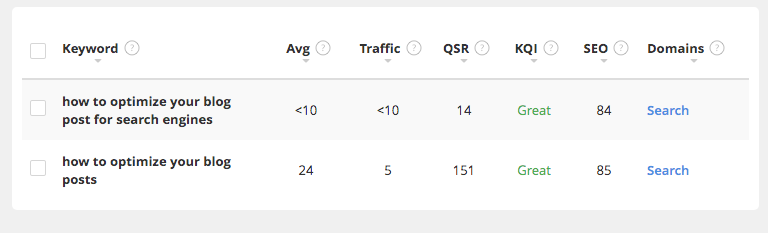
This has less traffic than ‘seo for bloggers’ so this isn’t a good choice.
If you want suggestions for other keywords to try, check out the right column. This shows related searches. These suggestions can give you good ideas for titles as well.
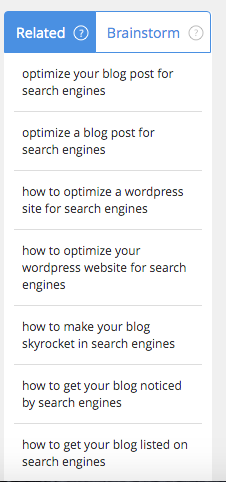
One more tip for keywords. You want your keyword to make sense. While the keyword ‘get listed search engines’ may rank highly, it sounds awkward and would never flow in a blog post. You want your keyword to be grammatically correct.
Next, I’m going to try ‘learn seo’.

‘Learn seo’ generates a lot of traffic, but there is too much competition to rank well on Google. I’m going to refine my search.
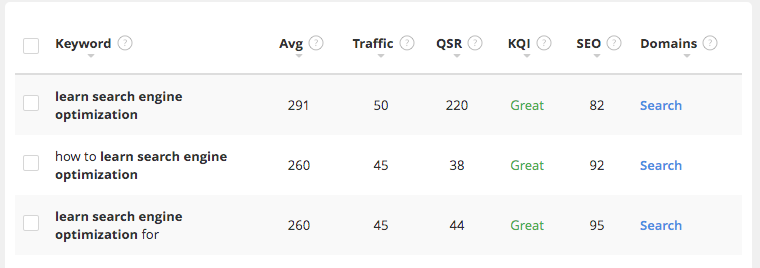
Here, I tried ‘learn search engine optimization’. This gets good traffic, but still has a lot of competition. So, I’ve decided to settle on the second option as my keyword: ‘how to learn search engine optimization’. This has a good SEO score (higher traffic, lower competition).
I’ll let you know if this keyword works in a few weeks…
Free Keyword Research Tools
Here’s a list of free keyword research tools if you don’t have the money to pay for a keyword research tool. Here’s a blog post that will tell you all about these free options:
- Google Trends
- Keyword Shitter
- AdWord & SEO Keyword Permutation Generator
- Answer the Public
- Google Correlate
- Keywords Everywhere
- Wordtracker Scout
- Google Search Console
If you delve further in the world of SEO and keywords, this is a good place to start.
I hope this introduction to learning search engine optimization is useful for you. This is the key for helping your target audience find your work.