
How to launch a migration project
A detailed checklist to start a re-platforming project.
There are a lot of articles about starting a new app or product, going from user research to UX, building sprints, and continuous deliveries.
But, if you need a technical migration from one platform to another, there is way less information while those projects are common and not as easy as you might imagine.
For example, you might need to migrate from Magento to Shopify or from Drupal to GraphCMS (because, you know, Drupal is dying…). Let’s see how to correctly start such projects.
I’ll share below examples of dashboards from real projects
Step 1: Discovery of the legacy system
During this first step you’ll need to gather as much information as possible about the legacy system:
- Who are the users and personas of the existing platform (admins, contributors, finance, sales, etc….)
- Define user journeys for each persona and name them precisely (“New article created by a journalist” or “Product price update by an e-commerce manager”).
- Each user journey should be played at least once in your presence, and recorded for future replays. Ask as many questions as you can.
Why: You need this step to gain a global vision of the current platform
Methodology: co-browsing during 1–2 hours workshops, repeated as much as necessary.
Duration: 1–4 weeks.
Output: Primary raw list of templates, features, external APIs and data sources, attention points, and questions. Recording of each session.
Attention points: Complex & custom features, external APIs.
Step 2: Templates gap analysis
The next step is to build, what I call, a “templates gap analysis” document. You basically go through all the screens of the legacy application mapping them to similar pages in the new system.
Usually, this step is straightforward. We’re talking about an as-is migration, meaning it’s plausible to think the front-end will remain unchanged. But you still need the full list of templates, to estimate and plan your front-end work.
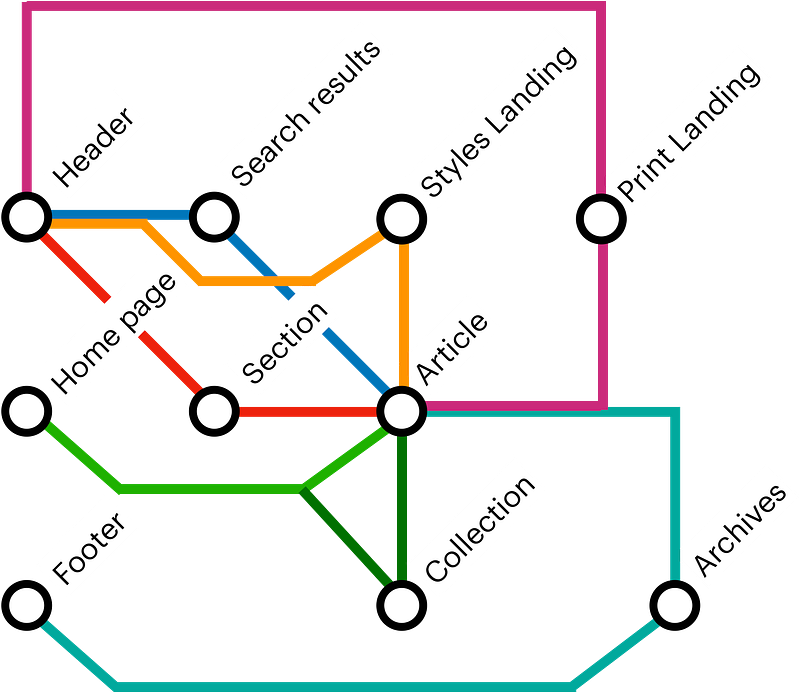
At code.store we use a metro-styled map of templates and user journeys, where each “station” is a template and each “line” is a specific user journey. Why do we do this :
- You have a big picture of your entire project
- The relations ships between pages are way more visible than in a classical hierarchical sitemap
- You can spot the most important pages immediately (the ones crossing the most of user journeys)
- You can split your migration project easily by ordering templates by the number of ‘lines’ crossing them
Why: A complete list of existing templates & pages gives you a first scope of the project.
Methodology: co-browsing with your client based on user journeys, may be done during step 1 on smaller projects. Use a metro-styles user journey map.
Duration: 1 week
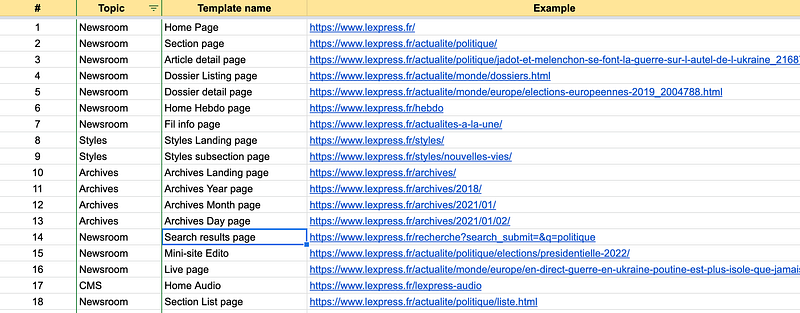
Output: Spreadsheet with page ID, Category, Name, complexity, and URL
Attention points: Hidden templates (footer, authenticated specific user roles, less used user journeys)
Step 3: Features gap analysis
Here comes the most complex part of the preparation work. You need to create a mapping between existing features and their replacement on the new platform. It’s a less obvious work compared to the templates gap analysis.
For example, we had to migrate a large publisher. They built their CMS as a monolith over 10 years. You can imagine the number of features, half of them were not used anymore.
Each feature should be presented in a User Story format, with the corresponding features in the new platform. Some features might be abandoned or migrated to multiple destination systems.
- Legacy Contribution > Composer
- Legacy Newsletters > Mailchimp
- Legacy Comments > Disqus
- …
Why: Start building your migration project backlog. Confirm your initial estimates. Detect missing features and mitigate gaps.
Methodology: Using previously built templates & user journey lists, extract features.
Duration: 2–4 weeks
Output: Spreadsheet with feature ID, concerned persona, destination platform product/feature, eventually completed with screenshots
Attention points: If legacy is a custom-built, old monolith. If you migrate to multiple tools.
Step 4: Data entities mapping
Here comes the most important part: data migration. It might be e-commerce SKUs, users, comments, clients, or articles. The process remains the same.
You need to build a map of all legacy entities and their fields, then map them to your new system.
Let’s take an example:
Legacy entity name: ARTICLE
Legacy entity fields:
- ID (int, mandatory, unique)
- Date published (date, automatic)
- Publication time (date, automatic)
- Date updated (date, automatic)
- Updated hour (int, automatic)
- Front page image (URL, manual)
- Overtitle (string, mandatory, manual)
- Title Article (string, mandatory, manual)
- Front page title (string, optional, manual)
- Magazine Title (string, optional, manual)
- SEO Title (string, optional, manual)
- Subtitle (string, optional, manual)
- Content (string, optional, manual)
- Information (string, not used, manual)
- Reading time (int, mandatory, automatic)
Immediately I see several complexities :
- The article has multiple titles depending on the distribution channel. I do not have an equivalent feature in my new CMS. (Alert should be raised, and risk mitigated)
- The information field is not used anymore, but what about 10 years old archives?
- Reading time is calculated using a formula, which one? I don’t have the possibility to add custom fields to the destination CMS. Alert.
This is how might look your data migration mapping :
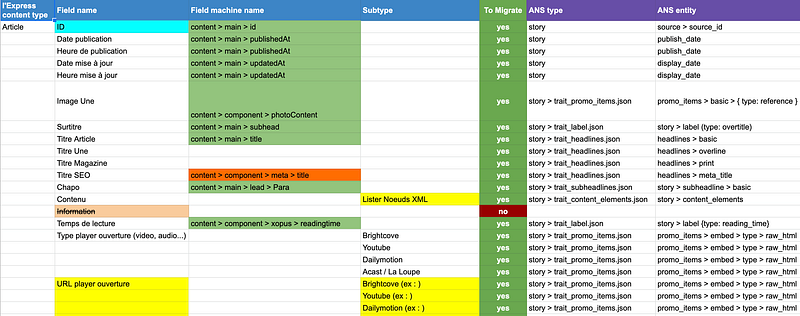
What is important?
- Start with source fields
- One field per line
- Add columns with machine names (from DB or API)
- Add a column to say if the field should be migrated at all
- Add destination entity, field, and machine names.
- Colors help a lot!
Why: Prepare work for developers responsible for the migration scripts.
Methodology: Analyse existing Database, API schema, and admin UI.
Duration: 4–8 weeks
Output: Spreadsheet with source and destination entities & fields.
Attention points: Legacy entities may be split into multiple destinations. Data-set size. Multiple sources for one destination entity. Which ETL / script will you use?
Step 5: Test data-set
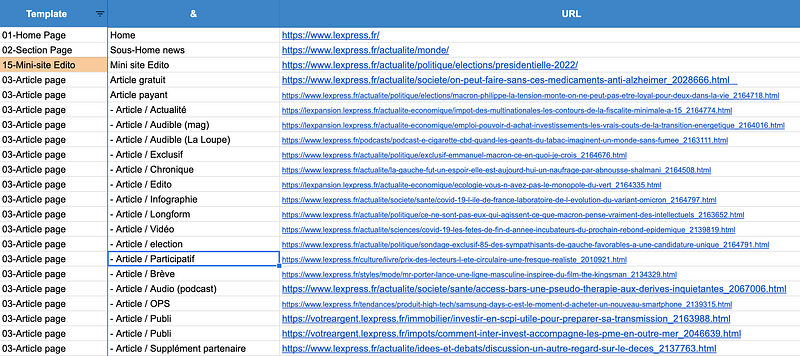
Migration testing is an extremely complex and painful process. I suggest you create a test data-set spreadsheet, listing pages presenting all legacy entities with all their variations. It should basically be a list of URLs as in the following example :
Why: Simplify the quality assurance of your migration scripts
Methodology: Work with those who know the legacy platform the best. Go through admin UI and ask for examples of entities for each feature (article with an image, video, Instagram embed, a product with variations, products with upsells, products in each category, etc…)
Duration: 4–8 weeks
Output: Spreadsheet with a list of URLs.
Attention points: Try to not forget every single smallest variation. The dataset should be as complete as possible. Be careful with old and forgotten archives.
Step 6: Detailed technical requirements
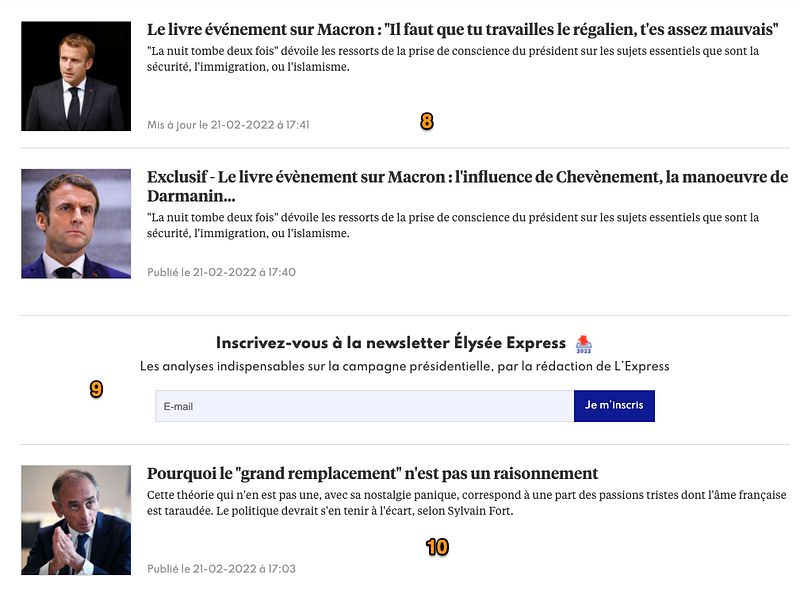
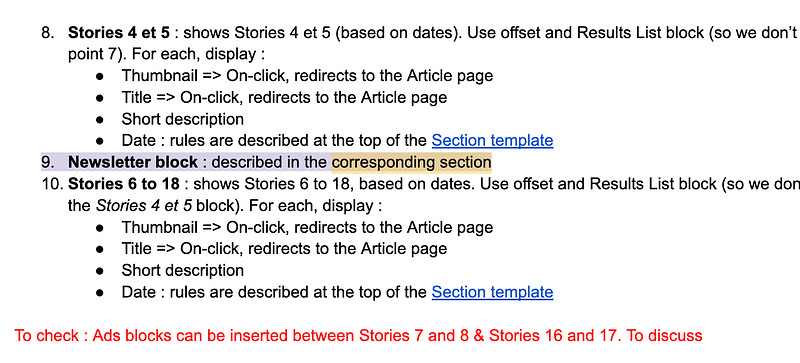
Once you’ve done the preparation work, you should be able to start a detailed requirements document. In this document, you take all your templates and annotate them with data structures from your new platform.
Why: Streamline the development process. Validate assumptions. Avoid re-work. Control budget & planning.
Methodology: Take each template and describe every single element on it in a shared Google Docs.
Duration: 6–12 weeks
Output: Google Doc requirements document.
Attention points: Try to be as precise as possible. Use machine names when possible. Define rules: where the element is taken from, what are the rules, which user journey is concerned, which persona…
If you need a professional team for migration & re-platforming, talk to us ;)