avatarSujani Hansamali

Free AI web copilot to create summaries, insights and extended knowledge, download it at here

4702

Abstract

_source=unsplash&utm_medium=referral&utm_content=creditCopyText">Unsplash</a></figcaption></figure><p id="996a">Don’t use big notebooks for writing notes during your class. Take a pen and a paper. It will help you to make your mind and brain free. Put the date on the paper before starting the class. If you are interested in typing on MS Word or Google Docs, then you can use it to note down the important points.</p><p id="008b"><b>4- Keep a glass of water or water bottle on your table</b></p><figure id="8ab3"><img src="https://cdn-images-1.readmedium.com/v2/resize:fit:800/1*i3JQKLVhfuzQBIke82RYtg.jpeg"><figcaption>Photo by <a href="https://unsplash.com/@olenkasergienko?utm_source=unsplash&amp;utm_medium=referral&amp;utm_content=creditCopyText">Olena Sergienko</a> on <a href="https://unsplash.com/?utm_source=unsplash&amp;utm_medium=referral&amp;utm_content=creditCopyText">Unsplash</a></figcaption></figure><p id="bf37">Many students go here and there in the home for various purposes because they naturally feel lazy during their online classes. When you feel thirsty, then you go to the kitchen to drink some water and you start to chat with other people in the house. You spend a considerable time there and attend the class again. At this time, you won’t listen to class attentively. The best option is to keep a glass of water on your table. Then you will be more productive and it won’t waste the time.</p><h1 id="b716">During the class</h1><p id="af41"><b>5- Avoid using your mobile phone during the lessons</b></p><figure id="e531"><img src="https://cdn-images-1.readmedium.com/v2/resize:fit:800/1*rdfSLqVre67hlDx1nEPwtQ.jpeg"><figcaption>Photo by <a href="https://unsplash.com/@nicolasjleclercq?utm_source=unsplash&amp;utm_medium=referral&amp;utm_content=creditCopyText">Nicolas J Leclercq</a> on <a href="https://unsplash.com/s/photos/mobile-on-desk?utm_source=unsplash&amp;utm_medium=referral&amp;utm_content=creditCopyText">Unsplash</a></figcaption></figure><p id="1213">If you are using your computer, desktop, or laptop to join the class, what’s the purpose of keeping the mobile phone in your hand? If you search on social media during classes, you won’t concentrate more on the lesson contents. That’s the main reason for your boredom. So, try to focus more on your class when the teacher explains the lesson.</p><h2 id="e51a">6- Stop the habit of eating when you are learning online</h2><p id="8b87">You indeed can eat while you are in the online classes as the teacher can’t see you. This bad habit will kill your enthusiasm for the lessons. Focus on one work at one time, it may improve your efficiency.</p><h2 id="5332">7- Be an active participant in the class</h2><p id="a1e7">Most of the students don’t answer the questions and they skip them saying that they are having connection issues. So, what’s the purpose of attending a class? You have a responsibility, to be honest, and to be attentive to the teacher. If you listen well to the teacher till the end of the class, you can smartly answer all the questions. Be confident. You can adjust yourself to this novel learning system.</p><h2 id="1a25">8- Don’t be shy to ask questions from the teacher</h2><p id="5517">If you have any questions regarding your lessons, just ask the teacher. In the physical classroom, you raise your hand and present the question. Try to use smart techniques in your online learning platform too. For example, in zoom classes, five different reaction emojis are provided for you. Be familiar with them. Check the red arrows given below.</p><figure id="1535"><img src="https://cdn-images-1.readmedium.com/v2/resize:fit:800/1*5uGsJphc7qk7-Fd7FJ8DXQ.png"><figcaption>Image by author</figcaption></figure><h2 id="6650">9- Greet your teacher</h2><p id="84c6">After your class, don’t forget to say “thank you” to your teacher. It will make your teachers so happy as well as it’s one of the best morals to follow when learning online. It will make you more interested to participate in the next class.</p><h2 id="c956">10- Done and Dusted</h2><p id="7878">Take the short note that you wrote during your online class and make it a complete note by adding extra details for the lessons. Try to finish the homework just after the class. Then, you may feel free . If you follow these simple and easy steps, you won’t feel bored attending your online classes anymore.</p><p id="5556">We need the dedication of both students and teachers to make their online classrooms more engaging and interactive. Successful online teaching requires implementing different tools and techniques because the needs of students can vary widely and teachers have to adapt as much as possible and keep searching

Options

for the most adequate solutions.</p><h1 id="8f90">What can a teacher do to make the online class more interactive?</h1><p id="ac56">One of the most used platforms for online teaching is Zoom. I always prefer using the Zoom platform for conducting online classes. It is being used for teaching and learning on a large scale and it allows real-time interaction: chats, breakout rooms, and content sharing.</p><p id="6791">In an online class, the students know that they can escape from it and there are many ways to escape from it. It is much easier for the students to go on another website by switching off their camera. But, the teachers can support them to focus more on their online lessons.</p><p id="fb77"><b>Easy and simple techniques to make your students more interactive during your online Zoom classes</b></p><h2 id="2cf4">Be creative in making your PPT</h2><p id="4732">Most of the teachers use ppts sometimes self-made from SlideShare. Some teachers use highlighted PDF of the textbooks too. Students naturally feel bored to see the monotonous slides and the highlighted textbooks every day in their online class. These are few steps to follow to make your ppt a brilliant one.</p><p id="a586">Include the topic of the lesson and lesson number in the very first slide.</p><figure id="af60"><img src="https://cdn-images-1.readmedium.com/v2/resize:fit:800/1*7C8hdncIrvU014maLBjfLA.png"><figcaption>Image by author</figcaption></figure><p id="478c">Demonstrate the content clearly in the second slide. It will make learners more interested and they will listen to you attentively till the end.</p><figure id="54b9"><img src="https://cdn-images-1.readmedium.com/v2/resize:fit:800/1*3hqJQEA62iUw-DnbR2iKHQ.png"><figcaption>Image by author</figcaption></figure><p id="ec86">Use appropriate and authentic photos if necessary. If you paste eye-catching images in your slides, learners won’t feel tired looking at your screen for many hours. They may feel that it’s so engaging.</p><figure id="3144"><img src="https://cdn-images-1.readmedium.com/v2/resize:fit:800/1*ObrkcAN0WVjJm-8WHVUqCA.png"><figcaption>Image by author</figcaption></figure><p id="79a5">Include few questions in the final slide. Ask volunteers to answer them. So, you can decide how successful your class is. Your students will wait until the question session if they find it more interesting and fun. Try to add marks for each question. They will become active and happy learners at the end of your class.</p><figure id="3139"><img src="https://cdn-images-1.readmedium.com/v2/resize:fit:800/1*cNwCLiIrL1Wb8s4OFjPfAw.png"><figcaption>Image by author</figcaption></figure><h2 id="b95e">Schedule your zoom class with “Appointy”</h2><p id="1fec">“Appointy is a scheduling tool that integrates with Zoom and it helps teachers automating class schedules. Appointy-Zoom integration may support you to improve your productivity and efficiency.</p><p id="42f8">With this integration, teachers can share their online class details with all the learners when they sign up for a session. Scheduling a zoom class with Appointy is very easy and simple.</p><p id="8b49"><b>How to schedule a Zoom meeting with the help of Appointy?</b></p><p id="dcc0">You can follow these three steps:</p><p id="25ce">Step 1: Connect your Zoom account with Appointy</p><p id="199b">Step 2: Participants receive Zoom meeting details</p><p id="8a9b">Step 3: Host a Zoom class or seminar</p><h2 id="daf4">Be tactful when creating and sharing the link</h2><p id="4880">Most of the time, teachers send their links to their students via WhatsApp or email. Teachers can create it more interestingly.</p><p id="7966">Try to make students more enthusiastic to attend your online class. Send the link with a question that is so new for them. They may yearn to learn it. So, the learners won’t skip their online classes and they won’t feel bored attending online classes anymore.</p><figure id="a948"><img src="https://cdn-images-1.readmedium.com/v2/resize:fit:800/1*iLUqtg4Lu_Ino1mOuaxlfQ.png"><figcaption>Image by author</figcaption></figure><p id="d0ad">We don’t know how this unexpected move to online learning will affect the education system. It’s better to realize that further integration of technology in education will be accelerated and it may become a necessary part of young learners’ lives.</p><p id="fc7a">If you are a student who is learning online, make yourself more bright by following those easy, simple steps and share them with your classmates because they will be thankful for you. If you are a teacher, just share it with your students as they always need your guidance for their success.</p><p id="0ac7"><b>Happy learning!</b></p></article></body>

How to Kill Boredom during Online Learning and Teaching

How to keep going on with online classes without getting bored

Photo by Cookie the Pom on Unsplash

Fun Experiences in the Physical classroom

Students get bored in online zoom classes because they have to look at a single screen for a longer duration of time and less interaction kills their enthusiasm for the lesson.

In the physical classrooms, learners see others taking notes, reading comprehension, studying the day before the assessments, and it keeps them inspired. In the physical classroom, students can make ugly snaps of their friends till the teacher arrives. All of them seem so fun and engaging. It’s full of happiness.

“Teacher, I completed the assignment but left my notebook at home”, is now replaced by “Sorry teacher, I have some network issues, I can’t hear you”. We tend to get distracted in an online class because there is less interaction with the teacher and the mates.

Eating in class is fun only in the offline mode. The rush to take a bite as soon as the teacher turns towards the whiteboard is another fun activity in a physical classroom. If the teacher cancels the class, the students roam around the school and start chatting with friends.

This article is written for students as well as for teachers. The first part consists of simple, and easy tips for students to beat their stress and boredom in their online class. The next section of the article is focused on providing novel, interesting techniques for teachers to follow in their online teaching.

What most of the students say about the online classes

“ Most of the time, I listen to my online classes when I am in a good mood. If the lesson is so new and interesting for me, I will listen to it well. But, if it isn’t so engaging, automatically I open WhatsApp, Facebook or Instagram”.

“ I like my physical classroom more than online classes because I can’t pay continuous attention to it. Sometimes, I just started playing games on my computer while the class went on my mobile”.

10 Simple Tips to kill the boredom during the online class

What can you do before the class

1- Sit 5 minutes before the class

Image on freepik.com

Don’t try to join the class after it started because it will destroy your enthusiasm. Get your meal freely. If you still feel hungry, drink enough water. Ask for the link from your teacher when you feel confident.

2- Make your learning environment pleasant
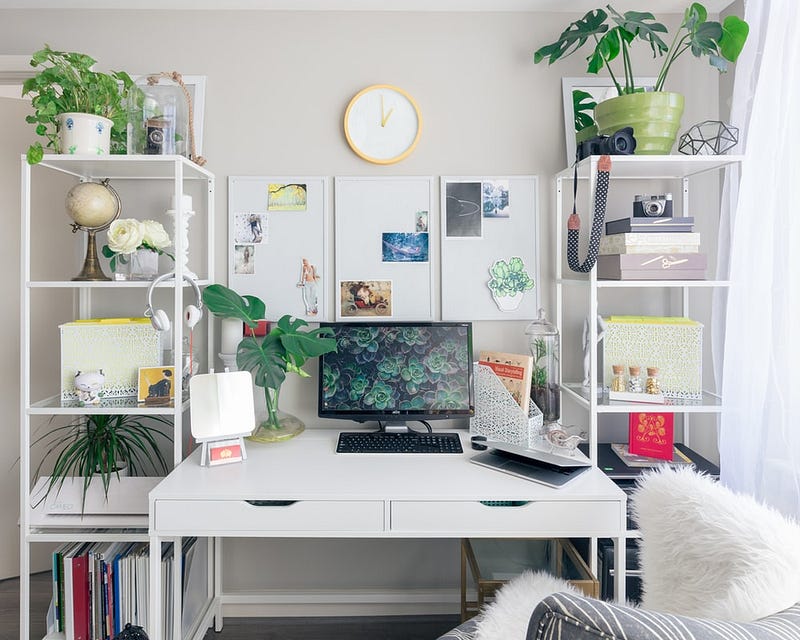
Photo by Slava Keyzman on Unsplash

The students have to use their rooms as their setting for the class. Keep your room neat and clean. If you are using your laptop, don’t keep it on the bed. Just use a separate table for it and then you won’t feel sleepy. Keeping a fresh flower vase just near the computer or desktop will double your happiness. You can just have a quick look at your beautiful flower vase when you feel bored during the online class.

3- Just take a pen and a paper

Photo by Maya Maceka on Unsplash

Don’t use big notebooks for writing notes during your class. Take a pen and a paper. It will help you to make your mind and brain free. Put the date on the paper before starting the class. If you are interested in typing on MS Word or Google Docs, then you can use it to note down the important points.

4- Keep a glass of water or water bottle on your table

Photo by Olena Sergienko on Unsplash

Many students go here and there in the home for various purposes because they naturally feel lazy during their online classes. When you feel thirsty, then you go to the kitchen to drink some water and you start to chat with other people in the house. You spend a considerable time there and attend the class again. At this time, you won’t listen to class attentively. The best option is to keep a glass of water on your table. Then you will be more productive and it won’t waste the time.

During the class

5- Avoid using your mobile phone during the lessons

Photo by Nicolas J Leclercq on Unsplash

If you are using your computer, desktop, or laptop to join the class, what’s the purpose of keeping the mobile phone in your hand? If you search on social media during classes, you won’t concentrate more on the lesson contents. That’s the main reason for your boredom. So, try to focus more on your class when the teacher explains the lesson.

6- Stop the habit of eating when you are learning online

You indeed can eat while you are in the online classes as the teacher can’t see you. This bad habit will kill your enthusiasm for the lessons. Focus on one work at one time, it may improve your efficiency.

7- Be an active participant in the class

Most of the students don’t answer the questions and they skip them saying that they are having connection issues. So, what’s the purpose of attending a class? You have a responsibility, to be honest, and to be attentive to the teacher. If you listen well to the teacher till the end of the class, you can smartly answer all the questions. Be confident. You can adjust yourself to this novel learning system.

8- Don’t be shy to ask questions from the teacher

If you have any questions regarding your lessons, just ask the teacher. In the physical classroom, you raise your hand and present the question. Try to use smart techniques in your online learning platform too. For example, in zoom classes, five different reaction emojis are provided for you. Be familiar with them. Check the red arrows given below.
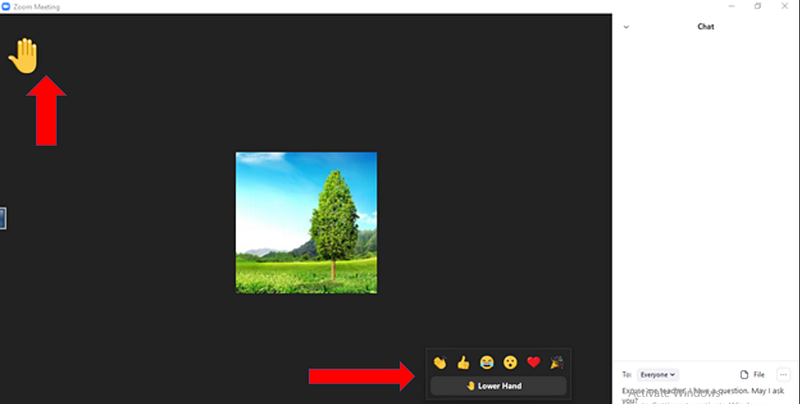
Image by author

9- Greet your teacher

After your class, don’t forget to say “thank you” to your teacher. It will make your teachers so happy as well as it’s one of the best morals to follow when learning online. It will make you more interested to participate in the next class.

10- Done and Dusted

Take the short note that you wrote during your online class and make it a complete note by adding extra details for the lessons. Try to finish the homework just after the class. Then, you may feel free . If you follow these simple and easy steps, you won’t feel bored attending your online classes anymore.

We need the dedication of both students and teachers to make their online classrooms more engaging and interactive. Successful online teaching requires implementing different tools and techniques because the needs of students can vary widely and teachers have to adapt as much as possible and keep searching for the most adequate solutions.

What can a teacher do to make the online class more interactive?

One of the most used platforms for online teaching is Zoom. I always prefer using the Zoom platform for conducting online classes. It is being used for teaching and learning on a large scale and it allows real-time interaction: chats, breakout rooms, and content sharing.

In an online class, the students know that they can escape from it and there are many ways to escape from it. It is much easier for the students to go on another website by switching off their camera. But, the teachers can support them to focus more on their online lessons.

Easy and simple techniques to make your students more interactive during your online Zoom classes

Be creative in making your PPT

Most of the teachers use ppts sometimes self-made from SlideShare. Some teachers use highlighted PDF of the textbooks too. Students naturally feel bored to see the monotonous slides and the highlighted textbooks every day in their online class. These are few steps to follow to make your ppt a brilliant one.

Include the topic of the lesson and lesson number in the very first slide.
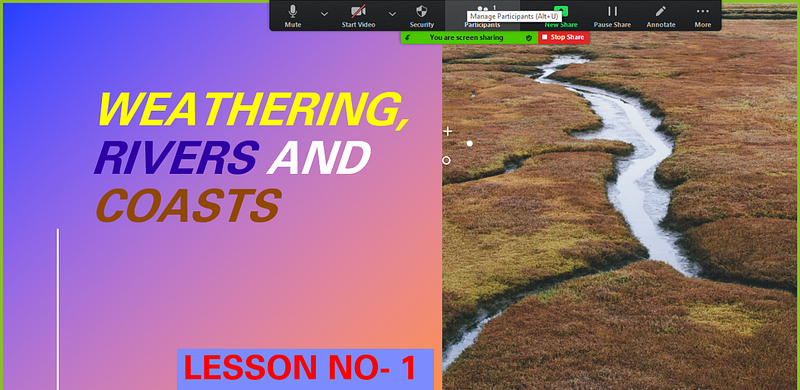
Image by author

Demonstrate the content clearly in the second slide. It will make learners more interested and they will listen to you attentively till the end.
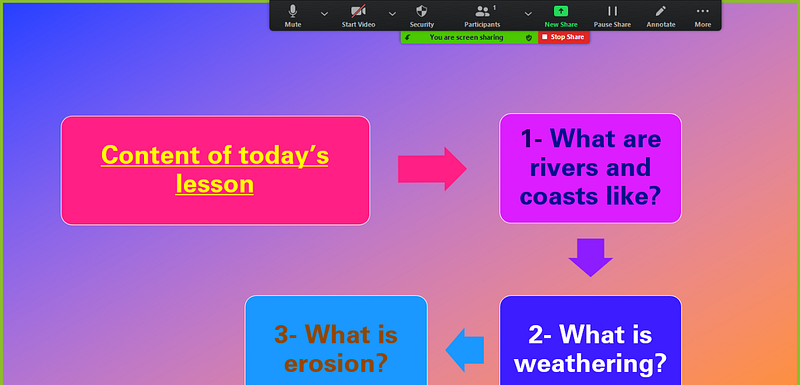
Image by author

Use appropriate and authentic photos if necessary. If you paste eye-catching images in your slides, learners won’t feel tired looking at your screen for many hours. They may feel that it’s so engaging.
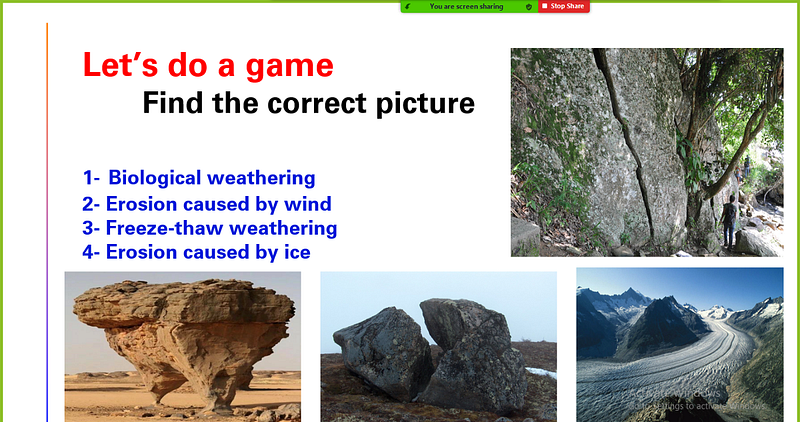
Image by author

Include few questions in the final slide. Ask volunteers to answer them. So, you can decide how successful your class is. Your students will wait until the question session if they find it more interesting and fun. Try to add marks for each question. They will become active and happy learners at the end of your class.
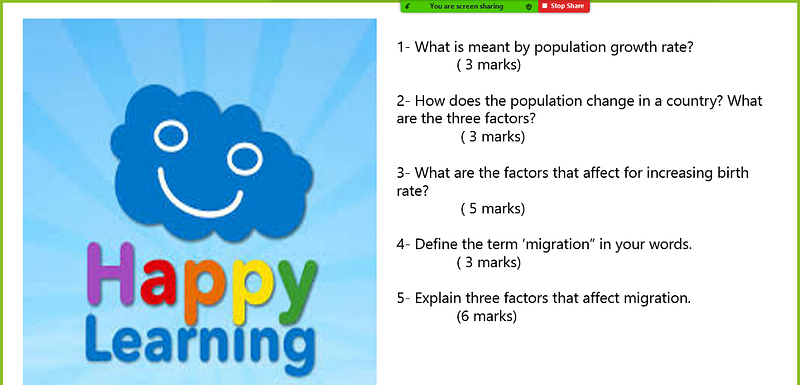
Image by author

Schedule your zoom class with “Appointy”

“Appointy is a scheduling tool that integrates with Zoom and it helps teachers automating class schedules. Appointy-Zoom integration may support you to improve your productivity and efficiency.

With this integration, teachers can share their online class details with all the learners when they sign up for a session. Scheduling a zoom class with Appointy is very easy and simple.

How to schedule a Zoom meeting with the help of Appointy?

You can follow these three steps:

Step 1: Connect your Zoom account with Appointy

Step 2: Participants receive Zoom meeting details

Step 3: Host a Zoom class or seminar

Be tactful when creating and sharing the link

Most of the time, teachers send their links to their students via WhatsApp or email. Teachers can create it more interestingly.

Try to make students more enthusiastic to attend your online class. Send the link with a question that is so new for them. They may yearn to learn it. So, the learners won’t skip their online classes and they won’t feel bored attending online classes anymore.
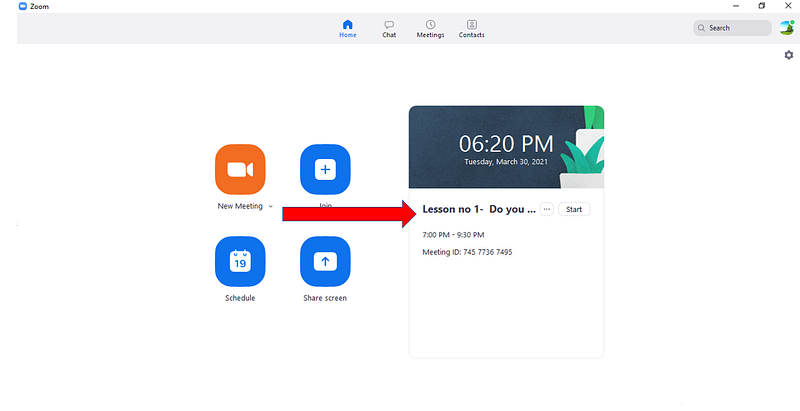
Image by author

We don’t know how this unexpected move to online learning will affect the education system. It’s better to realize that further integration of technology in education will be accelerated and it may become a necessary part of young learners’ lives.

If you are a student who is learning online, make yourself more bright by following those easy, simple steps and share them with your classmates because they will be thankful for you. If you are a teacher, just share it with your students as they always need your guidance for their success.

Happy learning!

Recommended from ReadMedium