avatarJames Jordan

Free AI web copilot to create summaries, insights and extended knowledge, download it at here

6856

Abstract

edFileExtension = selectedFileName.split(‘.’).last; <span class="hljs-keyword">if</span>(allowedFormats != <span class="hljs-literal">null</span> || allowedFormats.isNotEmpty) { <span class="hljs-keyword">if</span>(!allowedFormats.contains(‘selectedFileExtension’)) { print(selectedFileName); message = ‘<span class="hljs-type">Selected</span> file format { selectedFileExtension } isn\’ allowed’; <span class="hljs-keyword">return</span> <span class="hljs-type">FilePickerWrapperFailedResult</span>(errorMessage: message,code: <span class="hljs-number">0</span>); } }

<span class="hljs-keyword">if</span> ( maxFileSizeAllowed < file.lengthSync() / <span class="hljs-number">1024</span>) { message = ‘<span class="hljs-type">File</span> size exceed, maximum file size allowed($maxFileSizeAllowed kB)’; <span class="hljs-keyword">return</span> <span class="hljs-type">FilePickerWrapperFailedResult</span>(errorMessage: message,code: <span class="hljs-number">0</span>); } <span class="hljs-keyword">return</span> <span class="hljs-type">FilePickerWrapperSuccessResult</span>(code: <span class="hljs-number">1</span>,filePath: file.path, fileName: selectedFileName); } }

<span class="hljs-class"><span class="hljs-keyword">class</span> <span class="hljs-title">FilePickerWrapperResult</span> </span>{ int code; <span class="hljs-comment">// 1 means success result, 0 means failed or error result </span> }

<span class="hljs-class"><span class="hljs-keyword">class</span> <span class="hljs-title">FilePickerWrapperSuccessResult</span> <span class="hljs-keyword">extends</span> <span class="hljs-title">FilePickerWrapperResult</span> </span>{ <span class="hljs-type">FilePickerWrapperSuccessResult</span>({<span class="hljs-meta">@required</span> <span class="hljs-keyword">this</span>.filePath, <span class="hljs-meta">@required</span> <span class="hljs-keyword">this</span>.fileName, <span class="hljs-meta">@required</span> int code}) { <span class="hljs-keyword">this</span>.code = code; } <span class="hljs-type">String</span> filePath; <span class="hljs-type">String</span> fileName; }

<span class="hljs-class"><span class="hljs-keyword">class</span> <span class="hljs-title">FilePickerWrapperFailedResult</span> <span class="hljs-keyword">extends</span> <span class="hljs-title">FilePickerWrapperResult</span> </span>{ <span class="hljs-type">FilePickerWrapperFailedResult</span>({<span class="hljs-meta">@required</span> <span class="hljs-keyword">this</span>.errorMessage, <span class="hljs-meta">@required</span> int code}) { <span class="hljs-keyword">this</span>.code = code; } <span class="hljs-type">String</span> errorMessage; }</pre></div><p id="bb4a">In this helper class, we added functionality to select the image from the gallery app on the device. Now create a new file and name it <b>image_picker_wrapper.dart.</b></p><h1 id="c228">Enabling image selection</h1><p id="d038">Add the following code to this file:</p><div id="ef30"><pre>import ‘dart:io’; import ‘package:facerecognition/supporting_files/file_picker_wrapper.dart’; import ‘package:flutter/cupertino.dart’; import ‘package:flutter/material.dart’; import ‘package:image_picker/image_picker.dart’;

typedef ImagePickerResult = <span class="hljs-keyword">void</span> <span class="hljs-title function_ invoke__">Function</span>(FilePickerWrapperResult result);

<span class="hljs-class"><span class="hljs-keyword">class</span> <span class="hljs-title">ImagePickerWrapper</span> </span>{ <span class="hljs-title function_ invoke__">ImagePickerWrapper</span>({ @required ImagePickerResult imagePickerResult, <span class="hljs-keyword">double</span> maxFileSizeAllowed = <span class="hljs-number">2024</span> //size in kb }) { this._imagePickerResult = imagePickerResult; this._maxFileSizeAllowed = maxFileSizeAllowed; } ImagePickerResult _imagePickerResult; <span class="hljs-keyword">double</span> _maxFileSizeAllowed;

<span class="hljs-keyword">void</span> <span class="hljs-title function_ invoke__">openImagePickerActionSheet</span>({@required BuildContext buildContext}) { <span class="hljs-keyword">if</span>(buildContext == <span class="hljs-literal">null</span>) { <span class="hljs-keyword">print</span>(‘build content can’’\’t be <span class="hljs-keyword">empty</span>’); <span class="hljs-keyword">return</span>; } <span class="hljs-keyword">if</span> (Platform.isIOS) { <span class="hljs-title function_ invoke__">_actionSheet</span>(buildContext); } <span class="hljs-keyword">else</span> { <span class="hljs-title function_ invoke__">_androidBottomSheet</span>(buildContext); } }

<span class="hljs-comment">//For ios </span> <span class="hljs-keyword">void</span> <span class="hljs-title function_ invoke__">_actionSheet</span>(BuildContext context) { _containerForSheet<String>( context: context, child: <span class="hljs-title function_ invoke__">CupertinoActionSheet</span>( <span class="hljs-attr">title</span>: <span class="hljs-title function_ invoke__">Text</span>(‘’), <span class="hljs-attr">message</span>: <span class="hljs-title function_ invoke__">Text</span>(‘’), <span class="hljs-attr">actions</span>: <Widget>[ <span class="hljs-title function_ invoke__">CupertinoActionSheetAction</span>( <span class="hljs-attr">child</span>: <span class="hljs-title function_ invoke__">Text</span>(‘Camera’), <span class="hljs-attr">onPressed</span>: () { <span class="hljs-title function_ invoke__">_openCamera</span>(ImageSource.camera); }, ), <span class="hljs-title function_ invoke__">CupertinoActionSheetAction</span>( <span class="hljs-attr">child</span>: <span class="hljs-title function_ invoke__">Text</span>(‘Gallery’), <span class="hljs-attr">onPressed</span>: () async { <span class="hljs-title function_ invoke__">_openFileExplorer</span>(); }, ), ], cancelButton: <span class="hljs-title function_ invoke__">CupertinoActionSheetAction</span>( <span class="hljs-attr">child</span>: <span class="hljs-title function_ invoke__">Text</span>(‘Cancel’), <span class="hljs-attr">isDefaultAction</span>: <span class="hljs-literal">true</span>, <span class="hljs-attr">onPressed</span>: () { Navigator.<span class="hljs-title function_ invoke__">pop</span>(context, ‘Cancel’); }, ))); }

<span class="hljs-keyword">void</span> _containerForSheet<T>({BuildContext context, Widget child}) { showCupertinoModalPopup<T>( context: context, builder: (BuildContext context) => child, ).then<<span class="hljs-keyword">void</span>>((T value) { }); }

<span class="hljs-comment">//For Android </span> <span class="hljs-keyword">void</span> <span class="hljs-title function_ invoke__">_androidBottomSheet</span>(BuildContext context) { show

Options

ModalBottomSheet<<span class="hljs-keyword">void</span>>( context: context, builder: (BuildContext context) { <span class="hljs-keyword">return</span> <span class="hljs-title function_ invoke__">Container</span>( <span class="hljs-attr">margin</span>: <span class="hljs-keyword">const</span> EdgeInsets.<span class="hljs-title function_ invoke__">only</span>(<span class="hljs-attr">left</span>: <span class="hljs-number">20.0</span>, <span class="hljs-attr">right</span>: <span class="hljs-number">20.0</span>), <span class="hljs-attr">child</span>: <span class="hljs-title function_ invoke__">Wrap</span>( <span class="hljs-attr">children</span>: <Widget>[ <span class="hljs-title function_ invoke__">ListTile</span>( <span class="hljs-attr">leading</span>: <span class="hljs-title function_ invoke__">Icon</span>(Icons.camera), <span class="hljs-attr">title</span>: <span class="hljs-title function_ invoke__">Text</span>(‘Camera’), <span class="hljs-attr">onTap</span>: () { <span class="hljs-title function_ invoke__">_openCamera</span>(ImageSource.camera); }), <span class="hljs-title function_ invoke__">ListTile</span>( <span class="hljs-attr">leading</span>: <span class="hljs-keyword">const</span> <span class="hljs-title function_ invoke__">Icon</span>(Icons.landscape), <span class="hljs-attr">title</span>: <span class="hljs-title function_ invoke__">Text</span>(‘Gallery’), <span class="hljs-attr">onTap</span>: () { // <span class="hljs-title function_ invoke__">_openFileExplorer</span>(); <span class="hljs-title function_ invoke__">_openCamera</span>(ImageSource.gallery); }, ), ], ), ); }); }

Future<<span class="hljs-keyword">void</span>> <span class="hljs-title function_ invoke__">_openCamera</span>(ImageSource source) async { File imageSelected = await ImagePicker.<span class="hljs-title function_ invoke__">pickImage</span>( <span class="hljs-attr">source</span>: source, <span class="hljs-attr">maxHeight</span>: <span class="hljs-number">400</span>, <span class="hljs-attr">maxWidth</span>: <span class="hljs-number">400</span>); <span class="hljs-keyword">if</span> (imageSelected != <span class="hljs-literal">null</span>) { <span class="hljs-keyword">final</span> String fileName = imageSelected.path.<span class="hljs-title function_ invoke__">split</span>(‘/’).last; <span class="hljs-keyword">if</span> ( _maxFileSizeAllowed < imageSelected.<span class="hljs-title function_ invoke__">lengthSync</span>() / <span class="hljs-number">1024</span>) { String message = ‘File size exceed, maximum file size <span class="hljs-title function_ invoke__">allowed</span>(<span class="hljs-variable">$_maxFileSizeAllowed</span> kB)’; <span class="hljs-title function_ invoke__">_imagePickerResult</span>(<span class="hljs-title function_ invoke__">FilePickerWrapperFailedResult</span>(<span class="hljs-attr">errorMessage</span>: message,<span class="hljs-attr">code</span>: <span class="hljs-number">0</span>)); } <span class="hljs-title function_ invoke__">_imagePickerResult</span>(<span class="hljs-title function_ invoke__">FilePickerWrapperSuccessResult</span>(<span class="hljs-attr">code</span>: <span class="hljs-number">1</span>,<span class="hljs-attr">filePath</span>: imageSelected.path, <span class="hljs-attr">fileName</span>: fileName)); } <span class="hljs-keyword">else</span> { <span class="hljs-title function_ invoke__">_imagePickerResult</span>(<span class="hljs-title function_ invoke__">FilePickerWrapperFailedResult</span>(<span class="hljs-attr">errorMessage</span>: ‘Failed to get the image’,<span class="hljs-attr">code</span>: <span class="hljs-number">0</span>)); } }

Future<<span class="hljs-keyword">void</span>> <span class="hljs-title function_ invoke__">_openFileExplorer</span>() async { <span class="hljs-keyword">final</span> FilePickerWrapperResult wrapperResult = await <span class="hljs-title function_ invoke__">FilePickerWrapper</span>() .<span class="hljs-title function_ invoke__">openFileExplorer</span>( <span class="hljs-attr">maxFileSizeAllowed</span>: <span class="hljs-number">2048</span>, <span class="hljs-attr">fileFormatsAllowed</span>: [‘jpeg’, ‘png’, ‘jpg’]); <span class="hljs-title function_ invoke__">_imagePickerResult</span>(wrapperResult); } }</pre></div><p id="f671">This helper class will provide the functionality to pick an image from the device’s gallery app or take a new one using the device’s camera. The alerts style will be as per the platform (i.e., on iOS, it will be shown in Cupertino style, and, on the Android platform, it will be displayed using Material style).</p><p id="4867">In this blog, we have examined the steps needed to create a UI in Flutter to allow users to pick images from their phones for use with Amazon Rekognition.</p><p id="2179">Next, we design a UI to allow the user to pick images and implement the functionality to pick image/s either from the camera or mobile storage. In the next part of this blog, we will focus on:</p><ul><li>Initiating the action of comparison.</li><li>Convert the raw result into a model.</li><li>Display the result of the comparison.</li></ul><p id="9c29">Read the next part of the blog on implementing facial recognition where we cover these topics:</p><div id="eb9f" class="link-block"> <a href="https://readmedium.com/implementing-facial-recognition-in-flutter-apps-1e99a23ac9c4"> <div> <div> <h2>Implementing Facial Recognition in Flutter Apps</h2> <div><h3>Read our blog to learn how to implement Facial Recognition in Flutter Apps using Amazon Rekognition.</h3></div> <div><p>DLT Labs on medium.com</p></div> </div> <div> <div style="background-image: url(https://miro.readmedium.com/v2/resize:fit:320/1*aGrAV7khLCz6_oKQmAG29w.png)"></div> </div> </div> </a> </div><p id="ca73"><i>Amazon Rekognition is the intellectual property of Amazon Inc. Flutter is a trademark of Google LLC.</i></p><p id="e5a4"><i>Author — Suhail Shabir, DLT Labs</i></p><p id="0f4a"><b>About the Author: </b><i>Suhail </i>is an application development professional who has worked on different platforms and technologies. He has completed his Bachelors in Computer Application from Kashmir University.</p><p id="e3ea">Disclaimer: This article was originally published on the DLT Labs Blog page: <a href="https://www.dltlabs.com/blog/enabling-facial-recognition-in-flutterapps-764220">https://www.dltlabs.com/blog/enabling-facial-recognition-in-flutterapps-764220</a></p><figure id="2629"><img src="https://cdn-images-1.readmedium.com/v2/resize:fit:800/0*0Rjo1bW8T-fHbjiq.png"><figcaption></figcaption></figure></article></body>

How to Keep Your Fitness Resolution

Fitness, or weight loss, is as much a mindset as it is physical
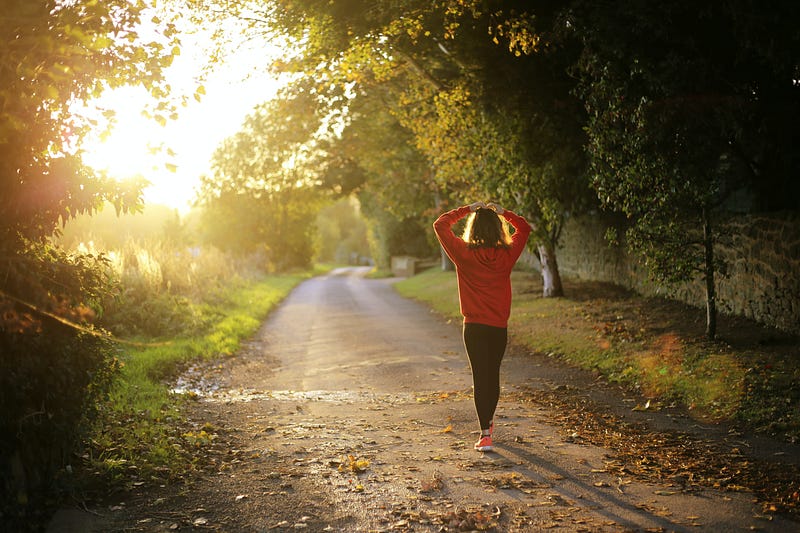
Walking has great benefits, physically, mentally, and emotionally. Photo by Emma Simpson on Unsplash

A lot of people make resolutions to either lose weight, or get into better physical condition, and those resolutions often fade quickly. As many as half give up their resolution before January ends, and only about 10 percent actually do what they resolved to do.

Our modern culture expects quick results, and when it comes to fitness, there are no quick results.

You did not put on that extra 15 pounds overnight, and it’s not going to come off quickly either. Don’t fall or quick fixes.

Diet and exercise are the two main factors.

When I have traveled to other countries, right away I notice that there are not as many overweight people as there are in the United States. In other countries, people walk more than we do. They also have smaller portion sizes in restaurants, and there is not as much fat-laden fast food available.

You could probably lose some weight just by walking more and eating less food. But to see significant improvement you need to have motivation and a plan.

Pro tip: Don’t get too fancy or make things hard. Simply walking is the most effective exercise there is in the long run. You can even do that in your street clothes if you have to. You dont have to have special clothes or buy expensive equipment.

Reasonable goals

An even better approach would be to adopt a more healthy lifestyle and take steps to get stronger. If you do that, weight will take care of itself in most cases.

You need to set reasonable goals, which are challenging but still doable and measurable. “Losing some weight,” is too vague. “Losing 50 pounds” is too big and it's too easy to quit when you don't see results.

A reasonable goal could be to walk a mile every day. If that seems too much, set a goal of 10 minutes per day. Once you have done that for awhile, you can expand your distance or time. Some people like to measure it by time, and some prefer counting steps.

You could also start going to a gym to work out. Gyms are also good for treadmills when the weather is not cooperating.

Pro Tip: Don’t pay for an expensive electronic device to monitor your steps, heart rate, or anything else. There are free apps for your phone available that work just as well, if not better.

Photo by Luemen Rutkowski on Unsplash

Listen to your body

The key to a good program is for it to be challenging, but also something that is within your capability. You only find out what your capability is by doing it.

It is normal, even good, to have a small amount of pain as your muscles grow. You should not be in a lot of pain though. If you work out and are really sore the next day, you are doing too much and need to scale back. It's the same with walking. If your legs, or body, hurt a lot later, you are doing too much.

Doing too little is also a bad thing. If your exercise is too easy to the point it's boring, you need to step up your training routine.

You should walk fast, and you should be a little tired at the end.

The key is to pay attention to what your body is saying. It can be a hard call to make at times. Is it just a normal ache, or are you hurting yourself? Experience will tell you, but don’t keep going if you are in a lot of pain. Don’t let a little discomfort stop you.

Pro tip: There are a lot of studies that say walking is the best exercise. It is also not as hard on your legs or joints as running is. The surface matters too. Avoid concrete sidewalks as much as possible. A dirt trail is the best surface for walking.

Diet

What you eat matters, But just like in getting used to walking, don’t try to change your whole world overnight.

Cutting back on sugary soda drinks and fast food is a great help. Even then you can still indulge now and then.

I have a sweet tooth. I still eat some cookies or ice cream every day. I take small portions and only do it on days when I have walked a mile or more. It’s a minor incentive when I don’t feel like going out and walking.

I am not an advocate of strict diets or those flashy fad diets that are supposed to do miracles. Eat plenty of vegetables and fruit. Meat is also healthy in moderation. If you are a vegetarian, make sure to get your protein somewhere, and some foods can do that as well.

Keeping an eye on your calorie intake, without being obsessive, is also a good idea. Most adults need around 2,000 calories per day.

Pro Tip: You don’t have to give up everything that tastes good. Just eat smaller amounts of things like cake or ice cream. Once a month or so, reward yourself with a big desert.

You can still enjoy things that taste good and be into fitness. Photo by Unsplash

Obstacles

There will be obstacles, or difficulties, that can get in your way. It’s OK to skip a day when necessary, but it is very easy to let one day become a week.

The weather can certainly be an obstacle. Work schedules can also make it difficult.

Obstacles often become excuses. Do what you can do, and plan to keep obstacles from stopping you.

Keeping things simple eliminates a lot of obstacles. That is why I advocate simply walking. The less you have to do to get ready, the harder it is to come up with excuses for not doing it.

Pro Tip: One obstacle can be sore feet. Get some good quality walking, or hiking shoes. Don’t get running shoes. Get the most expensive shoes you can afford. The difference between cheap and quality shoes is amazing. Do your homework though. Some expensive shoes are not high quality.

Measuring results

One good idea is to have an accountability partner. Knowing someone is going to ask you how it is going, does provide some incentive. You can also do things like mark your efforts on a calendar or keep a step tracker on your phone.

Your goals should be small and measurable. Doing a one-mile walk, at whatever pace, would be a good start. You could then have a goal of walking a mile in 15 minutes. Keep having goals like these that can be measured, and keep track of your success.

Pro Tip: Exercise will also make you feel better. It releases endorphins which relieve stress and improve your sense of well-being. Studies have also shown being outside in nature is good for your mental health, and also releases feel-good chemicals.

Conclusion

The key is to have reasonable goals. Make them small and measurable. Look out for obstacles and plan for them. Once you get in the habit of walking daily or doing some kind of workout, it will start to feel better and it will get easier too.

Resolutions
Goals
Fitness
Losing Weight
Health
Recommended from ReadMedium