How to Join Someone’s Live on TikTok [Screenshots Included]

Wondering how to join someone’s Live on TikTok? It is not hard and with my step-by-step guide, it will be much simpler.
TikTok’s Live broadcasts have been a popular feature since they were introduced in early 2019. They allow us to interact with other users in real-time and you can even join in on someone else’s Live stream to chat with their audience in no time.
In this article, I’ll show you how to join someone’s Live on TikTok and also how to go Live on your own and invite others in. So keep reading for the tried and tested step-by-step processes to follow.
Who Can Go Live on TikTok?
Whether you want to join someone’s Live video on Tiktok or you want to go Live on your own, you must meet the following criteria:
- You must be at least 16 years of age or older.
- You must have a minimum of 1000 followers.
- Your account must be in good standing with TikTok’s Community Guidelines.
P.S. If you aren’t eligible to go Live on TikTok, you won’t be able to join someone’s Live stream as well.
So it’s important that you work towards growing your TikTok community, starting from getting more views on your TikTok videos to gaining more followers.
If you’re serious about making it big on TikTok, I’ve also put together an interesting article on TikTok growth tips based on my testing earlier. You can check it out here.
The Step-By-Step Process of How to Join Someone’s Live on TikTok
If you meet the above criteria, you just need to follow the step-by-step guide below to join someone’s Live on TikTok. Let’s get started.
Step 1: First things first, open the TikTok app on your device and sign in if you haven’t already.
Step 2: Click on “Live” at the top-left corner of the screen.

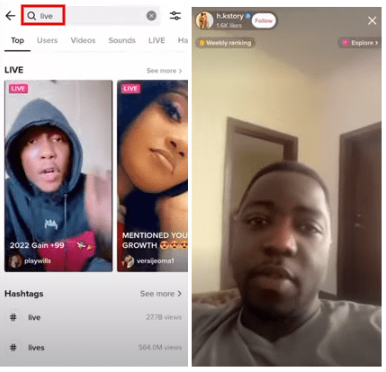
Step 3: Now find the Live stream that you want to join. You can either search for “live” or search for the person whose Live stream you want to join by tapping on the “Search” bar at the top of the “Discover” page.
Once you know which Live stream to join, you should tap on it to view it.
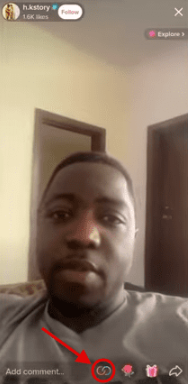
Step 4: Once you’re there on their Live stream, simply click on the “Multi-Guest Request” icon to join in on the fun.
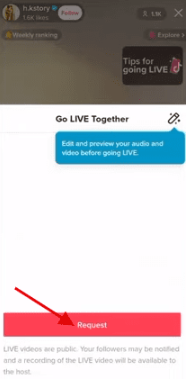
Step 5: A pop-up will appear, giving you an option to go Live together with the host of that Live stream. If you’re sure you want to join them, just click on the “Request” button.
And that’s it!
If the user accepts your request, you’ll be able to successfully join in on their Live broadcast shortly. The screen will split into two and your stream will appear together with that of the host of the Live stream.
However, if the user doesn’t accept the request, you’ll not be able to join the Live stream.
Therefore, it is best to plan it beforehand if you want to be part of a joint broadcast with someone. When they know you’re relevant to the broadcast, the person whose Live stream you want to join is more likely to accept your request.
Joining in on a Live stream is a great way to interact with other users and also show your support for the person who is Live streaming. So go ahead and give it a try the next time you are on TikTok.
If the host doesn’t know you, they’re more likely to ignore your request to join Live. In that case, you can still show your support by sending the creator a virtual gift during their Live video.
TikTok allows you to send a variety of virtual gifts, ranging from roses to fire, applause, shooting stars, and more, to show your appreciation to your favorite creators.
These gifts are easy to send. You just need to tap on the gift icons you want to send.
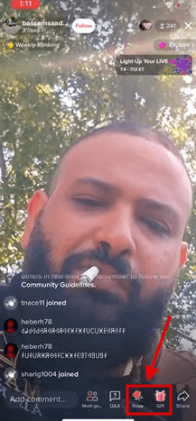
You can also use the “Live comment” feature to engage with the person who is Live streaming. Just type in your comment and hit send. The comment will appear at the bottom of the Live stream for everyone to see.
How to Join Someone’s Live on TikTok When You Get an Invite
Your fellow TikTok users may also invite you to join their live stream. When a TikTok user does so, you should be able to see their request for about 20 seconds until it disappears.
To be able to join their Live stream on TikTok, you need to accept their request within this time. Otherwise, the user will have to send you the invite again.
Here’s what you need to do when you get such an invite:
Step 1: Open the TikTok app and go to the main screen.
Step 2: Tap on the notification icon in the top-right corner of the screen.

Step 3: You should see the list of recent notifications. Find the one that says someone has invited you to join their Live stream.
Step 4: Tap on the “Join Live” button to join the stream.
If you tap on the “Join Live” button, you will be taken to the live stream immediately. You can start watching or interacting with the broadcaster right away.
TikTok Live gives you an opportunity to co-host a TikTok Live stream with another user and interact with both of your audiences. It is a great way to share knowledge, have healthy discussions, increase engagement, and gain new followers.
When you’re done watching or interacting, you can tap on the “Leave Live” button to exit the stream. The broadcaster will be notified that you have left their stream.
How to Start a Live on Tiktok and Invite Someone to Join You
If you want to go Live on TikTok, you need to meet the app’s eligibility criteria (you should be 16+ years old and have 1000+ followers on your TikTok account).
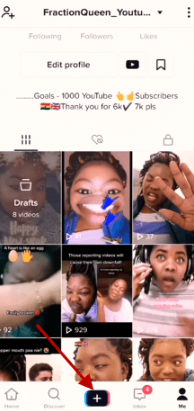
If you have this many followers, starting a TikTok Live is a straightforward process. You just need to log in to your TikTok account and click on the “+” sign to get started.
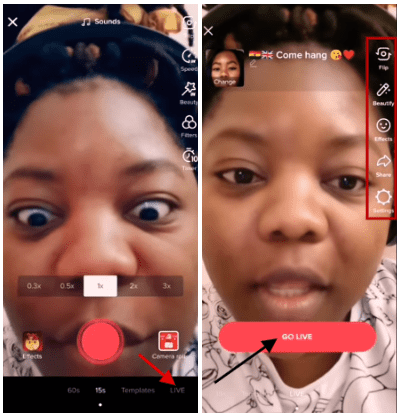
Tap on “Live.” Check out all of the features on the right side of the screen including adding filters, changing the speed, or flipping your camera. Once you’re satisfied with the settings, click on the “Go Live” button.
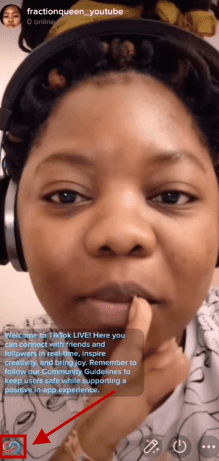
You’ll start your Live broadcast shortly after a 3…2…1 countdown. To invite other people from the TikTok community for joint broadcasts, you just need to tap on the two half circles-shaped icon at the bottom-left corner of the screen.
Once you click on that icon, you’ll see a list of all the people in your circle who are eligible to go Live and join your Live broadcast. You just need to tap on the “Invite” button next to their usernames to invite them to your broadcast.
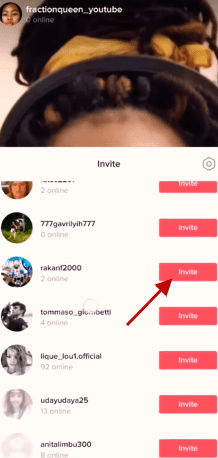

P.S. Many of these might be random people who you may not know directly.
Once you click on the “Invite” button, a countdown will start and the other user may either accept or reject your request to join your Live video during those 20 seconds.
Another important thing to note here is that you can only do join Live broadcasts with people who are on viewing your Live video. It has to be someone who is already on their own separate Live feed. Only then you can join together to address both of your audiences together.
The screen will split into two and you’ll be able to co-host a Live stream together.

Pro tip: When you go Live on TikTok, you’ve to be entertaining. Don’t just wait for viewers to ask you questions. You need to engage everyone who hops on your Live stream to be able to gain new followers and increase engagement.
Are You Ready to Join Someone’s TikTok Live Stream?
It’s easy enough to do — just follow the steps I’ve outlined above.
And if you’re feeling a little shy, don’t worry — now that you know how to join someone’s Live on TikTok, you can always watch other people’s Live streams before jumping in yourself. Remember, the more fun and entertaining you are on your Live stream, the more followers and engagement you’ll get.
If you do it right, you’ll also be able to earn money as an influencer on TikTok. All you need to build a decent following and maintain a good engagement rate.
Do you have any other questions about TikTok? Let me know in the comments below and I’ll be happy to answer them.
This post originally appeared at ShaneBarker.com